We remain fully operational. Our teams are working around the clock to ensure your deliveries continue safely.

下载应用程序


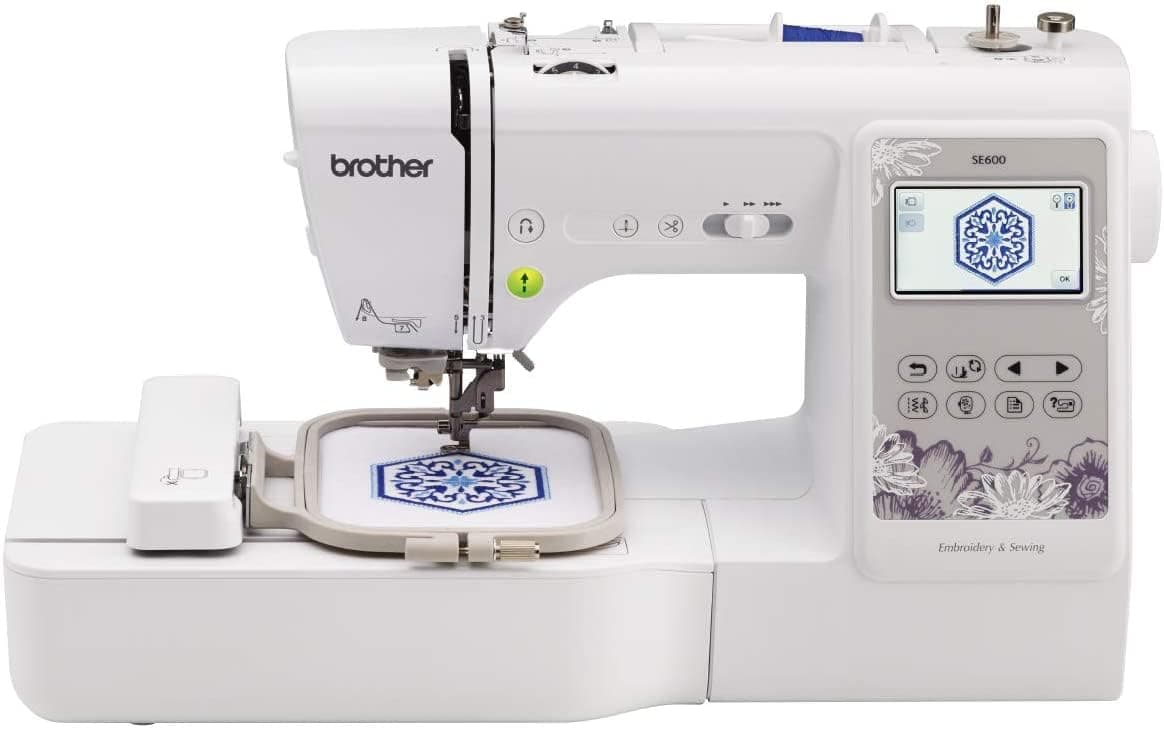






🧵 Elevate your craft with Brother SE600 — where innovation meets your imagination!
The Brother SE600 is a computerized sewing and embroidery machine featuring a large 3.7" color touchscreen, a 4" x 4" embroidery area, 80 built-in embroidery designs, and 103 sewing stitches. It supports USB import of custom .pes embroidery files, offering advanced design editing tools for professional-quality projects.


| ASIN | B074F8TZNH |
| Brand Name | Brother |
| Colour | White |
| Customer Reviews | 4.6 4.6 out of 5 stars (7,401) |
| Global Trade Identification Number | 00012502649823 |
| Included Components | SE600˄Dust cover˄buttonhole foot˄zipper foot˄zigzag foot˄button sewing foot˄overcasting foot˄Blind Stitch Foot˄Monogramming Foot˄Embroidery foot˄Accessory pouch˄bobbins (4)˄seam ripper˄needle set˄ball point needle˄twin needle˄cleaning brush˄eyelet punch˄screwdriver˄spool caps (3)˄3 pcs pre-wound bobbin with Embroidery thread˄extra spool pin˄embroidery hoop˄power cord and operation manual… |
| Is Electric | Yes |
| Item Dimensions D x W x H | 10.2D x 136.6W x 106.7H centimetres |
| Item Type Name | Brother Sewing Machine, SE600, Computerized Sewing and Embroidery Machine with 4" x 4" Embroidery Area, 80 Embroidery Designs, 103 Built-In Sewing Stitches, White |
| Item Weight | 26.24 Pounds |
| Manufacturer | Brother International |
| Material | Metal, Plastic |
| Model Number | SE600 |
| Part Number | SE600 |
| Power Source | Corded Electric |
| UPC | 012502649823 |
| Unit Count | 1.0 Count |
D**R
wife loves it
wife said its fantastic loves it to bits never see her now as she in her craft room most time now..
J**N
LOVE IT!
I just purchased a Brother SE-400 computerized sewing and embroidery machine from Jeganology via Amazon.com. It arrived within three days. So far, I am VERY pleased with this machine. Loving embroidery, I decided to purchase the Brother SE-400, as it had all the features I wanted and it was within my price range. Noteworthy is the fact that the SE-350 and the SE-400 are the exact same machines except for the additional computer connectivity that the SE-400 possesses. The SE-400 has a port for computer connectivity and comes with a USB cable which helps connect directly the sewing machine to your computer. This is an advantage over the SE-350 as this feature allows you to upload embroidery designs directly from the web(or your computer) to your machine, and update your machine's operational software from Brother whenever updates occur. The SE-400 is compact enough, comes with a handle at the top, which makes it truly portable. Even though it is relatively lightweight (compared to my good 40-year old "all metal" Kenmore), the SE-400 feels sturdy while sewing and it is a very easy machine to operate. The manuals that came with the machine are very well written and the diagrams easy to follow. It took me only a few minutes to figure out how this machine operates. I love the self threading feature of the machine, as well as the built-in thread cutter, bobbin sensors, and drop in lower bobbin. I was also delighted to find out that the embroidery part of the machine has the following built in features: You can reflect an embroidery design; and rotate the design 1 degree, 10 degrees, or 90 degrees at a time. I appreciated all the enclosed accessories that came with my SE-400. I wished though that it came with an additional large embroidery hoop too, besides the medium hoop. I guess I will have to buy a large hoop sooner or later, if I am to become more involved with machine embroidery. The SE-400 is a good choice for a home sewer. I give it a 5-star. One more note. If you are looking for a hard carrying case for this machine, I highly recommend the Brother 5300 universal hard carrying case. It is the perfect fit for it.
T**C
This machine is a breeze to use. Sewing is so easy. Everything is so smooth so projects get done faster. My old machine was very clunky and "mechanical" and made sewing a struggle. This combo machine is quiet and quick. Let's you know when your bobbin is low, when the thread slips out of the needle, and even cuts your thread for you so you don't need to stop and go. It gave me the confidence to start sewing clothing! The embroidery part is a bit of a learning curve if you've never done it before, but the manual is easy to follow.
F**Y
I received this machine through Amazon in June, watched a couple of YouTube videos, kept the manual open and handy and got started. My laptop doesn't have a CD drive, so I haven't watch many of the videos the machine comes with because I have to do it on my old clunky laptop. To get started I purchased *some fonts and other embroidery designs from artists on Etsy and embroidery library dot com. * the 61 colors embroidery thread kit sold on Amazon 61 Thread for Brother Disney Embroidery Machine + RACK --write the color numbers inside the spool because you will need the color numbers for color charts when you do certain designs! * extra machine needles *some extra bobbin cases and *some tear-away stabilizer (however, I recommend cut-away stabilizer for embroidering on towels) I SHOULD have also purchased a thread stand at the time, but didn't. It's less than $10 and you never have to worry about your thread not feeding correctly; lower the hassle factor while you are learning and buy this. [...] This is a picture, but don't spend that much money (euros!); your local mom and pop sewing center should have them. Mine was 8 dollars and 99 cents. To transfer a design from your laptop to the machine you simply connect the machines with the included USB cable, turn the SE400 on, and open a Finder window in your PC and pull, or copy, the file you want from your laptop to the embroidery machine (which may be identified as a removable disk if you are running Windows). The SE400 will show on its LCD screen that a file is being loaded. Then it shows up on the screen and you are ready to go. I got to work and monogrammed a couple of pillow cases, t-shirts. Pretty easy. But I hooped something wrong, I think, and broke a needle and did something to engage the safety mechanism inside the unit and the motor would not move. So I called the Brother Customer Service and they told me I had to take it in for service. The service center was less than 20 minutes away from me and they got it working in 8 days and it's been perfect since! No charge for the warranty repair. I've done 6 hand towels (it's true that dry cleaning bags work great as a top layer so that the terry loops don't get hung up on the machine). And I've discovered the Embossing technique which is truly an elegant look (and look for toile designs as well)--look for these types of files on embroidery library dot com. This machine does all this detailed, multilevel work beautifully. This week, I didn't know what I was getting myself into when I downloaded a design for $1 but it ended up being this ornate bird on a blackthorn branch which had 23, yes 23!, color changes. This machine handles it great. I ran out of bobbin thread in the middle and had to stop and wind one and replace the bobbin but the machine knew exactly where to start back up on the design. Its ability is diverse and this is my first time with an embroidery machine; I had spent a bunch of money getting baby blankets embroidered at the hometown threads inside of WalMart stores, so this is slightly justified in future gift savings. I plan to do some applique designs later this week. I haven't used it as a sewing machine, but I've had a sewing machine for 25 years which I used probably less than 100 hours, but I'm confident this machine will handle whatever I expect it to do sewing. Cons: *the hoop size is limited to 4 inch by 4 inch designs and there are some larger that I'd like to embroider. I know there is a way to break up designs into quadrants but I'm not ready to tackle that yet. * if you want to put letters together or merge 2 designs layer over layer, you will need some editing software. I was able to download and trial one version for 30 days and it worked great, but I wasn't willing to spend the money yet. I've since found a free iPad/iPhone app (pEmbroidery) that will put letters together and email the design to you in .PES file type (the embroidery file type this machine can read). That app led me to Sierra software which is another design and editing software package available for free but I am just getting started with it, it's not intuitive how to combine letters on top of another design, so I can't recommend that software yet. But it is free, and has an active Yahoo group, so it's worth some investment of my time to play with it and see what it can do. New discoveries I'm looking forward to experimenting with: solar thread that changes color when in sunlight (sold on Amazon), glow-in-the dark embroidery thread, and metallic threads. I hope you will be encouraged to get this machine and get started. It's a great machine for about 1/3 of the price of machines I've considered elsewhere.
S**A
J'aime tout de la SE 400. Je l'utilise depuis juillet 2018. Super bonne machine à coudre avec une quantité impressionnante de points intégrés. J'ai facilement appris à utiliser la fonction de broderie et j'adore. Plusieurs vidéos en ligne peuvent aider au départ, et il y a même un groupe fb dédié aux utilisateurs. Une petite note: nettoyer souvent la bobine et la partie autour afin de toujours avoir un fonctionnement optimal! En bref, je la recommande!
A**D
This a gift for my daughters. Please ensure you have a 110v outlet in your home.
A**E
I ordered it in January 2021, and got it on time, well packaged with the machine and all it's accessories intact. I cannot remember the last time I was that excited while waiting for an order. This machine is a beauty to behold (sometimes I just sit and look at it and thank my Lucky stars I ordered it from Amazon). It is a joy to sew with as it sews like a dream😍. It was love at first sight for me, yes...I fell in love with my machine and I fell real hard. I have done some monogramming with it and it came out so beautiful. I have also mended clothes and sewn simple projects with it and it did the job with ease. The fact that it runs quietly and the led light shines so bright is a given. A good piece of advice though, run away from cheap and bad threads because it hates it. I will continue to rock my machine and I will give an update on its durability and usage later. If you are looking for an all round no stress machine, look no further, just order this machine and thank me later. Believe me you will become the fashionista of your dreams as it can handle most projects and materials like denim, cotton, polyester etc. I simply adore my brother SE600 and you will too. Update after 2 years in my sewing and craft room... I simply adore this machine. I use it mostly for it's embroidery function as I got another brother sewing machine with one size font lettering capability. Brother SE600 is simply the best. Some tips for you though... Do yourself a huge favour...READ YOUR MANUAL from start to finish. You will be glad you did. You will not visit any repair/service workshop for a long time if you do. Buy 75/11, 80/12 and 90/14 organ needles in packs. More of the 75/11 though. Don't bother with any other brand if you want no incessant needle breaks, needle timing issues, needle and bobbin case hit and miss stories etc. The longevity and durability of organ needles are a plus too. I now understand why brother recommend it for use in their machines, they are in sync period. Use the best rayon and polyester threads you can find, do not go cheap and too cheap on it, you will not only be disappointed but you will definitely regret it. I use newbrothread polyester threads for most of my embroidery designs and a very good rayon thread (threw away the label and box so I cannot remember the brand name sorry). I only use simthread prewound bobbins for all my projects. I found out that simthread prewound bobbin threads were the exact weight recommended by brother for their machines unlike the newbrothread prewound bobbins I saw on Amazon. I stuck to simthread because it does not shred nor release too many lint in my bobbin case. It never cuts off, lasts long and sews to the last thread. It works very well with the newbrothread polyester threads as top threads. Stick to the tension that works for your machine embroidery needs. Avoid uncessary trials and errors. I stuck to 4 on mine. It was set like so from the factory and when I sewed with it, it came out perfect and I never touched that dial till date. Threading it is a breeze, just follow the instructions on the body. If your needle is not threading automatically, leave a longer thread tail and also check out the machine arm wheel and align the line on the rolling arm to the slit on top of the machine. It does the trick. Clean your machine after each project if you can. I couldn't lol so I stuck to my weekly routine which worked perfectly because I was not using it on daily basis. If you use it daily on several projects then change your needle daily. I never got used to the idea of a new needle for every new project lol but I noticed that the needle change and cleaning of the machine helps it to work quietly and smoothly without needle breaks, tension issues or bunched up threads. Trust me, I know. When I maintained my cleaning, oiling, needle change and good thread routine, I decided I couldn't live without my machine lol. Buy a small laptop vaccum cleaner, it works for cleaning the insides of your sewing machine too. Contrary to popular believe, do not oil your machine too often, read your manual to know how often and where to oil your machine. I only oil my bobbin area sparingly after cleaning it. A tiny drop of oil from my lily white zoom spout bottle. Use the dust cover to protect your machine after each use, don't procrastinate and don't be lazy too. Dust and debris are your machine's worst enemies. I use the dust cover it came with cover mine and then another bag for the embroidery arm. Lastly, make your machine uniquely yours by tweaking the look of it lol. Add some stickers and your name on the body. I hope this helped someone. Cheers.
TrustPilot
1 周前
2 周前