We remain fully operational. Our teams are working around the clock to ensure your deliveries continue safely.

下载应用程序




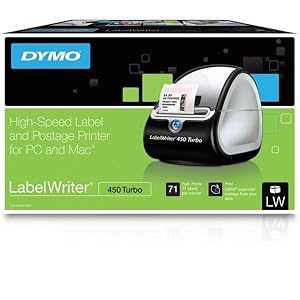
⚡ Turbocharge your workflow with ink-free, lightning-fast labeling!
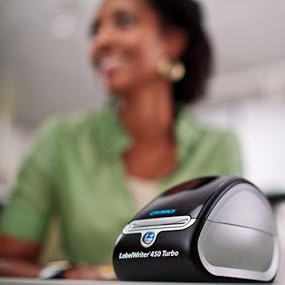
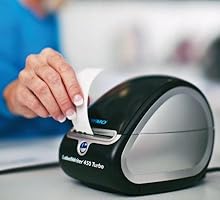
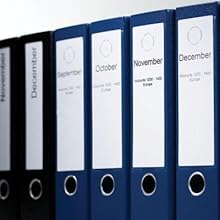
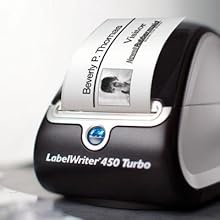
The DYMO LabelWriter 450 Turbo is a high-speed thermal label printer capable of producing up to 71 precise, four-line labels per minute without ink or toner. Compatible with Windows and Mac, it integrates seamlessly with popular software like Microsoft Office and Google Contacts. Its compact design and USB connectivity make it an essential tool for professionals seeking efficient, cost-effective labeling solutions.






| ASIN | B0027JIIKQ |
| Additional Printer Functions | Print Only |
| B&W Pages per Minute | 71 ppm |
| Best Sellers Rank | #21,618 in Office Products ( See Top 100 in Office Products ) #60 in Desktop Label Printers |
| Brand | DYMO |
| Built-In Media | Label Maker |
| Color | Black/Silver |
| Color Depth | 8 bpp |
| Color Pages per Minute | 1 ppm |
| Compatible Devices | PC |
| Connectivity Technology | USB |
| Control Method | App |
| Controller Type | iOS |
| Customer Reviews | 4.4 out of 5 stars 13,231 Reviews |
| Dual-sided printing | No |
| Duplex | |
| Global Trade Identification Number | 00071701056580 |
| Hardware Interface | USB |
| Ink Color | Black |
| Item Dimensions D x W x H | 4.08"D x 7.25"W x 5.75"H |
| Item Height | 5.75 inches |
| Item Type Name | Direct Thermal Printer |
| Item Weight | 1 Kilograms |
| Manufacturer | DYMO |
| Maximum Copy Resolution Black and White | 600 dpi x 300 |
| Maximum Copy Speed Black and White | 71 ppm |
| Maximum Print Resolution Black and White | 600 x 300 |
| Maximum Sheet Capacity | 71 |
| Maximum print Resolution Color | 300 x 300 |
| Media Size Maximum | Paper Roll |
| Model Name | 450 Turbo Machine |
| Model Number | 1752265 |
| Model Series | 450 Turbo |
| Other Special Features of the Product | Email Print |
| Output sheet capacity | 71 |
| Paper Size | 2 3/10" |
| Print media | Labels |
| Printer Connectivity Type | USB |
| Printer Output Type | Monochrome |
| Printer Type | Thermal |
| Printing Technology | Thermal |
| Processor Count | 1 |
| Resolution | 600 x 300 |
| Scanner Type | Sheetfed |
| Special Feature | Email Print |
| Specific Uses For Product | Office |
| Total USB 2.0 Ports | 1 |
| Total Usb Ports | 1 |
| UPC | 071701056580 300715912989 689407072928 300715917113 369452795590 071701691101 369452795583 |
| Unit Count | 1.0 Count |
| Warranty Description | 2-year limited warranty |
| Warranty Type | limited warranty |
R**E
Love this. I don't know why I waited so long.
I got this for my birthday. I ship alot of packages (10 or so a month) and I HATED going to the post office and waiting in line, etc. Now I print from home using PayPal and my Mac and it was not only easy to set up I got it working in no time and it prints perfect labels. I recommend you get the 2x7 (approx) label then you can keep it off. The labels are even small enough to fit on a small 4x8 envelope. I love this and it has already saved me approx $1.00 for everything I have shipped so far. Shipping from home is cheaper then the post office. Then you can go to USPS and schedule your mailman to pick up your package for free during regular mail delivery. You can specify where you are leaving the package (mailbox, front porch, you can write out instructions on where they need to retrieve it from. Now you have to ship first class (cheapest for anything less then 2lbs (I believe) or flat rate priority (second cheapest route for larger packages or multiple items. You pick up the boxes free from the post office and your mailman can have a order to pick it up when he delivers. It's the best! The quality is amazing and I absolutely love this. It's already paid for itself saving: gas, my time, energy, and post office costs (a little more IDK why) so I feel like this easily pays for itself in a short time. I also found it easy to use paypal and even a mac computer in order to successfully use this printer. LOVE THIS!
A**W
42,000+ printed labels and still going strong.
We use this little printer, the Dymo LabelWriter 450 Turbo, to print ingredient and name labels for various products, all of which are used in a freezer and go through freeze/thaw cycles. The print quality is great and the off-brand labels I used (Enko) work great on our containers in the freezer. We've printed over 42,000 labels in just six months and it has work perfectly the vast majority of the time. Every so often it jams and it can be a bit of a pain to get fixed, but it only takes a few minutes to get it working again. Also, if you put the labels in the wrong direction then it will 100% jam every time because there isn't a sensor to tell it that they are in incorrectly, so just pay attention as you are installing it. They go in with the sticker facing down, so it is a bit odd initially. We use three different sizes of labels and it takes literally SECONDS to change the label type. It also has a system in place which automatically prevents the labels from printing in the wrong spot. What that means is you will never have to slowly adjust the location of the labels on the spool to get it to print in the correct spot. It prints perfectly center every time. The print quality is great - we can print extremely small font and it is still legible. It is very quick. The small labels we use can print about 2 per second and the largest can take about 1.5 seconds per label due to it having an image (our logo), but prints faster if only text is displayed. The program that comes with it is adequate for printing simple labels and text. It is fairly simple to use and only has a couple of annoying aspects that can be overcome with some patience. For example, if you are typing or copy/pasting in a text box you will have to manually press enter for each line break, otherwise it will continuously write the text on the same line way off the screen. Overall it is a great product. I will probably buy a couple more in case this one breaks, but at the sub $100 price point it is totally worth it, especially considering the volume of labels that have gone through it. Definitely recommended.
K**W
Awesome LabelWriter 450
Great Printer. Much faster than the 330 I had before. Fast delivery
J**K
Great Labeler that Prints you a perfect Label
This Label Printer works great and makes anything you want a nice Label on this Labeler will get it done
D**N
Great label maker
The negative first; this device was a bear to set up on Windows 7. Although Windows thought it was connected, the software (DYMO Label v.8) refused to find it. For whatever reason, I had to uninstall/reinstall twice, AND go to device manager and uninstall the drivers before the thing was finally recognized. Once it was set up, it worked like a charm. No problem entering label information (though importing from a spreadsheet wasn't very helpful - too many corrections needed to the way I like names formatted). You can set up multiple address books in the software, so that you can store labels for future use. The Quickbooks integration doesn't work, as far as I can tell. After installing the software, the DYMO install said I'd be prompted to allow the add-in next time I started Quickbooks - but I wasn't. So I'm having to copy all the label info to the DYMO address book manager. Not a biggie, but a little frustrating. It would be great if the DYMO address books would also allow you store other address info - telephone, email etc. I would love to find one product that could store all my address related info in one place, AND print labels. Sadly, this is not that software. The printer comes with a meager number of 'starter' labels - I'd suggest ordering labels at the same time you buy the printer. Label supplies are pricey - I think like other printer manufacturers, DYMO make their money from the consumables, not the equipment. However, the print speed and quality of the labels is excellent. One thing (common to many manufacturers) is their decision to place the serial number on the bottom, UNDER the cables - making it almost impossible to read without disassembling the cables. Why don't devices have a way of displaying their serial numbers on screen, or at least put them somewhere easily accessible? It turned out I didn't even need the serial number to register the device, although the registration screen said I would. Oh well. On the whole, if you want a fast, simple label printer, this would be the one to go for.
T**G
Super Good Item
My first experience with this item was using my co-worker's. I was reluctant and didn't see the need for this, until I tried it. Now I couldn't imagine working without one. I bought one (450 regular)for my home, have since retired and just purchased the 450 Turbo. It's easy to load the labels in, and the setup is a breeze. You can also print labels from a Word document by clicking on the Dymo icon on your Word toolbar. It takes different size labels. It's a must have for single address label use or multiple addresses. You can also save your data to the address book. You can insert graphics. It prints in monochrome, not color. There's no ribbon or ink-cartridges to buy or change. The price is an absolute steal. I own the regular Dymo 450 (it prints 51 labels per minute) and it's a God-send. It's still going strong after printing thousands of labels. No more handwritten addresses ever. I also use it to label other items (canisters, power cords, etc). I purchased this because its a super, super good deal and just in case my current Dymo goes toes up. At 71 labels per minute, it's faster and cheaper. UPDATE: (4/28/2013) Moved my old Dymo 450 to my backup computer. Thought I had to install the software for the 450 Turbo and would lose my addresses when I installed the 450 Turbo to my main computer. But I was happily surprised. No need to install the included software, as the Dymo 450 and 450 Turbo software are the same. All I had to do was load the labels and plug it in and I was ready. Loading the labels can be tricky and you need a little patience, but it's doable. Love it. And it's super fast. I don't use it to print postage, so I can't comment on that.
B**R
I Loved My Last Dymo LabelWriter. This One Must Have Been Created By Someone Who Dislikes Macs
Updated to say that the new Dymo Labelwriter 450 stopped working just like the last one did. I got it to work again for a month or so, but then it stopped permanently. It isn't compatible with my OS X version 10.7.5. That means I had to find a different Labelwriter for my computer, and it wasn't easy. I finally found the Seiko Smart Label Printer and couldn't be happier. It's so much easier to use. I had used the Seiko years ago, but somehow switched to Dymo. Dymo has now lost me as a customer because their products aren't compatible with my Macintosh. That was time and money I can't get back again. Here is what I wrote previously, before my Dymo Labelwriter permanently quit on me, totally incompatible with my Mac: Previously over the years I couldn't imagine being without my old Dymo Labelwriter, which is no longer supported after a Mac system upgrade apparently. That thing could do no wrong! This one does everything and does it fast---but lost a couple of the 'simple' functions that I enjoyed, and the instructions for a Mac user were not very helpful. They need to get someone who actually USES A MAC to write the Macintosh instructions. Just a suggestion. Now that I've calmed down after the one-star review I wrote yesterday (See below), I'll bump it up to a 4-star review, [Note: I bumped it back to 1 star again because it no longer works at all] because the product actually is probably the best available. [Note: I don't think that now] I do think that the product and/or the user manual must have been designed/written by someone with an intense dislike for Macintosh computers. I did finally get the address book created. However, I'm not used to having to click the X-box for the address I want to print, copy it and paste it into the print box. However, the LabelWriter 450 does just about anything one could want it to do. It does much more than I will ever want it to do. It's FAST. Please see my original rant (review), written after a frustrating several days trying to understand the online user manual: "There seems to be no way to create a new address book. That means each time I want to send something to the people I send things to twice a week, I can't just pull up their name and address. I have to search for it in my database and retype it---each time. I have wasted HOURS trying to read the user manual and find a way to do this. I am furious! I had to update from my last Dymo Labelwriter, which I liked very much and wouldn't be without, but it suddenly refused to close. Then I found that Dymo no longer supports that version. I bought this one as a compromise and it doesn't work for me. I would not recommend this product to anyone who uses a Macintosh." ---original review updated above after I calmed down a bit. I'm still annoyed that they just stopped supporting my old LabelWriter.
C**H
Works great for what we needed
We own a The UPS Store and needed this to print metered mail it is perfect