





🖥️ Elevate your setup, declutter your desk, dominate your workflow!
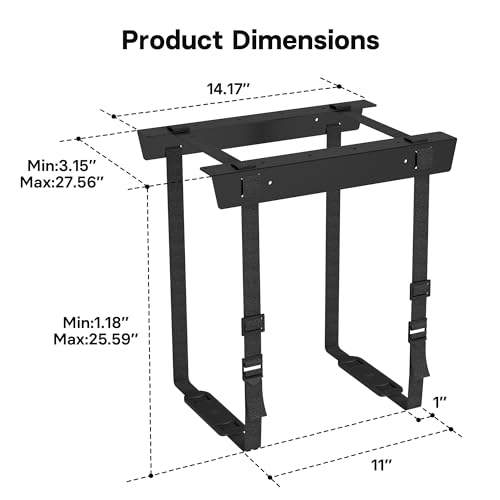
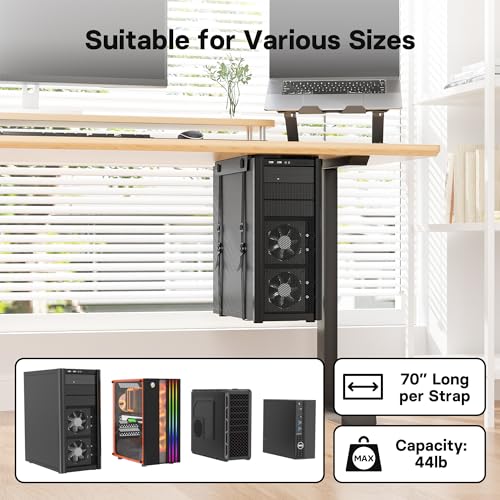
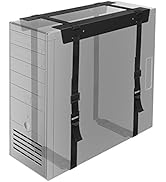
The 1home Economical CPU Holder is a sturdy, adjustable steel bracket designed to securely mount desktop PC towers under your desk. Supporting up to 20 kg, it frees up workspace while protecting your PC from dust and damage. With anti-rust coating, non-slip straps, and easy installation hardware included, it’s a durable, versatile solution for a cleaner, more efficient office or home setup.

















| ASIN | B07PJQ6QV6 |
| Best Sellers Rank | #992 in Laptop Stands |
| Customer Reviews | 4.4 4.4 out of 5 stars (418) |
| Date First Available | May 6, 2019 |
| Item Weight | 2.25 pounds |
| Item model number | CH001-v02-US |
| Manufacturer | 1home |
| Product Dimensions | 14.17 x 14.17 x 14.17 inches |
P**Z
Strong and Secure
The CPU Holder has worked well for under desk suspension of tower cases of varying size. With a bit of adjustment, it is being used to suspend a sub woofer too (use the foam insulators to prevent vibrations). I own six of these and removing floor clutter on a three foot deep by fourteen foot long desk yields an incredible difference in appearance and functionality. Nice to be able to safely vacuum under my desk. I plan to use one on a stand up desk that is being built and expect the same outstanding results. Be sure to pre-size the supporting nylon straps and it will save time and frustration during installation. The units come in a default sizing yet are able to be adjusted to fit your installation. Spending a few minutes understanding the way the straps work with the buckles will yield top results. The product does come with all the necessary hardware needed for installation. I have contacted customer support and found them to be responsive and friendly. Refreshing to see a seller stand behind their product at this price point.
A**R
Great option for those that build their own pc
I built my own pc and this was the perfect size for my bulky case. It installed pretty easy, but having a friend would make it easier. It comes with everything you need. It’s lightweight, but very durable. It holds a weighty pc under my desk and looks great.
C**S
Cheap, effective, no-frills solution
The product is of reasonably good quality but a pain to install. The screws it comes with are too small in my opinion, but work fine for my application. The strap system is also way more convoluted than it needs to be. It would be awesome if the brackets were fixed to a frame to give it a way to adjust them easily as well as simplify the installation process. This is a relatively inexpensive way to get your computer hanged, but it's just sort of a crappy design. If I had to interact with it much beyond installation, I would've gave 3 stars.
V**N
Works well. Check your pc size first.
works for its purpose. make sure you check you pc is big enough for the the straps to hold it though. my micro atx pc is barely big enough.
D**E
Easy Installation
Mounted to the bottom of my standing desk. Very easy to install and get my PC into.
K**E
Easy to install and very sturdy
This setup is well made; and is a great addition to my vwindesk standing desk. Originally I tried one of those 3-sided CPU holders and it was comically undersized for my gaming case. Like it looked as if it would drop my PC on the floor in under a month. To install this one, I used some additional hardware from here and other places; 4x 5"x3" black brackets from amazon to hang the CPU Support brackets under the desk support bars 2x 1" MCBBLK Black Oxide Metal Cam Buckles from Strapworks (not amazon) 2x 1" MS-RBLK Black Oxide Rounded Metal Slides from strapworks (not amazon) to replace the plastic parts based on reviews on here. The only other thing you need are some screws for the L brackets to the cpu holder brackets. All in all it took about an hour to install and switch out the buckles for the metal ones.
N**S
Well made,
This is a perfect quality product to hold your PC off the floor and under your desk. Mine is mounted under my electronics worktable. I would like quick release clips to remove the PC from the straps when I must access the insides of the computer. This is a minor complaint, as I can slide the PC back out of the straps currently.
N**K
Pretty darn good
Mounted this under my new desk and am holding a pretty heavy and large PC in it. Others mentioned breaking the buckles when tightening, so I just took my time and didn't "crank" on the straps and got it solid and secure without any major issues. I reduced by 1 star because while it is very good, it isn't perfect. One of the straps was fed through the metal brackets wrong. I didn't notice this until the brackets were mounted under the desk. Getting things adjusted wasn't hard, but this was a somewhat time consuming and I had to remove the computer once, readjust the adjusting buckles and try again. It also requires someone to hold up the computer while another person carefully tightens the straps, or propping it up with a box or something to allow for removing the slack in the straps without the weight strain from the computer. Overall this worked really well though.
S**Z
Excelente solución para este tipo de escritorios. Ajustar las correas es un poco dificil pues las piezas de plástico se pueden romper. Recomiendo ajustar lo más que se pueda y terminar de pensar con alguna taparrosca por debajo.
C**U
It's "easy" to install from a technical perspective. But if, like me, you don't want to turn your desk over, you might, at the very least, break a sweat while screwing it in. I adjusted the straps to create a slightly larger opening than I was going to need before installing, and I got rid of the base pads, which were too wide for my device, and completely unnecessary in my opinion. I then created an adhesive pad with a piece of cardboard sandwiched between two pieces of double-sided tape, to stick the first bracket where I wanted it before screwing it in, so I didn't have to hold it in place. And I rested an elbow on one knee as I sat cross-legged and turned the screws, because it got hard to hold my arm up while pressing upward. I actually placed the metal brackets about half a centimeter too close together, but then it turned out that I had to hang my UPS lower anyway, so its buttons were accessible below the bracket of the privacy panel attached along the same edge of the desk, so it worked out. But if you want the top of your device flush with the bottom of your desk, maybe give yourself half a centimeter or more of play with the width, and maybe measure at the bottom of the brackets, not the top, in case the vertical bits seem to point inwards a little (as mine seem to), rather than going straight up and down (i.e. in case their angle is just shy of 90 degrees). In addition to getting rid of the base pads, I cut some of the excess length off the straps after the final adjustment, to have a nice, clean installation. I then melted the ends with a butane torch lighter to prevent fraying. The buckles look metal in the listing pictures, but I got plastic ones. They seem okay though. I lifted my device while tightening the straps, and didn't reef on them. It's been a week and they're holding steady. I reassure myself by remembering that backpack buckles are presumably made of the same sort of plastic, and they often experience a lot more stress without breaking. In my picture you can see that I also attached a small shelf to the adjacent privacy panel, under my UPS. It's not currently weight-bearing, but my hope is that it would provide enough support, along with the leg of the desk, to prevent a complete catastrophe in the event of a critical failure of the mount.
M**S
ストラップは使ってるケースに少し短かったから別のに入れ替えたけど、大型ケースに普通に使える。
E**T
Works for my Razer Core X eGPU. Yes, you have to adjust straps but you only need to do it once. It comes with hardware (screws to mount, little zip ties to secure excess from straps) I love it. It’s snug, secure and clears up space on my minimal desk.
S**E
紐部分がしょぼくしっかりつかない 自分で補強した方が良い
TrustPilot
2 周前
5天前



