We remain fully operational. Our teams are working around the clock to ensure your deliveries continue safely.

下载应用程序


🚀 Elevate your living room with the fastest, smartest 4K streaming powerhouse!
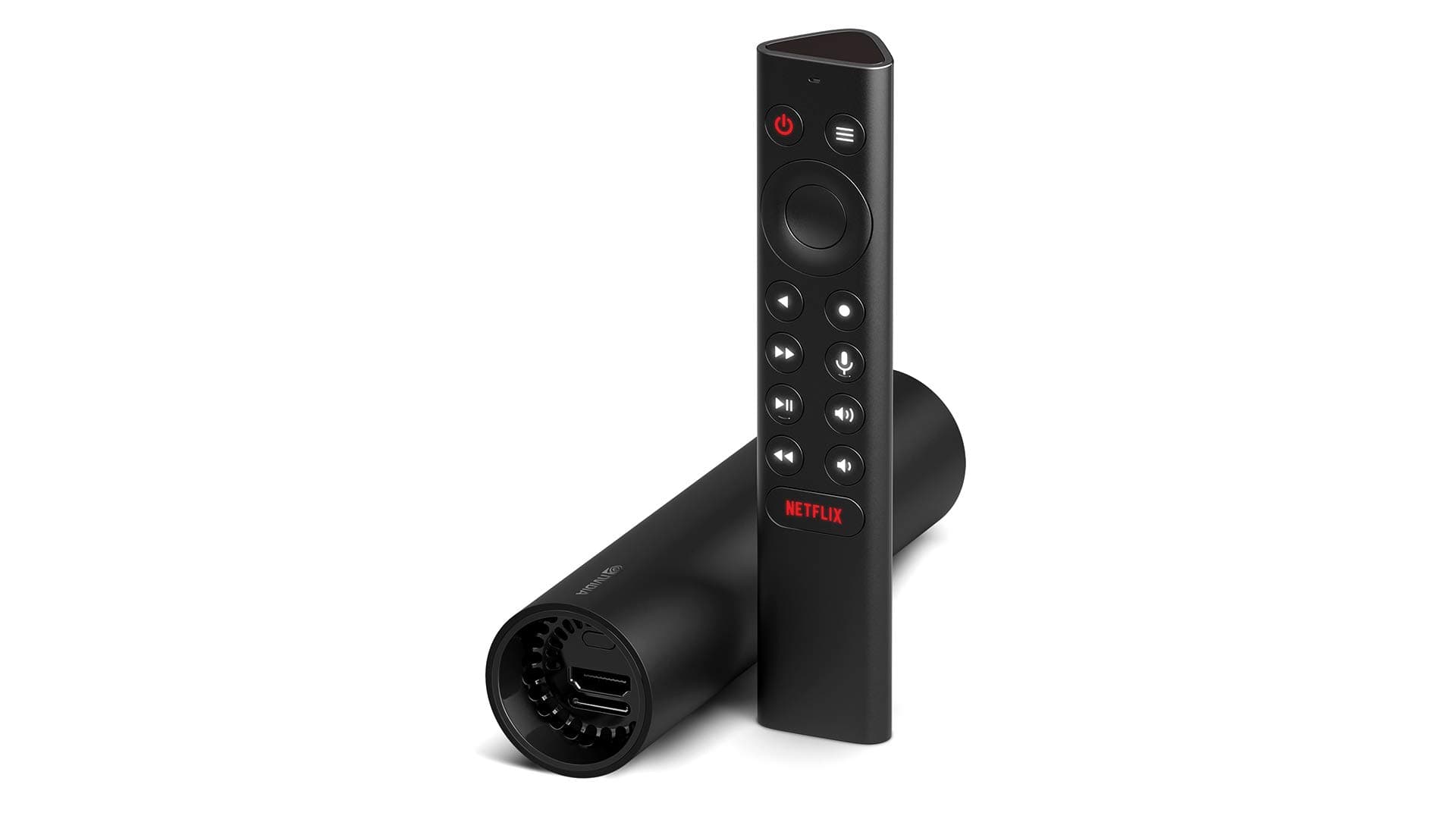
The NVIDIA Shield Android TV is a compact, high-performance 4K HDR streaming media player featuring the powerful Tegra X1+ processor for up to 25% faster performance. It supports Dolby Vision and Dolby Atmos for premium audio-visual quality, offers gigabit Ethernet and dual-band Wi-Fi for robust connectivity, and includes built-in Google Assistant and Alexa compatibility for voice control. With Chromecast 4K and GeForce NOW cloud gaming support, it transforms your TV into an all-in-one entertainment and gaming hub.


| ASIN | B07YP94PBJ |
| Best Sellers Rank | #7,059 in Electronics ( See Top 100 in Electronics ) #46 in Streaming Media Players |
| Brand | NVIDIA |
| Built-In Media | Remote Controller |
| Color | Black |
| Compatible Devices | Television |
| Connectivity Technology | Ethernet, Wi-Fi |
| Connector Type | Ethernet, HDMI |
| Controller Type | Voice Control |
| Customer Reviews | 4.2 4.2 out of 5 stars (5,068) |
| Form Factor | TV Box |
| Global Trade Identification Number | 00812674023892 |
| Item Dimensions L x W x H | 1.57"L x 6.5"W x 1.57"H |
| Item Type Name | Streaming Media Player |
| Item Weight | 13.6 Ounces |
| Manufacturer | NVIDIA Corporation |
| Memory Storage Capacity | 8 GB |
| Mfr Part Number | 945-13430-2500-000 |
| Model Name | shield |
| Model Number | 945-13430-2500-000 |
| Other Special Features of the Product | Chromecast |
| RAM Memory Installed | 2 GB |
| Resolution | 4k |
| Supported Internet Services | Amazon Instant Video, Browser, HBO, Hulu, Hulu Plus, Netflix, Pandora, Vudu, YouTube, default_no_selection_value |
| UPC | 812674023892 |
| Video Codec | H.264, H.265/HEVC, VP9, AV1 |
| Video Output Resolution | 4K |
| Warranty Description | One (1) year from the date of purchase of your new Warranted Product. |
T**D
Really Really Impressed with this!
I'm well versed with smart tvs, roku's, and Chromecast, but this Shield TV blows them all out of the water. My 1 year old Vizio P series (best model offered by Vizio) is so slow verse this Shield TV. I currently have this connected to my older Vizio tv as it didn't offer any "smart functionality" and I really just wanted to pick up one remote and watch Youtube TV without having to cast it to a previously added Chromecast. You know the deal, make dinner, sit down, turn on the tv, and of course your cell phone is back in the kitchen. That was getting old. That all being said, this Shield TV is very polished. Setup took about 3mins as I connected directly to a Ethernet cable (no wifi). A couple more mins for a few updates to install and I was on my way. Syncing the Shield remote to the this Vizio TV was done in less then 10secs. I remember my Xfinity/Comcast taking 10-15mins of trying code after code to find the right one that worked. Post setup, I had to test my Plex server first. A little background, my Plex server is 10+ year old Dell XPS (1st gen) laptop running Win10... a very low powered Plex Server by most people's standards. I have one 4k movie and this Shield TV Pro plays it with no issues. My other "New" Vizio P-Series TV with its native Plex app, can't play this same 4k movie with out stuttering ever 10secs. While I though for the longest time it was the server, it actually is the TV's Ethernet port which is limited to 100mb, while the Shield has a gigabit connection... Simply the Shield TV has the connected bandwidth to play 4k in a local network with out issue. A lot of people over look these kind of issues with Plex Server and waste money on upgrading the server when the network connection speed is the problem. A little tip for you all As I moved on to setting up all the apps YoutubeTV, Amazon, etc, I was really blow away with Netflix. I couldn't believe how fast the app launched and the moves started playing. On my new Vizio tv with the Ethernet connection, it would typically take 30secs to fully open Netflix and another 10-20secs for the movie/show to start playing.... Everything with the Shield is near instant. It like running a PC with SSD for the first time, you had no idea how much faster something can be. Lastly I want to talk about the remote. It's a little on the small size which makes it a little awkward like I'm going to drop it. For example I have a Samsung S20 Ultra and if a friend hands me a old and much smaller iPhone, it just feels out of place in my hand. The other thing I don't like and a lot of TV remotes do this, is the over shape can't tell you which direction the remote is pointing without looking at it. For example if you are familiar with Logitech Harmony remotes, they used to have a hour glass like shape, but the top and bottom aren't the same width, with a little muscle memory you can grab the remote and know which way it is pointing. With this Triangular Prism shape it looks cool, but if you pick it up without looking, you can't tell which way the remote is pointing. People with argue that this doesn't matter as this is bluetooth remote, but it isn't about pointing the remote at the tv it about knowing where each button is on the remote without looking. Kind of like learn how to type on a keyboard, the goal is now to look at each button. Now imagain every time you stop typing, you keyboards moves around, and you have to reoriented it before you can start typing again. It really not a huge issues, but it is still annoying. A few positives about the remote... I do like how the buttons are illuminated by lights. Very useful for dark room while watching a movie. As well, I really love the "find my remote" feature. No longer do I have to go from family member to family member interrogating them on where they left the remote. Lastly, the voice search it super impressive and fast. I like the fact that I can tell it to launch an app and the app will be launched before it can finish confirming your request. In summary, I haven't test the gaming functionality of it yet, so once I get some controllers connected I'll update this review. As for my overall impressions of this, I really really like it. If they had a slight bigger and better shaped remote, I would love it. I still give this a 5 stars, when I really want to get it a 4.5 stars. I don't think the remote should stop anyone from getting this. I know I've only seen the tip of the iceberg with all that can be offered with the Shield TV, I'll be getting another for my second tv as I'm really that impressed by it.
J**E
An excellent Android TV streaming box, works great
We recently switched from cable internet+tv to fiber internet, and it felt like the right time to jump to streaming TV since our fiber ISP has no usage caps like cable plans. I had been holding out for the new Google Sabrina device but eventually we got tired of waiting and sprung for the Nvidia Shield TV tube. We decided to go with YouTube TV for now, and so Android TV was a natural choice, which made the Shield a really attractive box. After using it for a few weeks, I'm very impressed. The video quality is excellent and it was trivial to setup. It also switches between apps MUCH more quickly and fluidly than what you might be used to with the built-in apps on a "smart TV", or even the apps on a faster box like a PS4. YouTube TV is fantastic and feels just like regular cable TV, but like jumping ahead 2 or 3 decades in user interface. HBO Max works perfectly, Netflix, Hulu, YouTube, Amazon Prime, all the apps we use on a regular basis just work. (Actually we occasionally notice movie previews are black on Hulu, but it's just previews and just Hulu, so I can't blame the Shield for that.) The remote is surprisingly easy to use, and the cursor wheel makes forward/reverse efficient because most apps show a small preview above the current spot in the timeline. This means you'll be able to skip commercials or credits in shows way more surgically and faster than a typical DVR. My one complaint about the remote is the Netflix button, which I occasionally hit by accident. I use Netflix all the time but never use the dedicated button, so the only time I press it is when I am just picking up the remote to adjust the volume or do something else. If you just wanted to adjust the volume and end up launching a different app, it's an annoying mistake that takes 10-15 seconds to undo, so I just wish we could disable or remap that one button. There are apps which allow just that, but you run the risk of having an app that can read all your keystrokes, and in this case it seems like the risk outweighs the reward. Fortunately over time I've learned to avoid pressing it as often, but it is just a tad bit annoying to have to be so careful when picking up the remote. The box gets regular firmware updates and has seemed incredibly reliable so far. The tube itself is mildly warm but never gets hot to the touch, but then again I'm not playing games on it. Overall a fantastic box.