We remain fully operational. Our teams are working around the clock to ensure your deliveries continue safely.

下载应用程序




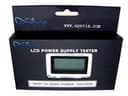
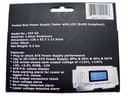
Apevia’s LCD Power Supply Tester allows fast and easy test for your power supply. Pocket size with a LCD screen to show all the ATX power voltages on +12V1/+5V/+3.3V/5VSB/+12V2/-12V and P.G. With alarm warning any abnormal voltage, this power supply tester is one of the best in the market. Just connect the 20-pin or 24-pin main connector from the ATX power supply to this LCD power supply tester and plug in P4/P6/P8 to show the voltage on the screen. Made of quality aluminum material, this power supply tester helps you easily diagnosis the problem source and prevent possible damage to your system. It's a small investment for a "must have" tool for pc builders. -Easy to use ATX power supply tester with LCD screen -Check eact ATX power supply connector -Accurate voltage indicating +/-0.1V or +12V1/+5V/+3.3V/5VSB/12V2/-12V -P.G. value display -Lower and higher P.G. values alarm -Low voltage alarm -Over voltage alarm -No voltage alarm Review: Apevia LCD display ATX power supply tester - Very helpful, works well except for the audible beep alarm for when a reading is out of tolerance - I can't hear it at all, so either it doesn't work or it's too high-pitched and/or weak for my ears; it's hardly necessary anyway. The LCD displays are good although older users may need a magnifier to read the small text. The tester gets quite warm in just a few minutes so it can't be left plugged in for long. The main 24/20+4 connector is kind of tight, requiring care to plug and unplug, and it has no marks to indicate where a 20-pin plug should be plugged in, so you have to look closely to identify the correct keyed pins and line them up. Users need to be aware that because this Apevia puts very little load on the power supply under test, some PSU's may show one or 2 incorrect readings while on the bench out of a computer: I tested a few PSU's and found one that gave a 10% out-of-tolerance low reading on the 3.3V rail until it was plugged into a PC and re-checked with a meter. Review: nice tool - easy to use and compact
| ASIN | B003F2VG8U |
| Brand | Apevia |
| Compatible Devices | Personal Computer |
| Connector Type Used on Cable | plug in |
| Customer Reviews | 4.6 4.6 out of 5 stars (24) |
| Form Factor | ATX |
| Manufacturer | Apevia |
| Mfr Part Number | PST-03 |
| Model Number | PST-03 |
| System Bus Connector Type | 20 Pin |
| UPC | 837344009143 |
B**R
Apevia LCD display ATX power supply tester
Very helpful, works well except for the audible beep alarm for when a reading is out of tolerance - I can't hear it at all, so either it doesn't work or it's too high-pitched and/or weak for my ears; it's hardly necessary anyway. The LCD displays are good although older users may need a magnifier to read the small text. The tester gets quite warm in just a few minutes so it can't be left plugged in for long. The main 24/20+4 connector is kind of tight, requiring care to plug and unplug, and it has no marks to indicate where a 20-pin plug should be plugged in, so you have to look closely to identify the correct keyed pins and line them up. Users need to be aware that because this Apevia puts very little load on the power supply under test, some PSU's may show one or 2 incorrect readings while on the bench out of a computer: I tested a few PSU's and found one that gave a 10% out-of-tolerance low reading on the 3.3V rail until it was plugged into a PC and re-checked with a meter.
P**S
nice tool
easy to use and compact
T**R
Hard to plug/unplug
This device would be cool if they took some time in engineering the connector socket. It is almost impossible to unplug from the PS without causing damage to the connectors.
S**R
Indispensable for serious PC tech's toolbox.
I've been repairing PCs for over 10 years and never bothered to buy a dedicated PSU tester. After deciding to add one to my travel tools, I researched for a couple of weeks. There are many similar devices, most sharing the same case. However, the Apevia seemed to get universal praise from most reviewers with real PC repair experience. It is well built. The display is bright. It took me about 30 seconds to figure out the P1 connector. This tester paid for itself with the first use. Highly recommend for anyone that provides PC tech support for fun or profit.
P**L
Resolved my problem.
I had a problem with my computer did not start, and with this tester problem was solved. You can check your motherboard and power supply with no problem. It work great. Good tester. I recommend it.
J**H
Power Supply Tester by Apevia.
Shipped and received early. The tester works well and is nicely made. The digital read-out of the voltages and LED indicators are very useful and simple to use. The Instructions are brief but useful. This unit saved me time in testing power supply problems - much faster and simpler then trying to use a meter. Makes a nice addition to your electronic trouble shooting equipment.
H**E
Worked Fine
Used on a 650 Watt BFG PSU, and a OCZ Fatality 1000 Watt PSU, worked great in telling me voltages, and PG, was able to make sure psu's were in good running, shape. The beep in somewhat unnecessary, otherwize screen is easy to read and clear, good product, a must have for any tech or system builder.
D**D
awesome product
its just what i was looking for saves me alot of time testing pc's for problems no more swaping out parts and busting my brain lol all in all worth the price
TrustPilot
1 个月前
4天前