We remain fully operational. Our teams are working around the clock to ensure your deliveries continue safely.

下载应用程序


🔥 Build Bold, Stay Cool, Connect Fast!
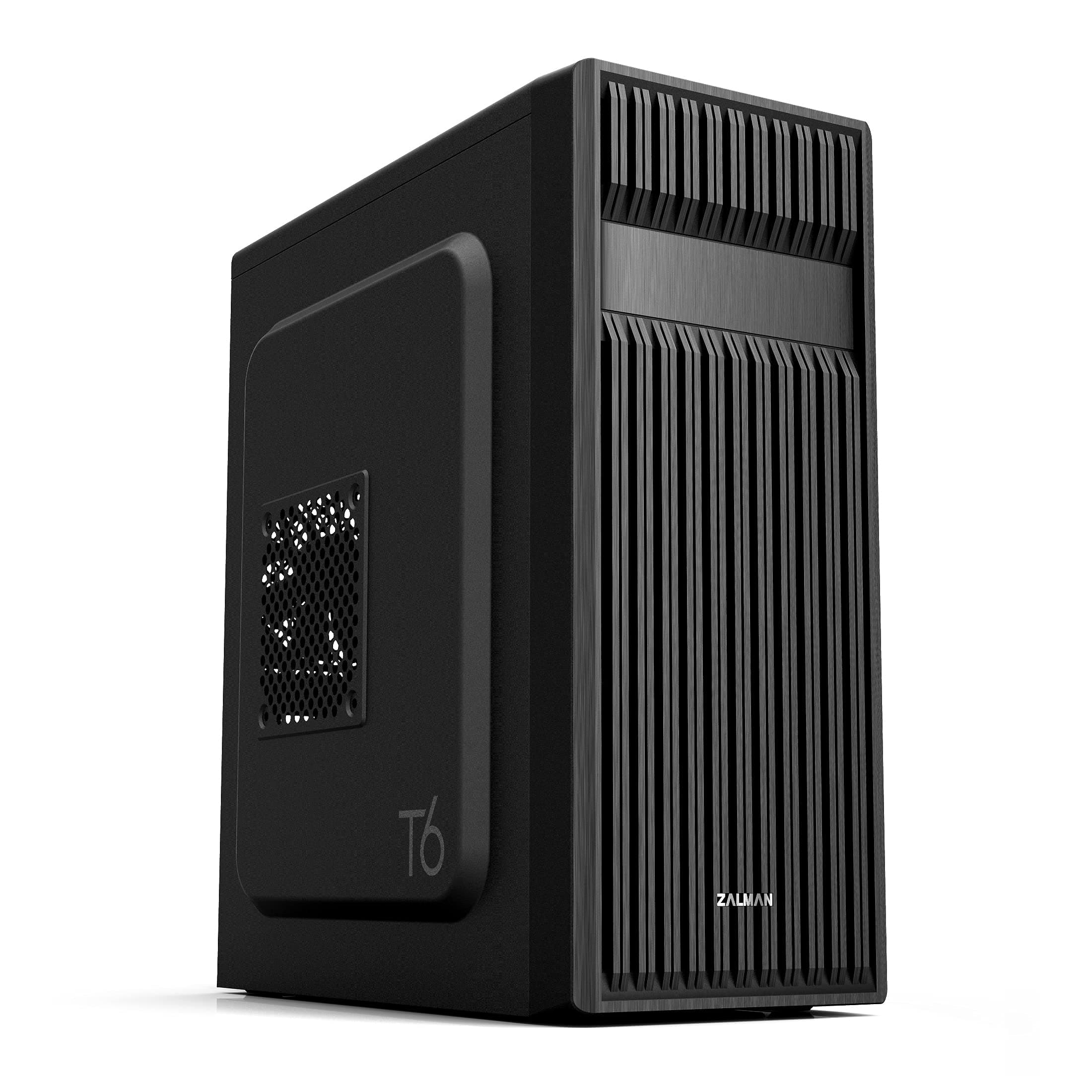
The Zalman T6 ATX Mid Tower PC Case combines a stylish patterned mesh design with a pre-installed 120mm fan to deliver superior airflow. Its powder-coated steel chassis offers durability and corrosion resistance while supporting ATX, mATX, and mini-ITX motherboards. Equipped with versatile drive bays and front USB 3.0 ports, it’s engineered for professionals and gamers seeking a compact yet powerful workstation chassis.



| ASIN | B07R2JBTDR |
| Additional Features | Built-In Fan, Dust Filter, USB 3.0 |
| Aspect Ratio | 16:9 |
| Best Sellers Rank | #87 in Computer Cases |
| Brand | Zalman |
| Built-In Media | Contents: 1 piece |
| CPU Model Number | T6 |
| Color | Black |
| Compatible Devices | ATX, mATX, Mini-ITX |
| Connectivity Technology | USB |
| Cooling Method | Air |
| Customer Reviews | 4.3 out of 5 stars 899 Reviews |
| Display Resolution Maximum | 1920x1080 |
| Display Type | HDMI (FHD) |
| EU Spare Part Availability Duration | 5 Years |
| Global Trade Identification Number | 08809213769429 |
| Graphics Card Description | Dedicated |
| Graphics Card Interface | PCI Express |
| Graphics Coprocessor | Integrated Graphics |
| Graphics Description | Dedicated |
| Graphics Ram Type | DDR4 SDRAM |
| Hard Disk Description | SSD |
| Hard Disk Interface | USB 3.0 |
| Hardware Interface | USB 2.0, USB 3.0 |
| Human-Interface Input | Keyboard, Mouse |
| Item Dimensions | 7.87 x 16.93 x 14.84 inches |
| Item Type Name | ATX Computer Case |
| Item Weight | 8 Pounds |
| Keyboard Description | Standard wired keyboard |
| Keyboard Layout | QWERTY |
| Manufacturer | Zalman |
| Memory Slots Available | 4 |
| Model Name | T6 |
| Model Number | T6 |
| Model Year | 2026 |
| Native Resolution | 1920 x 1080 |
| Operating System | Windows 10 Pro |
| Personal Computer Design Type | Computer Tower |
| Personal computer design type | Computer Tower |
| Power Plug Type | No Plug |
| Processor Count | 1 |
| RAM Memory Technology | DDR4 |
| RAM Type | DDR4 SDRAM |
| Resolution | 1920 x 1080 |
| Speaker Type | External Speakers Required |
| Specific Uses For Product | Gaming, Multimedia, Personal |
| Style Name | T6 |
| Total Expansion Slots Quantity | 7 |
| Total Usb Ports | 3 |
| UPC | 823884209099 |
| Video Output | HDMI |
| Video Output Interface | HDMI |
| Warranty Description | 1 Year |
~**~
Great for what it is
This is a great case as long as you know what you are in for. Can you build a gaming pc in it, yes. Should you, no. Mainly due to cooling potential. This is, however, an ideal case for a workstation. I will be using it to build a new pc for my senior-citizen relatives. Pros: low cost, lightweight, has a 5.25inch bay for optical drive, surprisingly small for an ATX mid-tower case (fits a full size ATX motherboard easily). Meh: metal is thin (contributes to both light-weightedness and top-heaviness). No venting on the top or bottom (good or bad is use-case dependent). Finally a very minor issue, IF you are using this case for ATX build, be aware only 6 of the 9 necessary motherboard standoffs are pre-installed, the remainders/extra are included with the other hardware but must be installed yourself. Cons: Biggest issue for me is the mount for the power supply is at the top and makes it very top heavy, definitely would have preferred psu mounting on the bottom for such a lightweight case. Might not be ideal for beginners as the case is very tight with ATX build and can be difficult to work in, let alone cable manage. No USB-C on the front I/O panel. All the screws come together in one bag with no separation, 3 types of screws, 4 if you include mb standoffs, all in one non-ziplock bag... irritating. Personal: Zalman is a trusted brand. In the last 22 years I've had 3 pc cases and 2 were Zalman, which lasted about 18-19 of those years. Overall, this case is great. But again, it depends on your what you'll use it for. I am using integrated graphics from cpu and a low profile cooler which means there is a lot of empty space in the case, which likely contributes to the top-heavy nature I previously mentioned. That being the case, I wish there was a version where it is half the width and the spot for the optical drive was rotated 90 degrees to remain included, a bottom mounted psu, and perhaps more venting on top to compensate for the smaller size and fan size.
C**T
Very Good Case at my Price Point
I needed an inexpensive mid-sized case for an ATX MoBO build which I was transferring from a much larger case. I needed this case to fit under a particular piece of furniture. Bottom line, this fit the bill nicely. Couple points: Metal sheet is pretty thin, which makes for a light case, but it's not real heavy duty. I used (and recommend) at least one aftermarket fan in the front to pull air in to the case (I used two). These need to be installed before anything else (another buyer noted that same point) particularly if putting in a full ATX MoBo. You will not have the room after the board is in to get the fan screws in place. The front plastic panel is most easily pulled off from the bottom. Just be gentle and firm and it will pop right off. Goes back on easy as well. Recommend removing the enclosed exhaust fan prior to mounting the MoBo. You'll need some maneuver space. I had 2 SSD's for this build, a 500 GB and 250 GB. These are mounted outside the main part of the case, which takes a little consideration for cabling. Easily done though. ATX MoBo is s tight fight, but it fits. Don't forget your standoff nuts, these are not all in place for the ATX board. I also used aftermarket cooling. The tower is too high to allow for a side mount fan in this case. Back panel is a little loosey-goosey. This is where the thin metal sheet is most evident. To allow for the GPU to seat one must pop out the panels. They will be destroyed doing this so make sure you line up your cards correctly. It looked wonky initially, but once the GPU was in place everything locked down tight, no issues. Power supply mounts on top, which I was initially a little concerned about but it worked out nicely. This particular power supply is not modular, so it's a bit of beast in terms of excess cables, but there was more than sufficient space to store them away. Since this isn't a display build I did not concern myself with fancy cable management, a few enclosed zip ties to keep things tidy was about it. So again, good case for the money. Not sure I would use it for my first build though. I'd recommend laying out a little more to get a more modular and flexible case, something with a bit more room and more heavy duty. However if you've got a build or two under your belt, and you aren't concerned with being the Michelangelo of PC building, this will work fine.
W**R
Inexpensive and Lightweight and just perfect for my build.
The case is inexpensive but sturdy, especially once you start mounting stuff in it. Removing the metal punch-outs for Optical drive and Video Card requires in addition to pushing the with your fingers bending the metal with a pair of pliers and then using a small file (and a paper or tissue underneath to catch the filings) to remove the resulting sharp metal jagged edges. There are about a dozen motherboard stand-offs included, which require a 3/16" or 5mm socket to screw into the case. I used a flat tip medium size screwdriver to start to pry the front panel, after which it came off easily. I removed two adjacent rear punch outs and also the thin section between them (which bent easily) to mount the double width video graphics card. And of course using a small file (and a paper or tissue underneath to catch the filings) to remove the resulting sharp metal jagged edges. I mounted a single 120mm fan blowing air in the front. You have to mount the front panel and then insert the optical drive from the front, and then screw in the drive mounting screws. Tight fit with the power supply and optical drive up top, and tucking in and using cable ties to secure the cables somewhat so they don't fall down or wind up hitting the CPU fan blades. I took some pictures and captioned some of them to hopefully help other people see what could be involved in using this case. I like that this inexpensive case has an option for mounting an optical drive. Some of use still use CDs and DVDs for software and video and music. It took some time to get everything in and doesn't look the neatest, but the result is a small compact unit.
M**R
Great ATX Case
I bought two of these cases to put on a class for secondary school students in Belize. I packed all the components inside the cases using the original shipping boxes/packaging, and took them on the flight. Both arrived in great shape. The cases worked out great, giving the students the experience of building their own PC, and getting to understand what each of the components do. The cases were sturdy yet light weight. Functionally, they have good air flow with a back-panel fan and the power supply mounted at the top of the case. There are walk-throughs to route the wire to conceal them on the backside mounting panel. The only concerns were the difficulty in removing the back-panel slots (they're stamp metal, and you need to twist them out carefully without damaging the thin metal between them). The students were able to do it themselves to install the graphic cards. They are functional and are aesthetically pleasing. The school will continue to use them for their digital creative arts classes. I would use these for my personal builds and recommend these.
T**M
Excellent Case - Really like the Control Panel on Top Front
This worked perfectly for my build. ATX Motherboard fit just right. Make sure to install the rear fan before installing the MB - I had to take the MB out and put the fan in and reinstall the MB, but that was the only issue I had with the case in the whole process. I really like the Controls, Sound Ports and USB Ports located on the top front of the case. Plenty of room and an external bay for the DVD drive.
R**8
Where's the pre-installed PC Fan Zalman?
I needed a new mid-sized ATX PC case for my home computer and decided to get this Zalman T6 computer tower case. Description states, "Pre-Installed 120mm Fan", but when I got it today, I got the PC case just fine, but NO 120mm fan to be found....they did not install ANY 120mm fan. I had to use an older 120mm fan for the backside of this Zalman PC case. That's a deduction of 1 star there. Second glaring defect were the motherboard black mounting screws or whatever you call those thingies are so cheap...when I use the screws to screw into those mounting brackets to connect it to this PC case, they warped the case and right now, the motherboard is installed, but not tight to the motherboard....wobbley in fact. I will simply keep it like this and sort it out later and that's a deduction of 1 more star. Cheaply built and it bends easily. Deduct 1 more star for that chinese cheapness factor there. There is a lot of room to work inside this PC case. Install whatever ATX or mini-ATX motherboard into this case before installing anything else....it's not that big inside to work around and will make future stuff to install such as CPU chip and cooler fan, the DVD burner, video card and so on. There is just 1 5.25 slot for whatever....in my case....a CD/DVD player/burner and it installed pretty easily. It has 3 USB ports, mic jack and headphone jack on top with the control panel all located at the top front of this PC case....pretty nice. Seems decent, tho fan ventilation is not the best. I have installed 2 120mm fans and will install a smaller internal fan up front to keep it cooler inside this PC case.....however the front of this case lacks vent holes. Whoever designed this Zalman T6 case, could have most certainly done a better job. In regards to the missing 120mm "Pre-Installed 120mm Fan" situation....I notified Amazon and they gave me a partial refund.....most likely to cover the possible cost of a 120mm PC cooling fan. I rate this PC case 3 stars because it was because of those glaring issues I mentioned earlier. I know it's just a $60 basic PC case, but when Amazon puts in its description......"Zalman T6 ATX Mid Tower Computer PC Case, Pre-Installed 120mm Fan, 5.25 ODD, USB 3.0" and so on.....and the 120mm fan was not there.....that is not a good thing. 3 stars. Thanks.
S**J
Yes, it's thin, but it's cheap, and do you care?
I'm not a gamer, and you're not either if you're reading this. Or at least you're not into the RGB craziness. This case is supposed to sit under your desk and be forgotten like even the flashiest of clear-panel cases will be eventually. I bought a new motherboard, processor, power supply, M.2 SSD, OS, case fans, CPU cooler, and some other assorted parts, and I sure didn't feel like spending $100 or more for a case! So I looked and found this one, which appealed to the "old school" side of me as it had a very-rare-these-days slot for a DVD/CD drive. Hey, before ye judge, consider that the brand-new MSI motherboard included A CD OF DRIVERS! Was I supposed to shove that CD into a USB port??? And indeed I needed that CD when I installed the OS. So other reviews will tell you how thin the metal is on this case. It's not tinfoil, but compared to one of my heavy-steel cases from the 1990s, it weighs about 1/3 as much. But that's a GOOD thing! Once you get fans, power supply, and the motherboard installed, it's sturdy enough, and nobody is going to kick this item when it's under my desk. It's fine. I was able to install my full-size ATX motherboard and I didn't have ANY of the problems I've read in other reviews... none of my motherboard ports were blocked in any way by the scooped-out side, and I could install and take out any case fan at will after the motherboard was in place. While there is not a full-size rail for the DVD/CD, it mounts perfectly stable in the case. About the only problem I had was that the DVD drive I installed cramped the area where power supply and top-panel wiring runs, so it gets a little congested up there. There is no concession to cable management, but when you put on the steel side, not a soul is going to see the rats nest. Just make sure your wiring is stabilized and can't stop a fan from turning. Bottom line... I'm completely satisfied with this case. It's light, sufficiently sturdy, has a DVD slot, and quiet. And cheap! Recommend.
T**Y
Very basic case for low profile (stealthy) gaming builds.
Update: I’m posting a picture of exactly why I bought this case and of the fifth fan installed where the 5.25” bay is. I bought this handle in a four pack for about $15, it’s for play sets. Original: I like this case more than I thought I would. First thing you should know is that you can fit a fifth fan behind where the 5.25 slot is, on the inside of the case. I highly recommend doing that to keep airflow optimized. I will say that this is a very flimsy and lightweight case. Both would normally be cons, but for my purposes they really aren't. I bought this case to build a gaming PC that I can easily transport. It has a solid top that I can attach a handle to. It's light weight helps keep it light weight, I know, shocking. Compared to my other gaming PC I recently built, this feels a bit lighter. I haven't weighted either but perhaps I will in the future. Honestly, I like this case. I like the solid black panels, the OEM look it tends to have, and the mounting for a fan in the side cover. Although it is cheap feeling, with how thing the steel is, it's really easy to build in and pretty well thought out. The only cable management issue is the power supply cables have to be directly fed through a hole to the "back" side panel. Other than that it seems fine to me. Although I do like this case, if you spend just $20-30 more you can get a better case. You should only buy this if you're on an extremely tight budget and need a case right now or if you want a low profile OEM looking build.
TrustPilot
2 个月前
1 个月前