We remain fully operational. Our teams are working around the clock to ensure your deliveries continue safely.

下载应用程序


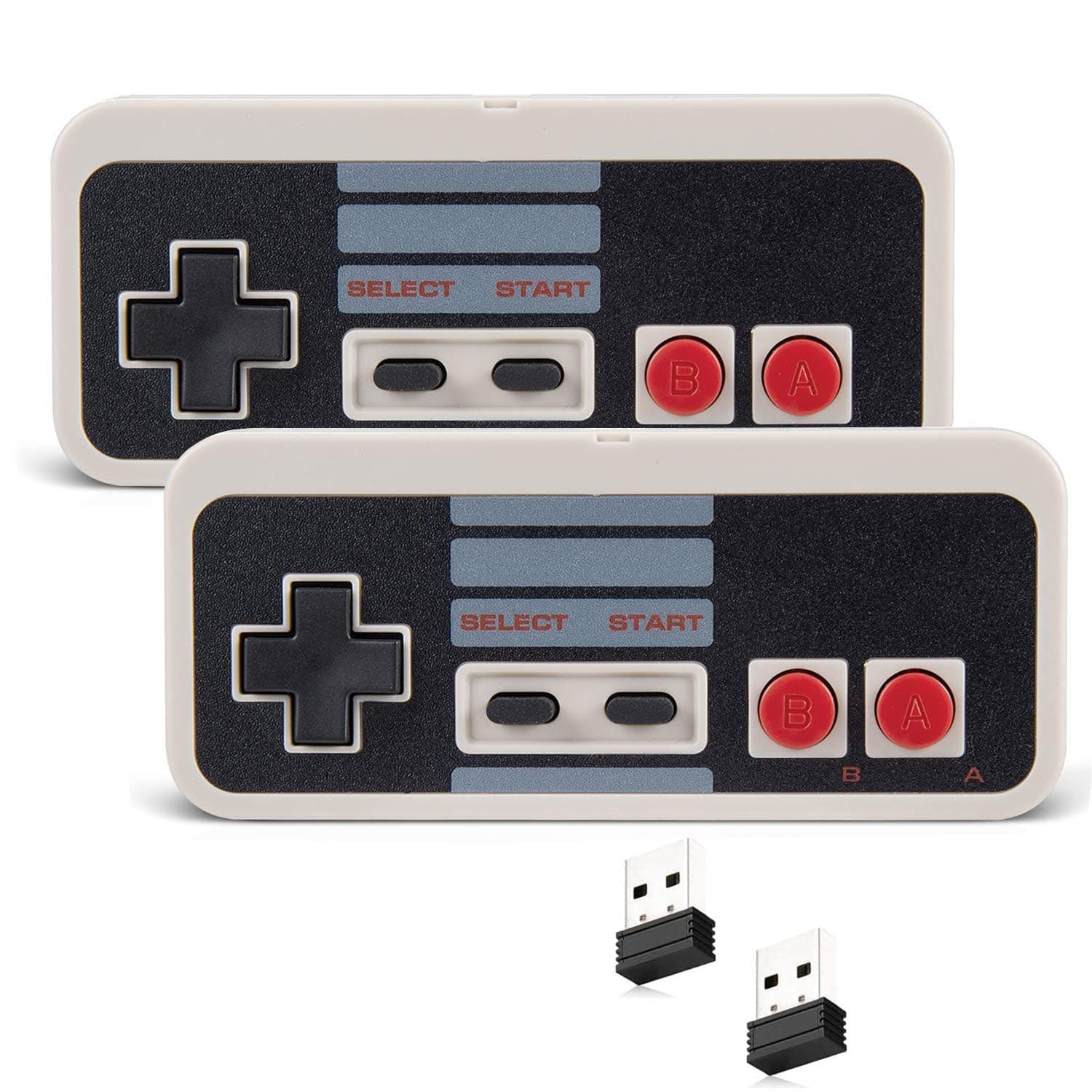
🎯 Level up your retro game nights—wireless, precise, and built to last!
The KIWITATA 2X Wireless NES USB Controller delivers authentic retro gaming with modern wireless freedom. Featuring a 2.4GHz USB dongle for lag-free play up to 30 feet, an ergonomic anti-slip design, and a rechargeable battery lasting over 12 hours, it supports Windows (XP through 11), MacOS, and Raspberry Pi RetroPie. Perfect for serious emulation enthusiasts craving nostalgia without the wires.


| ASIN | B08X6FSRPQ |
| Additional Features | Wireless USB Controller for PC |
| Best Sellers Rank | #7,069 in Video Games ( See Top 100 in Video Games ) #127 in PC Gamepads & Standard Controllers |
| Brand Name | KIWITATA |
| Button Quantity | 10 |
| Color | Gray |
| Compatible Devices | Windows,iOS,Raspberry Pi |
| Connectivity Technology | Wireless USB |
| Controller Type | Gamepad |
| Customer Reviews | 4.0 4.0 out of 5 stars (168) |
| Hardware Platform | For Raspberry Pi(4/3/2/1/Zero), PC/Mac/Linux/Unix, Raspberry Pi |
| Item Weight | 0.02 Kilograms |
| Manufacturer | KIWITATA |
| Model Name | Y-D002-239-K |
| Package Quantity | 1 |
| Power Source | Battery Powered |
S**O
Finally, good NES controllers for use with a computer!
Absolutely spectacular NES controller! I use Nestopia and OpenEmu emulators on a Mac computer, and I've tried so many different brands of Nintendo controllers, and this brand is by far the best one I've encountered. Smooth button action, seamless wireless function, and the ergonomically rounded corners are easy on the hands. Delighted!
J**H
Totally stinking awesome
I got this so I could play nes games on my Samsung Galaxy s22 (android) and its freaking awesome. Maybe its cause im old and used to a physical controller, but I just could not use the virtual on screen controller at all. I had to get a little USB A to USB C adapter (came with my phone anyway) but when I plugged it in it kinda worked right away. I could tell the buttons were doing something, just not the right thing, so I had to go into the emulator settings and configure (map) the buttons to the button theyre supposed to be. Once that was done, it worked like a charm. Its so stinking awesome. I've been wasting my life away playing the original legend of Zelda and finally made it to level 8. I couldn't have done it without this controller because I kept getting killed. I wasnt fast enough with the stupid virtual controller. Update: The controller stopped working after a while. Probably because I kept dropping it out of my front shirt pocket, which to its credit, it withstood countless drops before it quit working. It wouldn't take a charge and I couldn't get the light to come on anymore. Ive always been one to fix things so I took it apart to see if I could see a problem. The board appeared in good shape and I didnt see any cracked solder joints. I unplugged the battery from the board and plugged it back in. The light immediately started working. So I plugged it back in and charged it up and its been working just fine ever since. I have been extremely happy with this controller. **if anybody's controller stops working then try unplugging the battery and plugging it back into the board to "reboot" it. ** if I have any more updates I'll add them here. Hopefully this helps someone who's controller stopped working.
A**O
Actually pretty solid!
Actually pretty solid controllers. Haven’t yet depleted the battery so it holds up well there. The buttons feel responsive for the most part, there are a few hiccups here and there. The curved edges are sure a choice, although i prefer the original shape and buttons of the official controller. They work on Switch as well and thats a great feature.
S**S
Did not pair.
Crappy. Did not pair with my Nintendo Switch.
D**R
Does what it says
Surprisingly nice for the money. Connected and worked fine.
B**E
Great for my MiSTer
These are perfect for the price. They connect immediately and have pretty good battery life. They work great with my MiSTer. I also tried them on my windows machine and they were fine there. I originally thought one of mine had a problem, since it wouldn’t charge. But, i think it just came precharged to full. After some use it charged. I reached out to the seller before discovering it worked and they sent me an additional. Great product and great service. At this price point I have nothing but good to say.
G**4
Meh - Works with NVIDIA Shield, but only 1 of them at a time
Bought this to use on the NVIDIA Shield with NES Emu. Buttons did not map properly, but were easily remapped and I was able to set it up as a regular NES controller. When I plugged the 2nd USB dongle in, it never showed up. The Shield couldn't tell the two dongles apart, and acted like they were the same controller! So you can only use 1 controller at a time on the Shield, acting as player 1. Feels great to use, just wishing they would show up as 2 separate devices.
A**R
Higher Quality than what You Might Expect; Good Range
I am an avid retro gamer, as I use a number of emulators and play many older games from the 8-bit NES era. For many years, I was dead-set on using only original and authentic wired Nintendo brand controllers from the 1980s and then converting that original interface to USB before plugging that into the computers that were emulating the games. It was part of the "keeping it real" vibe that I was seeking, even though that's kind of an oxymoron when considering that I'm emulating them through a computer anyway. More recently due to my setups changing and the original controller's cable being too short to reach my seating, I figured I would branch out a little bit and go for something wireless. I'll admit that I was skeptical, but in the same breath I will say that I am fully surprised and more than pleased with the wireless setups I now have. Response is great, range is good to great, and the quality of the controller is much higher than I was expecting. A nice little bonus, since we're talking about changing things up a little bit anyway, is that the controller is essentially the same size and the buttons and everything are in the same "position" or "spot" which helps "keep it real" -- but the corners of the controller have a very slight but noticeable radius to them that makes them quite a bit more comfortable than the original models from the 1980s. I highly recommend.
K**.
Incompleto Falta una pieza
TrustPilot
1天前
1 周前