We remain fully operational. Our teams are working around the clock to ensure your deliveries continue safely.

下载应用程序





📺 Elevate your home entertainment—stream smarter, watch together, and never miss a moment!
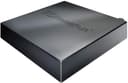
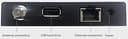
The SiliconDust HDHomeRun FLEX DUO is a dual ATSC 1.0 network TV tuner that streams live over-the-air HD channels to multiple devices simultaneously. Featuring Ethernet connectivity and a USB port for subscription-free whole-home DVR functionality, it supports a wide range of platforms including Android, Apple, Roku, and Windows. Designed for seamless multi-room viewing, it offers an intuitive web interface for easy setup and signal optimization, backed by a 2-year warranty.


| ASIN | B092KM482V |
| AntennaDescription | Television |
| Best Sellers Rank | #13 in External TV Tuners |
| Brand | SiliconDust |
| Built-In Media | HDFX-2US, network cable, power adapter |
| Color | black |
| Compatible Devices | Android, FireTV, AppleTV, Roku, Sony, XBox, iPhone, iPad, Win10/11, Mac |
| Connectivity Technology | Ethernet |
| Connector Type | RJ45 |
| Customer Reviews | 4.2 out of 5 stars 942 Reviews |
| Includes Remote | No |
| Item Dimensions L x W x H | 7"L x 5"W x 2.2"H |
| Manufacturer | Silicondust USA Inc |
| Mfr Part Number | HDFX-2US |
| Model Number | HDFX-2US |
| Product Dimensions | 7"L x 5"W x 2.2"H |
| Tuner Type | ATSC |
| UPC | 850028206003 850028206058 |
| Warranty Description | 2 year warranty |
S**.
Great for whole-home network use!!
Works great with the native iOS and Roku apps, but you will get crashes on both of them when viewing channels where actual RF signal strength or noise is an issue... That being said, it's a great and easy to use device that so far has operated flawlessly when RF signal has not been an underlying issue. I presently use the HDHomeRun tuner device to provide OTA HD streaming to devices and televisions on my home network. The device is located out in my unconditioned barn where the outside roof mounted antenna has a strong signal for all the major network stations I need (mainly for sports). It's connected via underground fiber back in to the home network. (During testing, I actually powered it via PoE with an external adapter while searching for the best location across my property, and it operated without issue by that means as well...) Originally, I did have the same Roku app crash issues mentioned in other reviews, but I was able specifically chase that back to one VHF channel (12.1 at 189.029mhz) with a very high S/N ratio (likely from my outside POE cameras) that would ultimately cause the data stream to be interrupted and crash the native Roku app, but only in that scenario on weak channels. Pointing your web browser to the device provides an intuitive simple interface for configuration and setup. This made signal troubleshooting a breeze by showing strength and s/n readings live for whatever given channel each tuner was parked on. (Handy to look at on your phone while you're making fine antenna adjustments on the rooftop). You can directly access streams via url (for example from VLC) over the network, which will automatically assign an available tuner to whatever channel you're attempting to access. In the end, my production setup has the HDHomeRun fed into TVHeadEnd server that pipes it to Jellyfin (all on the same Linux machine) so OTA TV is available everywhere it's needed. The key here in this setup solves the marginal channel issue for me-- TVHeadEnd service gracefully handles any weak signal issues or interruptions (weather, lightning) before they ever get passed down the line so the video stream never actually crashes. Again, it's my work-around and unique situation that I had fun making work... All that being said, just buy it- you'll be glad you did!
Z**E
Works well, wide support
This is a further update to the review below, written Apr 13, 2025. I contiinue to be impressed by the HDFX-2US and the Silicondust customer service. I experienced another failure of an HDFX-2US under warranty, and customer support sent me a new unit with reasonable quickness and minimal inconvenience on my part. I've had several of these devices fail now, but customer support assured me that they've made changes to their low-noise amplifier's input protection, which should make failure much less likely. *** end of update Apr 13, 2025 This is an update to the review below. The main update is to add that the unit I received failed after about three weeks. As I mentioned, I have owned more than one HDhomerun that failed, including at least two that were under warranty. I can definitely say that the warranty support is still outstanding, and I received a new unit within days of reporting the failure. **** end of update. This is a review of the Hdhomerun model HDFX-2US. Its basic function is to accept TV signals from an antenna and make them available in a format that can be streamed by devices on your home network and displayed on a screen, anywhere there is access to either wired ethernet or Wifi. This model has two tuners for channel selection so you can stream two TV channels at once. If you pay a monthly fee you can also access DVR functions. There is a USB port that can be used for external storage. I believe network storage is also supported. SiliconDust provides an app on many platforms to which the HDhomerun can stream directly. Supported platforms include Roku, Android, Apple products, Windows, LG WebOS TV, etc. I've tried the apps on Android and Roku, and found them to be adequate. Third party software also supports the Hdhomerun, like more comprehensive home theater applications. I use Kodi on Libreelec, but there are others as well. Note that HT applications (e.g. Kodi) may provide a free DVR function A note on setup: At various locations the instructions tell you to access the maintenance functions by connectiing to a web page at either my.hdhomerun.com or homerun.local, neither of which worked for me. I was able to connect to the device by specifying its ip address on my local network. I.e. http://x.x.x.x where x.x.x.x is the device's ip address. Once connected, I downloaded a firmware update, and there are other functions like editing the channel list. Overall, this is an excellent product. My only reservation that prevents me from giving it 5 stars is that I've had a few Hdhomeruns of various generations and none have lasted especially long. On the other hand, I believe the current product has a 2 year warranty, and, as I recall, my experience with warranty return has been painless. As far as overall function, it is fine. I receive dozens of channels and the Hdhomerun provides a stable connection. However, I have a rooftop antenna and live in a major metro area, so YMMV. Note also that this model isn't compatible with ATSC 3.0. It is also not compatible with encrypted cable signals.
T**M
Works well as a tuner for a Plex Server TV/DVR source
Setup was reasonably straightforward despite the fact that their web interface is pretty clunky. The Android app seems to work well but I purchased this to feed my Plex server running on an Asustor NAS AS540Z1 and, as such, have not connected external storage. Plex recognized the tuner immediately and, as long as you remember to identify a directory to store DVR data in setup, works well without a lot of headache. The tuner seems to be a bit more sensitive than a Tablo that I also have, time will tell if it's more stable. (Tablo is still a good product but is famous for instability in HW and apps. I have a remote power switch to reset the thing to make life easier when it locks up) It was much easier than the Tablo to set up. and, unlike Tablo, has a web interface to watch on the PC although it appears to have been written by engineers that were rushed to get something out the door. I have not tested HDHomeRun through it's dedicated Roku app but the HDHomeRun shows through the Plex app running on Roku works well. The 2-tuner version was purchased as an experiment but if ATSC3.0 ever rears it's ugly head, I'll likely spring for the flex 4K version.
S**A
Essentially works fine but with caveats
I purchased this to reposition the digital on air antenna for our TV without having to run wires/cables. It's been quite good at achieving that goal. I positioned our old antenna by a less obstructed window and wired to the HD tuner and then to the router. From this position, the antenna picks up all the local channels great (including a few I could not see before). In fact, I was thinking of getting a new powered antenna eventually, but I think the receiver in the device is better than what my TV had. The quality of the video play-back is generally great. Being able to watch on multiple devices is a nice bonus. It is not perfect though because of a few issues: 1) The TV apps (Roku, windows, Apple, Android, etc.) have some glitches. The display settings on the apps are not the same across devices. Some features are not possible in one environment or another, and the user interface is a bit clunky at times. On the mac, sometimes if I minimize the app window when it is set to "be on top", it flips to an earlier channel. There are times the audio seems a little off (lags), you cannot rewind live TV on Roku, etc. 2) The Roku app was a challenge to set-up. I could not get audio for quite a while. After a lot of trouble shooting, it was a matter of changing some settings on TV and Roku (basically disable the auto-volume adjust for the app, Roku, and TV) and it finally worked. But, boy, that was a huge hassle to set-up. Searching for solutions online was not as straight forward. 3) My biggest worry is the device security. Until now, I had put most internet enabled devices (TV, security cameras, dryer, etc.) on my guest network and not on my main home network. Unfortunately, this device has to be hardwired to your router, which mostly means on your main network on the router. This also means, I have to have my Roku device on the main network (rather than a guest network that prevented devices from seeing each other and the router). I am pretty sure 95% of users don't care about this, but I am personally not happy with this set-up. I think it creates a security hole to my network from both the Roku device and the Silicon Dust tuner. Roku is a big enough company I hope I can trust, but I have no idea whether SiliconDust will keep their device secure. If you care about such things, be forewarned that you are opening your home network to the outside. I just hope their platform is not very hackable and their device OS does not have a generic admin password...
S**8
Amazing little piece of equipment (Detaild review with some instructions)
I only give five stars and take my time to write detailed reviews when something is deserving. And you should buy it. In this case, this little piece of tech has far exceeded my expectations. The reason for that is I have a first generation Haupage, and I have never been able to get more than a couple of channels. I've been in the tech world over 40 years, am a Broadband and Network Engineer going back to 2001, and cut the cable about ten years ago. Biggest problem, without paying fees, is real time news on TV. Yea, you can get real time local news streaming (For a fee in our case) or watch it on a computer, but we do prefer having it on TV. There are also some network TV shows my wife likes, streaming they are always a day late. She would like to watch them when they are on. And this device was the ticket. I watched quite a few videos on how to get the best reception with this device. In short, 45 miles away on a single hill with multiple towers, they broadcast 40 channels. As noted I was never able to get more than 2 or 3 even with the most expensive powered antenna. My RV has an integrated raise. Lower antennae and can get 8 from my backyard. After connecting this device, properly, I get all 40 channels crystal clear. I bought this device fully expecting to see it not work and send it back. Nope, definitely keeping it. Here are step by step instructions, I took from multiple videos, on how to get the most channels and best reception. But first a couple of notes. After setup, I will go over some of the features of this little box and the app. You can ignore some of the older review complaints, because as I learned (Again watching videos) there have been more than a few updates and I can verify you do not need a Plex server or anything else. More on that after installation. I have a hardwired house with a network room, server, couple of cabinets etc, so for me I can make it work anywhere in my house. I am not restricted by a modem/router. I will make some notes on that as I go along. 1. Find your broadcast towers. There are multiple websites you can use, I used Channel Masters and two others to get exact location. I found that 40 channels were broadcast from a hill in one city and 3 more were broadcast within range from a different direction. I cannot get those three channels. It doesn't matter because I get all the local and networks on the 40. 2. Download a map compass on a cell phone. I used an app called Compass Maps for Android. You may or may not have to download the map in addition to the compass. I did, works great, going to keep it. That is unless you already know the exact location of your broadcast towers. 3. Locate the window in your house closest to pointing directly at those towers. A couple of notes. * Walls will severely restric reception. * Clear glass is good, this will still work if you have screens, but screens will restrict reception. In a storm window with a screen, I recieve about 15 of the 40 channels available, moved over one window, center, no screen, 40 channels. 4. If you have an amplified antenna, do not use the amplifier. Thread the antennae directly onto the HDHomerun. Amplifiers severely interfere and restrict reception through the tuners and are not needed. And of course if you do not have an amplified antenna, don't buy one for this, not needed. 5. Thats it, for best reception put your antenna in a window facing as close as possible in the direction of your broadcast towers, plug it in to your network or router. Then download the HDHomeRun App on any or all devices. Note that this should be obvious but two tuners means you can only watch on two devices at once. But you can set it up on as many devices as you want, in my case it is set up on nine devices, including multiple big screen TV's, several computers and a couple of cell phones. It works perfectly through all of them. This works through any type of network configuration, wireless router (with jacks), hardwired home network or Powerline Adapters, I have netgear powerline adapters running in a couple of rooms off of my network and tested, works fine, no problem. The App I nearly ignored the app based on old complaints until watching a video that showed the complaints had been addressed. It is not hard to use and has a lot of new functions. (I do not know how the old App was since I have not used it, so I have to take other people's word for it). Once you download and install the app on your Smart TV or streaming device you use your normal remotes as usual. There is no separate remote for this device. You do not have to create an account to use the app, and there are no fees for anything. Once you click on the app you will see: Version (You do have the option to upgrade firmware through your account. I did that) Using ASymch Platform API It searches and then "Found 1 Device" Then device number and HD Homerun" followed by booting to the main screens. Total boot time for my devices is no more than about ten seconds. It will boot to the last screen you were watching, including if you logged out while watching a channel/TV program. Your first screen is your "Live Screen". Pressing theup or down arrows on your remote displays all of your channels and moves up and down through the channels. It may take a couple of seconds to populate all the channels. On the right side, all of your channels, each channel shows what is currently playing on that channel with a screenshot along with channel, 3.4, 3.3 and so forth. On the upper left side of the screen it will show time, Channel and current TV show playgoing. on the very top right of the screen are five icons. Search, favorites (Star you can click to lock that channel/show as a favorite, return to last icon, a newspaper icon that bring up only the news channels, a football icon that brings up only the sports channels, and a movie (film) icon that brings up only movies. Bottom is your fast forward, reqind, pause (You can fast forward, pause and rewind live TV with this app), your SAP, CC, Zoom, full screen and "Discover" Icons. Hitting the Discover Icon takes you to the Discover Page which is a full screen guide of TV shows, movies, sports, news, documentaries etc., you can select any of them, select a time when they will be on and set to record. Note you do not need an account to record, you can attach up to a 2TB drive to this device for recording. Above the full screen guide are four options. Now (Which it will be on automatically), Shows, Movies and Sports and clicking any of them will show only those categories in the guide. Above that are four options. Live, Recorded, Discover and Tasks. Live takes you back to the main page where you can watch whatever is on live TV. Recorded is self explanatory Discover shows you the guide with everything that plays on every channel. Clicking on any show, sports event, or whatever gives you the option to record an entire series or multiple events. Tasks shows whichever tasks you have selected, Record, playback and others while an "Upcoming" shows just that, upcoming tasks. Clicking "Live" at the top of any screen other than the main "Live" screen takes you back to the live TV screen. Note on the top right corner of any screen other than the Live screen is a settings icon. In the settings you can do the following. See account information See devices and device serial number See a list of all available channels and select any number of them to add to favorite channels Set parental controls including adding a Pin Set your Start Page to any channel you want on bootup The guide on the Live page is called the Live TV slice guide (Ill explain further down), you can turn it on or off. Set your speaker configuration. There are multiple surround sound options, Digital Passthrough and others Send Diagnostic Information (On/Off) The very bottom is early access to new features. For me, I am keeping it off because have seen more than one person get a firmware update and brick their device. The Live Slice TV Guide on the "Live Screen". On your remote, you use the up and down arrow buttons to open the guide and right and left arrow buttons to see more information for whichever channel you are watching. Clicking right on your remote arrow key will show you the next 1,2,3,4 and 5 shows coming on, on that particular channel, with a synopsis of the current show and a synopsis of the next five. You can click to see 1 through 5, whatever you want. If you click on any future show, it will give you the option to record that show. Clicking the left arrow button closes the guide to the show you are watching. To clear the screen of the Live Slice Guide, simply click your back button. How satisfied am I with this device. Solid Five Star satisfied. Easy to set up Works great with any type of network Uses basic antenna's, no amplified antenna needed Crystal clear picture Great app with a lot of options Can connect up to a 2TB hard drive. Quick Edit: When I first purchased it recorded without an account. Then it stopped and I had to add an account and purchase the annual subscription. The subscription IIRC is $27 (give or take a few dollars) annually and worth every penny. On the original recordings I really had no control over it and could only delete directly from the drive. Having the account with the DVR service gives me full control and makes the low cost annual fee worth every dime.
I**D
DO NOT BUY!!!!! CHANGED REVIEW. Plug and Play - Excellent Picture Quality
What happens when internet is out or the or SiliconDust service is shutdown or discontinued? YOUR DEVICE BECOMES A USELESS BRICK! WHEN INTERNET IS OUT, THE NETWORK-TUNER CAN'T CONNECT TO HDHOMERUN SERVERS FOR TV GUIDE AND IT CLOSES THE VIEWER APP REFUSING TO FUNCTION LIKE A REGULAR LAN ONLY TV TUNER. HERE IS ANOTHER DEVICE THAT DEPENDS ON INTERNET CONNECTION/CLOUD TO FUNCTION EVEN THOUGH THE ANTENNA AND LAN IS ALL THAT IS NEEDED TO STREAM THROUGH LOCAL NETWORK. THIS IS AN ARTIFICIAL LIMIT AND CAN BE FIXED VIA A SOFTWARE UPDATE BUT THEY PROBABLY WON'T BECAUSE THEY WANT TO RUN A BLACK BOX IN YOUR HOME LAN AND COLLECT TELEMETRY. WILL BE RETURNING. DO NOT BUY. ========================================================== This Network Tuner is outstanding. I have the signal split from antenna to a decent quality TV among top tier model, and to HDhomerun. Performed side by side comparison for some channels where TV pixelates, HDhomerun is broadcasting the same channel clear without artifacts and watching it on a tablet/firestick/laptop/cellphone. The install was super simple, download the app, just plug the cables in and play. HDHomeRUN hits a home run in performance. I was under the impression that it would be doing multicast, meaning multiple devices could watch the same channel without taking up tuner space but that does not seem to be the case. Regardless, it is well worth the price and in my opinion much better performance/value than TABLO even though recording is not included with HDhomerun . Tablo seems to be transcoding the native broadcast to MP4 from MPEG2 in order to reduce network traffic but it slows down, image quality degrades where HDHomeRUN is retaining native broadcast resolution and encoding MPEG-2. Even with my older wifi I'm able to watch it smoothly. Did I mention, it works great with FireTV stick (4k), Fire Tablet, desktop, laptop, and phone,.... It just works!
D**G
A stable and mature product compared to other options
Very happy with this device after switching from Tablo (legacy model). I did not change rest of my setup at all, i.e. same antenna, same network connectivity, etc., simply swapped out Tablo with HD Homerun (HDHR). Some of the channels that would pixelate with Tablo are now stable and I can view without issues. I am using the native HDHomerun apple on AppleTV & iphone. It can display the programming in a nice grid view, which I like. There is also the Channels app, free on iphone which I like. The Channels app on Apple TV is paid, have not tried it yet but have heard good things about it. All in all, no subscriptions needed to watch OTA broadcasts. To record shows, I plugged in a 2 TB USB storage, got the HDhomerun DVR subscription for $36/yr. It was all very easy to get it working. I could have gone with Plex or Channels for DVR but those require subscriptions which are just a bit more expensive than HDHR, plus the HDHR solution meets my requirements. If the internet is down, I can still tune in to OTA channels. On the other hand, the new Tablo requires internet connectivity to be able to do the same. That’s a big flaw in Tablo design because if the internet is down, e.g. bad weather, you won’t be able to tune in to OTA channels. Not only that Tablo has failed even when Internet is up because its servers failed for whatever reason thats known to them. The last NFL season was a huge failure for Tablo. HDHR has a nice simple UI to manage the device, and I like its simplicity and the visibility it provides. I find the HDHR device to be more open, a more robust ecosystem of apps around it, and more stable than Tablo.
D**.
Super easy to setup and use!
For a long time the wife and I subscribed to LiveTV packages on both YT and Hulu. But we got tired of the price for mainly two shows we watched live: our local ABC news weekend morning show, and Jeopardy. At $90+ a month, we couldn’t justify it. We had an antenna already but wanted something we could DVR, and came across this device. Since I already have a NAS at home, and Plex running on it, it was literally plug and play. Hooked the antenna up to the box, and hardwired to my Nighthawk gigabit switch. Downloaded the app, but didn’t need it except to double-check signal quality. Plex auto-detected the box, and using auto-setup within Plex, it scanned all the channels in about 5-7 minutes and it was off to the races. Plex had downloaded the Live TV Guide for my zip code and I setup my two recordings: Jeopardy at 7PM on weeknights, and weekend local morning news. That was it. A few personal tweaks to Plex and ignored it for a week to see if it would record properly. We run 4x AppleTV’s in our home as our streaming box, and loaded the Plex app on each of them and logged in. Sure enough, in our Plex library were 4 recordings of Jeopardy and 1 morning show (it was a Saturday afternoon). Everything came in perfect. Few hiccups in terms of the quality but there’s a tree right outside the window where my antenna is so I moved it and haven’t had an issue since. Broadcasts are crystal clear, and DVR functionality is amazing when paired with Plex. Otherwise, if you are just watching OTA broadcasts on your TV, save the money. Coupled with a network attached drive capable of running Plex? This device becomes worth it’s weight in gold and then some. The upfront costs are probably about 4-5 months of LiveTV subs, and then it pays for itself. Can’t believe we were spending that much for live TV. And we are in another state across a river from where our local channels being broadcast and it’s perfect image quality. Can’t recommend this enough. Since this has 2 tuners built in you can DVR 2 channels at once, and that’s perfect for our household since we can’t imagine needing to record 4 at once. If you aren’t sure whether you need this, most smart TVs have a tuner built in where you can buy a $15 HD antenna and test your receiving capabilities. If you don’t need DVR or don’t need to stream live OTA to multiple devices, you can skip out on this. Otherwise, a few mouse clicks and you can enjoy live TV OTA and pay once. Good luck! Note: This device MUST be connected via ethernet cable to a router or switch. My current setup is: HomeBox connected to switch, which is connected via ethernet cables throughout home that connect to 3x Google Wifi mesh devices. Two AppleTVs are connected via hardwire, and another two via Wifi. Both stream from the NAS which is connected via dual gigabit ethernet connections to another switch.