We remain fully operational. Our teams are working around the clock to ensure your deliveries continue safely.

下载应用程序


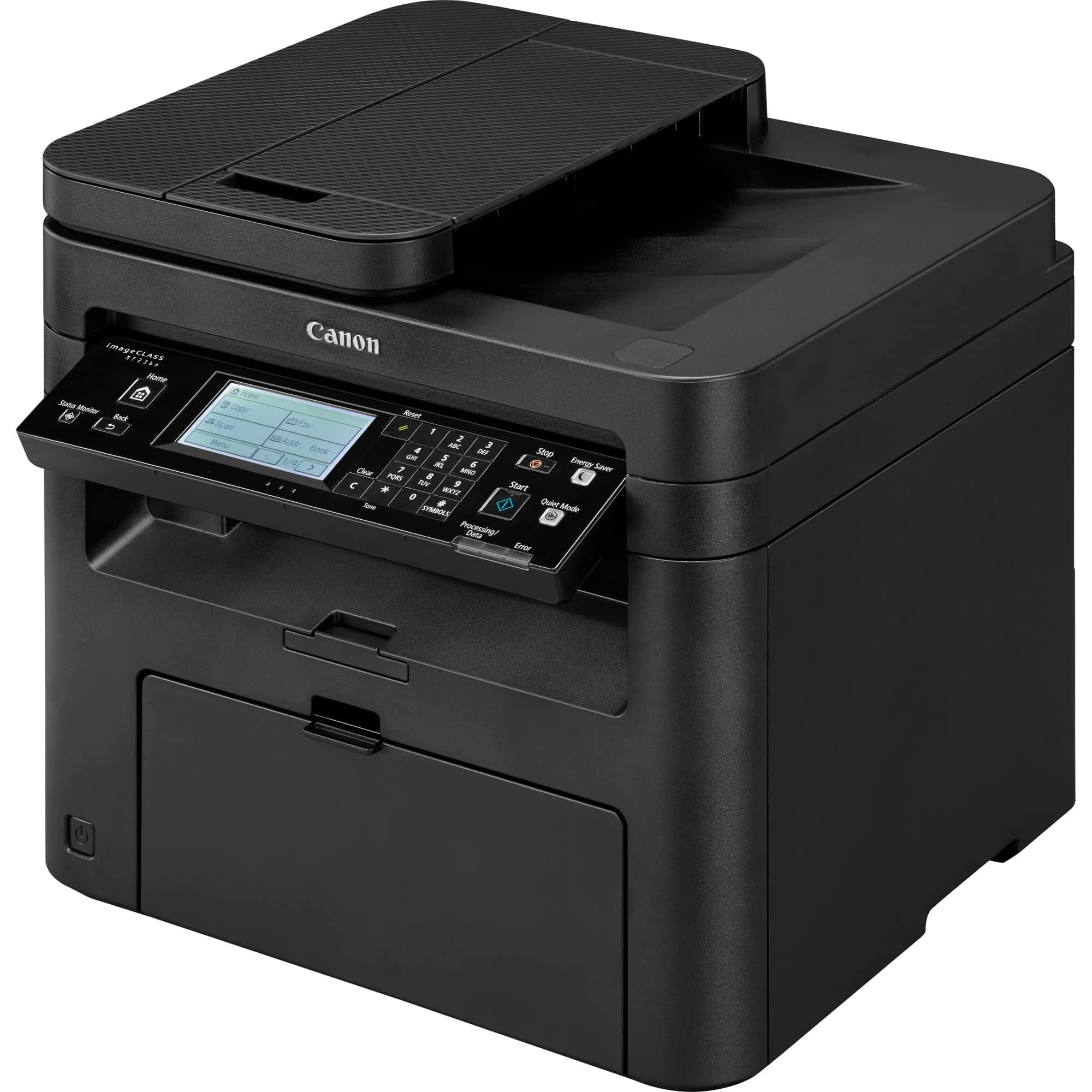

🖨️ Elevate your home office game with classic reliability and modern speed!
The Canon imageCLASS MF236n is a monochrome all-in-one laser printer designed for small or home offices. It delivers sharp 600x600 dpi prints at up to 24 pages per minute, supports print, scan, copy, and fax functions, and features a 250-sheet paper capacity with a 35-sheet automatic document feeder. Energy-efficient with a 2-watt saver mode and Ethernet connectivity, it combines dependable performance with cost-effective operation.



| ASIN | B01K1KUQHK |
| Additional Printer Functions | Fax |
| B&W Pages per Minute | 24 ppm |
| Best Sellers Rank | #96,184 in Office Products ( See Top 100 in Office Products ) #96 in Laser Computer Printers |
| Brand | Canon |
| Built-In Media | MF236n Product, Power Cord, Starter Cartridge 137 (Starter Yield: 1,700 Pages, ISO/IEC Standard), Starter Guide, User Software DVD-ROM |
| Color | Black |
| Color Pages per Minute | 24 |
| Compatible Devices | Laptops, PC, Smartphones |
| Control Method | Touch |
| Customer Reviews | 4.0 4.0 out of 5 stars (2,257) |
| Display Type | LCD |
| Dual-sided printing | Yes |
| Duplex | Automatic |
| Global Trade Identification Number | 00013803275124 |
| Hardware Interface | USB |
| Ink Color | Black |
| Is Electric | Yes |
| Item Dimensions D x W x H | 14.7"D x 15.4"W x 14.2"H |
| Item Type Name | Laser Printer |
| Item Weight | 25.4 Pounds |
| Manufacturer | Canon USA (Lasers) |
| Maximum Copy Speed Black and White | 24 ppm |
| Maximum Media Size | 8.5 x 14 inch |
| Maximum Sheet Capacity | 250 |
| Model Name | Canon imageCLASS |
| Model Number | 1418C036AA |
| Model Series | Canon imageCLASS MF236n |
| Number of Ethernet Ports | 1 |
| Number of Licenses | 1 |
| Number of Trays | 1 |
| Other Special Features of the Product | Seamlessly navigate through all the features with the user-friendly 5-line, tiltable, black/white LCD panel. |
| Paper Size | 8.5 inch x 14 |
| Power Consumption | 13 Watts |
| Print media | Paper (plain) |
| Printer Connectivity Type | USB |
| Printer Output Type | Monochrome |
| Printer Type | Laser |
| Resolution | 600 x 600 |
| Scanner Type | Sheetfed |
| Specific Uses For Product | home office |
| Total USB 2.0 Ports | 1 |
| UPC | 013803275124 |
| Unit Count | 1.0 Count |
| Warranty Description | 1 exchange / carry in |
| Wattage | 2 watts |
D**.
Solid printer/scanner that doesn't want your data, and earns it's keep being a good printer.
This printer is old school and I love that. Modern printers have subscriptions to overpriced ink, you'll need an account to download drivers, and collect your data, and a steady supply of revenue for ink. This printer is not disposable, it's worth getting additional toner cartridges. A simple with USA and an ethernet interface, Windows will automatically detect it (and most phones will too). It just works, then when the cartridge is empty, you buy a cannon cartridge, or any number of compatible types which are readily available and reasonably priced.. This printers not smart enough to steal your data, not greedy enough to force you to but a cannon cartridge, but it is smart enough to answer as a printer, scanner, or ( FAX ? ) and sleep when not in use. But it's old school... You have to set the time yourself.
N**L
Great Printer so far, glad I bought it
I've had this printer for a couple of months now. I mainly purchased it as a copy machine. So far it has scanned and copied very well. You have to look hard to tell a difference between the original and the copy. You can tell a difference, but you have to be looking for it. Its not quite, but it's not exactly noisy. You will hear it kick on and it might get annoying. It has more function than I will ever need. It has a touch screen which I was not expecting. I have not tired the wireless feature yet. Its is light enough to be moved around but not light enough you will want to do it every day. My one concern is the top of the lid where you manually scan is not secured as well as I could like it to be. When you lift it up it wobbles. I would like two solid connections for the pivot/hinge, not one solid and one lose. If you have kids, that might be a concern for you.
A**.
Confusing setup
I got close to boxing it up and sending it back. But I believe I managed to get the installation done. 1. The manual is actually a composite for 3 different models which makes it tough to follow along. One of the 3 models supports wireless lan but this printer does not so WHY is that crap in the manual at all? 2. Many people complain because the printer doesn't come with a USB cable nor an RJ45 network cable. I expected that by reading reviews prior to ordering but since I have an existing HP officejet (that is what the Canon is replacing) I thought I would just use that cable. That proved to be yet one more stumbling block. Canon, WTF! stick a GD cable in the box! Installation with printer on LAN network: I actually bought it to be a networked printer so I first thing I connected it to my router with RJ45 cable. I downloaded the installation software (MF230SeriesMFDriverV520WPusEN.exe) rather than trying to start with the CD in the box. The second or third time trying the install software and it found the printer on the network. It seems like chicken and egg problem whether the sofrware is installed before connecting the printer and turning it on, but whatever, it took about 15 minutes and I was beginning to be hopeful. Ok, I could print to the printer from my laptop. Seemed to easy. Then I went and got the scanner software (winmfscanutilityv11000.exe) and installed it but it complained about not seeing the printer. And after far too much fooling around trying to get scanner to work I decided that maybe the scanner software only works when using the USB cable. Installation with printer connected by USB to my laptop: Hours of frustration trying to get the sofrware installed. Went to the canon forums and found postings talking about the issue "Scan Utility A Scanner Driver Supporting This Software Is Not Installed". Long story short - at some point just before I boxed it up to send it back I thought maybe I should try a different USB cable. It was a working cable but I dug into old boxes to see if I had another cable. So after switching USB cables, I uninstalled all the printer software, rebooted and then ran the install. This time it installed using plug and play (which it hadn't done before) and so the scanner software worked. Again, Canon, I hate you for not putting a USB cable in the box. Grrrr. Other negative comments is that the paper bin has a strange cover and even just getting paper loaded the first time was unnecessarily awkward to figure out and the manual was no help at all. There are two yellow plastic things on the toner cartridge and the manual shows removing only one of them. Both must be removed so again, the manual was misleading and not helpful. By the way, I am using NAPS2 scanner utility which is simpler to use than the Canon scanner utility. It worked on they HP printer and I'm happy to find it works on the Canon. There were mixed reviews regrading how noisy the printer was. There is a button on the printer console labeled "Quiet Mode". With quiet mode off the printer makes a sort of hi pitched whine which I think is too loud but the printer runs fastest that way. With quiet mode on the printer is nicely quiet and honestly I didn't perceive much of a slow down. I bet the time difference to print 100 pages would be less than one additional minute. I can sure live with small delay to enjoy the quiet mode. Print quality: Fine for BW documents. The scanner scans in color. The printers gray scale conversion of color pdf files isn't to my liking yet. I'm experimenting with the settings to darken the lightest parts but it does do a good enough job on the darker colors.
M**T
It really is a fantastic printer, no issues at all.
I have had good luck with Canon printers. Toner lasts a very long time (3200 pages) and quality, compatible toners are less than $10 ea. This printer does all I needed it for... Print/quick copy/dedicated FAX line/auto-document feeder/ethernet connection. It really is a fantastic printer, no issues at all. Unlike HP products, I have never had a software conflict issue with the Canon printer software. That in itself is the reason I only purchase Canon printers.
R**Y
This is the first amazon warehouse item I've purchased, and I've got to say it's been smooth sailing. Printer arrived well packaged, no damage whatsoever. For the price I don't see how you could get a better printer. Plugged into 5-way ethernet switch coming straight from our ISP's wifi router, this printer connected straight away to every device on the network (airprint on iphone over wifi worked straight away) with no issues. The network scanning function works well, just be sure to install the canon mf scan utility (built-in windows scan function can't see it on the network). So far there has been no need to connect the unit directly with USB. The toner cartridge replacement is as straight-forward as can be, and the canon page yields (at least on paper...haha) seem to be worth the price over the cheaper off-brand 137 toner cartridges, so you may actually get what you pay for. The photo scans are very good quality (see attached scan of a flattened Ryzen CPU box), scanning a stack of documents seems to work well (it puts all scanned documents in order in one PDF file from default). The prints are super crisp and the printer warms up and prints very quickly, not obnoxiously loud either. For the price ($150 CAD amazon warehouse used with free shipping) you can't go wrong. Will update review if things change.
C**N
No imprime a dos caras. En la información publicada no se hace ninguna referencia a la falta de esa característica
M**N
I have owned several ink jet printers, but this is my first laser printer. The quality of the print is incredible. The absolute smallest print is so crisp and clean. 5 minute wireless set up, with no issues at all. Print from my phone, or tablet. For $250, it is a steal. Each toner cartridge prints 2500 pages at 40% coverage. Copy, fax, scan, print, lcd touch screen, all work flawlessly. I will never buy a different kind of pri term again. I bought the 3 pack of toner cartridges, so I can now print 10,000 pages at 40% coverage. YOU DON'T NEED TO BE A TECHNO GEEK TO HOOK THIS UP WIRELESSLY. OUT OF THE BOX, AND PRI TING IN 10 MINUTES. SUPER PLEASED!!
R**H
To print my personal works but I was expecting a double-sided printing model like the old model MF 4270 I still have which is not compatible with windows 11 and that is the reason why I made that order.
H**H
This printer has some nice features. It's fast, it's quiet, and the quality is great. For the price, it's a handy little laser printer. However, it does not do duplex (2-sided) printing. Also, despite supporting AirPrint, it does not have wifi capabilities. It will need a wired ethernet connection to a wireless access point in order for you to be able to print from your phone. Finally, it's just a black-and-white unit. No colour printing here. If don't depend on 2-sided printing, don't need a wireless printer, and don't need colour, you'll be happy with this unit.
TrustPilot
2 个月前
1天前