We remain fully operational. Our teams are working around the clock to ensure your deliveries continue safely.

下载应用程序




🎤 Own your sound. Record like a pro, anywhere.
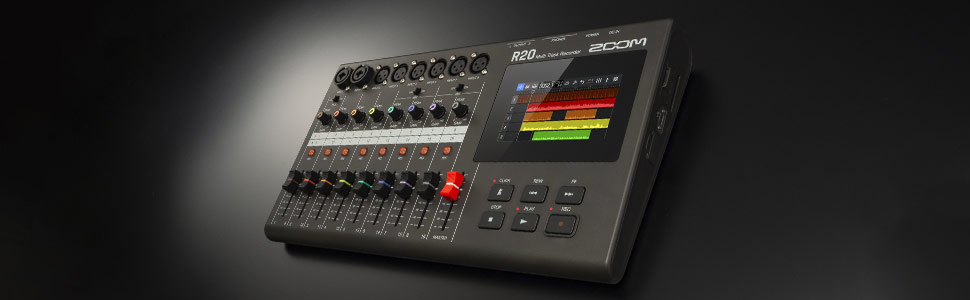
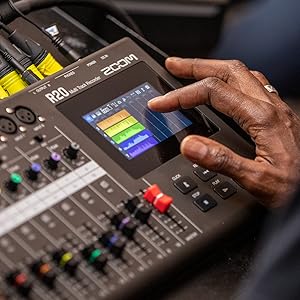
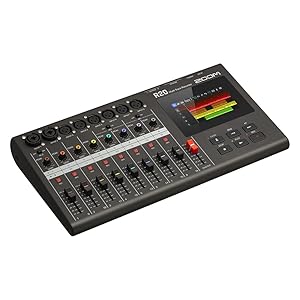
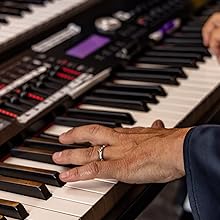
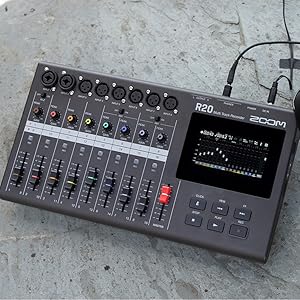
The Zoom R20 is a compact, professional-grade multitrack recorder featuring a user-friendly touchscreen interface, 16-track recording capability with 6 XLR and 2 combo inputs, onboard editing with intuitive gestures, built-in effects and drum loops, and USB audio interface functionality—perfect for musicians and producers seeking studio-quality recording on the go.

| ASIN | B09MR4VD7F |
| Best Sellers Rank | #13,620 in Musical Instruments ( See Top 100 in Musical Instruments ) #13 in Digital Multitrack Recorders |
| Brand Name | Zoom |
| Compatible Devices | Personal Computer |
| Customer Reviews | 4.3 4.3 out of 5 stars (188) |
| Included Components | R20 |
| Item Dimensions D x W x H | 8"D x 15"W x 2"H |
| Item Type Name | Digital Multitrack Recorder |
| Item Weight | 4.3 Pounds |
| Manufacturer | Zoom |
| UPC | 884354025892 |
| Unit Count | 1.0 Count |
| Warranty Description | 1 year - replacement. |
D**E
Great sound and easy to use out of the box
Zoom products are usually very good and this is no exception. Very very easy to use. Great touch screen application. Great sound and effects.
R**B
For musicians
This device is great for real musicians who play instruments five stars
R**R
Basically an Updated Version of the Zoom R16
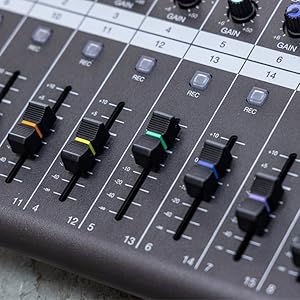
I am a musician/producer who normally records at home but recently got an offer to play bass in a local punk band. We started talking about how we would record. I suggested we DIY it as opposed to going to a studio in town as it would save money and I'd do the engineering/production. While doing research on portable 8-16 track recorders I noticed Zoom had put out what looked like an updated version of their R16 unit. Because I had previously owned an R16, I decided to try this one out as $400 didn't seem like a bad price for what it could do. The biggest update is the multi-color touch screen. The previous model had a single color screen displaying only words stating commands. I definitely appreciate they added a grid interface as it makes it far easier to cut, copy, paste and delete. Also, the multi-color gain knobs and faders coordinating with the color of the stems is aesthetic and practical. Another big change is the inputs themselves. The R20 now has only 2 1/4 jack/XLR inputs with the other 6 being strictly XLR whereas the R16 had all 8 as 1/4 jack/XLR. Also, phantom power can now be run on inputs 5-8. I would consider this a good but not necessarily great change. It should be noted that the power supply has a fastener that attaches between the plug and the power port so the power won't be easily unplugged from the device. The software itself offers templates featuring drum loops for different genres and various sound settings for guitar, bass and vocals. This is all well and good but unneeded for me as I will end up transferring the files to my desktop and editing in FL Studio. Truth be told, there are a lot of features in the Zoom software I will likely not use for the aforementioned reason. The only real problem I have with this device is how lightweight it is. Some people might find that to be a good thing but for me, light plastic is far less durable than metal. That means you have to be EXTRA CAREFUL with it so no open drinks or placing it somewhere it can be stepped on or knocked over. Otherwise, game over. If you don't own a laptop but still want to record your practice sessions with your band, the R20 pretty much fills that need. Just keep it away from your clumsy bandmates (unless you're the clumsy one). EDIT: I forgot to point out that unlike the Zoom R16, the R20 has NO BATTERY OPTION so that ad they show of the bass player making the goofy face playing outside in the middle of a park where power outlets are not easily found may be misleading. Despite this, I'm still mostly good with this product. EDIT as of 12/24/21: I have run into a rather annoying issue with the multi-track interface of the Zoom R20. Previous to what I am about to describe which is happening, the R20 and FL Studio were working great with no problems. A few days ago when arming one of the channels on the virtual mixing board in FL Studio with any of the inputs for the R20, the sound automatically muted itself - when I disarm the channel, the sound comes back on. I have tried uninstalling and reinstalling the R20 drivers, shutting off all of my sound drivers except the R20 one and checking my settings on FL Studio. I am highly certain this is an issue with the R20 or it's drivers as I plugged in my Focusrite Scarlett Solo with FL and had no problems whatsoever. I've sent an email to Zoom regarding this issue and hope we can figure out a solution because this will affect the rating of this review. Update as of 5/10/22: No word from Zoom, no firmware updates on the Zoom company website regarding the aforementioned issue as far as I can tell so... we go from 4 to 2 stars. Update as of 12/14/22: Lost my power adapter so I called the company and asked if I could buy one. The person I talked to said they'd send one for free which to their credit they delivered. I'm improving the rating to 4 stars because at least their customer service was accomodating.
A**O
Accurately described.
Great unit. Lots of features and easy to use.
D**L
Priorities seem mixed on this recorder
It feels like this recorder is uncertain of its identity. Is it a streamlined multitrack recorder or a self-contained editing workstation? Is it physical or digital? Instead of emphasizing one direction, it tries to combine everything. We get some aspects of a tactile, DAW-less workflow (barely) and many aspects of digital touchscreen-driven editing, and the result is a bit self-defeating. On the recording side, for example, there is no punch-in option, which makes building combined parts frustrating. As much as I wanted this to be physical and tactile and hands on, feeling grounded, my experience would end up being dominated by the touchscreen editing process. At the same time, recording to another track requires physically moving cables between inputs, and some of the jacks are extremely tight, making this more disruptive than it needs to be. It's more the worst of both digital and physical that gets emphasized, rather than the best. The touchscreen is slow and choppy, and after recording, the system pauses a bit while saving to the SD card, reminding you of its internal workings and interrupting the flow. When I think physical recorder, I think of an almost tape-style, down to earth, grounded hardware-focused experience, but this processing delay and the touchscreen dominant editing features reinforce the opposite. Oh and also, the unit has no internal battery, so relocating it requires a full shutdown and reboot, which further breaks continuity. What I was hoping for was a no-fuss multitrack recorder that would let me build songs layer by layer, loop sections easily, and stay away from the computer to feel a grounded, committed recording process. But in practice, the R20 felt more like a slow, limited computer with a mediocre touchscreen, no mouse or keyboard, and missing core recording features. After giving it a fair trial, I think it hindered rather than supported my workflow. I ended up replacing it with an MPC Live 3, which aligns better with my workflow.
C**E
It does the job well
Don't let the size full ypu this is a very capable unit. It's a great tool for rehearsal and song writer's or getting thoughts recorded quickly. The effects nice and are very usable. This unit is compact and powerful. But I suggest getting a stylist pen whit it when ordering It makes navigation on the screen way more efficient. This isn't going to replace a recording studio no time soon but it can help you a demo to pro jump easier with its 16 tracks out to computer or SD card... I like it so far.
J**Z
Versatile and Fun
As a solo musician, I wanted something simple I can use to record my demos when the inspiration presented itself. It's not too easy to "travel" as it requires a special AC/DC adapter. I could not find a replacement for the adapter one time I forgot it at home. I did a bunch of research and could not find a way to buy another AC/DC adapter. I mainly use it to interface inputs on my Cubase DAW. It works amazing and it even controls the DAW's recording features from the R20 built in buttons. I really like it, but I have not used all the great features that come with it. Make sure you update the Firmware as soon as you get it. I have V.3 as of this writing.
L**E
Touch screen/SD card
I was looking for a multi-track recorder to get back into recording. The Zoom R20 has checked all the boxes I was hoping for! Easy to start a project, easy to add tracks and easy to take the SD card and load tracks on my laptop and from there easy to get the sound and mix. The touch screen functions are great and color coded inputs and track display are more reasons to love it.
D**T
Fait exactement ce que j'en attends. Une fois mes pistes enregistré je dump le tout sur la clé et je termine le mix dans REAPER. J'adore cet enregistreur, simple, rapide d'utilisation et nul besoin de lire le manuel tellement c'est simple. Avec de bons vieux bouton pression c'est tellement visuel ! Je le recommande cet enregisteur. Son preamp est de bonne qualité.
P**E
Très bien pour crée sur le pouce. La navigation par l'ecran tactile est juste génial! Synthé, drum (midi) guitarlab les effets du multifx g5n, peut servir de surface de contrôle du DAW etc etc. Ne remplace pas le software sur certain aspects, mais si tu veux crée sans avoir la lourdeur de software et les 1000 options non necessaire pour toi, alors go, cet outil est fait pour toi !
TrustPilot
1 周前
2 个月前