We remain fully operational. Our teams are working around the clock to ensure your deliveries continue safely.

下载应用程序



🚀 Elevate your PC game with Intel Optane: Speed that keeps you ahead!
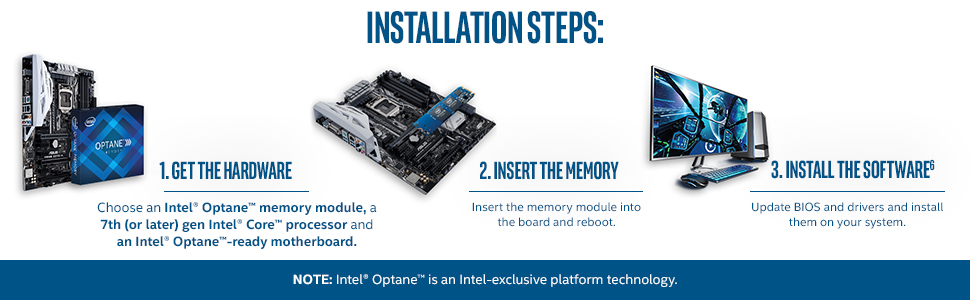
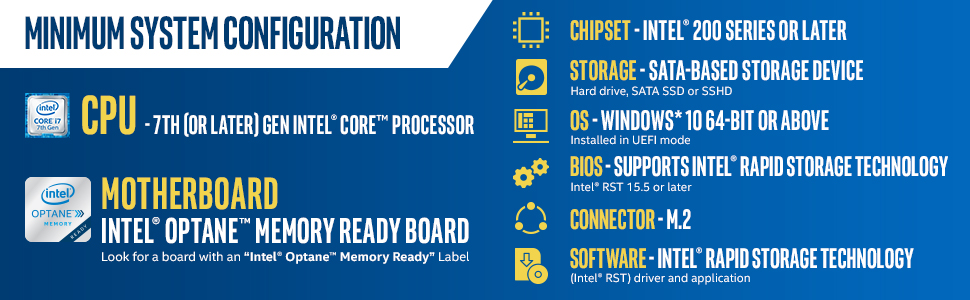
Intel Optane Memory M10 16GB PCIe M.2 is a cutting-edge caching module that dramatically accelerates system responsiveness by pairing with HDDs. Compatible with 7th Gen Intel Core processors and Optane-ready motherboards, it reduces boot times to around 4 seconds and speeds up application launches, delivering SSD-like performance while preserving large storage capacity at a budget-friendly price.



| ASIN | B06XSMTN31 |
| Best Sellers Rank | #281 in Computer Memory |
| Customer Reviews | 4.3 4.3 out of 5 stars (1,574) |
| Date First Available | March 27, 2017 |
| Is Discontinued By Manufacturer | No |
| Item Weight | 1.6 ounces |
| Item model number | MEMPEK1W016GAXT |
| Manufacturer | Intel |
| Product Dimensions | 3.14 x 0.86 x 0.09 inches |
E**4
Intel Optane M.2 — Speed That Feels Instant!
Installed this Intel Optane 16GB module back in 2020, and it completely transformed my PC’s performance. Super-fast boot times, quick file access, and still running flawlessly years later. One of the best upgrades I’ve ever made!
I**C
Optane is a nice caching drive for HDD (and only HDD -- don't use with SSD! )
I recently built a new computer for my nephew to run his virtual reality games. I had heard of Optane on the tech channels but never used it. The product acts as a fast, low-latency caching drive that uses a combination of hardware and software to intelligently cache frequently accessed data. In essence, it allows you to run a (much) cheaper HDD but get storage speeds comparable to an SSD. The advantages are 1. price, since Optane + a 1TB HDD is still considerably cheaper than a 1TB SSD, and 2. storage density, since HDD come in sizes way larger than SSD. There are serious limitations you should understand going in. First, it won't work great in all cases, such as when you are working with very large files. Second, you need to match the Optane product to a newer Intel chipset motherboard specifically designed to use Optane. And third, you can only use Optane with your primary HDD; it won't work with drive arrays that I'm aware of. Still, installation wasn't too involved and on the computer I built it reduced boot times to something like 4 seconds; not bad at all in my book. If you are looking to build a basic-ish computer and want a decent amount of storage but have a limited budget, I would seriously consider Optane.
A**N
Cache drives in a Synology NAS
I'm using a pair of these small but fast SSDs as cache drives for my Synology NAS. The Synology OS uses one for write caching and one for read caching. This makes transferring lots of small files much faster than before. While these drives are not on Synology's official compatibility list, I've heard from other Synology users who have also had success with these drives. At their current price, it is worth it! Edit: Upon update to the latest Synology software, one of the cache drives was either unsupported or died. This caused a major issue that required a complete reinstall of the Synology software on my NAS. Fortunately, this did not lose any of my data but did require that I re-install all my packages and re-configure everything. It could have been worse.
M**A
A must have for gamers playing games stored in an HDD
I have a 512GB M.2 SSD as my primary drive and a 4TB HDD where I store all my games. I purchased this 16GB Intel Optante cache drive without having any expectations. At the current price (around $30), it was almost an impulse buy. Since I got this drive for gaming I thought 16GB wouldn't be enough to make a noticeable difference, but boy was I wrong. The speed improvement really cannot be overstated. All of my games load much quicker, especially when you die and reload or play the same game over and over. It's much faster than my SSD in fact. In one game in particular (Rising Storm 2), I loaded into the training area, went back to the menus to tweak some settings, and when I went back into the training map, it was nearly instant - I mean like 1 - 2 seconds loading time. Without the cache drive it took 10 - 20 seconds minimum. This is an amazing technology, I'm very pleased with my purchase, of you play games off of a mechanical hard drive, I'd consider this a necessity. The 16GB Intel Optante drive made a huge difference in loading times for me.
J**W
Cheap upgrade with questionable gains
A cheap simple upgrade to my Dell mini PC that had an open M.2 slot. These Optane modules only work with certain CPUs and motherboards, so check your computer to make sure it will be recognized by the BIOS and the OS. You also have to use the Intel Optane driver package which can be finicky to install. I had to install and reinstall a couple of times before the software recognized the Optane. I also had to go into the BIOS and select the correct HDD settings for Optane (it's kind of like a RAID setup, but not). Once configured, everything seems to be working great. There's no noticeable difference in PC performance so the gains are questionable. But for less than $20 it's a fun PC hardware upgrade.
S**A
Best from the rest I paired it with my 250 Samsung evo and believe me my PC is flying. Super fast boot and usage very easy to setup and use. And it was delivered within 2 weeks form the US. Thanks Amazon and Intel
M**A
Excelente produto qualidade Intel. Não consegui configurar tive de levar em uma assistência! Mas ficou melhor , mais rápido apesar de que já tenho SSD INSTALADO. RECOMENDO.
C**O
Fiquei muito satisfeito com o desempenho do computador após colocar esse módulo Optane. Meio chato de configurar mas ficou excelente.
S**M
Je ne regrette pas de l'avoir acheté (32 euro) en reconditionner à l'époque couplé avec un 2 TO, la vitesse est impressionnante. J'ai mis mes jeux dessus, c'est bête que cette technologie a été abandonné, si vous avez de la chance essayé d'en trouver un à pas cher.
P**O
Literalmente, ha convertido mi hdd de 1tb en un ssd de 1tb. No hay mucho más que explicar, simplemente funciona y lo hace muy bien, el ordenador inicia en 10-15 segundos (antes me tardaba un par de minutos en cargar todo el escritorio) y los programas cargan enseguida. Lo único en mi caso fue que tuve que actualizar bios y activar el modulo de memoria desde la bios, pero depende de cada caso y además no es dificil de hacer.
TrustPilot
2 周前
2 周前