We remain fully operational. Our teams are working around the clock to ensure your deliveries continue safely.

下载应用程序



Buy anything from 5,000+ international stores. One checkout price. No surprise fees. Join 2M+ shoppers on Desertcart.
Desertcart purchases this item on your behalf and handles shipping, customs, and support to Taiwan.
✍️ Label your world with confidence and style!
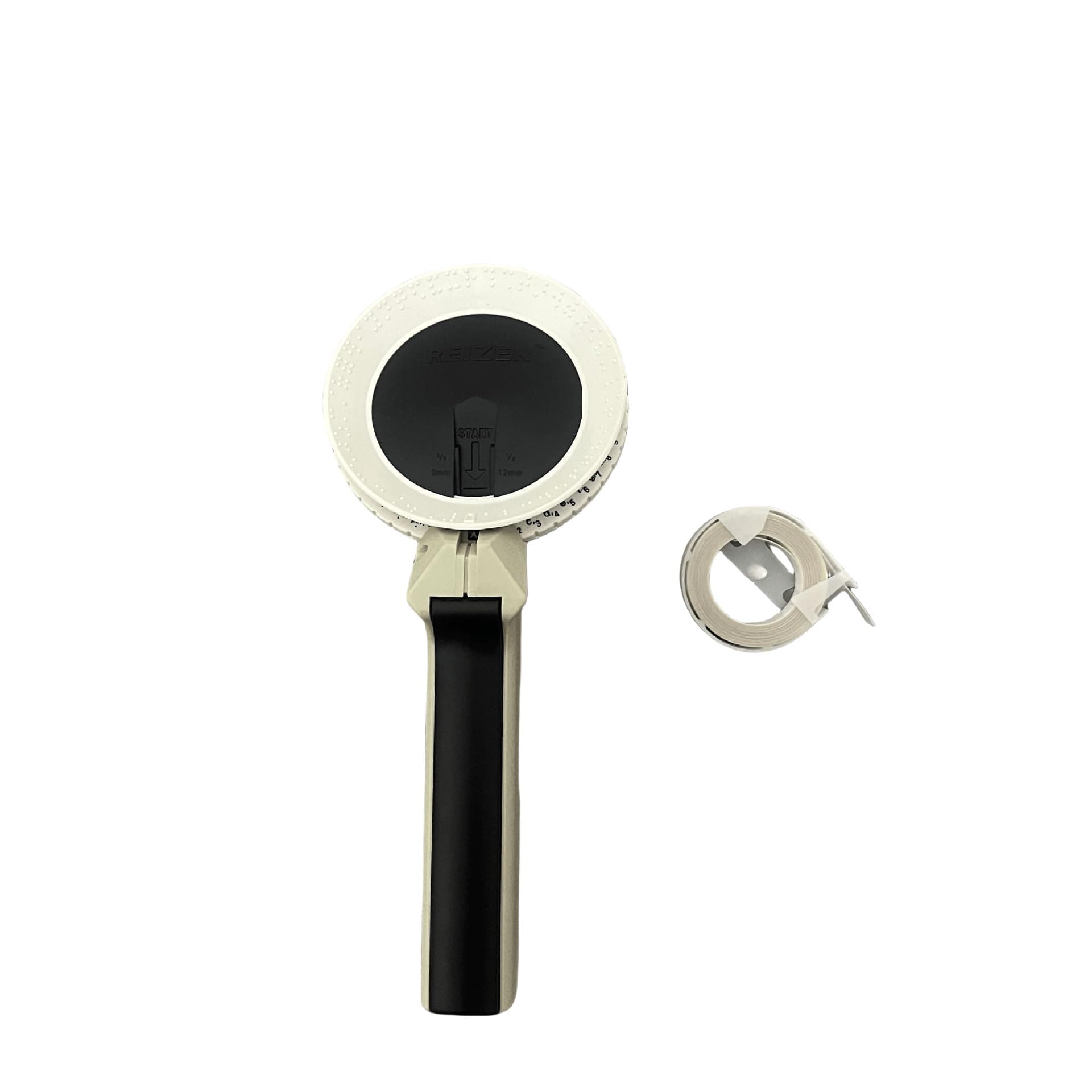
The Reizen RL-350 Braille Labeler is a lightweight, portable, and durable device designed for effortless Braille labeling at work, school, or home. Featuring an ergonomic handle, easy tape loading, and compatibility with multiple tape sizes, it empowers users to organize personal and professional items efficiently. Compact and travel-friendly, it’s the perfect tool for anyone seeking tactile labeling solutions with a 1-year warranty for peace of mind.
| ASIN | B00II08XH6 |
| Additional Printer Functions | Print Only |
| Best Sellers Rank | #72,282 in Office Products ( See Top 100 in Office Products ) #375 in Label Makers |
| Brand | Reizen |
| Built-In Media | Labels |
| Color | White |
| Compatible Devices | Various electronic devices with text output capability |
| Control Method | Touch |
| Controller Type | Hand Control |
| Customer Reviews | 4.1 4.1 out of 5 stars (240) |
| Dual-sided printing | No |
| Duplex | simplex |
| Hardware Interface | USB |
| Ink Color | black |
| Item Dimensions D x W x H | 25.4D x 10.2W x 6H centimeters |
| Item Weight | 0.3 Kilograms |
| Manufacturer | Reizen |
| Maximum Copies Per Run | 1 |
| Maximum Copy Resolution Black and White | 200 dpi oder 300 dpi |
| Maximum Media Size | 210 x 297 millimeters |
| Maximum Print Resolution Black and White | 200 dpi" or "300 dpi |
| Maximum Sheet Capacity | 10 |
| Model Name | RL-350 |
| Model Number | 263667 |
| Model Series | RL |
| Number of Drivers | 1 |
| Number of Trays | 1 |
| Other Special Features of the Product | Lightweight,Portable |
| Output sheet capacity | 10 |
| Paper Size | 210 x 297 millimeters |
| Print media | Labels |
| Printer Connectivity Type | USB |
| Printer Output Type | Monochrome |
| Printer Type | Thermal |
| Processor Count | 1 |
| Resolution | 200 x 200 dpi oder 300 x 300 dpi |
| Scanner Type | Portable |
| Series Number | 350 |
| Specific Uses For Product | Braille Labeling |
| Total USB 2.0 Ports | 1 |
| Total Usb Ports | 1 |
| UPC | 612750263507 |
| Unit Count | 1 Count |
| Warranty Type | limited warranty |
C**N
étan mal voyant, j'adore ce produit car il m'ai très util; juste un problème, c'est que les rouleau pour recharger cet article, sont pratiquement à 10 euro; trop chère pour mon budget
S**E
very special
K**E
5 stars for the labeler itself, but 3 stars for the tape as does NOT stick to hard plastic (as attested by other reviewers as well). -- Comes with one full roll of self-adhesive, vinyl tape. See-through (clear) tape works great, as can go over written words without covering them up. So, sight & sight-impaired can tell what the label means. See separate review only giving 3 stars for the vinyl tape given have to shipping-tape both sides to any hard plastic surface (but does stick to kitchen cabinetry, glass, paper, and ziplocks). -- Does require repetitive gripping as squeeze labeler's trigger for each letter rotate the Braille wheel to (can be hard to see as quite small). Also, requires double hard trigger grip on the "cut" mode (icon on the wheel) to cut the tape. So, somewhat strong hand strength is required if plan on doing a lot of labels in one sitting. -- The device does a GREAT job once cut of providing a self-starter, perforated pull-tab at the END of the label to aid in easily removing the backing to expose the sticky, back-side of the tape (this also serves the non-Braille reader to know which side is the end, so don't stick the label upside down on item trying to label). -- Use Tip #1: To sidestep several hassles with the tape, I advise clicking (half squeeze) the trigger twice before starting to actual punch a letter. This allows the tape to be long enough to 1.) not cut off the 1st Braille letter, 2.) get the tape easily out of the device once cut, and 3.) the edges to be long enough to tape (clear shipping tape works) to the surface should the actual vinyl sticky back not stick to the surface. -- Use Tip #2: If the cut tape feels like it's hung up, ensure squeezed trigger long enough to hear audible "click", then let go of the trigger. Then, simply depress the trigger again, but only half way (while still on the cut icon). This will hold the uncut tape in place, while allowing the cut piece to be pulled out.
J**N
Da ich selbst blind bin, muss ich häufiger mal Gegenstände o.Ä. in Braille beschriften. An sich ist dieses Beschriftungsgerät dafür auch wirklich praktisch, wenn es denn auch immer zuverlässig wäre. Denn nach dem Abschneiden des Bandes kann man leider nie zuverlässig sagen, wann man weiter schreiben kann. Manchmal reicht es, ein Leerzeichen einzufügen - manchmal muss man aber auch mehr als fünf mal drücken, bis das Band weit genug ist, um darauf zu schreiben. Wenn man das nicht beachtet, wird der Text unlesbar und man darf von vorne beginnen. Zudem fehlen leider Zeichen - das normale Alphabet ist zwar vorhanden, aber Umalte wie ä, ö oder ü, und gar das Komma das für Kurzschrift durchaus wichtig wäre, hat man sich leider gespart. An sich eine gute Sache, aber noch mit Luft nach oben.
D**Y
Excellent product. Daughter is using it to label everything