We remain fully operational. Our teams are working around the clock to ensure your deliveries continue safely.

下载应用程序






🎯 Level up your Xbox storage game—never lose a moment of play!
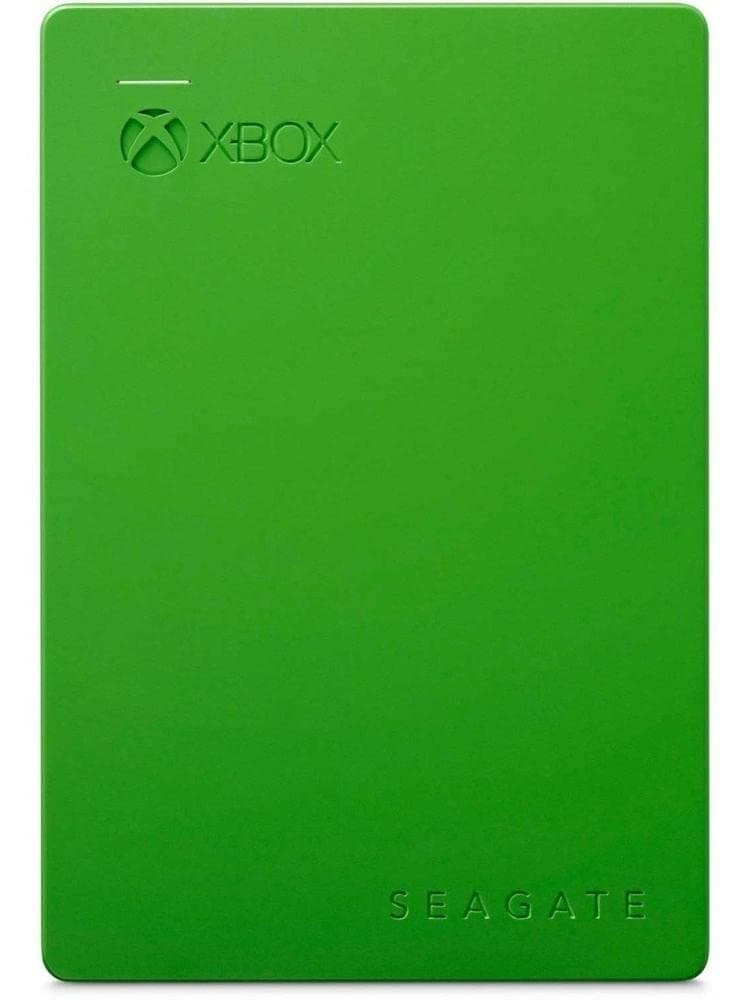
The Seagate Game Drive for Xbox offers 2TB of portable external storage with USB 3.0 connectivity, designed specifically to expand Xbox One storage. It supports over 100 games, features a compact green design matching Xbox branding, and includes a two-year rescue service for data protection. Plug-and-play setup ensures quick installation without extra power cables, making it the perfect companion for gamers who demand speed, reliability, and portability.


| ASIN | B01065S79E |
| Best Sellers Rank | 31,234 in PC & Video Games ( See Top 100 in PC & Video Games ) 1 in Xbox One Memory |
| Box Contents | Hard drive - external (portable), USB 3.0 cable |
| Brand Name | Seagate |
| Cache Memory Installed Size | 2 |
| Color | Green |
| Compatible Devices | Gaming Console |
| Customer Package Type | Standard Packaging |
| Customer Reviews | 4.7 4.7 out of 5 stars (26,252) |
| Data Transfer Rate | 5000 Megabits Per Second |
| Digital Storage Capacity | 2 TB |
| Enclosure Material | Unspecified |
| Form Factor | 2.5-inch |
| Global Trade Identification Number | 00763649073360, 07636490071911, 08944467781596 |
| Hard Disk Description | Portable External Hard Drive (USB) |
| Hard Disk Form Factor | 2.5 Inches |
| Hard Disk Interface | USB 1.1 |
| Hard Disk Rotational Speed | 5400 RPM |
| Hard-Drive Size | 2 TB |
| Hardware Connectivity | USB 3.0 |
| Installation Type | External Hard Drive |
| Item Dimensions L x W x Thickness | 29.7L x 20.3W x 3.7Th centimetres |
| Item Length | 117 Millimetres |
| Item Type Name | Seagate Game Drive for Xbox STEA2000403 - Hard Drive - 2 TB - USB 3.0 - Green |
| Item Weight | 218 g |
| Item Width | 80 Millimetres |
| Manufacturer | SEAGATE |
| Media Speed | 1.4E+2 megabytes_per_second |
| Model Name | STEA2000403 GAME Drive |
| Model Number | STEA2000403 |
| Network Connectivity Technology | Wired |
| Number of Items | 1 |
| Product Features | USB powered |
| Product Warranty | 1 year |
| Read Speed | 140 Megabytes Per Second |
| Specific Uses For Product | Personal |
| UPC | 780746864936 749363840242 763649073360 |
| Unit Count | 1.0 count |
G**G
Lean, mean, storing machine
Unsurprisingly I bought this to go with my XBox one X, and rather than store games on the local hard drive, I store them all on this for easy transportation between different Xbox One consoles. I've got over 100 games installed and it's maybe just over half full, so plenty of storage. It's fast, quiet, and reliable. It's tucked away to I don't get to admire its looks, but it does look nice too with its green and black colour scheme. Setup was a breeze, just plugged it in, it was detected, and formatted as extra storage. Any games I had installed locally I moved across, and then set the Xbox to default to external storage for downloads and installs. Once when I turned the Xbox on after an update, it failed to show the games. A quick restart soon sorted that, and that's not the fault of the drive.
A**I
Great drive!!
Great for Xbox One S, however when the device is on the always on standby setting, the drive spins up periodically, guessing that is to check for updates on games or something but must have an effect on lifespan, I guess just plug it in when you plan to play a game and when device is off, unplug the drive also. Great for taking out of the case and using the laptop 2.5 drive in a desktop. My first purchase of this lasted 3 years but it went through heavy use downloading many games, so still a worthwhile purchase, the 2nd purchase is around a year so far and I am using it for desktop backups, kept it in the case so it's portable and can be easily disconnected when not needed. I've had around 15 hdd's in 15 years and only ever seen one failure, I've had 4 nvme's in 4 years and already seen 1 failure. The speeds aren't as fast but the longevity and price is way better. Solid purchase. Would note, that you need to be getting SSD for gaming now though but if it's just for mass storage or backups then it's still great or for retro gamers.
S**X
"..COOL BIT OF TECH.."
A very useful piece of equipment that no Xbox player can do without, your main hard drive space undoubtable fills up pretty quick with all them games and constant updates, this 2TB drive is such a lifesaver, plenty of great storage, very easy to use, just plug it in and away you go. you will need to format it first (takes seconds) you can save onto it immediately after you've plugged it in, you can transfer games straight over from your box hard drive or copy or move saves between them whenever, its very small so fits snug next to your box, the device will get warm when being saved on but then cools back down after, its a very useful bit of tech so its highly recommended if you need game space! You can also use it for photo and video space if you wish.
M**D
Need more storage space on your Xbox One? No problem...
Having owned an Xbox One for precisely a year, owning roughly 10 games on disc and a few other games which I downloaded with the Xbox One's "Games With Gold" scheme, I ran into a problem where the internal 500GB HDD on my Xbox One console got full. It is definite that other Xbox One users will run into the problem, much quicker in fact if you are an avid gamer. The "Seagate Game Drive for Xbox" was an absolute doddle to install. Simply remove the drive from it's packaging and connect it to your Xbox One console using the provided USB 3.0 data cable. The drive is self-powered, which is an added bonus as no external power supply is required. May I remind you that you do need to format the Game Drive before you can use it with your Xbox One. When you format your Game Drive, you will need to give it a name. The Xbox One's internal HDD comes already named as "Internal", so I decided to name the drive "External" (of which the Xbox One automatically names the drive when you first try to format it, of which can be renamed at a later date as an added bonus). Once the drive has been connected and formatted, you can straight away start using the Game Drive. After formatting the drive, you are given the option of whether you want new games installs to automatically install to the external HDD, of which I opted for due to the Xbox One's HDD only having a SATA II interface as apposed to the faster USB 3.0 interface of the "Seagate Game Drive for Xbox". Also because of this reason, I have transferred all of my old installs to the external HDD. The drive is also very easy to carry around, due to it's lightweight 170g design. As opposed to the "Xbox" branding on the drive, I believe the difference between this drive and the generic Seagate HDD is also the data transfer rate, which is rated at 625MB/s as apposed to just 500MB/s of data tranfer rate on the generic drive. This should result in faster loading times and quicker transfer/install speeds, which is ideal for an Xbox One console where you are always working with Gigabytes of data. This drive is compatible with both Xbox One and Xbox 360, however I cannot see anybody needing 2TB to store Xbox 360 games, due to them not needing installing and updates being much smaller. Because of this drive, my Xbox One console now has 2.5TB of storage as opposed to the 500GB I had before, which simply wan't enough. I highly recommend this product to those who are looking to expand the storage on their Xbox One console (especially avid gamers). Well worth the purchase!
J**N
1TB
Got for one of my sons. Saves him uninstall games. Does what is meant too do.
S**M
A Must Have Accessory!
Fantastic product. I filled my 1TB internal storage on my Xbox One X rather quickly so I’d been relying on my 500GB external hard drives, however one has decided to pack up! So a replacement was sourced which was this and it’s excellent! Reasonable price and I like the colour. The light is also not over empowering like some external storage ones are with a blue flashing light. Very easy to use and set up, simply plug it in, format the device to the console and you’re good to go!
E**A
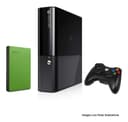
El producto me llego en tiempo y forma como lo pedi al dia siguiente (prime). En perfectas condiciones la caja, y el disco duro completamente nuevo. Recomiendo altamente comprar este disco duro si lo que buscas es mas espacio para tu Xbox One y poder tener mas juegos instalados en tu consola, es demasiado sencillo de instalar, unicamente tienes que conectarlo a cualquier entrada de USB de tu Xbox y de inmediato te aparecere un mensaje de como deseas usarlo, si es para juegos te da esa opcion y en menos de un minuto ya tienes listo el espacio para tus descargas. El color verde es muy ideal para combinarlo con la consola en color negro ya que parece un videojuego a lado. Cualquiera que dude en si comprar o no, mi recomendacion nuevamente seria si hacerlo y que mejor que cuando este en descuento. Saludos!
C**W
I am very happy with my purchase, got it at a great price from Amazon; loaded all my XBox One games on my new Seagate Game Drive and still have more than 1/3 space left. Games load in a decent speed, Game Drive's top shell is Green in color, with an LED indicator light, and its good looks that matches my Xbox One system. Build quality is excellent!
J**.
Puedes pasar de todo a este disco duro para dejar espacio en el disco interno de la Xbox excepto la música que hayas extraído de un CD de música al disco duro interno de la consola. Videos descargados, juegos, configuración de usuarios, etc. Tengo un disco interno de 320Gb y ya no cabía nada más. Este disco de Seagate ha sido la solución. Lo he conectado a un usb trasero de la Xbox y cuando apagas la consola también se apaga el disco así que no gasta electricidad ni se desgastan las partes móviles. Hay que formatearlo con la consola antes de usarlo. Primero que todo lo conectas a la XBOX y lo formateas. Te pedirá que lo hagas la primera vez que conectes el disco duro externo nuevo a la consola. Te quedará un disco vacío. Ahora puedes pasar cosas que tengas en el disco interno de la XBOX a este disco para hacer espacio en el disco interno. Para copiar carpetas con canciones en formato mp3, videos y fotos tienes que apagar la XBOX y esperar unos segundos hasta que se apague la luz del disco externo de Seagate. Ahora puedes desconectarlo de la XBOX y conectarlo a un PC con Windows, en mi caso Windows 7, que instalará automáticamente los drivers necesarios. Ahora puedes crear las carpetas con el contenido que quieras. Luego tienes que expulsar el disco (Quitar Hardware de forma segura) y conectarlo nuevamente a la XBOX con esta apagada. Enciendes la XBOX y utilizando las aplicaciones para reproducir videos, música o visualizar fotos de la XBOX, según sea el caso, podrás ver o escuchar el contenido antes copiado. Esto lo he probado en una XBOX 360 slim que es la que tengo y funciona perfectamente. Incluso puedes avanzar o retroceder en los vídeos sin problemas. Lo que no puedes copiar al disco externo son los discos de música extraídos al disco duro interno de la consola.
Z**H
I've been using the Seagate Game Drive for Xbox for a remarkable eight years now, and it has been an absolute game-changer in terms of storage convenience and reliability. Originally purchased for my Xbox One, this external drive has seamlessly expanded my gaming library without a hitch. One of the standout features of this drive is its ample storage capacity. While I've never come close to filling it up completely, it's comforting to know that I have more than enough space to accommodate my growing collection of games. Even though I tend to delete games once I'm done with them, having the extra storage ensures that I never have to worry about running out of space. In terms of performance, the Seagate Game Drive has been rock solid. I've never encountered any issues or experienced any slowdowns, even after years of use. It's evident that Seagate has engineered this drive with durability and longevity in mind, as it continues to work flawlessly despite regular use. What's particularly impressive is how well it has stood the test of time. While my Xbox One has since been passed down to my kids, the Seagate Game Drive remains an integral part of their gaming setup. It's a testament to its enduring reliability and compatibility with multiple Xbox consoles. Overall, I couldn't be happier with my experience using the Seagate Game Drive for Xbox. Its ample storage capacity, flawless performance, and long-term reliability make it a standout accessory for any Xbox gamer. Whether you're looking to expand your gaming library or simply need extra storage for your digital content, this drive delivers in spades. Highly recommended.
O**E
I use this as the secondary hard drive on my Xbox one. It works extremely well and I continue to add games onto it to this day. Easily recognizable by the Xbox this drive is really a plug and play unit that writes data at a decent rate, especially if you hardwire your internet connection. My only comment would be I’m not sold on the green colour, but i will take performance over aesthetics on this one. Seagate has always been a trusted name in hard drives, and i would order again.
TrustPilot
1 个月前
1 个月前