We remain fully operational. Our teams are working around the clock to ensure your deliveries continue safely.

下载应用程序






Buy anything from 5,000+ international stores. One checkout price. No surprise fees. Join 2M+ shoppers on Desertcart.
Desertcart purchases this item on your behalf and handles shipping, customs, and support to Taiwan.
💼 Elevate your workflow with the ultimate all-in-one internal card reader!
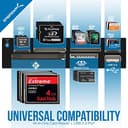
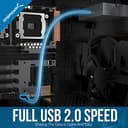
The SABRENT Internal 7-in-1 USB Card Reader is a versatile, high-speed internal memory card reader supporting over 74 card types. Designed for professionals, it offers plug-and-play convenience with no driver installation, powered via an internal USB hub for reliable performance. Its compact design fits seamlessly into your PC, making it an essential tool for efficient data management across Windows, MacOS, and Linux systems.


| ASIN | B000EWJYYW |
| Best Sellers Rank | 39,992 in Computers & Accessories ( See Top 100 in Computers & Accessories ) 3 in Internal Memory Card Readers |
| Brand | Sabrent |
| Brand Name | Sabrent |
| Colour | Grey |
| Compatible Devices | Personal Computer |
| Compatible devices | Personal Computer |
| Connectivity technology | USB |
| Country of Origin | China |
| Customer Reviews | 4.3 out of 5 stars 5,312 Reviews |
| Data Transfer Rate | 5000 Megabits Per Second |
| Global Trade Identification Number | 00188218000453 |
| Hardware Interface | Built-in Flash Memory, CompactFlash Type I or II, MiniSD, Secure Digital Card, USB 2.0 |
| Item Dimensions L x W x H | 10L x 9.5W x 2.5H centimetres |
| Item Type Name | Internal Memory Card Reader |
| Item Weight | 6.2 Ounces |
| Manufacturer | SABRENT |
| Media Type | CompactFlash, Memory Stick, SD Card, microSD |
| Media type | CompactFlash, Memory Stick, SD Card, microSD |
| Model Name | Internal Memory Card Reader |
| Network Connectivity Technology | USB |
| Operating System | Windows |
| Product Features | Multi-card support |
| Product Warranty | 1 Year |
| Special feature | Multi-card support |
| UPC | 188218000453 |
T**5
Excellent, Good value internal card reader!
Excellent internal card reader! Even though by todays standards USB 2.0 is slower than what some people are used to. The convenience, functionality and the large amount of different card slots available on this reader was perfect for my needs. Excellent value for money and a nice design too!
W**R
It Just Works.
I like the fact that this is an SD card reader without any of the bells and whistles that other products have. All I wanted was a reader that takes micro SD cards without having to scratch around for an adapter. It has two LED lights; blue to indicate power and white which is labelled 'Access' that lights up whenever an SD card is present. Installation was easy, just a connector to attach to the USB 2 header on the motherboard. As I didn't have a 3.5" external drive bay in my case, I got an adapter to convert a 5.25" one. The blue power LED is rather bright. If I get fed up with it, a bit of black insulation tape will cover it easily. No big deal. So overall, I'm very pleased with this product, it does exactly what I want for a reasonable price.
S**N
Probably the best...
...3.5" front dash card reader. Bought to replace an existing 3.5" reader as part of an upgrade for my aged Advance mATX case. A rare beast in its form factor as it stands only 250mm high. Only the newer HTPC case come close but they are a lot wider than the 290mm of this case. I'd already fitted a Tccmebius TCC-QL5E 5.25 Inch PC Multifunction Dashboard Media Front Panel, With SATA e-SATA Dual USB 3.0 6 port USB 2.0 Audio Ports and Five-in-one Card Reader (SD/MMC/CF/MS/TF / M2) and felt that you can never have enough connections. for external devices. Fitting is a breeze just one USB connectio to the USB header of internal distribution block fit the locking screws and replace the case. Done. Boot up and the unit is transparently present Modern tech has come on leaps and bounds and the explosion of Chinese generic has given the end user a vast array of well priced options. However the 3.5" range is somewhat limited to either a internal USB outlet panels with a couple of USB2 or USB3 connectors or these smaller 3.5 versions of the 5.25 standard front dashboards. A slightly specialist item but worth the very modest outlay. The other reason I bought this one the other 1.75" is taken up with the display of the internal/cpu thermometer which is part of the case...not something that is fitted to anything now...older cases have their advantages. Buy this reader if you have a spare bay and want more flexibility.
D**O
Does job I needed
Perfect little card reader does what it's meant to.
J**N
Perfect unit well worth the upgrade and money
This is a perfect fit for my computer. The black matches the case and the blue light matches the blue light in the case. Nice easy install with no issues turned the computer on and windows 10 self installed all the drivers. 10/10 for price and quality. Very happy
S**R
It does not say it is a 3 1/4
It does not say it is a 3 1/4 drive size and needs a caddy to fit a 5 1/4 bay, you also need this to mount in a pc https://www.amazon.co.uk/dp/B000HLZXH2?ref=ppx_yo2ov_dt_b_fed_asin_title&th=1
D**D
all in one picture viewing device
a to do job waiting for more bits
S**R
Not great!
The unit arrived and was an easy install. In the instructions it indicates that it must be connected to a 9 pin USB header. The problem is that only 8 pins have a wire attached but the socket does indeed connect to the 9 pin header. On firing up the PC the first thing you notice is the blue power light on the facia which doubles up as an aircraft landing light, it's that stupidly bright. The next thing I did was to insert a USB drive into the units usb socket, nothing, inserted a micro SD and all it wanted to do was format the card. Clicked on format disk and that also failed. I know exactly what files are on both storage devices and plugging into previously available input ports verified that the files were indeed there and readable.. Device manager confirmed there were no hardware conflicts. The unit was visible but unable to perform any read or write function. So after about an hour of research and implementation of the suggested solutions I concluded that the unit was defective and began a return. I ordered an alternative which arrived today. A very similar unit but the 9 pin USB plug has 9 wires, so one wire to each of the nine pins. It worked as soon as I powered up the PC and no annoying blue landing light. It immediately read the relevant storage device displaying the contents of each on the screen. This unit may work on some systems but certainly not on mine which is running on Windows 11. I therefore am unable to recommend this particular device as I failed to get it to work correctly.
TrustPilot
2 周前
2 周前