We remain fully operational. Our teams are working around the clock to ensure your deliveries continue safely.

下载应用程序




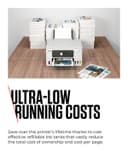
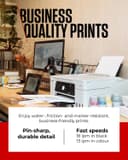


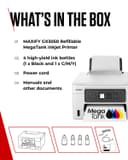
🖨️ Print smarter, save bigger, and stand out effortlessly.
The Canon MAXIFY GX3050 is a compact, wireless 3-in-1 inkjet printer designed for home and small office use. It delivers fast printing speeds of 18 ppm in black and 13 ppm in color, with a high max resolution of 5760 x 1400 dpi for vivid, professional-quality prints. Featuring versatile media support, a large 350-sheet capacity across three trays, and a cost-efficient MegaTank refillable ink system, it ensures high-volume printing with minimal interruptions. Connectivity options include WiFi, Ethernet, and USB, complemented by automatic duplex printing and scanning to email or network folders, making it a powerhouse for productivity and economy.


| ASIN | B0BP8B4QWN |
| Additional Printer Functions | All In One |
| B&W Pages per Minute | 18 ppm |
| Best Sellers Rank | 11,895 in Computers & Accessories ( See Top 100 in Computers & Accessories ) 15 in Ink Tank Printers |
| Box Contents | Ink Bottles |
| Brand Name | Canon |
| Color Depth | 24 bpp |
| Color Pages per Minute | 13 ppm |
| Colour | White |
| Compatible Cartridge | GI-56 BK, GI-56 C, GI-56 M, GI-56 Y |
| Compatible Devices | Laptops, PC, Smartphones, Tablets |
| Control Method | App, Touch |
| Controller Type | Amazon Alexa, Apple Airprint |
| Country of Origin | Vietnam |
| Customer Reviews | 4.1 4.1 out of 5 stars (42) |
| Display Type | LCD |
| Dual-sided printing | Yes |
| Duplex | Automatic |
| Global Trade Identification Number | 04549292204483 |
| Hardware Interface | USB |
| Initial Page Print Time | 8 Seconds |
| Ink Colour | Black, Cyan, Magenta, Yellow |
| Item Dimensions D x W x H | 41.7D x 39.9W x 21.6H centimetres |
| Item Type Name | Inkjet Printer |
| Item Weight | 8.3 Kilograms |
| Manufacturer | Canon |
| Maximum Copies Per Run | 250 |
| Maximum Copy Resolution Black and White | 1200 dpi |
| Maximum Copy Resolution Color | 1200 dpi |
| Maximum Print Resolution Black and White | 1200 dpi |
| Maximum Sheet Capacity | 250 |
| Maximum Supported Paper Size | Legal (216 x 356 mm) |
| Maximum print Resolution Color | 5760 x 1400 |
| Model Name | GX3050 |
| Model Number | GX3050 |
| Model Series | GX |
| Network Connectivity Technology | USB |
| Number of Drivers | 1 |
| Number of Trays | 3 |
| Other Special Features of the Product | Auto Document Feeder, Auto-Duplex, Email Print, Refillable Ink Tank, Scan To E-Mail |
| Output sheet capacity | 250 |
| Paper Size | 210 millimeters |
| Power Consumption Size | 18 Watts |
| Print media | Envelopes, Fabric, Glossy photo paper, Labels, Paper (plain) |
| Printer Output Type | Colour |
| Printer Type | Inkjet |
| Processor Count | 1 |
| Product Warranty | 2 year manufacturer |
| Resolution | 5760 x 1400 |
| Scanner Type | ADF |
| Series Number | 3050 |
| Specific Uses For Product | Home/Office, Photo Printing, Specialized Printing Tasks |
| Total USB 2.0 Ports | 1 |
| Total USB 3.0 Ports | 1 |
| Total USB Ports | 1 |
| Unit Count | 1.00 Count |
| Warranty Type | Limited Warranty |
N**K
GREAT!
Took a bit of working out as it has many functions. Apart from not yet using the print out of heavy card which I need to check how I do that. As it has 3 print out exits. The top, the tray and the other not yet tried at the side for heavy card. It has a good print and colours are good. Now I have it set up to do what I want, I just plug in and go. As still not quite there with instructions and just like to print or scan quickly, I leave the settings. I can recommend it though. The bottles of inks are quite big, a lot bigger than my previous fill up ink printer. Saves a lot too rather than cartridges. Also a lot easier to fill and a lot less messier to fill than my previous, where I always ended up with some on my hands. This so far is clean. I am glad that I did end up paying maybe a little more than some printers as it was worth it.
A**.
Excellent and economical printer
Excellent and economical printer, easy to set up unlike every HP printer I have ever used, especially the most recent HP models bought this year where 2 out of three new printers had to be sent back within a few weeks of purchase having failed.
S**E
canon gx3050 printer
Bought from Amazon and received on time. Printer was easy to install. Up and running in no time. With being connected via wifi the signal can drop out. Print speed OK. Print quality good. my only problem at the moment is if I want to print A5 Size on A4 Paper it challenges me and I have to press more buttons to get it to print. overall very goodC
A**R
Top Marks
This printer is very good ...its worth paying the extra money because it comes with bottled ink which will print thousands of copies. It also very robust unlike many of the cheaper brands ...which appear flimsy when it comes to the paper trays It also comes with a 3 year guarantee.....so far I am very pleased with the purchase and would certainly recommend it
K**N
Good quality prints but endless problems with it
When this printer works you get good quality and fast prints. I've no complaints with the print quality and the ink lasts a long time, However, there has been no end of problems. Won't connect via Wi-fi if you have a MacBook. Constant error messages for "reload paper" even though the cassette has paper, "paper jam" even though there is no paper jam and errors that won't clear even when resolved unless you remove printer and re-install. I spend a good deal of time trying to resolve issues rather than just being able to print, which is frustrating for the cost.
C**A
This printer is awesome!
This printer works great and is super easy to use. I highly recommend it! 👍 Colour quality, paper jam value for money 💰
K**E
Slow
Disappointed with this printer. It is very slow to start printing. It seems to dislike printing from our iPads, which can require us to restart our iPads. It is temperamental as to whether it will print at all, which now means we are not confident of quickly printing anything. We have had no issues with scanning documents - this works well.
J**Y
Canon Maxify - beware flaky connection
Really a terrible printer. Right from the start its connection to the WiFi was flaky. I should have sent it back immediately but I kept thinking perhaps if I changed my set up I could make it work. A year later and I have a large brick in my home office I cannot use. I ended up having to get my old canon back out again and connect it up. It doesn’t come with a LAN cable so I can’t connect directly. On the rare occasion I get it to connect it prints well. But I am sooo unhappy with it.
S**L
Imprimante plutot bien, seul problème elle se met en veille, il faut donc se déplacer quand on veux l'utiliser pour l'allumer Je l'ai branché via un câble USB car une fois paramètrer c'est trés long pour ce connecter a l'ordinateur ou au téléphone. Le scanner est vraiment nul, il scanne une seul face a la fois et que par la vitre du scanner. Les scan sont ensuite très lourd, donc pour envoyer par mail un par un seulement, mon ancien scan il scanait recto verso et plusieurs page sur un seul pdf, et je pouvais envoyer plusieurs scan a la fois par mail.