We remain fully operational. Our teams are working around the clock to ensure your deliveries continue safely.

下载应用程序



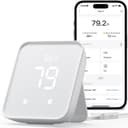
🏠 Master your smart home climate & control with effortless precision!
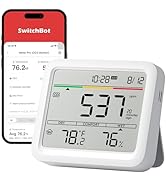
The SwitchBot Hub 2 (2nd Gen) is a smart WiFi-enabled hub featuring a highly accurate Swiss-made temperature and humidity sensor (±0.36°F/±1.8% RH), an adaptive light sensor, and an IR remote control that consolidates multiple devices into one app. Compatible with Alexa, Google Assistant, and Apple HomeKit via Matter, it supports automation scenes and geo-fencing, includes two physical smart buttons, and connects over 2.4GHz WiFi to streamline your smart home experience.











| ASIN | B0BM8VS13P |
| Additional Features | Equipped with a light sensor, that helps your device adapt to the local environment, Supports HomeKit via Matter, The Gateway of SwitchBot Products, link SwitchBot to Wi-Fi (Support 2.4GHz), WiFi Smart IR Remote Control, WiFi Thermometer Hygrometer |
| Battery Type | No batteries required |
| Best Sellers Rank | #13,920 in Tools & Home Improvement ( See Top 100 in Tools & Home Improvement ) #26 in Home Automation Hubs & Controllers |
| Brand | SwitchBot |
| Built-In Media | 2m temperature and humidity data cable*1, 3M adhesive*1, 5V 2A adapter*1, Hub 2*1, User Manual*1 |
| Button Quantity | 1 |
| Color | White |
| Compatible Devices | Air Conditioner, Other Infrared-enabled Appliances, Television |
| Connectivity Technology | Bluetooth |
| Controller Type | Amazon Echo, Google Assistant, IFTTT, Siri Shorcuts, SmartThings |
| Customer Reviews | 4.3 out of 5 stars 11,067 Reviews |
| Global Trade Identification Number | 00850046603181 |
| Item Type Name | Hub 2 |
| Item Weight | 0.19 Kilograms |
| Manufacturer | Wonderlabs |
| Max Number of Supported Devices | 6 |
| Maximum Number of Supported Devices | 6 |
| Maximum Range | 10 Meters |
| Mfr Part Number | W3202100 |
| Model Name | Hub 2 (2nd Gen) |
| Model Number | W3202100 |
| Smart Home Compatibility | Smart Home Compatible |
| Special Feature | Equipped with a light sensor, that helps your device adapt to the local environment, Supports HomeKit via Matter, The Gateway of SwitchBot Products, link SwitchBot to Wi-Fi (Support 2.4GHz), WiFi Smart IR Remote Control, WiFi Thermometer Hygrometer Special Feature Equipped with a light sensor, that helps your device adapt to the local environment, Supports HomeKit via Matter, The Gateway of SwitchBot Products, link SwitchBot to Wi-Fi (Support 2.4GHz), WiFi Smart IR Remote Control, WiFi Thermometer Hygrometer See more |
| UPC | 850046603181 |
| Unit Count | 1.0 Count |
| Warranty Description | 2 years |
A**.
UPDATED: Perfect control for a mitsubishi mini split AC
Update: Company was quick to reach out and send a replacement unit. So far everything has worked flawlessly and connection issues seem to have been resolved. The downside to a mini split is that a normal "smart" thermostat does not work with it, and there is no real scheduling options. Not only does this device allow control of the AC from your home automation system (Alexa, Google Home), but it also allows you to set up profiles and themes to control it to warm up before you climb out of bed, drop temperatures when you leave for the day, and again cool or heat your house prior to arriving home again. It has been running flawlessly now for about 2 months, was easy to set up, and perfect for remote operation or monitoring. UPDATE: After running for several months now, this unit seems to have issues maintaining a wifi connection (and disconnected "remote" no longer works). Wifi disconnects a minimum of 2 times per day, often throwing off the heat schedule (ie: it is cold when we get home from work), rebooting often results in bot being able to connect to ANY wifi network. My desire to recommend this is quickly waining!
A**N
Works Great With HomeKit and Alexa!
There's was a lot of buzz last year about the HomeKit compatible infrared blaster the Nature Remo Nano. It looks like a great product but unfortunately it is only for the Japanese market. The Switchbot Hub 2, however, beat it to the American market! And I have to say it's great! The update to change the IR blaster over to Matter was seamless and easy. The blaster works like a charm too! If there is anything to nit-pick about, I'd say that the Switchbot's phone app simply doesn't have very many pre-programmed templates to control various devices. Not that they are necessary. The Switchbot's ability to learn IR codes and button from current remote controls is fantastic and easy. As long as you have the remote, Switchbot can learn it! For all the devices I wanted to control, I ended up just creating my own templates using the "Others" category under "IR Appliances". Works great! A note note Apple TV users. Although Switchbot support will tell you it's impossible to control an Apple TV with Switchbot, that's just not true. It controls it fine. ALL Apple TVs can be controlled using IR signals from IR remote controls. You don't even have to mess with settings in the Apple TV. It just works out of the box. The hurdle to overcome, however, is to get a IR remote control for the Apple TV. Only a bluetooth remote comes with the Apple TV 4 and later, not an IR remote. Apple TVs gen 1-3 had IR remotes. You can still buy these older model remotes and Switchbot can learn them just fine, but the gen 4 and later Apple TVs added a new Home button which is not on the older remotes. The new Home button is how you put the Apple TV 4s and later to sleep. Luckily, there are many cheap ($10) 3rd party IR remote controls for the Apple TV 4 and later that have the new Home button. Just buy one of those, and you can use it to teach Switchbot how to control your Apple TV. Switchbot uses Siri Shortcuts to allow Siri to control an Apple TV. Would be nice if it had built in support for Siri, but using Siri Shortcuts works fine. Amazon's Alexa voice assistant can also control the Apple TV with Switchbot. So best of both worlds! I highly recommend Switchbot if you want to use it with Apple's HomeKit. It's not like we have much of a choice in any case. As far as I could tell, Switchbot is currently the ONLY smart home IR blaster in the American market that is compatible with HomeKit. But at least you know it works, and works well! :)
B**T
Easy setup, great features
Installed Jan 6, 2024 - I bought this Switchbot Hub 2 primary as an IR blaster to control an electric fireplace and an older Samsung TV in my bedroom to use my iPhone as the remote. Short story - works well, good app. Bonus: There are 2 physical buttons on the front you can use to trigger devices/scenes. Longer story for enthusiasts: Based on reviews of competing products, I am happy I chose this one, easily worth the extra money. Using the native hub automation you can use the built in temp sensor and set a threshold and corresponding action. Ultimately I plan to do automation via HomeKit but assumed it would take some time before matter functionality worked. So for the short term, using Switchbot hub2 as the automation engine is simple and intuitive. Also the app works with Apple shortcuts on IOS. Widget sort of works, only scenes (switchbot scenes) show up so far, not devices. These are native switchbot devices/scenes, not to be confused with Apple home. Apple HomeKit and Matter- I have done no research on matter, I keep hearing it is coming. I don’t care to promote or consult on it, I’ll use it when it’s ready. That said, I am pretty impressed so far: Upon pairing with HomeKit (read the included directions, they are far better than average) the temp and humidity icons show up immediately in the IOS Home app. Matter seems to be working. It takes a very long time for IR devices to show up in the IOS Home app. Several hours. I have fairly old Apple TV series 4, this could be why it takes a while? Again, it’s worth reading the instructions. Far superior than typical instructions from other device manufacturers. I am pleasantly surprised by this device. I never heard of them before yesterday!
C**H
Great solution for my needs.
I bought the hub with 4 sensors. Setup was pretty straight forward. Hub integrated easily onto my Wifi network and Alexa environment. I have one sensor in my pump house with an alarm when the temperature drops near freezing. A second is inside a freezer watching for temperatures above 10 degrees. This sensor does not update very often, I think the Bluetooth signal has a hard time getting out. However all I need to do is open it and I have the history of it's performance. The third sensor is inside my small wood drying kiln I use for bowl blank. Here the humidity sensor is very useful. The 4th is inside my workshop so I know what issues I will face with glues and finishes. There are issues with the speed of the updates, probably caused by the distance from the hub, but the data is updated eventually. However the fact that each sensor records readings about every 2 seconds and stores those results helps remediate the slow updates. The data is there. Like I said it fulfills my needs. The app is well designed, robust, and provides a good set of tools to review this recorded data. All in all I would recommend this to anyone who doesn't need instantaneous temperature reading and alarms.
X**X
Does so much!
I have been using these hubs for about 2 years now. Have one in my garage for temp monitoring and paired use with contact sensor on the garage door. One in my office to control IR TV and lights and monitor temps on my pc (exhaust). And another in my living room to monitor temps and control more IR devices such as fan control and curtains. -Accurately being able to keep track of temperatures around my home and set automations based on changes has been a great use of these. -Compatibility of the IR blaster works so good i dont know how it reaches half the devices it does. Great option to turn not so smart tech into smart home devices. Tons of ways to pair them with other non-switchbot brands as well. -Small/discreet and look nice. Can adjust viewing brightness. -Easy to setup and get going. Creating automations are easy but if you are creative can setup some very interesting uses with these. Overall great investment
E**Y
Great for smart home stuff + no more lost remotes
I got the SwitchBot Hub 2 mainly because I have these candles that came with a small room remote… which I kept losing all the time. I wanted something where I could just upload the remote to my phone and stop dealing with that, and this hub has honestly been really great. Now I can upload my TV remote to it, my lights, and just slowly start making my home smarter. I didn’t even realize how much I’d use it once everything was set up. I’m already thinking about getting the curtain opener next. I also really like that it tells you the temperature and humidity, and you can set it to turn on things like a fan if the room gets too hot. That part is super helpful, especially during warmer days. Overall this is a really great product if you’re trying to get into home automation without it being too complicated. Definitely recommend if you’re looking to make your place smarter little by little.
S**N
Wont work with Alexa, as sold.
1 Star shared between Switch-Bot and Amazon for the kludge this device represents when you consider "smart devices" of today's standard. First off, SHAME on Amazon for stating it "works with Alexa" and linking the devices necessary - in my case, I wanted SwitchBot Curtain 3 Rod as it was advertised to work with Alexa. Amazon provided a purchase together option would work with my Echo devices.... the Curtain 3 Rod and this Hub 2. I get them both and immediately plug them in to their charger (one; not two for two devices as you'd expect, which extended charging time). So, while that's happening, I'm following along with the directions and download their app, create the app account and sync it with a separate sign-in with Switch-Bot.com. Meanwhile, Alexa saw the device and starts an install process syncing with Matter - which I hadn't had on my phone, before. No sweat, but okay. But, Alexa wants me to put the Hub in a pairing mode for her Echo devices to find this Hub - "follow the manufacturer's instructions on how to put the hub into pairing mode." There in lies, a problem... Meanwhile in the hub install and configuration process, to get it to work with Alexa: On top of the SwitchBot app, I'm told I need Matter and a GOOGLE NEST HUB!?!?!?!?! Uhm.... Amazon, Switch-Bot, Anybody? To get Alexa to work with the Hub that I need to control the Curtain 3 Rod, I need to setup an entirely different home automation system - and a competitor of Alexa+'s to which there was NO mention in reviews, sales brochure stuff or in the linked equipment to make the claim "it works with Alexa" true????? Ergo, my "kludge" comment from the very beginning. Look Amazon, for something to truly "work with Alexa", two apps should be the max and just the devices' platform and the Alexa platform - if that is not the case, at lease sell me the additional platform's equipment so I truly see the total cost and complication of getting what should be a straight forward process, like all the other numerous Alexa compliant devices. Not pleased, at all.
B**.
Easy to Use with Matter and HomeKit
This has actually been really handy. I bought this primarily to connect some SwitchBot Bots (essentially remote button-pushing robots) to Apple HomeKit. This use case works like a charm! I just downloaded the SwitchBot app, set it up, and hit “Matter” in the app to get it going smoothly. Even beyond that, though, we have found the temperature display extremely useful in monitoring how comfortable we and our pets will be remotely (even from outside the home). We may even buy another one of these! The app design itself is a little over-complicated for my tastes, with several tutorial pages for every little details, but, as implied here, I do not expect to use the app often, given how smoothly it all works with Matter and HomeKit.
TrustPilot
1 周前
2天前