We remain fully operational. Our teams are working around the clock to ensure your deliveries continue safely.

下载应用程序



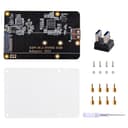
🚀 Elevate your Raspberry Pi with NVMe speed and sleek style!
The GeeekPi M.2 NVMe SSD Expansion Board transforms your Raspberry Pi 4 into a high-performance powerhouse by enabling ultra-fast NVMe SSD storage. Designed for easy installation with pogo pins and a compact footprint, it supports large data projects without bulky add-ons. Ideal for professionals seeking scalable, reliable storage upgrades, this adapter includes all necessary accessories for a seamless setup (Pi and SSD sold separately).
| ASIN | B0CBJYWKJ1 |
| Best Sellers Rank | #442 in Single Board Computers (Computers & Accessories) |
| Brand | GeeekPi |
| Built-In Media | Blu-ray |
| CPU Model | ARM Cortex A-9 |
| Compatible Devices | Raspberry Pi 4 Model B |
| Connectivity Technology | USB |
| Customer Reviews | 4.5 out of 5 stars 104 Reviews |
| Included Components | Blu-ray |
| Manufacturer | GeeekPi |
| Mfr Part Number | EP-0171 |
| Model Name | Raspberry Pi 4 Model B |
| Operating System | Raspberry Pi OS |
| Processor Brand | Broadcom |
| Processor Count | 1 |
| RAM Memory Technology | LPDDR3 or DDR3 |
| Total Usb Ports | 4 |
| Warranty Description | 6 months |
| Wireless Compability | 802.11b |
H**K
So far, very good!
I set this up the other day and seems to be working flawlessly using a Patriot P300 M.2 PCIe Gen 3 x4 128GB Low-Power Consumption SSD. This is for a Home Assistant install which can have heavy disk usage that burns out most SD cards too quickly. To install the image on to the M.2 drive, I used a USB to NVMe adapter and it worked fine directly from the Pi imager software... you will still need an SD card to set the Pi to boot from USB first (there is a utility in the Imager) since, by default, it wants to boot from the SD slot. After that option is set, you don't need an SD card at all. This mounts to the bottom of the Pi, so you can still use hats with it, but you will likely have to figure out your own case. It comes with a plastic bottom shield to prevent shorts but a case would be better. The only other down side was that you cannot easily install the drive with this mounted to the Pi... you could do it if you have a 2280 and a very low profile right-angle #1 phillips but most won't have that. And forget about it if you have a 2242 or 2260! The screw which mounts the standoff at the end of the drive is facing the bottom of the Pi, they need a better option so the drive can be changed easily. Overall I would definitely recommend this if you want to use an NVMe with your Pi!
M**E
Brings new life to my raspberry pi
Excellent value for the money. I was looking to buy a new raspberry pi 5 that supports m2 drives. When I found this, I grabbed it because I don't need all the power (or expense) of a pi 5. It's well built and comes with a frosted plexiglass bottom. And as an added bonus I was able to get it to work with a raspberry pi 3b+. That right! I did have to purchase a flexible USB A adapter but that was expected. This boots up faster than the SD card, and won't wear out. I run pihole, unify, and unbound on my pi and was burning through sdcards. Now I have plenty of room and no problems with burnout.
D**T
No Pi case available.
Works just fine. However, there are no boxes made to enclose the pi and this card.
D**L
Great addition to my RPi cluster system.
Easy install, works great.
N**Y
Absolutely the best storage option for a Pi 4B
Excellent. Love it. Easily boots with decent speeds I have mine auto-mounting at every boot then all my scripts auto-run so I don’t touch much of anything and I blame this. This thing helps tremendously. The design is sleek and nice. Very good kick for your money. And it by itself acts as a heatsink for the pi underneath it’s awesome. (I see a “noise level” thing? Ummm this is an SSD storage there’s 0 moving parts… sooooo there’s no noise! Besides from the fans on your pi (I’ve got a 140mm and 2 80mm it’s loud) but other than that your golden)
B**H
This board was DOA and no product support.
This adapter appears to be DOA. I did the installation following the instructions (which I had to download, and they weren't perfect) and rechecked the installation. I then inserted a working SSD and applied power. No matter what I did, the board would not detect the drive. I then inserted the SSD in another computer, and it worked fine. I asked Amazon for a replacement, thinking this may be a case of infantile failure. The product appears to be well-designed and constructed, but I am going to rate it as a 1 due to a lack of product support from the manufacturer.
S**N
Sheesh
I was waiting for this. Ok. So, I jad an extra samsung 980 pro 2tb just laying around and figured why not. So, I got this. At first I was aprehinsive about writing a review but everything is amazing. I thought from the other reviews I was needing to configure the raspberry for this to work. Its almost plug-n-play. I added this board to my raspberry pi 4b/8g. I was able to download the kali/pi image from the pi site. Yes, it does boot from the 980 pro with no need for a micro sd card. It just makes the pi a bit bulky but you can live with that. Lol.
B**R
I bought a second one
Worked well enough that I bought 2.