We remain fully operational. Our teams are working around the clock to ensure your deliveries continue safely.

下载应用程序



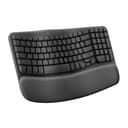
⌨️ Elevate your desk game with comfort and control — feel the Wave, own the day!
The Logitech Wave Keys Wireless Ergonomic Keyboard combines a compact, wave-shaped key layout with a memory foam palm rest to promote natural hand positioning and reduce strain. Featuring Easy-Switch technology, it connects seamlessly to up to three devices via Bluetooth or Logi Bolt Receiver, boasting an impressive 3-year battery life. Certified by ergonomists and crafted with recycled materials, it’s designed for professionals who demand comfort, sustainability, and productivity in one sleek package.


| ASIN | B0BTNY72VD |
| Antenna Location | Office |
| Are Batteries Required | Yes |
| Best Sellers Rank | #4 in Computer Keyboards |
| Brand | Logitech |
| Built-In Media | Palm Rest |
| Color | Graphite |
| Compatible Devices | Laptop, Personal Computer |
| Connectivity Technology | Usb |
| Customer Reviews | 4.3 4.3 out of 5 stars (3,582) |
| Global Trade Identification Number | 00097855191533 |
| Hand Orientation | Ambidextrous |
| Item Weight | 2.2 Pounds |
| Keyboard Description | Membrane |
| Keyboard Layout | QWERTY |
| Manufacturer | Logitech |
| Number of Batteries | 1 Lithium Polymer batteries required. (included) |
| Number of Keys | 101 |
| Operating System | Android, Mac OS, Windows |
| Other Special Features of the Product | Wrist Rest |
| Power Source | Battery Powered |
| UPC | 097855191533 |
| Unit Count | 1.0 Count |
| Warranty Description | 1 Year Limited Hardware Warranty |
M**B
Best keyboard I've owned
I have been using this keyboard for work and personal use for 2 days and am loving it so far. It's perfect for my needs and here's why: 1. It has all the functions I need and then some 2. It's just the right size. I was using a separate keyboard for my personal pc than for my work laptop and the other keyboard is much larger, not leaving much room for my mousepad in the desk tray. 3. It connects seamlessly to both, my laptop and desktop so I don't even have to use the other keyboard now! I wasn't looking for that but is a HUGE plus now that I have it setup. You can save 3 connected devices and switch between them using F1, F2, and F3. This was a huge help since I use the same monitor for both devices (I bought an hdmi splitter for that) but would have to use 2 different keyboard/mouse each time I switched. Now I only use 2 different mouses (mice?) which I'll probably upgrade as well. 4. The keys have good response without being noisy. You can hear them, which I prefer, and feel the feedback, also preferred, but you don't have to press hard and don't get the loud click-clack of old school keyboards. 5. It's comfortable to use, at least for me. The palm rest cushion is soft but seems like it will hold up for a long time. The major keys are reachable without lifting my palm and there was minimal adjustment from my much larger keyboard. 6. Very easy setup (I use Windows...can't speak to Mac, Google OS, etc.). As soon as I turned on the keyboard, it paired with my laptop. I had to do absolutely nothing for setup (see note below). The ONLY very small con I have is that it doesn't tell you anywhere in the packaged instructions that you can pair multiple devices. I knew this from another reviewer. Even then, I had to search how to do it, because it's not obvious on the Logitech website. Once I figured it out, it was very easy to do (have your laptop/pc/whatever search for bluetooth devices and hold down the button F1/2/3 button that you want to assign to that device. The device will then discover the keyboard and you're good to go). Other Notes: I would recommend this keyboard to anyone. It's pricier than other keyboards I've bought but I didn't add a con for that because I believe it's definitely worth it. You can change how the function keys work using their application and even setup "smart actions" which will do a bunch of stuff like opening your favorite apps and a bunch of other stuff. All of this stuff is configurable too, although, I haven't tried to use it yet. I just needed a keyboard so I didn't have to use my laptop keyboard but got many features I didn't even know I needed! Get this keyboard!
S**4
Best keyboard I’ve ever found
This is a great keyboard, and the wireless mouse is a bonus too. I’ve owned several iterations of this keyboard for about 15 years, and I’m on my fourth one (not for quality, but because I’ve moved jobs or wanted a more recent model). It is easy to set up using Bluetooth and sets up within seconds. The Bluetooth range is also great I can move the keyboard or mouse around my office and it still types no matter where I move. The keys are easy to type with ergonomically and when they type they’re soft yet firm, if that makes sense. They’re not loud. Really happy with this keyboard!
D**D
Typing with a gentle curve
This keyboard makes long work sessions feel softer and sweeter. The wave design and cushioned palm rest are a dream for wrists—perfect for homeschool planning, blog writing, or creative bursts that stretch into late-night tea sessions. I love the subtle rose color, too—it adds personality without being loud. The multi-platform support (Windows/Mac) and dual connectivity (Bluetooth & Logi Bolt Receiver) make it versatile enough for multi-device setups. It’s responsive, quiet, and feels way more luxe than you’d expect at this price point. With 4.3 stars and over 1,000 recent purchases, it’s clearly resonating with fellow creatives and comfort-seekers. If you’re looking for a gentle, ergonomic upgrade with soft curves and serious work ethic, this keyboard totally delivers
D**D
Logitech Wave Keyboard
I’ve been using the Logitech Wave Keys for about three weeks now, and overall I’m impressed. My wrists definitely feel more comfortable thanks to the built-in cushioned palm rest and the wave-shaped layout that keeps my hands in a more natural position. According to reviews it “felt immediately natural and comfortable to use”. The wireless connectivity is smooth — I’ve paired it via Bluetooth and also used the Logi Bolt receiver without much fuss. The key noise is very quiet, which is great for shared office spaces. That said, there are a few things worth noting: Because of the ergonomic/wave layout, the key spacing and overall footprint feel a little more compact and “different” than my old keyboard. It took me a few days to adjust. One review noted “the layout is a bit cramped and may take some getting used to.” There is no backlighting, and in lower-light conditions I sometimes find myself squinting to see the legends. The keyboard uses replaceable AAA batteries rather than a rechargeable built-in battery. It’s fine, but I would’ve preferred USB-C charging.
I**F
Smaller than expected (a positive)! Quality solution!
This is about 13 inches long and 8 inches top to bottom which is actually an inch ish smaller than my old Microsoft ergo mini wireless keyboard which I loved but it died. So glad I found this wireless ergo Logitech keyboard and mouse! I didn't notice the "on" switch at the top edge/side at first, but I switched it on and inserted the bluetooth into my laptop and it works very well. It is a great keyboard by comparison and for the price. Keys aren't too loud, but it is "louder" than my old keyboard just slightly. Keys aren't sticky at all. And the mouse included works well and just glides. Very surprised and pleased with this product. I recommend.
R**O
teclado logitech de muy buena calidad, llego sin problemas, funcionando muy bien, recomendado
P**R
Merhaba klavyenin içinden usb alıcı çıkmadı göndermenizi rica ediyorum
M**R
Good quality, took some time to fet used to the key placement. Sturdy & compact
C**L
cómodo lindo color precioso
A**E
A well-designed keyboard, well-sized and highly functional. It feels well-designed and well-built. It was easy to connect to my PC and easy to manage via the Logi Options+ app, which I also use to manage a Logi mouse. Part of the magic of why it's easier on your hands is the compact nature of key placement, i.e., it offers all the functions of a full-size keyboard but in a smaller form factor. My hands are large (i.e., I wear size large gloves), and I find the keyboard perfectly well laid out; I don't feel crowded, but this might be an issue if your hands are even larger. A couple of items that I will need to get used to are the placement of the delete key and the arrow keys. I figure it'll take a couple of days, and I'll have the muscle memory, so no biggie. The keys are quiet and firm, yet easy to push. The wrist rest is nice, and I think it will help address the numbness issues I encounter during long work sessions. I'm using it on a sit-and-stand desk and will fine-tune the height to get things dialled in right, but in the meantime, it's working well. You can program a number of the function keys via the Logi Options+ app, something I've done with the mouse; this can be a huge time/keystroke saver for repetitive work. You can also enable the top row to be either F-keys or media keys, which means you don't have to push the function key along with the F-key that you want to use. In case you're wondering, no, this keyboard is not backlit. More importantly, it has raised lines on the home keys, and as a touch typist, this is all I need. I don't look at the keyboard, and don't need it to be backlit. To be honest, I would find it distracting and annoying. Yes, the Caps Lock key has a tiny light on it. Between writing for my PhD and my day job, I easily type for 10+ hours a day, hence why I opted for the ergonomic layout. Other than the minor items mentioned above, which I can adapt to, I think this will be an excellent keyboard to work with. This is an excellent keyboard and well worth the price. I would highly recommend it for someone who can touch-type, doesn't care about backlit keys, and wants the enhanced functionality of programmable keys. ***Update one week later Everything above is still true, but I found the keyboard to be too small for my hands; there were too many awkward finger twists, etc., and it was interrupting my typing/workflow. So, I returned it and got the larger Logi ERGO K860 For Business keyboard - love it!
TrustPilot
1天前
1 个月前