We remain fully operational. Our teams are working around the clock to ensure your deliveries continue safely.

下载应用程序




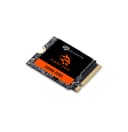


🔥 Level up your gaming and productivity with FireCuda speed and storage!
The Seagate FireCuda 520N SSD is a compact, ultra-fast M.2 2230 NVMe SSD delivering up to 5000MB/s read speeds and up to 2TB capacity. Designed for Steam Deck, Microsoft Surface, and laptops, it brings desktop-grade performance to portable devices. It includes a 5-year warranty and 3-year Rescue Data Recovery service, ensuring reliability and peace of mind for gamers and professionals alike.


| ASIN | B0CGF8V3XG |
| Additional Features | Data Recovery Service |
| Best Sellers Rank | #208 in Internal Solid State Drives |
| Brand | Seagate |
| Built-In Media | FireCuda® 520N SSD 2TB PCIE |
| Cache Memory Installed Size | 2048 |
| Color | Black |
| Compatible Devices | Desktop, Laptop |
| Connectivity Technology | PCIe |
| Customer Reviews | 4.7 out of 5 stars 121 Reviews |
| Data Transfer Rate | 5000 Megabytes Per Second |
| Digital Storage Capacity | 2048 GB |
| Enclosure Material | Nand Flash |
| Form Factor | 2.5-inch |
| Hard Disk Description | Solid State Drive |
| Hard Disk Form Factor | 2.5 Inches |
| Hard Disk Interface | NVMe |
| Hard-Drive Size | 2048 GB |
| Hardware Connectivity | Solid State Drive |
| Installation Type | Internal Hard Drive |
| Item Weight | 7.7 Grams |
| Manufacturer | Seagate |
| Media Speed | 4750 megabits_per_second |
| Model Name | FireCuda 520N SSD |
| Model Number | ZP2048GV3A002 |
| Number of Items | 1 |
| Read Speed | 5000 Megabytes Per Second |
| Special Feature | Data Recovery Service |
| Specific Uses For Product | Gaming |
| UPC | 763649181720 |
| Warranty Description | 5 year manufacturer |
E**O
Easy upgrade for my new Surface Pro 9
Microsoft wants...yes, this is not an error- a $900 premium for a Surface Pro 9 (i7 version) with 1 Tbyte storage over the same one with 256 Gbyte. This one costs $150. The upgrade was almost trivial, thanks to Youtube. Remove a cover, unscrew a T3 screw (yes, you may need a special screwdriver, I bought a set on Amazon for $16). Remove the existing 256 Gbyte drive, install the new 1 Tbyte drive. Download the appropriate Win 11 iso file from Microsoft (yes, it's free, and they have versions specific for the SP9), put it on a bootable flash drive (again, Google is your friend), insert into the SP9 (may need a USB-A to USB-C adapter, ok, another few bucks), install the OS. Physical installation takes maybe 15 minutes. Plus- PLUS- you now have a extra 256 Gbyte M2 2230 SSD, something you won't get with a Microsoft upgrade. I was almost tempted to try a 2 Tbyte M.2 drive for another $50 or so, but paraphrasing an old Bill Gates quote, "<1 Tbyte> should be enough for anyone...". If you want to, again, Google is your friend. Yes, you can buy a cheaper 1 Tbyte SSD, but if your spending $1400 on your basic SP9, another 10% shouldn't break the bank and you get a brand name WITH A DATA RECOVERY WARRANTY! I mean, give me a break, what's not to like here? I wish I could give this drive more tha 5 stars...
E**N
2TB. Very small - size wise. Easy to install. Works great on my X1Nano 3rd G.
Fair price. Very good specs. Although I just got it, the warranty seems to be absolutely sufficient. I is installed on a few months old Think Pad X1 Nano 93rd Generation).
M**T
Great for ROG ally
Got this for the ROG Ally, and it’s such a necessity
D**N
Legit, Fast.
This thing is blazing fast! I'm getting about 4800 MB/s read and 3900 MB/s write. I used EasUS to transfer my old 456 GB drive to this ~2TB drive and it works flawlessly. The whole process took less than an hour to complete. The old drive is now in a QWIIZLAB M.2 2230 SSD NVMe Enclosure, enclosure for super-fast transfers. I'm getting ~1000 MB/s sustained on both read/write, which is pretty close to the theoretical limitations of the USB-C's 10Gb/s transfer speed. https://a.co/d/0g4FNVYW
M**S
Installed in Surface Pro.
I installed this in a Microsoft Surface pro and it worked great. I'm happy so far. If things change I'll update my review.
Y**L
Surface Pro 8 Compatible Gen4 SSD!!!
I tried so many Gen4 SSDs on my surface. They all restarted randomly even with the altered bios settings. This is the only one I have found that seems compatible. Not a single restart yet. It just works. Bonus: It's also faster than Sabrent Rocket.
A**S
Easy swap for steam deck.
Super easy to swap out the drive on the steam deck. Now able to keep all the games I play, even the big ones loaded on internal memory and not have to worry about swapping SD cards or waiting for reinstall.
A**R
Great
Exactly what I ordered. Works great in my steam deck