We remain fully operational. Our teams are working around the clock to ensure your deliveries continue safely.

下载应用程序



Buy anything from 5,000+ international stores. One checkout price. No surprise fees. Join 2M+ shoppers on Desertcart.
Desertcart purchases this item on your behalf and handles shipping, customs, and support to Taiwan.
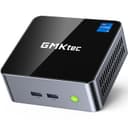
🚀 Mini PC, Mega Power – Elevate Your Desk Game!
The GMKtec Mini Desktop Computer M3 packs a 12th Gen Intel Core i5-12450H processor with 8 cores and 12 threads, turbo boosting up to 4.4GHz, paired with 16GB DDR4 dual-channel RAM and a speedy 512GB PCIe NVMe SSD. It supports dual 4K HDMI outputs, WiFi 6, Bluetooth 5.2, and ultra-fast 2.5G Ethernet, all in a compact, mountable chassis designed for professionals craving high performance in a sleek, space-saving form factor.


| ASIN | B0CWR3SZVT |
| Additional Features | Gaming PC, Home Theater, Digital Signage, Video Conference, Business, Video & Photo Editing, Education, Everyday Use, Multimedia |
| Aspect Ratio | 16:9 |
| Brand | GMKtec |
| Built-In Media | GMKtec Nucbox M3 Core i5 12450H Mini PC, HDMI Cable, Power Supply & Cable, User Manual, VESA Mount with Screws |
| CPU Model | Core i5-12450H |
| CPU Model Number | Intel Core i5 12450H |
| CPU Model Speed Maximum | 4.4 GHz |
| CPU Speed | 4.4 GHz |
| Cache Memory Installed Size | 16 MB |
| Cache Size | 16 MB |
| Color | Black Silver (M3) |
| Compatible Devices | Keyboard, Mouse, Monitor, Speaker, Headphone, Printer, Smartphone, Projector |
| Connectivity Technology | 2.5GbE LAN Intel i225v, 3.5mm CTIA, Dual HDMI, USB 3.2, Wi-Fi 6 |
| Cooling Method | Air |
| Customer Reviews | 4.4 out of 5 stars 374 Reviews |
| Display Resolution Maximum | 3840 x 2160 pixels |
| Display Type | LCD |
| Graphics Card Description | Integrated |
| Graphics Card Interface | Integrated |
| Graphics Card Ram | 16 GB |
| Graphics Coprocessor | Intel UHD Graphics 1.20GHz |
| Graphics Description | Integrated |
| Graphics Ram Type | Shared |
| Hard Disk Description | PCIE 3.0 M.2 2280 & M.2 2242 PCIE/SATA |
| Hard Disk Interface | PCIE x 16 |
| Hardware Interface | Bluetooth, Bluetooth 5, DisplayPort, HDMI, Radio Frequency, USB 3.0, USB 3.0 Type C |
| Human-Interface Input | Keypad |
| Item Dimensions | 6.22 x 4.09 x 6.46 inches |
| Item Type Name | Mini PC |
| Keyboard Description | No keyboard included |
| Manufacturer | Shenzhenshi Jimokekejiyouxiangongsi |
| Memory Clock Speed | 3200 MHz |
| Memory Slots Available | 2 |
| Memory Storage Capacity | 64 GB |
| Model Name | M3 |
| Model Number | M3_Ultra_LD |
| Model Year | 2024 |
| Native Resolution | 4096 × 2160 |
| Number of Component Outputs | 3 |
| Operating System | 11 Pro |
| Personal Computer Design Type | Mini PC |
| Power Consumption | 45 Watts |
| Power Plug Type | Type B - 3 pin (North American) |
| Processor Brand | Intel |
| Processor Count | 8 |
| Processor Series | Core i5-12450H |
| Processor Socket | FCBGA1744 |
| Processor Speed | 4.4 GHz |
| RAM Memory Installed | 16 GB |
| RAM Memory Technology | DDR4 |
| RAM Type | SODIMM |
| Ram Memory Maximum Size | 64 GB |
| Resolution | 4096 × 2160 |
| Specific Uses For Product | Business, Education, Everyday Use |
| Specification Met | True |
| Style Name | Mini PC |
| Total Expansion Slots Quantity | 2 |
| Total Number of HDMI Ports | 1 |
| Total Usb Ports | 5 |
| Video Output | HDMI, DisplayPort |
| Video Output Interface | DisplayPort, HDMI |
| Video Processor | Intel |
| Warranty Description | 1 Year Warranty |
| Wireless Compability | 2.4 GHz Radio Frequency, 5 GHz Radio Frequency, 802.11a/b/g/n/ac, Bluetooth |
| Wireless Network Technology | Wi-Fi |
| Wireless Technology | Bluetooth, Wi-Fi |
B**Y
Great Little PC That Crushes Emby & Plex Transcoding!
I was looking for something to replace my N100 mini PC, that replaced my old tiered i5 desktop that runs my PMS. The mini N100 PC was doing a pretty decent job until I decided to run Emby and Plex on the same PC, both would buffer frequently if both were running and transcoding at the same time. It was a bit much for the N100 and Intel UHD intergraded graphics to handle. I didn't want to go back to a full sized desktop, and stay in the mini platform if I could. I came across this mini PC with the i9, which has the Intel iris XE intergraded graphics that I gather is a monster step up from the UHD intergraded graphics. Everything I found while researching stated the the iris XE was capable of chewing through multiple streams of transcoding simultaneously, even up to 4K. I figured I'd give it a try and it's been running for about a week now and it has handled three 4K transcoding streams at the same time without any noted issues so far. It does get pretty warm, so I added a cooling plate under it and vented the cabinet it sets in with an intake and exhaust fan to help keep it cool and prevent any issues with overheating. So far I am pretty impressed with this mini PC, for its size it's pretty fast and seems pretty powerful for such a small package. The 32GB of DDR5 is nice, but at some point I will step that up to 64GB+ so I can dedicate a bit more RAMDisk space for transcoding, but for now it is doing great. I don't notice any more noise from it than the N100 mini PC I have, but it is in a cabinet so I probably wouldn't hear it that much even if it was a bit louder. I can't speak to the longevity of it, as I've only had it up and running for about a week now but so far I have no complaints or issues to report. If anything changes I'll will update my review of this product. It made a noticeable difference going from the N100 processor with 16GB of RAM to the i9 with 32GB of RAM, and so far I am pleased with its performance for what I am using for.
A**R
GMKTec EVO-T1: A Mini-PC Worthy of Your Family’s AI-Learning Journey?
GMKTec EVO-T1: A Mini-PC Worthy of Your Family’s AI-Learning Journey? Is the GMKTec EVO-T1 an excellent choice for your school age children (grandchildren) to learn and build a solid foundation in AI tools while being capable of supporting more advanced AI development and experimentation as their interest and skills grow? As a Grandparent who attended High School during the early days of the development of Personal Computing, I know firsthand how valuable it can be to have easy access to technology tools to experience, learn and experiment with developing technologies. Having access to these tools can provide a lifelong knowledge base that could lead to meaningful opportunities. Developing a solid technology skill base today is even more important than when I was a student. AI technology development is progressing so much more rapidly than in the past that I fear that if my grandchildren do not get on the learning train early, they might find themselves left shut out of future opportunities and find that catching up to their peers is an impossible task. One of the most satisfying and impactful gifts I can give them is the tools and opportunity today to learn skills that they can call upon to succeed in the future. This was the basis for my purchase of the GMKtec EVO-T1. No doubt with its technology leading Intel Core Ultra 9 285H CPU and ARC 140T iGPU, it can easily handle any computing task that my family could ask it to do. The capability to upgrade the RAM from the included 64 MB to 128 MB and outfit it with up to three M2 NVME storage drives allows for future expansion. I was also impressed with the array of IO options available such as Audio ports front and back, dual 2.5 GB Lan ports and an Oculink port to support adding a separate GPU card to either support the needs of demanding game play or more demanding AI computation models and tools. This level of hardware should allow the GMKTec EVO-T1 to function in almost any other technology roll such as a Home Server, Router or NAS long after my Grandchildren have outgrown and moved past its role as an AI learning and development platform. The attractive and compact design ensures it fits easily into a home office or workspace and with its cooling capabilities it does not create a noisy environment that might distract or take away from an effective learning environment. I want to provide a capable technology device for my family to learn and develop AI skills beyond those provided by built in Internet connected LLM models offered to most computer user. I selected the GMKtec EVO-T1 believing it is up to this task and more. I want it to fill the gap between those that are highly advanced with AI development and require high end multi-GPU hardware in a dedicated AI Lab and what is currently available to novice AI users as part of most consumer computing hardware and software. At the same I wanted it to provide the added security and privacy of local AI usage thus removing the need to be tied to the public internet or to subscription fee models. Here is my assessment of how well the GMKtec EVO-T1 meets my needs and hopefully it will be of use in your purchasing decision. Most basic AI tasks start with using LLM’s through text-based prompts to have the AI models provide some answer to the prompt. To allow for easier access to these models several AI GUI wrapper applications are available. I tested the following AI GUI applications with several of the same prompts on the GMKtec EVO-T1 to ensure operations and determine if there were any issues. All these AI Wrappers perform their function and which one you choose as your daily driver will be an individual choice. I have included some brief notes beside each one based upon my impressions. AIPC This is the default application provided on the desktop. It has several advanced capabilities beyond simple prompt-based queries and provides them in a logical structure such as document analysis, translation, meeting minutes and image retrieval all accessed under the Skills menu. It also provides a LLM Model/App Store tab which allows access to eight popular LLM’s models locally along with the ability to also access many more paid Internet connected models and tools. You can use the AIPC application completely locally by simply clicking the “Offline Mode” selection on the screen following application launch. Or if you wish to utilize the Internet AI capabilities then on the launch screen you enter your email address and click on the “Send Code” button. Following receiving the code you enter it in the “Verification Code” field, check the User Agreement box and click “Login.” I found this application to be feature rich and convenient for most normal AI interactions along with providing several more advanced capabilities that might be of use. From my inquiries the GMKtec team authorizes and approves the addition of any LLM’s that are provided on the local selection to ensure security and useability. Given that this application is new it is still evolving, and documentation and screens are not yet polished for an English audience. Given the ease of use of the application for a wide audience I am sure any improvements will arrive in short order. LM Studio, JAN & AI Playground for Intel ARC All these GUI wrappers provide basic functionality and additional features that might be useful. I have listed these together because when tested they all fully utilized the GMKtec EVO_T1 Intel Arc 140T iGPU. One caveat is that many other tools natively support the Nvidia GPU. Therefore, they require some more advanced configurations to allow us to utilize the iGPU instead of only the CPU. While my testing shows the Core Ultra 9 285H CPU does a respectable job while executing AI LLM functions it does not perform this task as fast and as effectively as the Intel ARC 140T iGPU. If speed of execution is desired, then you would want to investigate advanced configurations by searching PyTorch and ipex.llm and learning how to configure those within the other AI GUI wrapper applications. LM Studio allows for almost any Open Source LLM model to be downloaded for local use and provides a well-integrated API back end as well as RAG integration. JAN provides one of the easiest GUI to navigate and use and also provides an API. While AI Playground for Intel ARC provides full and deep utilization of the Intel libraries and iGPU hardware. This allows for the use of CPU, NPU or iGPU selection while providing some preconfigured tools to accomplish image enhancement, text to image and text to video AI Generation within this GUI. A nice capability for the user. GPT4All, Ollama, OpenWebUI, Msty, Cherry Studio, Anything LLM I found that these tools utilize the Intel CPU and do not support the Intel ARC iGPU natively out of the box. My earlier comment that additional configurations work is needed to allow for iGPU use applies. I have confidence that some if not all these models will provide native use of the Intel iGPU in future releases and thus expand options for local model use. So, what might be expected for Tokens/second results for local models run on the GMKtec EVO-T1 and what are its real-world functional capabilities? To answer this question, I ran samples in each of the following Generative AI functional areas. AI LLM Chat, Text to Image, Text to Video and AI Agents. AI LLM Chat was tested with a variety of prompts including plain text, document analysis, and coding. In each case my results only represent the average Tokens/sec not the quality of the output. From this data a few conclusions on the performance of the GMKTec EVO-T1 can be made. Each model was tested with the CPU and the iGPU as the main AI computational device as shown in the results. Mistralv03:7b - CPU 9.95 T/s GPU 17.4 T/s MINICPM-V - CPU 5.9 T/s GPU 9.8 T/s QWQ:32b Q4 KM - CPU 2.7 T/s GPU 3.6 T/s LLAMA3.1 :8b - CPU 11.8 T/s GPU 13.6 T/s QWEN2.5:14b - CPU 6.2 T/s GPU 7.2 T/s QWEN2.5:7b - CPU 10.6 T/s GPU 14.3 T/s QWEN3-coder:30b - CPU 9.2 T/s GPU 19.1 T/s DEEPSEEK_R1 :32b - CPU 2.8 T/s GPU 3.5 T/s DEEPSEEK_R1 :14b - CPU 5.3 T/s GPU 7.9 DEEPSEEK_R1:8b - CPU 10.2 T/s GPU 15.6 T/s GPT-OSS:20b - CPU 11.8 T/s GPU 15.5 In evaluating these results, I personally use the benchmark of my reading speed ability. Meaning that if I am waiting for text to display while reading then performance seems slow, and this would not be an effective use of my time. This benchmark will vary by person, but I find for me anything around 4-6 T/s is a comfortable reading speed to ensure understanding. Hence some of the 32b models when utilizing the iGPU are close to meeting this benchmark and I would find them useful when being executed on the EVO-T1. For text to image and text to video several tools were used but primarily Comfy.UI. In all testing cases results with image generation finished in a reasonable time of less than a minute but with video generation this time expanded considerably depending upon settings. I find this functionality to be useable for learning and basic tasks on the EVO-T1. If video generation needs are higher for speed and resolution, then it is comforting to know that the EVO-T1 provides for this and other more demanding VRAM capabilities by including an Oculink port so that a separate and much more powerful GPU can be installed and utilized. Unfortunately, I do not have a more powerful GPU available, so this capability was not tested. To examine the GMKtec EVO-T1 performance with the execution of AI Agents I utilized n8n installed in a Docker Container on the Windows 11 operating system. Instructions are easily available to accomplish this and were easy to follow with the installation and operation going seamlessly. Several simple to complicated AI Agents were tested with workflows utilizing many node types calling both local and Internet LLM’s, Websites, API, and Data Bases. The GMKtec EVO-T1 with its powerful Core Ultra 9 285H CPU and 64 MB of RAM ensured that all steps and function worked quickly and flawlessly. Clearly this hardware with the selection of an appropriate high T/s local LLM makes the EVO-T1 a powerful AI Agent development and operational tool. Summary From my testing I can say with confidence that the EVO-T1 is well equipped and highly capable of providing the family with the tools to explore and learn AI tools today while easily scaling up for more demanding family members to expand their capabilities deeper into developing, learning and experimenting with the tools of AI.
V**E
The GMK K10 is an excellent, peppy machine.
WOW! My new GMK Core i9-13900HK (NucBox_K10) has put a smile on my face. It's replacing an outdated Win 7 machine for our everyday use: research, email, entertainment, surfing, and some gaming. It came preloaded with Windows 11 Pro, which includes New Outlook. For sure, I was immediately very impressed with the K10's performance. Specifics: Device name NucBox_K10 Processor 13th Gen Intel(R) Core(TM) i9-13900HK 2.60 GHz Installed RAM 32.0 GB (31.8 GB usable) System type 64-bit operating system, x64-based processor Pen and touch No pen or touch input is available for this display Edition Windows 11 Pro Version 24H2 Installed on 5/1/2025 OS build 26100.4202 Experience Windows Feature Experience Pack 1000.26100.107.0 First, I updated the OS using Windows Update. The update took perhaps 2 hrs (typical given other users' comments re: Win11 updates). Next order of business was to install my security software and run a full scan: pleasantly, no issues. Bios access was simple using the esc key, though I had no reason to change anything. The machine runs extremely quiet and was very fast at all the tasks I performed. I'm currently using WiFi and the GMK K10 is equally distant from my router and an Access Point in the lower level. I tested performance on 4 local networks I had defined: Router(2.4 and 5.0) and AP(2.4 and 5.0). No matter the network, the GMK K10 was impressively snappy. The wi-fi antennas are clearly a plus. Web pages appear in a flash, and every task I perform delivers at turbo-speed. I ran multiple applications simultaneously with numerous tabs open and everything ran flawlessly. I plan to add a second SSD and the easy access panel on the underside should make things easier. Additionally, the Kensington Lock capability provides for a layer of physical security if that's an issue. On the flip side, the power button could use better illumination. Depending on ambient lighting, it can be difficult to tell if the machine is on or off (a tribute to how quiet it is). When I ran the OS update the screen went blank multiple times and, judging from the power button, I didn't know if the K10 was asleep, in the middle of a reboot, shutdown, or even if the update was complete. In sum, the GMK K10 is a great machine. Big shout out to GMKTec, I'm impressed. If you're looking for a low cost, up-to-date upgrade to replace your present pc, you should consider the new GMK NucBox_K10.
S**E
Great Mini Workstation
Excellent mini workstation! Great connectivity and fast processing. I use it to monitor multiple DVR Security camera locations. Handles 4 monitors no problem. Quiet machine, plenty of USB ports. Windows 11 Pro!
E**.
I9, 32/1TB, Sweet PC, Performs well. Support is non-existent.
Device works exceptionally well, support is non-existent. I wanted to replace the 1TB NVMe drive with a 4TB, and ran into issues because their website instructions and files didn’t work. Tried their website support, tried their support number, no joy. Gave up, cloned their drive and used the remaining 4TB as a second drive on the same NVMe. A+ for the i9 and its performance. F for their support. What worries me is if I have a problem in the future… where do I get parts or support? Is this a disposable lighter PC?
G**N
Awesome computers! Big power in a little package!
I love these little micro computers. I have purchased 4 of them.got rig of .y big old box computers. These little guys are fast and flawless. I'm actually using one for HD video editing with 3 monitors. I'm surprised and happy with how well they work.
S**.
Solid SFF Workstation!!
No complaints. Yes it is technically a high-end laptop CPU, but it works great in this SFF application. Great build quality on the hardware, and very simple access to the M.2 bays (three of them) from the bottom without removing the full cover at all. I wiped it immediately to install Linux so I can't comment on the any of the pre-loaded Windows stuff. BIOS is completely unlocked and options are very extensive and actually well beyond my needs, but the ability to tweak anything and everything on the motherboard is all available. My Ubuntu install absolutely screams. Video and graphics work fantastic with and quality is great for integrated graphics. Overall great value for the money if non-ECC RAM is acceptable for your application. It's been running 24/7 for six months now without any hiccups, overheats, or crashes. Though I do have it automatically reboot once a week at 3am to avoid any issues with non-ECC memory.
W**B
Very nice machine. Small and Powerful.
I was a little worried about getting a mini, especially from some Chinese company I've never heard of before. But a couple of trusted review sites convinced me that GMKtec was probably the best choice for a mini. I took a risk, given that GMK offered a really cheap machine which seemed powerful enough for what I needed. I was impressed. I liked the tiny size. So I decided to replace one of my big towers with a more powerful mini, and bought a GMK K10. Very fast high end 13th gen Intel chip, 32G of the latest fast DDR5 RAM, 1 TB SSD (and support for 11 TB more). I particularly like the 8 USB, plus several other ports. One monitor is enough for me, but my brother is going to get a K10 because it can drive four separate 8K monitors. What I didn’t tell you is that I bought a K9 before the K10, and it had wifi problems - and getting support from China had me worried. I was happy to find that GMK’s support tech writes perfect English, and was very accommodating. The support was as good as I’ve found anywhere. So I returned the K9 and decided on the K10 instead. I bought a simple half-inch high USB DVD writer to complete the package. So my whole system now is what, 8 x 8 x maybe 3”? I like these minis. But don’t ask me about Microsoft’s required upgrade to Windows 11 and its lack of support for legacy software.
TrustPilot
1 个月前
5天前