We remain fully operational. Our teams are working around the clock to ensure your deliveries continue safely.

下载应用程序


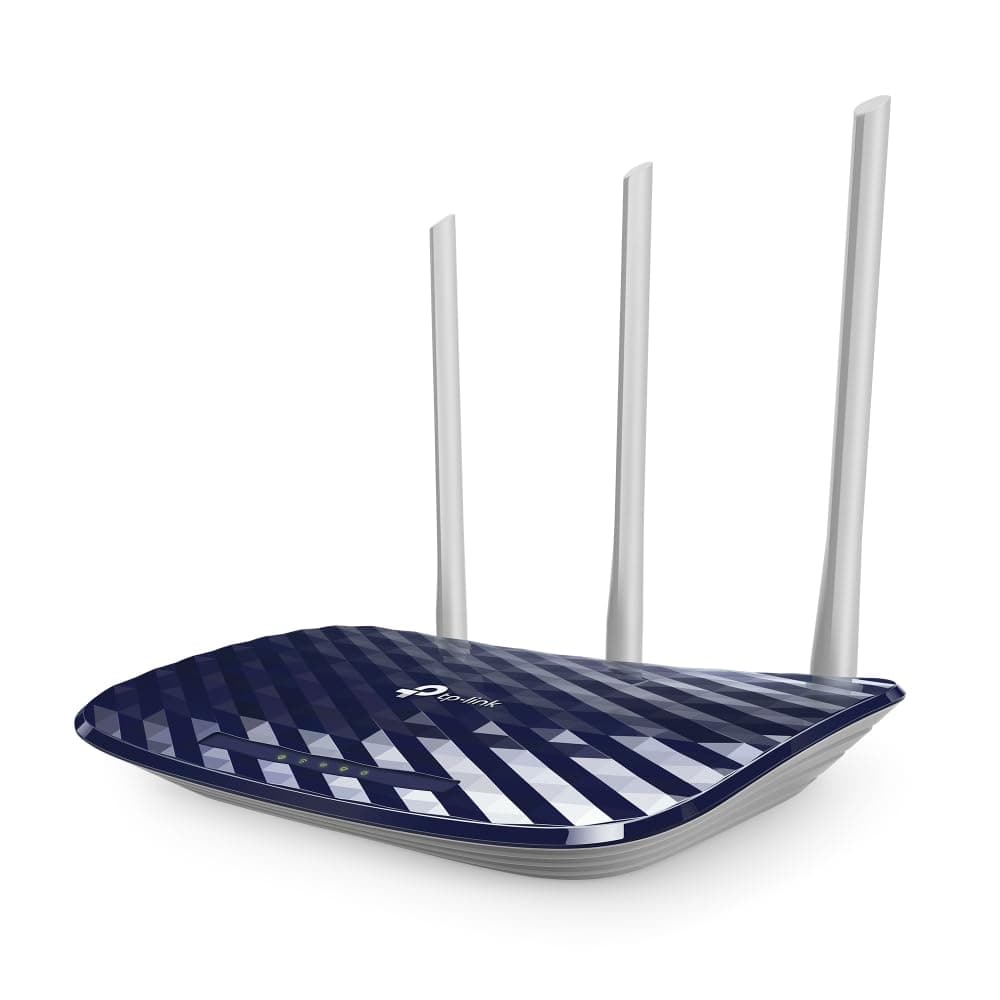


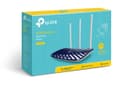
🚀 Elevate your home network game with Archer C20 — speed, coverage, and control in one sleek blue package!
The TP-Link Archer C20 AC750 is a dual-band wireless router delivering up to 750 Mbps combined Wi-Fi speed with 3 external antennas for enhanced coverage. It features 4 LAN and 1 WAN 10/100 Mbps ports, supports guest networks and parental controls via app, and offers multiple working modes including router, access point, and range extender. Ideal for medium-sized homes, it ensures stable connectivity with advanced security protocols and comes with a 3-year warranty.


| ASIN | B0759QMF85 |
| Antenna Location | Gaming, Home |
| Antenna Type | Fixed |
| Best Sellers Rank | #295 in Computers & Accessories ( See Top 100 in Computers & Accessories ) #6 in Routers (Computers & Accessories) |
| Box Contents | Archer C20 Router, Power Adapter, RJ45 Ethernet Cable, Quick Installation Guide |
| Brand | TP-Link |
| Brand Name | TP-Link |
| Colour | Blue |
| Compatible Devices | Laptop, Personal Computer, Smart Television, Smartphone, Tablet |
| Connectivity Protocol | Wi-Fi, Ethernet |
| Connectivity Technology | Ethernet |
| Control Method | App |
| Controller Type | Parental Control |
| Country of Origin | India |
| Coverage | Medium |
| Customer Reviews | 4.3 out of 5 stars 33,622 Reviews |
| Data Transfer Rate | 433 Megabits Per Second |
| Frequency | 5 GHz |
| Frequency Band Class | Dual-Band |
| Global Trade Identification Number | 06935364080730, 06935364086480 |
| Importer Contact Information | TP-Link India Private Limited Office No.1, Tower 2, Level 2, Raiaskaran Tech Park, Andheri Kurla Road, M.V Road, Andheri East-400072 Contact: Toll Free 1800-209-4168, [email protected] |
| Is Modem Compatible | No |
| Item Dimensions L x W x H | 35.7L x 22.3W x 6.8H Centimeters |
| Item Type Name | Router |
| Item Weight Unit of Measure | 0.32 Kilograms |
| LAN Port Bandwidth | 10/100 megabits_per_second |
| Manufacturer | TP-Link, TP-Link Systems Inc. 10 Mauchly, Irvine, CA 92618, USA or TP-Link India Private Limited Office No.1, Tower 2, Level 2, Raiaskaran Tech Park, Andheri Kurla Road, M.V Road, Andheri East-400072 |
| Manufacturer Contact Information | TP-Link Systems Inc. 10 Mauchly, Irvine, CA 92618, USA or TP-Link India Private Limited Office No.1, Tower 2, Level 2, Raiaskaran Tech Park, Andheri Kurla Road, M.V Road, Andheri East-400072 |
| Manufacturer Part Number | ARCHER C20 |
| Maximum Upstream Data Transfer Rate | 750 Megabits Per Second |
| Model Name | Archer C20 |
| Model Number | Archer C20 V4.0 |
| Number of Ports | 4 |
| Operating System | Windows |
| Other Special Features of the Product | Access Point Mode, Guest Mode, Parental Control |
| Packer Contact Information | Vivaan Electronics Technology PVT LTD. Plot No.573, Sector 8, IMT Manesar, Gurgaon 122051, Haryana, India |
| Security Protocol | WEP, WPA-PSK, WPA2-PSK |
| Special Feature | Access Point Mode, Guest Mode , Parental Control |
| Unit Count | 1 Count |
| Voltage | 240 Volts |
| Warranty Description | 3 years warranty |
| Wi-Fi Generation | Wi-Fi 5 |
| Wireless Communication Standard | 802.11ac |
| Wireless Compability | 802.11ac |
V**D
Good product
Good 👍
H**1
Worth the price
Actually very good but 5g signal isn't as strong as I expected. Led turn off at night is a cherry on top
S**R
Good in quality
Very nice
S**H
Speed is good. Range is not satisfactory.
Range is good but not excellent.
A**R
Worth the money!
The build quality, range and functionality of this router is really nice and also the setup configuration was seemless. Just need to check the longevity of this product. Except that all the other things are really nice
R**P
Good Router with not so good signal range+strength.
It’s only been 2 days since I started using this router and I already know what problems it’s going to create. 1. The setup was rather easy and without any issue, it was ready to go in under 5 minutes for a normal home network. 2. The speed was rather good when nearby with negligible latency. I own a 50 Mbps connection and achieved almost all of it easily. But, the 3rd point will explain where the problems with the speed arises. 3. WiFi signal caused the main problem overall. I could sense the signal drop as soon as there was a minor distance of 10-15 feet. Although it works well enough in a separation of one thick wall, you’ll start experiencing signal drops in 2 thick walls. It isn’t able to hold the speed as soon as the signal drops by one bar. It directly got disconnected as soon as I was on a video call in a weak signal even when I could stream youtube and OTTs at the same range. Maybe it couldn’t handle the load, I don’t really know the specifics. I do acknowledge that the position of the router does affect overall performance but I ensured that by placing the same at the most optimum position in my home and still faced such problems. Overall, the router is good in providing the speed efficiently upto 100 Mbps connections, easy to install with good security but the signal strength is a major issue as it cannot hold the speed on a drop of one Wi-Fi bar, thus couldn’t serve my purpose.
P**T
Good product but bad range in 5Ghz channel.
I have spent a better part of several afternoons trying to fix this product and found many issues that might help you. Product is good and does what is advertised. I have been using TP link products for 5 years now to know that they are of decent quality and do their job with some problems once in a while but setting this up has been a nightmare for me. I had recently installed fibre optics and was looking for a router to use for that purpose. After purchasing and easy installation in few minutes i was able to use the router and also set up wireless distribution system to extend its range to first floor of my house. But after a week speed started to fluctuate a lot and i was thinking it was due to my new fibre connection but later found out that it was this router that was fluctuating quite a lot of speed and had to spend several days on calls with customer care which were very friendly but if your product is defective it will take them 14 days to replace it if you are lucky enough to have service center near you but after resetting and again setting up the router the problem seems to have resolved for now. Also i found out that 5 Ghz channel has low range so it will barey work in one room and if there is wall in between than better stick to 2.4 Ghz channel. 5ghz channel in this router is more of a gimmick and of no practical purpose and for me i have it turned off. Another thing for IPHONE users while setting up the router to get better speeds assign a particular channel instead of keeping it at AUTO. it took me 1 week of painfully messing around to find this out that you will not get good speeds without that. For now the products is working fine but i would appreciate if service center are present in major cities at least.
P**H
Very good product in the segment. Recommended
Very good router. I used it as range extender. Really satisfying with the result. Speed is almost the same as in main JIO fiber router. Range of the signal is also good.
TrustPilot
2 周前
1 个月前