We remain fully operational. Our teams are working around the clock to ensure your deliveries continue safely.

下载应用程序




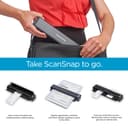
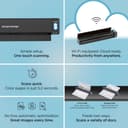
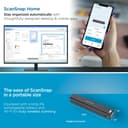
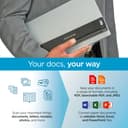
📲 Scan smarter, move faster — your mobile office just got an upgrade!
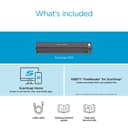
The ScanSnap iX100 is a compact, battery-powered wireless scanner delivering up to 260 scans per charge with 600 dpi clarity. Featuring Wi-Fi Direct Connect and cloud integration, it automatically organizes scanned documents by type across multiple cloud platforms. Its dual-scan capability and one-touch operation streamline digitizing receipts, photos, and business cards on the go, compatible with Mac, PC, and mobile devices. Designed for professionals who demand mobility and efficiency, the iX100 transforms any workspace into a seamless digital hub.


| ASIN | B00NWGGUAS |
| Best Sellers Rank | #75,618 in Office Products ( See Top 100 in Office Products ) #83 in Document Scanners |
| Brand | ScanSnap |
| Built-In Media | Computer Scanner |
| Color Depth | 24 bpp |
| Connection Type | USB, Wi-Fi |
| Customer Reviews | 4.3 4.3 out of 5 stars (614) |
| Global Trade Identification Number | 00097564308444 |
| Item Dimensions D x W x H | 1.87"D x 10.74"W x 1.42"H |
| Item Weight | 0.88 Pounds |
| Manufacturer | PFU Limited |
| Media Type | Business Card, Paper, Photo, Post Card, Receipt |
| Minimum System Requirements | Windows11 / Windows10 (32bit/64bit), Intel, or Intel-compatible processors, macOS Monterey 12 or later, iOS 16.0 or later, iPadOS 16.0 or later, Android 10.0 or later, ChromeOS 138.0.7204.178 or later |
| Model Name | IX100 |
| Optical Sensor Technology | CIS |
| Paper Size | 1 x 1, 5 x 7, 8.5 x 11, 8.5 x 14.17, 11 x 17 |
| Resolution | 600 |
| Scanner Type | Document, Receipt |
| Standard Sheet Capacity | 100 |
| UPC | 701480494951 744784767734 097564308444 012305045570 |
| Unit Count | 1.0 Count |
| Warranty Description | 1-Year Depot warranty |
| Wattage | 600 watts |
L**K
Damn near perfect for organizing receipts
Scanner This is a great little scanner - in over 300 receipts, not one misfire - narrow, slippery cash register receipts, 8-1/2X11 sheets, odd sized, adhesive backed labels, the feed mechanism worked nearly flawlessly - on the rare occasion of a skewed feed, the software straightened the scan nicely - One tip, keep a pair of scissors handy to clip any tear off tips - they will prevent the receipt from feeding squarely - the clip can be at an angle - as long as most of the leading edge is 'square', the receipt will feed accurately - __________________/| << Tear off tip |xxxxxxxxxxxxxxxxxx| |xxxxxxxxxxxxxxxxxx| |xxxxxxxxxxxxxxxxxx| |xxxxxxxxxxxxxxxxxx| I bought this particular scanner primarily because it included ScanSnap Receipt - managing my receipts as I travel around the country is a major PITA - it looks like all the Fujitsu scanners include ScanSnap Organizer, but only certain ones have this receipt processing application - if you're looking to manage receipts, check the included software carefully - Installing the software took a while (a couple hours including updating) - it appears to be a well featured suite, but so far I have only used the ScanSnap Receipt application - After scanning a batch of documents (make certain they are all of the same type, eg receipts, business cards, etc), the application to process the batch is selected - Another tip, if you scan a batch of receipts and checked the processed results, close that application - if not when you scan the next batch (say business cards), they will 'automatically' be processed into the open application - if no apps are open, the option to choose will again open - The supplied USB cable is short - it was awkward to hold the scanner in my hand to do a 'USB' linked scan, which was possible right out of the box (after the software installation) - Connecting a computer to the scanner WiFi as an Access Point was simple enough, but a PITA to change computer network connections around every time I wanted to do a scan - To connect the scanner to my home network took a bit more finagling, but well worth the effort - to do a scan, just open the scanner wait a few seconds for the connection and scan away - I don't know how long the scanner battery will last, but with the scanner's WiFi connection to a home network, you are free to do scans anywhere with no cables connected - The Scansnap Recipt software is decent - the software attempts to collect the Merchant, date, total amount, tax amount, cash/charge card and last 4 of charge card - of course, it makes a fair amount of errors which are relatively easy to correct - there is an option to assign a category and sub category (Auto:Fuel, Groceries, Utilities:Electric, etc) - and lastly, there is a free form notes field - any search/sorting is only on those fields - Issues: I haven't figured out what the software does when it 'combines' two entries - I think it just merges the formatted fields and retains one image - frankly, that doesn't seem useful, but I am not certain - A feature that that would allow multiple images for one receipt would be useful - my work around is to include a note with the some identifying number (order number) followed by Page X of Y pages - I leave the amounts $0.00 for the addtional pages, but do fill the Merchant, Category & date fields - Another feature that would be very useful is a formatted field for Cash Back amounts - the total amount usually does not include any cash back amount - that seems reasonable, but it would be nice to have a specific field designated to contain cash back amounts - again, I add a note "$X.XX Cash Back" - As best I can tell, any export does not include the image - Export to an Excel file is simple, but without the image is of little value - After doing a scan, a processing application MUST be specified, otherwise the scans will be lost - that is not really a problem - including a scan into an application is called 'registering' - trying to use the application while it is registering new scans is pretty 'stodgy' and it can take a while (maybe a minute or two per scan, a bit more?) to register scans - trying to edit a registered scan while the application is registering new scans can be frustrating - corrections get ignored or interrupted - Even after all new scans are registered, the ScanSnap application isn't smooth - it can take several seconds after clicking on a different entry for that entry to display - at this point I only have 300 entries in the data base - with no method to export images for archiving, the data base is going to continue to grow without bounds - there is a backup and restore function, it might be possible to backup data to a years worth of receipts and then delete those receipts from the active database - One last tip, scan receipts as soon as they are collected is simple and quick - I had a lot of 'catching up' to do - a lot of the recipts I scanned were older, faded, hard to read and so on - in spite of those obstacles, I scanned several hundred receipts in a relatively easy couple/three hours - - In summary, I am impressed with this small scanner - it works well, feeds all sorts of different items without hassle - the receipt software is decent, OCR grabs the most important information and provides an organizing system for receipts - So far, I have no experience with Cardminder, Folder, Mobile, Dropbox, ABBYY Scan to Word, Excel, etc -
C**C
LOVE this mobile scanner! Perfect for my mobile business!
I was very hesitant about getting this product after I read some of the reviews but got it anyway because I had a Fujitsu desktop scanner which I really liked. I was trusting that this would be as good despite some of the reviews. I am so glad I did. I LOVE THIS SCANNER. I have become more efficient in my mobile business and it's quick and easy to set up. I can't rave enough about the speed and ease of use. I'm a mobile notary and I have to scan and fax documents back to lenders. The copies are clear, it scans into one file, I can use either letter or legal, I can rename the file and fax or email right from the software program using my IPad. Love...love...love it! I have decreased the amount of time it takes to complete a signing and have increased my income because I can now do more signings. Fit's perfect in my notary bag as it slides easily in one of my side pockets. This is worth the money I spent on it as it will pay for itself in ONE DAY!
L**Y
Fujitsu is the Gold Standard for Business Scanners
I've had this unit for about a year now and it's still going strong. First off, I have several of the Fujitsu ScanSnap iX500 desktop scanners (and I had some of the model before that) and I consider those to be the "Gold Standard" of desktop medium-heavy duty scanners. They are affordable and just work. The little brother of the line, the iX100 continues the tradition. The important killer feature is that via WiFi you can scan and automagically upload to your cloud storage from wherever you are. You will need to wire it up to a computer initially to set it up. By the way, it is not immediately obvious, but it will automatically jump on multiple Wifi signals, so you can set it up to automatically link up with your office, your home, your cell phone hotspot, etc as you change locations. I'm not sure what the limit is, but its at least four different WiFi signals. Also remember it is portable so it is not a speed demon, although it is reasonably fast; you have to feed the sheets individually, and it is simplex (single-sided) scanning only. It can be set up to await the next sheet so you can do a multipage or two-sided document. It has a built-in battery which recharges relatively quickly via a standard "cell phone style" USB cable so you can recharge it in the same way as an Android cell phone. In use you can either hard wire it to your computer, or else you just flip open the cover, and after a few moments it will find the available WiFi signal, you can start scanning direct to your preferred cloud storage provider, and thereby have the document available for further processing in near real time by whomever has access to your cloud storage wherever they may be. While the unit is not fragile, it is a bit delicate so I would definitely recommend you get the little carrying case, At the time I bought it, they didn't have any third-party cases available, but apparently now they do. The OEM case works just fine, and the unit fits like a glove, but I wish there was a little storage pouch to keep the little 6-inch cable I use with it when I hook the unit up to my laptop directly. I definitely recommend this small scanner for its intended use case, and I will likely purchase additional units for staff members as the need arises.
T**S
wireless portable scanner
nice and convenient for scanning document
A**R
As a small business owner myself, I can't help but rave about the Fujitsu ScanSnap iX100! This little device has made my life so much easier by automatically recognizing and sorting receipts, saving me tons of time. What I love most about it is how user-friendly it is. Even without technical expertise, setting up and using the scanner is a breeze. Plus, it's super portable, fitting easily into my bag or briefcase when I'm on the move. And let's talk about space! The iX100 takes up barely any room on my desk, perfect for my limited office space. I've also managed to empty my wallet of all those receipts, which feels great for decluttering my workspace. To sum it up, if you're a fellow small business owner seeking an efficient way to manage receipts and keep your workspace tidy, you should definitely check out the Fujitsu ScanSnap iX100. Its user-friendliness, portability, and space-saving design make it an absolute must-have!
J**E
This is absolutely a great portable scanner that makes high quality scans! Installation of the drivers and use of the programs from the online website was very easy to figure out. Most of all, operating the scanner alone was straightforward - you just open the lid and hit the 'scan' button and you can choose to save anywhere you like (computer, cloud, phone, email, etc) I was generally surprised by how great the quality of the scan is. The only downside is that you can only scan one sheet at a time. So, it's great for daily use of items you want to scan like receipts, financial statements, etc.
S**S
I like how smooth the scanning is and how compact it is. Sometimes the scans look a little different from page to page, such as the colour, but perhaps I don’t know how to use it probably.
A**R
I've had the product for a couple weeks. Scanned about 25 documents so far. Scanner handles everything I can throw at it from crunchy receipts to regular letters. I find that using it wired to the computer is easiest. Just open the scanner door and it turns on and will accept your scan. Scan will work even if the computer is sleeping which is a great feature. Scanner has profiles so you can select the type of scan (receipt, document etc.) and use pre-set settings suitable for that type of scan. Most of the time I am in receipt mode because that is what I purchased it for. The software is running on Catalina with no issues. Software (ScanSnapHome) is highly configurable. My biggest gripe overall is that the support website and instructions are complicated and not the easiest to figure out. Example, I still have not figured out how to scan to the cloud or scan to an iPad, iPhone although I know it is possible. Scanning to a Mac is fairly straightforward by usb or wifi, but again, not sure how to get it to scan straight to cloud storage. Overall scans are very fast, and the machine is very well designed and built. More advanced features are hard to set up. The latter issue keeps this review at a 4 star for me. Could be 5 star if addressed in future software updates.
A**R
Portable, easy to use and good quality scanner that I would recommend.