We remain fully operational. Our teams are working around the clock to ensure your deliveries continue safely.

下载应用程序


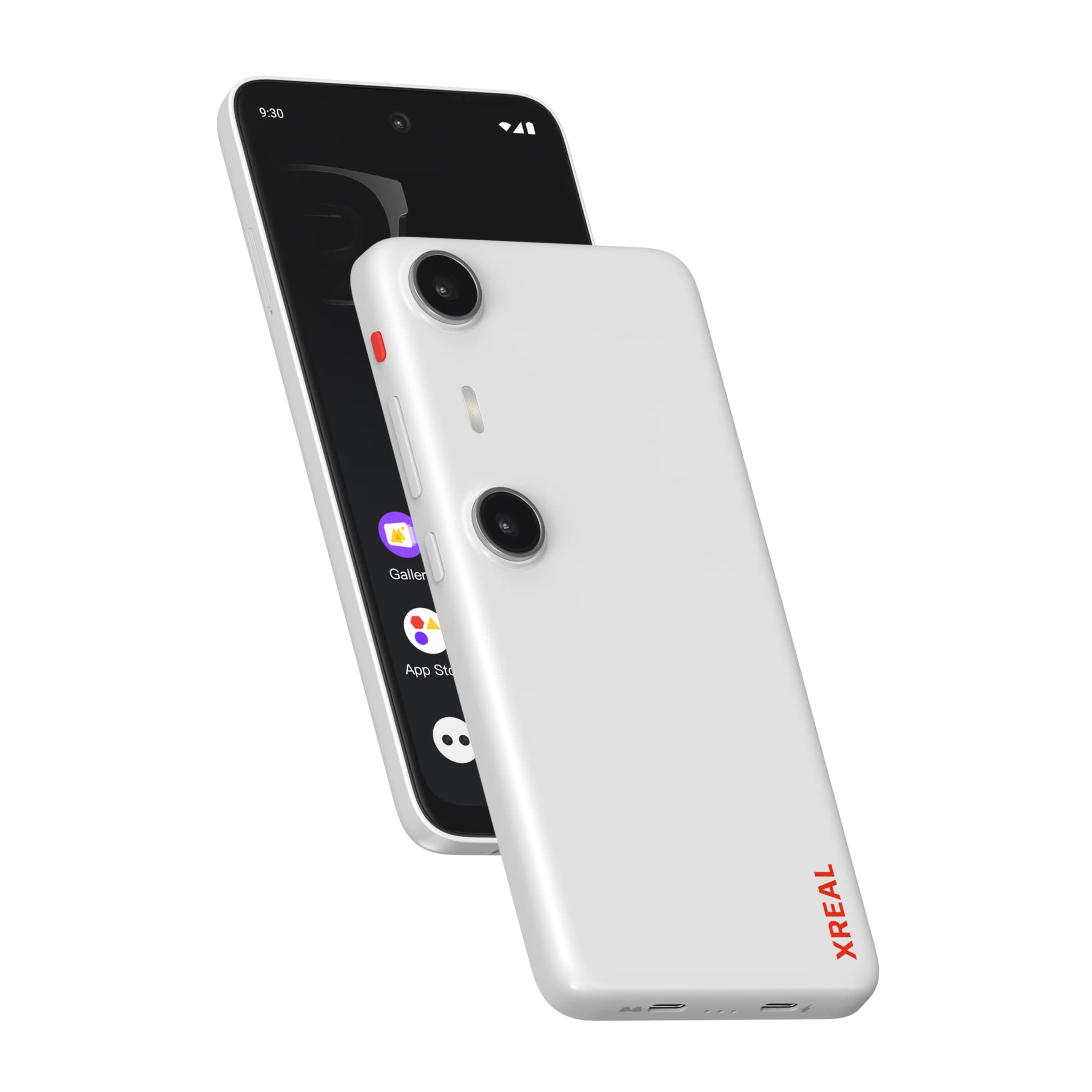
🚀 Elevate your reality — Work, play, and capture in stunning 3D with XREAL Beam Pro!
The XREAL Beam Pro 5G AR glasses combine cutting-edge Snapdragon-powered Android 14 OS with full Google Play Store access, dual 50MP 3D cameras, and a 90Hz FHD display. Designed for professionals and gamers alike, it supports multi-screen spatial computing, cloud gaming, and immersive 3D content capture. With WiFi 6 connectivity and a lightweight foldable design, it delivers seamless, low-latency experiences for work, entertainment, and creativity on the go.


| ASIN | B0DXPW3HPV |
| Average Battery Life Talk Time | 20 Hours |
| Best Sellers Rank | #25,459 in Electronics ( See Top 100 in Electronics ) #8,125 in Televisions & Video Products |
| Brand | XREAL |
| Built-In Media | ar glasses |
| Cellular Technology | 5G |
| Color | White |
| Connectivity Technology | 5G |
| Customer Reviews | 3.9 3.9 out of 5 stars (321) |
| Display Resolution Maximum | 1920 x 1080 |
| Display Type | LCD |
| Effective Video Resolution | 1080 Pixels |
| Flash Memory Supported Size Maximum | 256 GB |
| Form Factor | Foldable Case |
| Frame Rate | 90 |
| Front Photo Sensor Resolution | 50 MP |
| GPS Geotagging Functionality | False |
| Headphones Jack | No headphone jack |
| Manufacturer | XREAL |
| Memory Storage Capacity | 256 GB |
| Model Year | 2025 |
| Number of Front Cameras | 2 |
| Number of Rear Facing Cameras | 2 |
| Operating System | Android 14 |
| Phone Talk Time | 20 Hours |
| Processor Series | Snapdragon |
| RAM Memory Installed | 8 GB |
| Rear Facing Camera Photo Sensor Resolution | 50 MP |
| Refresh Rate | 90 |
| Resolution | 1920 x 1080 |
| SIM Card Slot Count | Dual SIM |
| Sim Card Size | Nano |
| Specific Uses For Product | Gaming, Streaming, Photography, Videography |
| Video Capture Resolution | 1080p |
| Warranty Description | 1 Year Manufacturer |
| Water Resistance Level | Not Water Resistant |
| Wireless Network Technology | GSM |
| Wireless Provider | Unlocked |
P**G
Really good accessory for the Air 2 Pro
I have been using the Air 2 Pro glasses for a little under a month now. They’ve been really good for flights and other commutes when I want a bigger screen. I’ve also used them with my work laptop as a second display when remotely working. After some more time with them, I realized that just using my phone with them had a few limitations. I couldn’t run my own streaming apps without the phone screen continuously turned on. The glasses also took up my phone’s only USB port. This meant that the glasses really ate at my phone’s battery, even in flight mode. So when I heard about the Beam Pro, I decided to make the purchase. They’re more closely integrated with the glasses, and you can use any app with the NebulaOS, which is more like a launcher specifically made for the glasses. They basically fixed my only complaint with the Air 2 Pro (which is really a complaint with my phone, not the actual glasses). There doesn’t seem to be any latency associated with the glasses, which is great. I’ve done a few things with them so far, namely PS5 remote play, local gaming (emulation), and video streaming (Plex and Max). The picture quality using NebulaOS is about the same as using my phone, which is to say, very vivid and visible. I connected a PS5 controller for remote play and gaming, and the Beam Pro handled it all very well. There’s a button to toggle between smooth follow (screen follows your eyes), and fixed position (screen floating in space). Smooth follow has some added stabilization, which makes using the glasses way more comfortable than just plugging in your phone, which if you move around too much, might get dizzy. This has been a BLESSING honestly. I also tried using the Beam Pro with my laptop, setting up virtual monitors via Parsec and SpaceDesk. The Beam Pro can run multiple windows, so I was able to set up two floating monitors within the glasses. I turned on fixed position and enlarged the Beam Pro windows, so the elements were way easier to see than just plugging the glasses in. The product runs Android, so it’s really versatile. It’s a new product and the team seems to be pretty responsive on Reddit, so I’m looking forward to some other creative use cases.
M**R
Love this soo far...
I own 3 phones. The HTC U11, HTC U20, and the Galaxy A52. BOTH the HTC phones supports Video output over USB-C, and the A52 does not. I own both the Rokid Air glasses and the Xreal/Nreal glasses. The Rokid Air space software works great on my HTC U20 phone (too slow on the U11), and the virtual reality does also. But, for the life of me, the stupid Xreal/Nreal Nebula software does NOT work on the HTC U20 phone at all. First, it can't find the software in the android store, and says it's not compatible, (even though the Rokid Air software is compatible). I did some goole search, and found a work around to get the Nebula software to install on the HTC U20, but it needs an update, and it WON'T update, because the phone isn't compatible. Nreal, get the Nebula to work on HTC U20 (with video over USB-c). Or, purchase this item, Xreal Beam Pro for $200, with the Nebula software built in. So far, I love this. I owned the Nreal glasses for about two years, but couldn't use it because nothing supports it. Not even the PC software. But, finally, I can use my Nreal glasses with the Xreal Bean Pro. I'm giving it 4 stars because of some bugs with the software. 1. When I tried to login to one of my streaming service, I forget which one, the virtual keyboard cam up for the user name/password. But, it sent me a 6 digit code to my email address. When I tried to enter the code into the streaming service, the virtual keyboard did NOT come up. 2. Bluetooth mouse. The bluetooth mouse worked on this device. But, as soon as I connected the Nreal glasses and launched the google chrome web browser, the mouse movement became REVERSED. Left/Right reversed, and Up/Down. Very irritating. When I disconnected the glassess, the mouse worked correctly on the Beam's screen. When I reconnected the AR glasses, the muse was reversed again.
と**ら
perfect match for the xreal glasses
I love it, its basically a phone i got the 256 no sim card option. it feels like a phone but works good for using the glasses. Only complaint is the mouse mode is hard to use on public transportation to skip stupid Youtube ads and stuff. you think you are hovering over the skip button and next thing you know the bus moves and you clicked else where! But The device is great, feels good. display is bright and clear, camera is great and the android store has some decent games that pair well with or without the glasses
A**D
Not ready for Prime Time
Don’t really work that well. You need a lot of patience and figure out work arounds to make basic functions work. Amazon Prime looks awful when I connect to the beam but looks great when using an iPad. This product is not really ready for prime time - I would suggest just getting the glasses and use your own device. After a couple of months it still not ready for prime time. It feels like a prototype that was rushed out the house. The glasses are great but the Beam not so much. Not for anyone without a lot of technical expertise with devices. Went to watch NFL ticket on YouTubeTV and nothing. Beam or iPad showed nothing when I connect the glasses to either device. When it works it’s great but it is so frustrating to use. Wait a few generations for this product.
V**N
Bad quality product. Screen was pixel damaged already for new product from the box from the very beginning.
T**R
Great device. Camera is awesome, so many features.
A**A
نود استرجاعه حيث تم تعطيل الجهاز دون سبب
M**K
works as described but very expensive if you live in canada.
L**O
XREAL Beam Pro Excelente producto de alta gama. Memoria y capacidad alta. Almacenamiento 250 GB y 8 GB RAM