We remain fully operational. Our teams are working around the clock to ensure your deliveries continue safely.

下载应用程序




⌨️ Elevate your tablet game with AI-powered, ultra-slim brilliance!
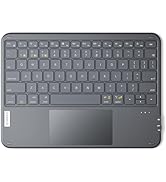
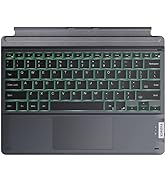
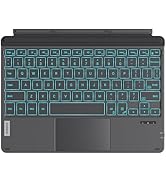
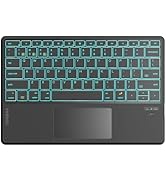
The Inateck Tablet Keyboard is a premium ultra-slim (6mm) and lightweight (340g) Bluetooth keyboard with a large touchpad and 7-color backlight. Compatible with multiple tablet models and operating systems, it supports seamless multi-device switching and integrates AI-powered features via the Inateck APP for enhanced productivity without extra accounts or cloud hassle.





| ASIN | B0DSZJKTMD |
| Additional Features | AI Function, Backlit, Lightweight, Trackpad |
| Antenna Location | Business, Education, Everyday Use, Student |
| Best Sellers Rank | #70 in Tablet Keyboards |
| Brand | Inateck |
| Compatible Devices | iPadOS/iOS/Android/Windows iPad 10/9/8, iPad Air, 12.9''/ 11''/ 10.5'' iPad Pro, iPad Mini 7/6/5 |
| Connectivity Technology | Bluetooth |
| Customer Reviews | 3.6 3.6 out of 5 stars (27) |
| Enclosure Material | Fabric |
| Hand Orientation | Ambidextrous |
| Item Dimensions L x W x H | 0.24"L x 0.24"W x 0.24"H |
| Item Weight | 11.2 ounces |
| Keyboard Description | Multi Functional |
| Keyboard Layout | QWERTY |
| Manufacturer | Inateck |
| Model Number | KB01104NEW1-G-US2 |
| Number of Keys | 78 |
| Power Source | Wired (passive input) |
| Style Name | Pro |
| Unit Count | 1.0 Count |
| Warranty Description | 30days |
K**I
3-device Bluetooth keyboard with trackpad, perfect K*M application for a 3 laptop setup
I am not a gamer, so i don't need a separate keyboard and mouse configuration. Looking around for a combo keyboard and mouse setup that you can switch between multiple workstations is hard because none of the top peripheral makers make these types of devices for some reason. This device supports Windows, Linux GUI, Apple, and Android tablets. Typing on the keyboard is the same as a laptop, the trackpad is super responsive, and it is thin yet strong. Had the device for about 2 weeks now, no issues to report. This device would be a direct comparison to the Lenovo ThinkPad Bluetooth keyboard with trackpoint. Now you have two options :) Hope this helps
C**O
Best thin and light keyboard on Amazon
I've been using this product for a while in tandem with my iPad, and I would definitely recommend it. It is thinner than many other keyboard options, including a foldable keyboard I once owned. The trackpad is very snappy, and the keyboard feels solid and premium. I also appreciate the backlighting. If they decide to create a second generation, I have a few caveats or nitpicks for improvement: 1. The Trackpad (a) The build quality: It feels like a wobbly trackpad, which is ridiculous given how nice the rest of the unit feels. (b) The click mechanism: It should be a single-button style, especially since I can already use a two-finger click to select items and open menus. (c) The size: I wish the trackpad were slightly bigger. Since it is a standalone unit that isn't physically connected to the iPad, I wouldn't mind if the overall footprint was a bit larger to accommodate a better trackpad. 2. Apple Functionality (a) Keyboard layout: Either introduce an Apple-only version or one with better Apple integration. (b) The Globe key: I use the Globe key frequently, and having it all the way up in the function row is inconvenient and annoying. It almost discourages me from using the keyboard sometimes. Overall, I still highly recommend this product. If they come out with a second version that improves on these details, I will definitely buy it—unless Apple or another brand I like releases something significantly better first. I think this company should release an improved second generation before another brand becomes the default choice. Under those circumstances, I wouldn't feel the need to upgrade anything except this keyboard.
J**K
3 Foot Range Ruins Otherwise 5 Star Keyboard
The keyboard is light, great shape for the lap, good battery life, cool key backlight color options, good typing and key bounce... all great! EXCEPT It will not work more than 3 feet away from direct line of sight from your PC. It has terrible connectivity. It seems to get WEAKER over time. I have tried the reset key combo to hopefully fix the issues but it continues to be really laggy or unresponsive. It's a shame because it's REALLY nice otherwise! Can only hope for a new driver at some day if it's possible to fix it.. I was really hoping this would be an excellent couch keyboard for my mini PC connected to my TV, but the search continues.
J**N
excellent backlit tablet-style bluetooth keyboard
I am in love with this little Inateck model KB01104 backlit tablet-style bluetooth keyboard. My initial impression is that it is well made and of high quality. The internal rechargeable lithium-ion battery is charged via a type C port. Included in the kit is a 32inch long USB type A to type C charging cable. So - first thing - i charged the keyboard. And the keyboard never took over 5Volts even though i had it on a type C PD charger. And - just as the instructions had suggested it would - it took about 2 hours to fully charge. And the keyboard comes with excellent instructions which explain all the tricks it can perform. But since i intend to use this in its most basic form, my plan is to keep the instructions closeby to the keyboard and only access those instructions whenever i need to learn necessary details like how to select the seven backlit colors and the three levels of backlit brightness. But for those of you who might want a keyboard with a ton of tricks, this seems like an excellent choice. I ordered this keyboard to use with a tiny GMKtec Mini PC NucBox G5 running Windows 11 Pro (with Intel 12th Gen Alder Lake N97, 12GB RAM, and a 256GB M.2 SSD and with built-in bluetooth 4.2.) The (bluetooth) setup was super easy - i simply pushed the switch at the lower righthand of the keyboard all the way to the right (to ON.) And then accessed WIN11’s bluetooth settings at the lower RH of the screen and said YES to “do you want to connect to Inateck KB01104 ?” And i totally love the backlighting and the touchpad. The backlight comes in seven different colors and three different levels of brightness. There are all kinds of shortcut keys available: for example - control of brightness is F1 for - and F2 for + and the <function key + ENTER key> (pressed simultaneously) changes the color of the keyboard’s backlighting. Alternately the <function key plus the SHIFT key> (pressed simultaneously) changes the brightness of the backlighting. And the charging indicator lights are the kind of simple that i love: solid red means “charging” and solid green means “fully charged.” And the keyboard keys are very delightful to my fingers. And the backlight turns off after about ten seconds of inactivity (to save power) but turns right back on at the first key-press. It’s all simple, straightforward and so logical. All-in-all i totally love this little keyboard for my application - especially that it provides a very useful backlight and it allows me to avoid having to use that computer mouse. (Although i hate computer mice and love touchpads, i left the old hardwired keyboard and old hardwired mouse attached even after i connected this new bluetooth keyboard; They all three remain happy working together without interfering with each other.) And although i am using this new bluetooth keyboard paired to a mini-desktop running Windows 11, i would imagine that this keyboard offers the same benefits to someone pairing this keyboard with a tablet device running some other operating system.
H**B
1 year on..
Surprisingly long battery life, I forget to charge it. If you can get it on sale. Do it!
TrustPilot
2 周前
2 个月前