We remain fully operational. Our teams are working around the clock to ensure your deliveries continue safely.

下载应用程序


🖐️ Elevate your workflow with comfort and precision — because your wrist deserves the upgrade!
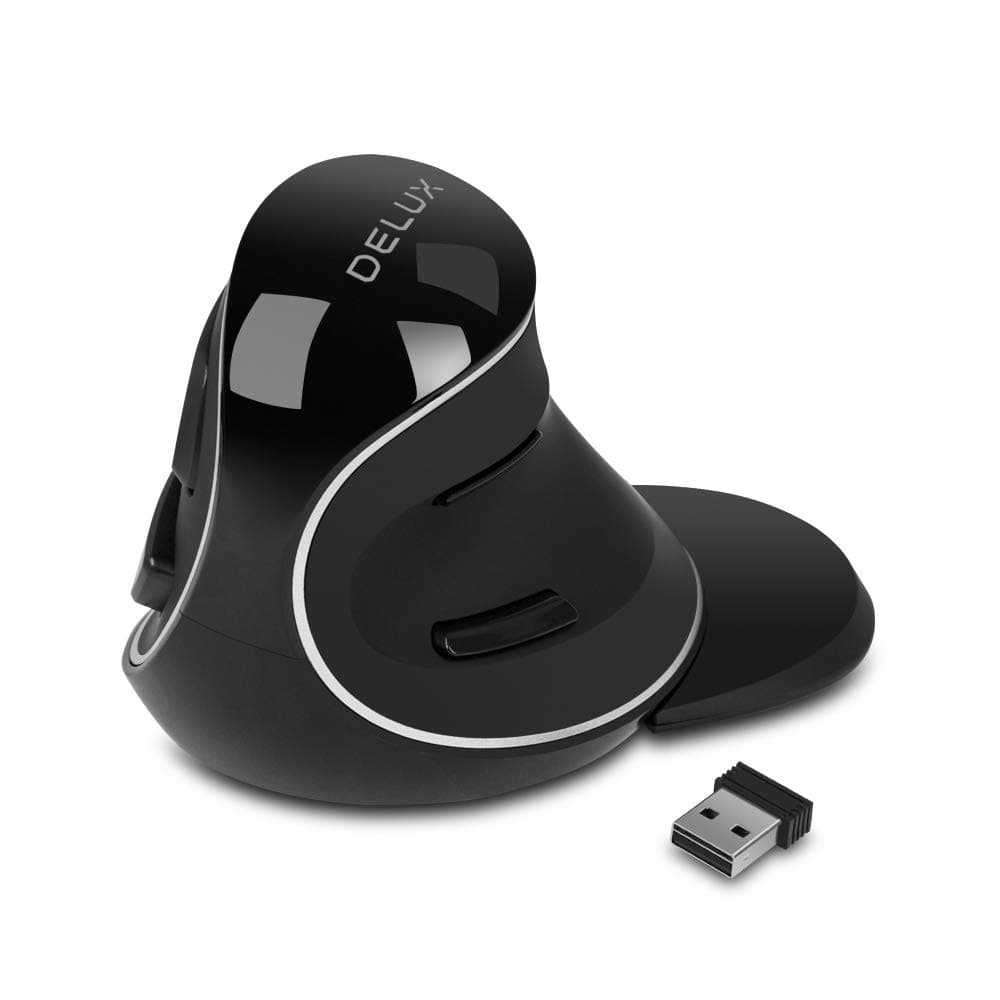
The DELUX Ergonomic Vertical Mouse (M618Plus Wireless) is a wireless, right-handed mouse designed specifically for large hands. Featuring a unique vertical ergonomic design, it reduces wrist strain and hand stiffness. It connects via a stable 2.4G wireless USB receiver with a range of up to 33 feet, requires one AA battery (not included), and offers three adjustable DPI levels up to 1600 for precise tracking. Equipped with six buttons, silent clicks, and a removable wrist rest, it’s compatible with most Windows PCs and laptops, making it an ideal choice for professionals seeking comfort and productivity.




| ASIN | B07G5BH3D4 |
| Additional Features | ➤Ergonomic Vertical Design ➤2.4G Wireless Connection ➤Powered by a Single AA battery ➤3 Adjustable DPI Levels ➤Removable Wrist Rest ➤Widely Compatibility ➤Silent Clicks ➤Plug and Play ➤7*24 Hours Customer Service and 1-Year Warranty |
| Antenna Location | Office |
| Are Batteries Included | No |
| Are Batteries Required | Yes |
| Best Sellers Rank | #347 in Computer Mice |
| Brand | DELUX |
| Built-In Media | ➤M618PLUS Wireless Ergonomic Vertical Mouse ➤Removable Wrist Rest ➤2.4G USB Receiver ➤User Manual ➤Reliable Customer Service |
| Button Quantity | 6 |
| Color | 2.4G Wireless |
| Compatible Devices | Laptop, Personal Computer |
| Connectivity Technology | Radio Frequency |
| Customer Reviews | 4.2 4.2 out of 5 stars (6,647) |
| Enclosure Material | Plastic |
| Hand Orientation | Right |
| Hardware Platform | PC |
| Item Dimensions L x W | 4.21"L x 3.74"W |
| Item Weight | 180 Grams |
| Manufacturer | DELUX |
| Model Number | DeLUX-M618Plus Wireless |
| Mouse Maximum Sensitivity | 1600 Dots per Inch |
| Movement Detection | Optical |
| Number of Batteries | 1 AAA batteries required. |
| Operating System | Windows |
| Power Source | Battery Powered |
| Range | 33 feet |
| Style Name | Modern |
| Unit Count | 1.0 Count |
K**S
Nice mouse with a quick learning curve
It's a nice vertical mouse that I took to VERY quickly, that didn't leave me fumbling around trying to be able to use it. Maybe I'm more adept at spatial orientation, I am an engineer, and I do my own CAD work so the orientation change honestly seemed transparent. I did have to mess with the DPI a bit so I wouldn't run the mouse across 2 monitors, now I can do CAD, games, and just regular day to day stuff with it. I have a fairly big hand the only thing I can complain about, maybe, is since there are buttons for thumb as well as your index finger, I've accidentally hit back instead of left click a few times. It also has a wrist wrest, but I find it's too cumbersome somehow... I think if the mouse was a tad heavier, that would help too, because sometimes I'll grab for it after typing and I'll boot it across the desk because the web of my hand hits before the palm and it shoots the mouse away. If it had a half ounce of extra weight or so, I suspect it would have just enough stiction and body mass to overcome that little bit of hand pressure when you grab for it. Is it enough for me to worry about it, not at all. I'm just used to a weighted gaming mouse. Also, that being said, the teflon pads on the bottom make it glide very smoothly on desktop or big mouse pads. I also have the model that has the dongle along with the bluetooth function and wifi. It picks up motion very fast from being 'asleep' way better than my microsoft 5050 keyboard/mouse combo does when it dozes off. I'm using the the bluetooth option, no issues. How long will batteries last? I have no idea, I try to turn in off at night when I remember to, but I never had to with my microsoft 5050 mouse, so it's a thing I have to remember to do. All told, you can use this thing all day long and your wrist doesn't give you any static, I'm definitely happy with it.
D**N
Great Mouse, Great Customer Service
I work from home and have my hand on a mouse a lot of the time. I found that after using a standard mouse for extended periods of time, my wrist would hurt due to the unnatural wrist angle. This vertical mouse is perfect to alleviate that pain. After a week of use, I no longer had any pain in my wrist. The size is also perfect for me, and it’s nice to be able to change the DPI setting based on your preference. Sadly after eight months, which is two months after the warranty ended, the batter on my mouse died and it would no longer charge. The battery lasts a really long time, and I only charged the mouse a few times, but when I did I would plug it into a wall charger. This is apparently not how you’re supposed to charge it, si improbably overloaded it. This stipulation is clearly stated in the product documentation which I clearly ignored. I decided to take a chance and reach out to customer support despite the warrant period already being over. I explained the situation and without hesitation they offered to send me a replacement mouse to rectify the situation. Wow, now that’s what I call caring about the customer. For the the reasons outlined above, I highly recommend this ergonomic mouse to anyone looking to prevent wrist pain, while knowing that the manufacturer will have your back if something goes awry.
-**-
Nice mouse with Pros and Cons
My mouse died so I had to look for a new one. IT has been ages since I shopped for a mouse and this new ergonomic style looked to have some advantages over traditional mice. So lets get into it. I work on a computer all day 8-16 hours a day depending upon demand. I do not game much. I have been having trouble with Tennis elbow over the last couple months, no idea why as work habits an life have not altered. I thought the ergonomic mouse might help because of the change in wrist/hand angle. I only got it an hour ago so I have no info on whether it will actually help that but it is comfortable. Now for the details. My hand is 7.5" long. Using a more snug, not tight, grip with my palm resting firmly on the body of the mouse, my ring finger extends about 0.25" beyond the LED line around the body while my thumb has 0.375" extra space beyond the end. I like the thumb button placement being 1 above and 1 below. That allows for slight movement to activate the buttons. The main button placement is good. I have medium width fingers and can operate the buttons with either index and second finger or index and ring finger depending upon how I rest my palm in the grip space. The roller button is responsive and works well with a slight detent feel as it rolls. However, it is a bit of a miss in terms of ergonomics. It is too close to the palm to use the middle finger on the roller when gripping the mouse closer. I have to either clench raise my hand slightly off or to the rear of the mouse or clench my middle finger to get to it. Neither of those is ergonomic. Rotating the body of the mouse and thus adjusting the relative positioning in the hand, allows using the first two fingers for the button and more efficient use of the index finger to use the roller. (It would be really nice to have that roller father forward away from the wrist allowing better usability for the middle finger. Then I could engage all three fingers simultaneously... While the ergonomic shape is nice for releasing tension in the forearm, the one thing that is very different is the movement to and from the keyboard. on a traditional mouse the user barely needs to raise the wrist to move across the mouse to type. the forearm can stay on he desktop. The significantly increased height makes a much larger gross motor movement to get to and from the keyboard. I am not sure I like that. It is a very different movement so it will take come time to get used to. The DPI selection is very nice allowing the users who want faster movement and more sensitivity to get it. The instructions indicate that it will go up to 12800 and the cursor zooms. While the mouse works out of the box, some of the features require the driver to be downloaded from their site and installed. Installation requires admin level access.
J**A
Es muy cómodo y funciona bien
I**E
This vertical mouse is very wonderful to use in my experience. I found that using a wrist pad placed directly underneath the joint of the wrist to elevate my hand makes it most comfortable (there are many available here in Amazon). Of course everybody has different preferences for a mouse, but I have tried so many of the market almost screamed. I believe that a corded mouse like this one produces the least damaging radiation (I have also turned off Wi-Fi in my house) because it does not use Bluetooth. It is also very accurate because it plugs directly in to USB. The two click buttons on the right-hand side of very natural to use,. So what can I say? You need to try for yourself. But after trying may be 15 different kinds of mice over the last several years, I have settled down to use these for the last two or three months and don't picture myself going back.
J**G
Excellent mouse. Sensor is good for gaming. It's heavier than most mice but I like the solid feeling. Doesn't feel cheap and fits my large hands. It took me a while to get used to the orientation (which way is "north" on the mouse) but now this is my favorite mouse of the five different mice I ordered. I purchased another copy of this mouse as a backup, just in case they stop selling it in the future.
R**O
Produto de ótima Ergonomia, se encaixa perfeitamente na mao, otima qualidade e precisao!
C**E
Excelente produto. Ótima qualidade e acabamento. Muito confortável e ergonômico.