Buy anything from 5,000+ international stores. One checkout price. No surprise fees. Join 2M+ shoppers on Desertcart.
Desertcart purchases this item on your behalf and handles shipping, customs, and support to Taiwan.
🔌 Print Smarter, Not Harder: The Ultimate USB Switch for the Multi-Device Pro
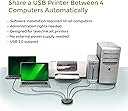
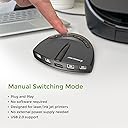
The IOGEAR 4-Port USB 2.0 Automatic Printer Switch (GUB431) enables seamless sharing of a single USB printer or device across up to four computers. Supporting USB 2.0 speeds up to 480Mbps and backward compatible with USB 1.1, it features automatic switching, a manual push-button toggle, and a switch-lock for secure access. Compatible with PCs and Macs, it requires no external power or drivers, making it an essential productivity booster for multi-device work environments.


| ASIN | B0036Z322Y |
| Actuator Type | Push Button |
| Best Sellers Rank | #50 in KVM Switches |
| Brand | IOGEAR |
| Brand Name | IOGEAR |
| Circuit Type | 4-way |
| Color | Black |
| Compatible Devices | PCs, Macs, printers, multi-function printers, external hard drives, scanners, and other USB devices |
| Connectivity Protocol | Usb |
| Connector Type | Plug In |
| Contact Material | Plastic |
| Contact Type | Normally Closed |
| Control Method | Touch |
| Controller Type | Push Button |
| Current Rating | 5 Amps |
| Customer Reviews | 4.3 out of 5 stars 173 Reviews |
| Global Trade Identification Number | 00132018317433, 00782386486950, 00881317504814 |
| Included Components | 1 USB 2.0 Auto Switch |
| International Protection Rating | IP00 |
| Item Dimensions | 1 x 4 x 3 inches |
| Item Weight | 3.2 ounces |
| Lower Temperature Rating | 32 Degrees Fahrenheit |
| Manufacturer | IOGEAR |
| Material Type | Plastic |
| Model | GUB431 |
| Mounting Type | Panel Mount |
| Number of Items | 1 |
| Number of Positions | 4 |
| Operating Voltage | 120 Volts |
| Operation Mode | OFF-NONE-ON |
| Part Number | GUB431 |
| Smart Home Compatibility | Not Smart Home Compatible |
| Specification Met | RoHS |
| Switch Type | Push Button |
| Terminal | Button |
| UPC | 071020498191 782386486950 172302777062 854587036613 014445075301 132018317433 803982811738 999992960259 320127544769 809392576670 617407453133 971477684959 012303269961 881317504814 168141590504 |
| Unit Count | 1.0 Count |
| Upper Temperature Rating | 100 Degrees Fahrenheit |
| Wattage | 2.5 watts |
M**A
My nightmare is over THANK YOU!
If you work off of multiple computers and only have 1 printer and you have to keep un-plugging and then re-plugging the printer into your computer then this gadget is the easiest and best thing ever. Personally I have a printer that is supposed to be Wireless/Bluetooth and should be pretty straight forward however, sometimes it would connect and print with ease, but in many cases I was forced to use a plug/cable to connect the printer and then because I use multiple computers (3 of them to be exact) to do my work I would have to plug and unplug the cable from one printer to the other or email docs between computers just to print. Seriously a freaking nightmare. Oh and did I mention 2 Microsoft Computers and 1 Mac? Yep, this gadget works on both and took me all of maybe 5 minutes to set up, HELLO! The install instructions were east to follow, but this is what was in the box and how I set it up. In the box is the printer switch (the gadget I referred to) and 1 printer cable. I plugged the printer cable into the printer and the other end into the gadget. Then took 3 of the 20' long USB cables (yes too long, but plenty of length if I want to change things around later) and then I plugged them into each computer and plugged the other ends to the back of the gadget. This works up to 4 computers and plug them in from left to right. The switch/gadget shows you port 1, port 2, and so on. Doing this left to right allows me to know computer on the far left is port # 1, the one in the center is port 2, and the one on the right side is port 3. Then when I am using the computer I want to print from I just push a button which I have a few inches from my mouse and yep it prints EVERY SINGLE TIME -
K**L
I like it
I bought this to remove printing through my home network which is connected to the internet. I don't like the idea of my Chinese made wireless (or wired) Canon printer possibly sending my stuff home without me giving permission! This little jewel makes it possible to at least make that more difficult. I spent entirely too much time unnecessarily researching how to disable the wireless printing of the Canon LBP6230dw printer. I finally just reran the printers CD and chose "Wired" instead of "Wireless" ("Wired" and "USB" work together quite nicely). Then I ran the setup CD for the GUB431. With a USB cable from each Win 7 (64bit) computer connected to the GUB431 and a USB cable to the printer, it installed quite nicely. Follow the picture instructions in the little manual under "Settings" to make it work "Automatically". I just finished the install today and it seems to work great. If it goes south on me, I'll come back here and report it.
A**R
Great for sharing a single printer
Great for sharing one printer to two separate computers. Works manually or automatically
K**H
How it works
At last thanks Rufus I got a printer switch that worked with windows 11. got 3 pc to use printer. No thanks to Microsoft.
L**Y
Not really automatic but works pretty good.
Took a bit to get everything to speak through it and it says automatic but you have to pick the device to make it work.
J**N
Works well
It works as it should. With some powered USB cords was able to connect 3 WinXP boxes in a room to a shared printer without need of network. WinXP kicked off network due to end of support. Note that the switch is automatic but only after installing software on PC.
T**E
Auto-switching not all it's purported to be with this critter
We have three of these switches connected to three clusters of Windows 7 Pro PCs. Each PC cluster is sharing one HP 5550 Laser Jet through one switch. Like many other 1-star reviewers, I found that the auto-switching function failed more often than not. The most common failures were print jobs hanging in the queues because the printer was showing "off-line" or the printer locked processing the job. We were constantly having to shut off the printers to reset them. No amount of fidgeting with the software or switch seemed to make any difference. We also found that the function that locks the switch temporarily to a PC failed to release the switch for sharing again. We were often required to delete any queued print jobs, completely disconnect the switch, and reconnect it. With the software in play, even manually setting the ports on the switch was unpredictable. When creating the queues, I had to bypass the switch altogether because the connection was so unstable. To address one negative review about the software, I was able to make the software run on boot-up. Unfortunately, that matters little if it doesn't work. I finally decided to abandon the software in favor of operating the switches in manual mode. That seems to work consistently as long as the users set the port at the switch before submitting the print job. In summary, these IOGEAR switches are far too expensive to be restricted to manual operation by unpredictable software. While there do seem to be positive reviews on this device, I wouldn't buy another one based on the performance I've experienced with three separate units. In fact, I would have a hard time convincing myself to by another auto-switching USB device of any brand, although I saw one model that had all 5-star reviews. I'm about to buy another switch for this same project and it will be manual all the way for about one-third the price. I hope this helps.
L**4
Obnoxious beeping noise, confusing LEDs ruin an otherwise good product.
First of all, the switch works. It is marketed as a switch for printers, but it should work with many USB devices. I connect a USB to it and plug my mouse, keyboard, and other USB devices into the hub. This allows me to use the same mouse and keyboard on multiple computers. It works, but every-time you push a button to switch to a different computer, the switch makes a horrible, loud, obnoxious beeping sound that is incredibly disruptive to everyone around me. This makes it totally unusable. I noticed from other reviews that people are confused by the LEDs, which is understandable. The lights to indicate which computer is selected are not along the front, as people are expecting. They are on top of the switch in a vertical line down the middle, which makes no sense. There is nothing to distinguish one light from another, and clearly people aren't noticing that they are even separate lights. there is absolutely no way to tell from looking at the light which one is lit without looking super closely to see which ones are not lit and counting. lol. so dumb. The lights should be next to the buttons! I could deal with the light problem, because I don't really need that feature, but the crazy sound means I'll be returning this.
A**R
Works great
Very easy to use but you have to pick your computer first
L**Z
PRACTICO Y ÚTIL
Excelente producto, excedió nuestras expectativas en cuanto a la velocidad de transmisión de datos, para compartir tres PC a una impresora térmica. Es una herramienta súper útil y sin complicaciones para la instalación.
A**R
Works terrific!!
Works super & does what’s meant to do.
M**N
Printing made simple
This enables us to use 3 computers and one printer just by pressing a button, great product
U**T
This is an automatic USB printer switch as long as ...
This is an automatic USB printer switch as long as you use Windows Vista up to 8.1 or Mac OS 10.6 to 10.9 I'm out of luck with Mac OS 10.11 and Windows 10. My automatic switcher is now a manual switcher.
Trustpilot
1 day ago
3 weeks ago