Desertcart purchases this item on your behalf and handles shipping, customs, and support to Taiwan.
🚀 Elevate your workspace with speed, color, and wireless ease — print smarter, not harder!
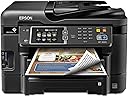
The Epson WorkForce WF-3640 is a wireless all-in-one inkjet printer designed for professionals seeking laser-quality speed and vibrant color output. Featuring 19 ppm black-and-white and 10 ppm color print speeds, ultra-high 5760 x 1440 dpi resolution, and versatile connectivity options including Wi-Fi Direct, it supports seamless printing from multiple devices. Its 35-page Auto Document Feeder and duplex printing enhance productivity, while Amazon Dash Replenishment ensures you never run out of ink. Ideal for busy managers and creatives, it combines performance and cost-efficiency with up to 40% lower printing costs compared to color lasers.
| ASIN | B00JXLGEUC |
| Additional Printer Functions | Copy |
| B&W Pages per Minute | 19 |
| Best Sellers Rank | #470,048 in Office Products ( See Top 100 in Office Products ) #298 in Ink Tank Printers |
| Brand | Epson |
| Built-In Media | Printer Accessory |
| Color | Black |
| Color Depth | 24 bpp |
| Color Pages per Minute | 10 |
| Compatible Devices | Laptops, PC, Smartphones |
| Connectivity Technology | USB |
| Control Method | Voice |
| Controller Type | Amazon Alexa, Vera, iOS |
| Customer Reviews | 3.7 out of 5 stars 1,790 Reviews |
| Display Type | LCD |
| Duplex | Manual |
| Global Trade Identification Number | 00010343908161 |
| Hardware Interface | USB |
| Ink Color | Color |
| Item Dimensions D x W x H | 20.2"D x 21.1"W x 15.6"H |
| Item Weight | 30.2 pounds |
| Manufacturer | Epson |
| Maximum Copies Per Run | 35 |
| Maximum Copy Resolution Black and White | 19 |
| Maximum Copy Resolution Color | ≥ 5760 x 1440 dpi |
| Maximum Copy Speed Black and White | 19 pages_per_minute |
| Maximum Media Size | 8.5 x 11 inch |
| Maximum Print Resolution Black and White | ≥ 5760 x 1440 dpi |
| Maximum Sheet Capacity | 500 |
| Maximum print Resolution Color | ≥ 5760 x 1440 dpi |
| Model Name | WorkForce 3640 |
| Model Number | C11CD16201 |
| Model Series | WorkForce |
| Number of Ethernet Ports | 1 |
| Number of Trays | 1 |
| Other Special Features of the Product | Auto Document Feeder |
| Paper Size | 8.5 inch x 14 inches |
| Print media | Envelopes, Paper (plain) |
| Printer Connectivity Type | USB |
| Printer Output Type | Color |
| Printer Type | Inkjet |
| Printing Technology | Inkjet |
| Resolution | 5760 x 1440 |
| Scanner Type | Sheetfed |
| Special Feature | Auto Document Feeder |
| Specific Uses For Product | chipless conversion |
| UPC | 010343908161 |
| Unit Count | 1 Count |
| Warranty Description | 1 year limited |
| Warranty Type | Limited Warranty |
| Wattage | 100 watts |
B**S
If only the rest of my life were this simple.....
Update, August 18, 2015 I had a strange thing happen with my printer that I still don't fully understand. I'm using the WF-3640 completely wirelessly. Even my desktop prints via the wireless router. I had to replace my router. I bought a combination Wi-Fi router and cable modem. Right after I installed the new router/modem, I printed a 92 page booklet from my desktop. Again, printing via the new router. No problem whatsoever. BTW, the duplex printing is pretty doggone amazing! The next morning, however, I could get nothing to print. I checked the router, the printer showed up as a connected device but no test page, nothing. I wound up having to completely uninstall the printer & all Epson software, then reinstall all of it. Now it works fine. Strange. ******************************************************************************************************************************************************************* If only the rest of my life were this easy. I went a little overboard on this because I don’t fax a lot, nor do I do an inordinate amount of scanning or copying. Just fits & starts of scanning photos for family albums, a couple of copies three or four times a week. But at this price & the packed feature list, how could I say no? This is my first Epson printer since, oh, about 1997 when I bought my first-ever inkjet. (Lord, has it been that long ago?!?) I really loved that printer and it lasted me quite a few years but, eventually, cartridges became harder and harder to find. Since then, I guess I slipped into some kind of printer coma and punished myself with another, more bloated brand that shall remain nameless. I'll just say that every subsequent model by that manufacturer became more and more of a Hideous Product. Anyway, my last AIO bit the dust about a year ago. I postponed replacing it because there just didn’t seem to be any decent models in my price range. The scanning & copying I needed to do I could accomplish using my phone. This week, however, that all changed. I suddenly had quite a bit of scanning that I really needed to get done. I just couldn’t make it work with my phone so I started shopping for a new AIO. I was trying to get the most bang for my buck while doing my best to stay below $150 with shipping. Another critical criterion was the device’s ability to use re-manufactured cartridges, something my old printers refused to accept. An expensive proposition, at best. No matter how positive the review, I purposely avoided my old brand. I did look at similar models from Brother, Lexmark & Canon but the reviews here on Amazon & elsewhere gradually eliminated all of them from the running—Sorry, Billy Blanks, I really liked those ads! I was leaning first toward the WF-3520 before I stumbled across a glowing review of the 3540 which, at the time, was linked to another online retailer with the lowest price of $129. I followed the link only to find that the 3540 was no longer available and had been replaced by a link to the 3640. Fully expecting a case of bait-and-switch sticker shock, I followed the link to find the new latest model had the same price! After comparing the price with Amazon, I placed my order. After all was said and done, the WF-3640 came in at $155 & change with tax, next day shipping & a 2-year extended warranty. Add another $17 for a set of remanufactured cartridges, each with 1100 page capacity. I have finished the initial setup of the printer. I have to say I honestly can’t remember ever having any initial device setup be such a breeze. Setting up our two laptops for wireless connection to the printer was simplicity itself, too, I’m happy to report. With one laptop I simply used the software disc that came with the printer. The other has a dead optical drive so I just downloaded the software from Epson’s support site. Setting up Epson Connect for email printing was a snap, too. Just had to change the default email address for the printer to something easier to remember. Getting the phones ready for cloud printing was just a matter of downloading & installing the free app. I haven’t done a lot of printing just yet but what I have printed has yielded crisp, sharp text that just blows away my old AIO, not to even mention my current inkjet. Is it better than a color laser? I can’t make that distinction right now. I’ll have to do some comparisons with docs here and at the office where there is a 10-month-old $900+ AIO model. Scanning performance is breathtaking, for me, anyway. I was astounded at how quickly the WF-3640 scanned the forms I needed to add to one of my web sites. It took literally less than 5 seconds from the time I clicked "Scan" for each form to appear in the directory. While there are far more features than probably I will ever need or use, for the price of this machine you simply can't go wrong. Could my needs have been adequately met with the WF-3620? Probably. But for the higher capacity paper trays, the price difference is negligible.
A**L
Stellar specs - but proved to be unreliable and did not last long
This printed was a great printer - while it lasted! I would have given it 5 stars if I had written a review within the first year of use. My given mine (and especially my wife’s) frustration, in dealing with the 0x97 error, I couldn’t give it more than 1 due to its poor reliability. I bought it from Amazon in March 2015. I really liked the quality of the prints, including plain text graphics and hi def photos as well as the scanning. We liked the ability to print wirelessly from any device in the house including from smart phone and tablets. I would consider our use light to modest. Since we bought it until February of 2017 we bought (from Amazon) 5 B&W cartridges (4 of those were XL) and 5 3-packs of color cartridges, about $300 cost. Around the fall of 2016 (after the 1 year warranty expired), we started getting the “0x97” error. At first, just turning the printer off and on took care of it. After a while it would take several power cycles, when eventually it would just print about 1/3 of a page and give the dreaded error. Of course this would happen at the most inopportune times. I did some searching on line back in the fall of 2016. The Epson website has absolutely NOTHING regarding this error, even though this error appears directly on the printer’s LCD. Other sources on the web pointed to corrupt files on the (Windows) computer (but that wouldn’t explain why you’d get the error from your smartphone, or directly from the printer itself, just running the on-board diagnostic programs and then attempting to print their output. Others pointed to dirty print heads, I followed a procedure to clean the print heads, as well as running the on-board program. Still no joy. Another web source pointed to faulty hardware. I accepted that this must be it. So I just ordered a new printer. Interestingly enough, while I was in the midst of my research, Amazon sent me an email to pick another Epson WF printer! Sorry, but based on my experience, I am staying as far away from Epson as possible. I don’t expect printers to last forever, but essentially only 1 and half years of use is really really short. My previous HP printers have lasted much much longer. In fact I still have them after 10 years. If it weren’t for the need to have wireless printing capability I would stick with them. In any case, I am going with a wireless HP printer this time. In short, this printer has stellar specs and lived up to them initially, but proved to be unreliable and had an early death. Epson on-line support is nonexistent; I don’t have time to stay on the phone forever, so I expect them to have solutions posted on their website.
V**T
This Replacement Worked Perfectly Right Out of the Box
Strike One: This original unit delivered Friday, 12/5, left on the neighbor's front step. Strike Two: I noticed on a "Track Package" that it had been delivered, but it was not on my front step -- I went looking and found it on the neighbor's front step and brougnt it home. Strike Three: Once I got it home, out of the box and plugged in, it did not work -- at all. It turned on, started its set-up cycle, then alternated between an error message that required turning the machine off and back on again, simply to re-start the setup, or a paper jam (no paper in the machine!), which, after more than an hour of fiddling, resulted in a great deal of anger and frustration. Saturday morning, 12/6 I called Epson Technical Support, where we repeated what I had spent the previous evening doing, alternating between the error message and the non-existent paper jam, when finally, I was told that I needed to return the machine. Duh! I already had that figured out. I contacted Amazon, simply stated that it was not working, that Epson Technical Support recommended returning it and I requested a replacement, since I really wanted this particular model. This is where it gets GOOD. Amazon approved the return within minutes, provided the return label for UPS and had my replacement ordered within minutes, to deliver Monday (today) and it delivered at 9:40 this morning. At the same time, I boxed up the lemon, took it over to the UPS Store and shipped it back within an hour, so they got theirs back and I got my replacement very quickly. I had this unit up and running in about an hour, wireless and all, including a firmware update from Epson. It is QUIET!! I have never heard a printer so incredibly quiet! And FAST! -- it printed a full page of 10 font text in just seconds, faster than any printer I have owned in the past 15 years. I love the two paper trays, one for legal, one for letter and the auxiliary feed for envelopes and specialty stuff that I work with now and then. And it's all entirely wireless -- even the scan works on wireless, unlike any other printer I have used previously. Having said all this, in summary, following its first day in service, I simply LOVE this printer. My next question is, "Will it fall apart a few days after the warranty runs out, or can I look forward to several years of dependable service?" Only time will tell...
G**E
Very nice so far, with a few minor irritants
This is a very nice multi-function printer and scanner. The original unit I received would not set up properly, but Epson support got a replacement to me in about a week. I use this for printing, scanning and copying with US Letter size paper. I don't anticipate ever using the fax function. The copy function is basically scan and then print. The machine also has ports on the front for USB thumb drives and for memory cards - I have not used them yet. Printing on plain paper is fast and very good quality for documents - faster and somewhat better than my aging HP DeskJet. I have not used photo paper yet. Double-side printing has no problem. There are two paper trays with 250-sheet capacity each, and one single-sheet feed at the back. I have not used the single-sheet feed yet for regular paper or photo paper. I did try to print some USPS Flat Rate shipping labels using Avery 8126. Surprisingly, those did NOT feed at all in the single-sheet slot, and I did not try them in a paper tray. (I shifted to that HP printer for that.) Scanning is good but with a few issues. One of my principal reasons for getting this machine was to aid in digitizing my paper records, because the scanner features automatic double-sided scanning. It is slower than I expected, though. In some modes, scanning in color can be very slow. After some experimentation I found a combination of color, feature and dpi settings that works for me. Paper weight (thickness) and coating is critical. Some of the magazines and journals I receive are printed on very thin coated paper and jam in the double-side feeder. That slows the process because I have to scan those a page at a time on the flatbed table. The content pages of other journals and magazines, printed on heavier paper, scan double-sided just fine. (Sometimes the covers are too thick - so back to the flatbed.) Still, an advantage is that I can proceed with other work while the scanner is doing its job. The machine can be attached directly to an existing local area network (LAN) - it does NOT have to be directly attached to a computer. This allows it to do some other cool stuff after setting up on an Epson website. First, you can send print jobs to it by e-mail or through the Google cloud print service. (I recently surprised a geek sister-in-law who wanted to print something from her i-device by giving her an email address to send the document to!) Second, you can scan directly to cloud services such as Evernote, Google Drive, Microsoft OneDrive, Box, Dropbox and so on. (I have not tried that yet.) Finally, the memory card port and USB port show up on networked computers as additional drive letters for removable devices after the Epson drivers are installed. The machine does have a lot of settings for power-saving, such as going to sleep after a preset interval of non-use. It also has an "eco" mode which, as far as I can tell, uses somewhat less ink. However, it also automatically turns off after 12 hours of non-use, and I can't find a way to work around that. If you are printing to it by email or over the cloud and the printer is off, the jobs are saved and then printed after you turn it back on. So this "feature" is only an irritant rather than a show-stopper. Overall, a very nice machine so far. For my current needs, it works well in all respects.
H**T
A really nice “combo” printer at a reasonable cost
Epson WF3640 – WOW ! A really nice “combo” printer at a reasonable cost. I’ve had FIVE (5). Five you say, ----- why five (5)? Well, after a period of time the head blocks up, and the printer becomes useless. This may be a fault of the printer, or the fact I don’t like being gouged by Epson to buy their very expensive refills and choose to buy online inks. Realistically this shouldn’t be a big problem. I read online that Epson created a special print head to improve the quality of their prints….. well they succeeded!!! Quality is outstanding! ----- BUT the heads seem to get blocked often! I don’t know if using Epson ink would solve the blockage problem (other reviews don’t make that clear) but the online inks seem to work OK for a while. Unless you spend many frustrating hours attempting to clean the heads, (Which is what I do --call me “chump”) ………….. You are out a printer. I’m running a small business out of my home running Win 10 and can’t afford to go without the features that Epson offers (at a very reasonable price). So I buy a new one, and play with fixing the old ones. If and when I get them fixed --- It’s actually kind of fun/frustrating. Then give them away to my family. So I spend $10-15 a month for an excellent printer. Think about it --- easy set-up, Wi-Fi, copy, scan, excellent color prints and speedy black and whites, faxing (who’d thought it still existed), don’t forget scanning (which is an easy setup). SO! The bottom line is --- Is this a “good” value. For me it is. I would like to get more mileage out of them, but I don’t think it’s all Epson’s fault. When this one goes …. I’ll probably buy another. I went thru this with HP printers, so I think I’m the villain. No I did not get paid to review this, but still 5 stars – just don’t expect too much – it’s just a printer!
L**N
Good features for the price if it meets your needs.
In many ways this is a 5-star product. I give it 3 stars because it ceased to meet my needs, but that doesn't mean you shouldn't consider it for your needs. Please allow me to explain. This was a replacement for a unit that failed -- but I'll get to that in a moment. I bought my original WF-3640 on Amazon Prime, and was so impressed with its features and price that I bought a couple more for family members as Christmas presents. The print heads on this unit failed after less than a year of use -- but I accept some responsibility for that failure. You see, I had become accustomed to printer ink cartridges that came with print heads, meaning I could leave the printer "always on" and start with a new set of print heads each time I bought ink cartridges. When the unit failed, I did some research and found YOU CANNOT LEAVE THIS PRINTER "ALWAYS ON" because the print heads are PERMANENT. This supposedly allows Epson to provide higher quality print heads. It also allows them to sell ink cartridges that cost less since they do not include the print heads. Okay, fair enough. However, there is one thing I have not yet mentioned. When I bought the first unit, it was important that it work with both Windows 7 and Linux Mint operating systems. The first unit did that, although not "right out of the box." Getting the scanner to work on Windows was no problem. Getting the scanner to work on Linux took some research, a software driver download (from the Epson website but NOT SUPPORTED by Epson), and a learning curve (I'm still somewhat new to Linux) -- but I got it to work (although not quite as seamlessly as on Windows). The quality of printouts from Linux was also less than that from Windows, although I found I could increase the Linux printout quality by sacrificing some speed. I satisfied myself that this was acceptable since mine is a sole proprietorship home office and my use of the printer would be such that I was willing to live with this arrangement. So, because of my "always on" policy, the printer failed and I replaced it with a new WF-3640 through Amazon Prime. Only a few days after setting up the replacement AIO (all-in-one), I found a message from Epson encouraging me to install a firmware upgrade. I did so and found, to my chagrin, that my scanner would no longer work with my Linux operating system. I tried everything I could think of before finally calling Epson technical support. The support technician told me 1) that the scanner software was supplied by a third party; and 2) that Epson had no control over that firmware. He also told me that he would never recommend upgrading firmware unless there was a problem and that there was no way to roll back the upgrade to the version that worked. The tech was very apologetic. I told him I appreciated his candor, but that it would have been nice if the firmware upgrade message had come with a warning or disclaimer to allow me to make an informed, intelligent decision before accepting the upgrade. He agreed and told me my comments would be passed along to others within the Epson hierarchy. For me, this was very unfortunate -- except for the stellar performance of Amazon Prime. I called the Amazon Prime operator and explained the situation. Without hesitation, she processed a RMA (return merchandise authorization) and a refund, and did her best to rectify the situation to my satisfaction. I have since done more research and ordered an AIO from a different manufacturer that meets my needs. I placed this order through Amazon Prime as well. The unit, an HP OfficeJet Pro 8710, installed on the Windows operating system very easily. For the Linux operating system, a software driver download was required for the scanner -- but the driver was supplied by HP and seems to work well. I'll leave you with this comment. Don't let my experience deter you from considering the WF-3640. Research this AIO (and any other) carefully in light of your specific needs and make your own decision. Just be aware that it may not work with Linux.
D**M
Great for the money, economic, aesthetically pleasing, but comes with neither paper nor connection cables.
Works great for printing - I queued up a bunch of photos on my recycled paper to see how it printed photos. Paper wasn't built for it, that's certain. Every printer I've ever purchased [I think they all came with PC bundles, actually] has come with like 50 sheets of premium paper and a handful of 4x6s to test out the photo capabilities. Usually ended up buying a bunch of photo paper after seeing the improvements of quality over the years. With hearing of Epson's quality, and seeing the printing performance of my relative's model [non-workforce, albeit], I was very excited to try it out. Kind of bummed that a $200 AIO printer doesn't come with a few photo cards, especially when it has a slot specifically for smaller media, but it's everything it said it would be, arrived on-time with Prime 2-day, and I'm loving the ability to print via email and mobile app. The application hasn't seen much use by me, and the first 3 things I tried to print were return labels in GIF format and when I emailed them, they printed the email header, but not the image. Had to log-in to the printer from my PC to find out that the printer doesn't support GIF format [probably because some are animated?], which means more steps before printing, like converting the image by downloading an image converter on my mobile device from the app store, waiting for install, converting, then re-submitting to the printer queue. Awesome printer for $130, sips at the ink, and has fantastic visual appeal. I'm using it for home and school, and it's totally overkill, but it's awesome and will resell better than any other inkjet line. Update: April 16 2015 The most frustrating g thing about this printer is that it has all these settings, but if the settings you define on the printer don't match perfectly with the settings defined in your computer's printer settings, it won't print! It doesn't tell you of the discrepancy and give you an option between definitely ed settings, it just tells you to fix it and try again. This was lazy development of soctware, u less I'm completely missing something .
B**S
Epsons 3640 and 4630 would not connect, but Canon MB2320 did
I've maybe written one review before, but feel compelled to write this review for the Epson WorkForce 3640, Epson WorkForce 4630, and Canon Maxify MB2320 multifunction printers, all of which are late-2014 models I bought in rapid succession from Amazon. They were each intended to replace a Canon Pixma that began printing only blank pages after a year and a half in a very light duty environment (a homeowner association board member office). I was disappointed in Canon because my generations-earlier Canon Pixma printer at home is still going strong after more than 5 years. Being also reluctant to try HP because of high cartridge costs, I first tried Epson. The net is that: 1. Both Epson printers had the same problem and were unable to connect to my Belkin F9K series a/b/g/n WiFi router via WiFi or Ethernet. 2. My previous and new Canons connected with no problems. 3. Epson tech support misdiagnosed my problems and was worse than worthless 9 of 10 times. 4. The Canon MB2320 beat the Epson 4630 in features, speed and price. 5. Amazon customer service continues to be the best I've ever experienced! The 3640 looked nice and has great features but would not connect to my 5-foot-away Belkin router via WiFi or Ethernet. I Spoke with Epson tech support about 10 times and spent the best part of two days trying to get the printer to connect. Most calls had to be re-placed by me because their voices were garbled/clipped and they would not call me back. I saw one review that said their support was out of the Philippines, but can't verify that. They could not explain a consistent E-9 error or why "Detailed IP Setup Check" showed "Unknown". They had me try several things, all with the same negative results. They thought my wireless phone might be interfering and had me move it. They had me call my ISP to ask if they blocked printers even though my computer and printer were going through my WiFi router. My ISP laughed. Epson had me call my router manufacturer to see if they were at 2.4 or 5, or whether there were no available addresses. My router manufacturer told me the router was way beyond the 6-month warranty, and I'd have to arrange payment for more info. I opted not to do that since I'd never had a problem with that router, and it was clear I had available IP addresses. I called Epson tech support back, and asked why the printer was showing itself assigned an IP address of 169.254.182.194. They told me my router had assigned that, both for WiFi and Ethernet. That didn't make sense, since the router uses 192.168.x.x addresses. Eventually, the last Epson guy I talked with told me that, contrary to what I'd been told before, the printer firmware assigned that 169.254.182.194 address when it couldn't connect to a router. After walking me through the same steps as previous tech support guys, he then had me swap Ethernet cables and Ethernet ports, which produced the same failure. He then concluded the printer was defective, and started to arrange for me to send it to Epson. I decided to instead return it to Amazon, who arranged free UPS pickup the next day and issued a full refund. I tried to order a replacement unit despite my frustration with Epson tech support (because I rarely have had to use printer tech support), but Amazon no longer had a unit with the same price and a Prime option. Amazon tech support was great, explained the unit must have gone out of stock, suggested and discussed many alternatives, and finally offered a promotion and next day delivery on a more expensive model, the Epson 4630. That unit looked even nicer and had more features, but also would not connect either via WiFi or Ethernet and gave the same E-9 error message as the 3640. I returned the unit to Amazon for a full refund, and ordered a Canon MB2320. The MB2320 looks just as nice as the more expensive Epson and installed quickly the first time. Hooray! The MB2320 has similar features to the Epson (e.g., two 250-sheet trays and auto-duplex printing/copying) but is faster and priced so much lower that I was able to order the MB2320 with replacement cartridges and three reams of paper for a few pennies less than the Epson 4630 alone. Printing results are fine so far. I just hope it lasts longer than the last Canon.
P**R
GREAT MACHINE
This is great for the price I paid. I got on sale for $99 and 10 pk ink for $29.99. I never liked inkjet printers before, always used Laser color printer and the ink cost was $100 for refill even using refurbished cartridges. This is half the cost for printing and the quality compare with my HP color Laser printer which I purchased at $500 two years ago. This is work horse. If you have small business or even for personal use it is a great machine. It has two trays one I use for paper and the second for envelope. easy to setup and it works like a charm wireless, I can also print from my phone on this printer. Excellent.
V**1
Excelente artículo
Excelente artículo
N**K
Great printer.
Works great out of the box. No problems. Expensive ink but that's true for all printers these days. I can scan documents to PDF if I use a USB stick, but I can not scan to PDF and send to my computer. That's my only complaint.
A**R
Not worth the money
I want to try and save people from wasting their money on this product. I started having issues with this printer right from installation but since I was eventually able to get it to install I decided to give it a try. In the first couple months the print quality was extremely good but went down hill from there. I have probably used more ink trying to unclog the printer heads then actually used for printing and after no more then 6 months this became a routine problem where I would have to unclog the printer heads almost every time I wanted to print. I would like to also mention even with spending hours trying to unclog the printer heads I can now only get the print quality to passable but not great. The WiFi worked for a day with my HP Pavilion laptop. I found that every time I turned off the printer or my laptop I would have to go through the WiFi set up all over again and eventually it stopped working all together. This was something I was willing to oversee at the time because of the print quality. The scanning feature only worked once on my laptop and that was it. I have to scan documents to a USB and then transfer them to my computer from there. Lastly, when you do run into problems you will find that most of the help offered through their support will not actually solve anything or it might the first time but that's about it. What you will get if you purchase this printer: hours spent trying to fix an array of problems, poor support, lots of frustration. I wish more people would come back to change their review after the initial purchase of this product because I believe the star rating of this product would be completely different and would save a lot of people from purchasing it. I truly hope this review will save someone else from going through the same frustration that I did.
D**E
Well Made Printer
Great value for the money and works well [once I get everything figured out] ; however, I have to clean the ink jets often which I didn't have to do with my other Epson. This could be the ink that comes with it [ old perhaps ?] so I will wait until I try new ink before I complain; cleaning jets very easy with the push of a button although it uses up ink with each cleaning. Setup would be easy for my grandson but very time consuming for me especially since this one is wireless and my last one wasn't ; I like the good old days of receiving a written set up manual instead of getting instructions off the computer but Epson tech people very fast to reply to my email questions although they probably have had a few chuckles from them.
Trustpilot
3 weeks ago
2 days ago