🚀 Elevate Your 3D Printing Game!
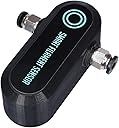
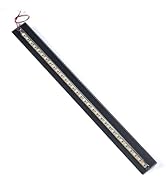
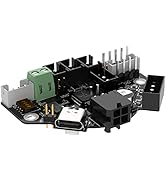
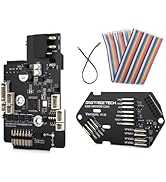
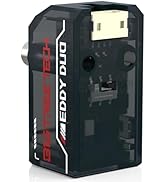
The BIGTREETECH Smart Filament Sensor is an essential module for 3D printing enthusiasts, designed to detect filament breaks and clogs, ensuring smooth operation. Compatible with popular firmware and various display screens, this lightweight sensor is perfect for enhancing your printing experience.


| ASIN | B07Z7Y5VY9 |
| Brand | BIGTREETECH |
| Customer Reviews | 4.1 4.1 out of 5 stars (353) |
| Manufacturer | BIGTREETECH |
| Material | PCB |
| Maximum Supply Voltage | 5 Volts |
| Measuring Range | 7 millimeters |
| Model Number | KINGPRINT-VVV001705 |
| Mounting Type | Surface Mount |
| Output Type | digital |
| Sensing Distance | 7 Millimetres |
| Specific Uses For Product | 3D printing with filament, monitoring filament and extruder status |
| Style Name | SFS V1.0 |
| UPC | 778601688070 |
| Unit Count | 1 count |
| Upper Temperature Rating | 257 Degrees Fahrenheit |
A**R
Very good but.....
I'm sure this particular product from bigtreetech works well however I am VERY dissapointed that it didn't include the BTT duck. This is outrageous! What's it gonna take for me to get my lil yellow friend? #Whattheduck?
S**I
Perfect if you don't mind tinkering
If you're the sort of person who is happy to spend time getting something set up and modifying firmware to make it work then you'll love this. If, however, you're after a plug and play solution then this isn't the product for you. I'm using this on a modified Ender 3 Pro with an SKR2 board and a TFT35 screen so it threw up some added complications. I strongly recommend that you go to the BTT github page and follow the instructions carefully. I have attached this sensor to the main board and I could only get the touchscreen to work in Marlin Mode as I hadn't updated the touchscreen config correctly, any print in touch mode would give a filament runout error. It's also important to note that the you'll need to add the "M75" command at the beginning of your 'start gcode' in your slicer as well as "M77" at the end of the 'end gcode' section. Once I'd sorted that out the sensor is working perfectly in both modes, it quickly detects runout/jams and the printer resumes correctly after. I do have one small gripe though, it's tight to feed filament through the sensor and there is a little drag for the extruder to overcome. It hasn't caused any issues but it's something I'll need to check.
T**G
Don’t Work
Impossible to get to work with the Board or the TFT! No matter how many tweaks or compiles you do, Even though both the Board and Screen are both from BTT, It’s a complete useless piece of kit, BTT Don’t care either, They just email you apologising that they sold it in the first place but can’t give any solution..
R**R
Non Functioning
I ordered this back in the summer to fit to my Ender 3 pro. Due to other things taking priority, I have only just gotten round to fitting it. IT DOES NOT WORK. I have tested on a patchboard and a friends machine which is fitted with a functioning unit to prove the fault. Unfortunately, it is too late to return for a refund. So if you purchse on, install and test it within the refund/replace window.
J**S
Defective unit
Doesn’t work as the motherboard is dead.
R**O
El sensor esta bien diseñado. Pero es muy grande. Lo malo es que usando la configuracio correcta en Marlin no hay manera de que funcione. Me compre uno y tube que devolberlo porque no habia manera de que funcionara. Compre otro y lo mismo. NO ERA PROBLEMA DE CONFIGURACION.
F**.
I installed this in an Ender 5 Pro and it works without issues. With my printer I had to update the firmware first to enable the filament sensor support. If you edit the firmware's code make sure you also enable and set the filament sensor distance, if you don't the sensor always tells the printer it's out of filament and will pause your prints from the start. The holder I used is from thingiverse, the Smart Filament Sensor Mount, item# 5222186.
C**W
I have been looking at adding a filament sensor to my heavily modded Ender 3 v2. At first I was going to go for a regular sensor. Heck, I was going to make my own out of an extra switch that I had, but then I heard about this Smart Filament Sensor. Unlike regular filament sensors, which use a simple switch, the Smart Filament Sensor used a wheel and an encoder. The advantage of using the encoder and wheel is that it measures whether the filament is moving/extruding, in or out. That means that the sensor can detect a variety of situations such as tangled filament, clogged nozzle, stripped filament, filament breakage, filament run-out, and any other event where the filament isn't extruding as it should. The normal switch sensor can detect filament run-out, filament break and filament run-out. The smart filament sensor can detect these events in as little as 7mm of expected movement, that's a very small amount. I decided, rather than hooking up the Smart Filament Sensor up to my printer, that I would plug the sensor into my OctoPrint raspberry pi (using the GPIO pins). There is an OctoPrint plugin called "Smart Filament Sensor" which works well with the sensor. I chose to plug the data to pin 13, as well as hooking the power up to the appropriate pins. The plugin doesn't default to the 7mm, as that is the lowest the sensor is able to go, but it also sets off a lot of false positives, so I went with the default of 15mm. After some printing I decided to increase it further to 20mm, which has eliminated false alarms. The nice thing about hooking the sensor upto the OctoPrint server rather than the printer is that you don't need to mess around with the firmware on the printer. If you are planning on plugging it directly into the printer you need to modify, in many cases, your firmware to work with the sensor. The manual, available online (https://github.com/bigtreetech/smart-filament-detection-module/blob/master/manual/smart%20filament%20sensor%20module%20manual201125.pdf) and easy to find if you search "BTT Smart Filament Sensor github" it should be the first result, then click through to the manual. If you are not familiar with modifying the firmware files and compiling I'd suggest searching for tutorials. It is important to note that most 3rd party firmware, such as Jyers, is configured to work with REGULAR switch filament sensors and unless configured properly will not work with the Smart Filament Sensor.
I**O
Added into my RatRig printer with klipper: [filament_motion_sensor btt_sensor] detection_length: 8.0 # The minimum length of filament pulled through the sensor to trigger # a state change on the switch_pin # Default is 7 mm. extruder: extruder # The name of the extruder section this sensor is associated with. # This parameter must be provided. switch_pin: PG12 #Octopus # The pin on which the switch is connected. This parameter must be # provided. pause_on_runout: True # When set to True, a PAUSE will execute immediately after a runout # is detected. Note that if pause_on_runout is False and the # runout_gcode is omitted then runout detection is disabled. Default # is True. runout_gcode: M118 Filament runout # A list of G-Code commands to execute after a filament runout is # detected. See docs/Command_Templates.md for G-Code format. If # pause_on_runout is set to True this G-Code will run after the # PAUSE is complete. The default is not to run any G-Code commands. #insert_gcode: # A list of G-Code commands to execute after a filament insert is # detected. See docs/Command_Templates.md for G-Code format. The # default is not to run any G-Code commands, which disables insert # detection. #event_delay: 3.0 # The minimum amount of time in seconds to delay between events. # Events triggered during this time period will be silently # ignored. The default is 3 seconds. #pause_delay: 0.5 # The amount of time to delay, in seconds, between the pause command # dispatch and execution of the runout_gcode. It may be useful to # increase this delay if OctoPrint exhibits strange pause behavior. # Default is 0.5 seconds.
A**S
Once installed and configured correctly, this sensor works quite well and has been pretty reliable, it hasn't stopped once over the last 20 hours of print time and seems to accurately detect issues PTFE Tubing: I HIGHLY recommend to use PTFE tubing between the sensor all the way to the extruder to maintain consistent filament length and reduce issues during large movements, ESPECIALLY on large printers. Otherwise, during a print, the nozzle might move to the complete opposite of the bed which could pull on the filament. That quick pull would trigger the sensor because it would think there is an overextrusion issue. THEN, you restart the printer. That previous pull means that there is now too much filament past the sensor, so the filament doesn't need to get pulled in for the next couple minutes worth of printing. The print then stops, the sensor detected an UNDERextrusion issue or a blockage. Installation Tips: Ensure the PTFE tubing is correctly locked into place. Inserting the filament might require some pressure due to the encoder sensor, that is perfectly normal, there needs to be some grip on the encoder to make sure it rotates as filament is pulled in, otherwise you might get false-positives.
Trustpilot
2 days ago
2 months ago