We remain fully operational. Our teams are working around the clock to ensure your deliveries continue safely.

DOWNLOAD THE APP


Copyright © 2025 Desertcart Holdings Limited
DOWNLOAD THE APP




Buy anything from 5,000+ international stores. One checkout price. No surprise fees. Join 2M+ shoppers on Desertcart.
Desertcart purchases this item on your behalf and handles shipping, customs, and support to Taiwan.
🎯 Elevate your PS3 Move experience—navigate like a pro, game like a legend!
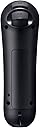
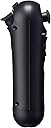
The PlayStation Move Navigation Controller is a wireless, rechargeable gamepad designed exclusively for PS3. Featuring 9 buttons, an analog joystick, and vibration feedback, it pairs seamlessly with the Move motion controller to deliver precise, ergonomic left-hand navigation in compatible games. Its USB charging and auto-pairing system ensures hassle-free setup, making it an essential accessory for serious Move gamers seeking next-level control and immersion.
| ASIN | B002I0K6X6 |
| Additional Features | Wireless Controller |
| Best Sellers Rank | #31,399 in Video Games ( See Top 100 in Video Games ) #96 in PlayStation 3 Controllers |
| Brand Name | PlayStation |
| Button Quantity | 9 |
| Color | Black |
| Compatible Devices | Playstation 3 |
| Connectivity Technology | USB, wireless |
| Controller Type | Gamepad |
| Customer Reviews | 4.6 4.6 out of 5 stars (1,259) |
| Global Trade Identification Number | 00711719990253, 20711719990257 |
| Hardware Platform | Playstation 3 |
| Item Dimensions | 7.5 x 5.3 x 0.6 inches |
| Item Weight | 0.26 Pounds |
| Manufacturer | Sony Computer Entertainment |
| Model Name | 98059 |
| Package Quantity | 1 |
| Power Source | Battery Powered |
| UPC | 711719990253 711719805908 763615787208 778888436975 115971251686 |
C**U
Robin to Motion Controller's Batman
Holy PS3 accessories :) The Navigation Controller is Motion Controller's (aka 'the Move') natural complement. It is not a 'must buy' at this time but it helps to have one for certain games where it's meant to be operated with 'the other' hand. If you don't have one, you can get away with a DualShock or a Sixaxis. To make an informed decision on whether a purchase is warranted at this time (or ever) it's important to be aware of the following: - At the time I am writing this, not too many 'Move' games need the Nav. Probably because, one week after Move's official launch there aren't too many Move games out there but that will change - I just ordered Heavy Rain which does use the Nav and I've had Little Big Planet 2 on order for quite a while. - There is nothing that that Nav can do that your DualShock or Sixaxis can't. In fact, the Nav Controller is nothing but the left side of the DualShock 3 plus the X and O buttons (PS button too) and minus rumble and motion sensitivity. You can, therefore, use your DualShock instead of the Nav on games that may require it. These being said, the Nav is a well-designed, quality built accessory that does what it's supposed to do very well. It may not look like much but holding and using it feels 'natural' and all the familiar controls are easy to reach even though it may take a little practice to get used to the unexpected but necessary O and X. And, of course, the Nav does NOT come with a wrist strap because it does not need one. The Nav Controller will not be used to hack and slash or punch or parry. As its name implies, its main use is for 'navigation', meaning mostly the analog joystick, but the L2/L3 triggers and the D-pad are also there when needed - in Aragorn's Quest you use the L2 to raise the shield. Rating the Nav controller for what it is and what it does, I find no faults with it whatsoever. I appreciate its exceptional design, quality and its apparent durability. Some of the early Move games that take good advantage of the Nav Controller include Heavy Rain, MAG, Aragorn's Quest at the time of this review, Little Big Planet 2 coming up in a couple of months, many in between, I hope. To the extent that the Move proves itself a success with game developers, the Navigation Controller will find its uses and its users. I believe it to be so because holding the DualShock in one hand while swinging the Motion Controller with the other is not a good way to play a game.
L**A
Very Useful for Move Gaming
The PS3 Move Navigation Controller may look like a Wii's nunchuck, but it serves a very different purpose. Where the nunchuck has motion sensing, the PS3 Move Navigation Controller is solely for button pushing. This small, easy to hold device lets you use your left hand for button related tasks - using the joystick for moving around a landscape, using the standard X and O buttons for performing actions. So for example if you are in a sword game you can have the motion-sensitive wand in your right hand, swinging your sword, while using your navigator in your left hand to walk across the field of battle and seek out your next opponent. You might ask, if all this controller does is let you use a joystick and a few buttons, why even buy it? Why not just use a normal controller in the left hand? Certainly you can do that - but the normal controller is set up for two handed use. Many people find it challenging to hold that controller just with the left hand in a way that easily gets them access to the joystick and the two buttons. With this navigation controller setup, it clearly is all arranged for one handed use. If you want to play a game that requires both hands to be motion sensitive - for example a boxing game where you punch with your left hand and also punch with your right hand - this is NOT the controller you want. For that type of activity you'll want two wand controllers, one for each hand. That means that for a typical player on a PS3 move system you need two wand controllers PLUS one navigation controller. You wouldn't use all three at the same time, but some games will have you using the two wand controllers and other games will have you use the wand in one hand and the navigation controller in the other. You can see where this is going. If you have two gamers in the household who want to play head to head games, you now need FOUR wand controllers plus two navigation controllers to have them covered. It's time to give your PS3 system its own shelf, to handle all these accessories! In any case the nav controller works well, is very useful for games, and I highly recommend it for any Move gamers. We purchased our controller from Amazon with our own funds.
C**.
100% A1
Excellent seller, top quality product A1, I recommend it 100%
0**5
Nifty, but kind of wasteful. Better than holding the ps3 controller.
So, as many others have noted, this is not really a required accessory for the move. I don't know, I feel like Sony should have wedged some sensors into this baby and slapped another glowy orb on top and made it a second type of move controller as opposed to something roughly analogous to a better thought out Wii "Nunchuck". I guess the obvious comparison to make here is to said Nunchuck - but that's not really fair because they are two completely different systems. But I do have to say, Nunchuck aside, that I feel Sony should have put vibration into the Navigation controller, as well as at least a single accelerometer or motion sensor of some sort (at least, as far as I can tell, it lacks both of these things...) Ideally, all move controllers would get the orbs on top and full motion tracking too, that way you could buy this for the price of the orb topped controllers instead of having to pick up two orb controllers for some games, and one of these controllers to use with one of the orb controllers for others. Kind of feels like a ripoff. But then again, the motion control of the PS3 is superior to that of the Wii in my humble opinion. So you get what you pay for. In conclusion - if you have a game that can take advantage of this, it's certainly nicer than holding onto the PS3 controller and a PS3 Move controller, but if you don't have a game, or the cash to pick this up, it's not worth wasting your money. That said, the list price of the item is reasonable for what it does, and I can't complain much. As you can see, I own one. I picked it up for Heavy Rain, and I don't regret it one bit. Your mileage may vary.
I**T
Alles Top bin sehr zufrieden Danke
V**T
Cette manette est un complément en plus de celle de détection. Elle correspondant au pad gauche de la manette standard. Elle se tient en main comme celle de détection, évitant de devoir manipuler la manette dans certain cas. Elle n'est pas indispensable
S**D
It looks like it's imported from China or something but even the PS4s are made in China. It's an original product and it works well. Don't expect warranty though.
L**O
I have a Ps3 but I purchased the Navigation controller for an entirely different reason. I use the Navi controller to control my tablet-PC when I use Photoshop/Clip Studio for painting/sketching. It may not have as many buttons as PC gaming keypads but it's shape and wireless feature makes it worth it. With just the Navi controller and a stylus, I can do everything but typing. When used with Xpadder (a keyboard/mouse simulator for game controllers) you can increase the number of actions per button and have immense control over how the controller functions. However, it will not function like this out of the box as it will require third party drivers/software (see below). Xpadder also has auto-profile so you can have specific profiles for all your programs (assuming you can remember all your buttons). Examples of my setup: -The R1 and R2 is set to change the controller profile of the stick/buttons so I can have 2 more sets of functions. I have an alternate profile accessed by holding down the trigger. This switches to my image manipulation profile which consist of "hue/saturation, color balance, transform tool and etc.. mapped to the D-pad (each having 2 possible actions each) -More than one action per button. Tap = Action1, hold for 0.5 sec = Action2, and etc.. For example: tap for undo, hold for redo. -Map mouse buttons (for mouse specific navigational hot-keys in 2D/3D software). *Please do appropriate research before attempting, I will not be responsible for any damages you incur.* The controller does not work normally in windows so you will need third party software for this to work (search for "Xinput wrapper"). If you want the wireless function you will need to dedicate a usb port for a compatible usb Bluetooth dongle. Since Sony doesn't supply drivers for this controller, the Xbox 360 controller driver will be used for this controller to function as stated in the instructions. Once this is installed you may also use any other Ps3/Ps4 controller or together (up to 4 controllers).
M**S
Doesn't work, asked for help, received NOTHING. They should be banned.
Trustpilot
3 days ago
1 week ago