Buy anything from 5,000+ international stores. One checkout price. No surprise fees. Join 2M+ shoppers on Desertcart.
Desertcart purchases this item on your behalf and handles shipping, customs, and support to Taiwan.
🚀 Store Fast, Work Smart, Stay Ahead.
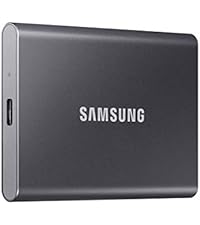
The Samsung T7 Portable SSD offers 1TB of ultra-fast external storage with read/write speeds up to 1,050MB/s via USB 3.2 Gen 2. Its compact, shock-resistant aluminum design withstands drops up to 6 feet, making it perfect for professionals, gamers, and creators on the move. Compatible across multiple platforms, it delivers reliable, high-performance storage backed by Samsung’s industry-leading flash memory technology.


| ASIN | B0874YJP92 |
| Additional Features | Portable |
| Best Sellers Rank | #3 in External Solid State Drives |
| Brand | Samsung |
| Built-In Media | USB Cable |
| Cache Memory Installed Size | 1 |
| Color | Blue |
| Compatible Devices | Gaming Console, Laptop, Smartphone, Television, iPhone 15 |
| Compatible Video Game Console Models | Microsoft Xbox SERIES S, Microsoft Xbox SERIES X, Sony PlayStation 5 |
| Connectivity Technology | USB |
| Customer Package Type | Standard Packaging |
| Customer Reviews | 4.7 out of 5 stars 37,835 Reviews |
| Data Transfer Rate | 10 Gigabits Per Second |
| Digital Storage Capacity | 1 TB |
| Enclosure Material | Nand Flash |
| Form Factor | Portable |
| Global Trade Identification Number | 00887276410760 |
| Hard Disk Description | Solid State Hard Drive |
| Hard Disk Form Factor | 2.5 Inches |
| Hard Disk Interface | USB 3.2 |
| Hard-Drive Size | 1 TB |
| Hardware Connectivity | USB |
| Hardware Platform | PC, Mac, Gaming Console, Android |
| Installation Type | External Hard Drive |
| Item Dimensions L x W x Thickness | 3.3"L x 2.2"W x 0.3"Th |
| Item Type Name | External Solid State Drive |
| Item Weight | 0.13 Pounds |
| Manufacturer | Samsung |
| Media Speed | 1,000 MB/s |
| Mfr Part Number | MU-PC1T0H/AM |
| Model Name | SAMMUPC1T0H |
| Model Number | MU-PC1T0H/AM |
| Number of Items | 1 |
| Read Speed | 1050 Megabytes Per Second |
| Special Feature | Portable |
| Specific Uses For Product | personal, gaming, business |
| UPC | 887276410760 |
| Warranty Description | 3 year limited warranty |
W**S
Much faster than HDD it replaced
The T7 was received in Fat32 Format with MBR Partition. I'm using this as a backup drive for a Win 11 Pro Desktop PC, so the first thing I did was reformat the Drive as NTFS with GPT partitions which is better suited for the Win 10/11 OS. With that out of the way, I turned to the provided USB C to C cable, it looks like good quality, however it's only 1 1/2ft long, too short for my needs, for I'm mounting the drive forward on the right side of my case, thus I picked up a 3.3ft USB C to C 3.2 Gen2 Cable (to insure the cable is up to speed with the SSD's capabilities) The drive itself I slipped into a Portable Hard Drive Sleeve that mounts to the side of my case. This is an ideal setup, it protects the SSD and secures it's position without fear of it being knocked to the floor, cable being disconnected or the SSD being misplaced for that matter. You never know, it is small and thin. Performance is as expected. It reads and writes IAW specs, about 10x faster than the HDD it replaced. When being accessed the highest temps, I've seen hovered around 42C, well below the 70C max you'll hate to see before thermal throttling kicks in. I expect this drive to have excellent longevity, just as I have achieved with a pair of Samsung M.2 PCIe's. Of course, length of service is dependent upon the quantity of processed data. For anyone in the market for a fast, high quality and reliable SSD storage device, I don't think you can go wrong making the Samsung T7 your choice.
T**S
Extremely Fast and Tons of Storage in a Slim Design
The SAMSUNG T7 Portable SSD 4TB is incredibly easy to set up and use. It has a massive amount of storage space and delivers very fast transfer speeds. The drive is thin, lightweight, and doesn’t consume much power, which makes it perfect for everyday use or on-the-go storage. Overall, a reliable and high-performance external SSD that’s well worth it. No Noise!
C**R
Excellent hard drive. Portable and fast
Amazing. Reliable. Works super fast. Highly recommended. Happy in Fresno.
E**P
Provides a large amount of storage + peace of mind
I've been using this external SSD for over a year now to back up data from my laptop and phone. It works great for that purpose! It's given me a lot of peace of mind, since I don't have to worry about losing my photos, documents, etc. if something were to happen to my phone or laptop. Pros! - It's manufactured well. It feels fairly durable, and it's held up great over the year that I've used it. I like the blue color, too! - The 2 TB of storage have allowed me to back up basically whatever I want without worrying about running out of space. - It has pretty fast speeds for transferring data, sometimes upwards of 200 megabytes per second, which saves time during large file transfers. - It's compact and doesn't weigh much! It fits in the palm of my hand, so if I wanted to I could take it on the go. - Comes with two cords, one USB C and one USB A! I use the USB C cord usually, but the USB A cord is a nice option. - Works on most devices! I've used it on both my Windows laptop and my Samsung phone no problem. As long as the device has a USB 3.0 port or a USB C port, this SSD should work! Cons! - This isn't really a con for the SSD itself, but it encourages you to use the Samsung Magician app with it. The app has some nice features including tests to verify that the SSD is working well, but on my laptop the app would be using the SSD even when I'm not. It was a bit of a headache when I'd go to eject the SSD safely. I just changed the app's settings so that it doesn't launch on startup and that fixed it, but that might be good to keep in mind if you plan on using the SSD on a PC and want to use the app. Overall, this SSD was a great buy for me! I'm very happy with it. I'll definitely consider Samsung's SSDs in the future if I'm in the market for something like this again.
C**K
Fast, lightweight, small, durable
The Samsung T7 Portable SSD 2TB External Solid State Drive works as intended. Like many other SSD's, this one is fast. Not only is it fast, it is lightweight, small, carries lots of storage and feels quite durable. Noise? None. The only freezes you would get would be probably from your own computer depending on reads and writes from other storage devices, whether it be internal or external storage. This device will not freeze on you. It is purposely developed for fast reads (view data) and writes (modify data). The computer recognition will see it as any other external storage media. This of course depends on your operating system, as it may use a different file system. This device came with a firmware installer, which you can delete, and if you want it back, you can simply go search up the model number of this device and redownload the firmware. This is a very convenient product, compared to something as slow as a hard drive, this SSD will not fail you. However, do take note that hard drive's last a long time, I have a 15 year old hard drive and it's still running to this day. I am not too familiar with the infrastructure of a SSD, as data is being read and written digitally, but hard drive's are easier to understand for me personally. SSD's do last too, but not as long as a hard drive. But, I am sure depending on your scenario and uses, you may prefer speed over longevity.
T**A
Connectivity
Easy to work and connect. I bought this for my MacBook Air. I got this specifically for sims and its runs pretty smooth but if ur low on storage and looking to get this, its not the best due to how its runs through the MacBook system. No other issues other than it would magically unplug by itself at times.
J**L
Fast, Portable SSD Lifesaver for M1 MacBook Air and M4 Mac Mini Storage Woes
I snagged the Samsung T7 Portable SSD (1TB, Gray) about five months ago from Amazon during a sale (~$90) to tackle storage limits on my 2020 MacBook Air M1 (16GB/256GB) and 2024 Mac mini M4 (16GB/256GB). As a web dev hobbyist training local AI models (e.g., Phi-3 Mini on my blog archives), I needed quick, reliable external space without slowing down my macOS Sequoia workflow. After reformatting to APFS in Disk Utility, it's been a seamless daily driver—plug-and-play via USB-C, no Samsung software required. Here's my experience from months of heavy use. Pros: Speed is the star—real-world reads/writes hit 850–950 MB/s direct into my Air's USB-C or Mini's Thunderbolt 4, blasting through 50GB ML datasets in under a minute (way faster than my old HDD). The 1TB capacity swallows backups, Python environments, and 4K video projects effortlessly, freeing my internals for active work. At pocket-sized (2.3 x 1.5 inches, 2 oz), it's perfect for shuttling between my portable Air and stationary Mini—no bulk for coffee-shop coding. The gray metal body with rubber grip shrugs off desk bumps, and it stays cool during long transfers. On my UGREEN Revodok 105 hub (for the Air's HDMI/charging setup), it runs stable via USB-A 3.0 (500 MB/s), but direct USB-C shines. Cross-platform? ExFAT default works great for Windows file shares with family. For the price, it's unbeatable value—durable, encrypted (hardware AES 256-bit), and future-proof for Apple Silicon. Cons: Out-of-box exFAT is fine, but reformatting to APFS (GUID scheme) is a must for Mac optimization—takes 5 minutes in Disk Utility, but newbies might skip it and see slower speeds. Theoretical 1,050 MB/s drops a bit on M1 USB-C (due to single-lane limits), but still blazing vs. competitors. The short USB-C cable (6 inches) means desk cable management, and no IP rating for water (grab the T7 Shield if outdoorsy). Tip: For M1/M4 Macs, erase/reformat to APFS right away (Disk Utility > Erase > APFS, GUID). Connect direct to USB-C for max speed; use with a hub like UGREEN's for multi-peripheral setups. Great for Time Machine—set it up in System Settings for automated backups. If sharing with Windows, stick to exFAT. This T7 is a no-brainer for Apple users needing portable power on a budget. It transformed my cramped setups into smooth-sailing storage havens. If you're juggling AI data or creative files, buy it—you won't regret!
A**R
Huge speed boost for my older Mac — worth every penny
I bought the Samsung T7 2TB portable SSD mainly to give my older 2017 Mac a new lease on life. The internal 500GB platter style hard drive drive in that machine was painfully slow, so I set up macOS to run directly off the T7. The difference was night and day — boot times dropped to seconds, apps opened almost instantly, and overall the computer felt like a brand-new machine. Honestly, it sped things up exponentially compared to the stock drive. Beyond that, the T7 has been great for general storage and file transfers. It’s small, lightweight, and built solid with its aluminum casing, so I don’t worry about tossing it in my bag. Transfer speeds are fast enough that moving large projects doesn’t feel like a chore anymore, and I haven’t had any reliability issues. It also stays cool during everyday use, which isn’t always the case with portable SSDs. Compared to the older external hard drives I used before, this is in another league for both speed and portability. Against other portable SSDs, I think Samsung’s combination of performance and reliability is hard to beat at this price point. If you have an older computer that’s slowing you down, or you just need fast and dependable storage on the go, the T7 is an excellent choice. For me, it completely transformed the usability of my Mac and has become a tool I use every single day.
E**K
Excelente
Excelente
P**O
Very good
Very good
V**F
Excelente produto
O produto chegou em perfeito estado. O funcionando é excelente. Totalmente descomplicado de usar. Recomendo em muito a compra, para quem estiver interessado de adquirir...
吉**毅
HDDからの切り替えで購入。
音楽ファイルを入れて配信で使用する用途で購入しました。 ChatGPTに何度も綿密に相談し、こちらをおすすめされました。 結果、購入して本当に良かったです! 速度も早く、カードサイズでコンパクト。 色もカッコ良いのと、接続ケーブルも2タイプ同梱されているので助かり気に入っています! 今後リピートすると思います!
ا**ة
Very good
Good
Trustpilot
3 weeks ago
2 months ago