


๐ฎ Small Board, Big Game: Power Your Next-Level Build with ASUS ROG Strix B550-I!
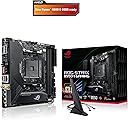
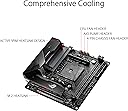
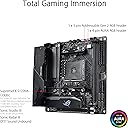
The ASUS ROG Strix B550-I Gaming motherboard is a feature-packed Mini-ITX powerhouse designed for 3rd Gen AMD Ryzen CPUs. It offers PCIe 4.0 support, WiFi 6, 2.5Gb LAN, and advanced cooling with Stack Cool 3+ technology. With Aura Sync RGB customization and SupremeFX audio, it delivers a premium gaming experience in a compact form factor perfect for small form factor builds.






| ASIN | B089D34SZT |
| Best Sellers Rank | #2,128 in Computer Motherboards |
| Brand | ASUS |
| CPU Model | AMD A4 |
| CPU Socket | Socket AM4 |
| Chipset Type | AMD B550 |
| Compatible Devices | Personal Computer |
| Compatible Processors | AMD 3rd Generation Ryzen |
| Customer Reviews | 4.5 out of 5 stars 894 Reviews |
| Graphics Card Interface | PCI Express |
| Item Dimensions L x W x H | 6.7"L x 3.2"W x 6.7"H |
| Item Type Name | ASUS ROG Strix B550-I Gaming AMD AM4 (3rd Gen Ryzenโข) Mini-ITX SFF gaming motherboard (PCIe 4.0, WiFi 6, 2.5Gb LAN, DDR4 5100+ (O.C.), front USB 3.2 Gen 2 Type-C, Addressable Gen 2 RGB and AURA Sync) |
| Item Weight | 2.4 pounds |
| Main Power Connector Type | ProCool II Power Connector |
| Manufacturer | ASUS |
| Memory Clock Speed | 3200 MHz |
| Memory Slots Available | 4 |
| Memory Storage Capacity | 64 GB |
| Mfr Part Number | ROG STRIX B550-I GAMING |
| Model Name | ROG STRIX B550-I GAMING |
| Model Number | ROG STRIX B550-I GAMING |
| Number of Ethernet Ports | 1 |
| Number of Items | 1 |
| Number of Ports | 15 |
| Platform | Windows 10 |
| Processor Socket | Socket AM4 |
| RAM Memory Technology | DDR4 |
| Ram Memory Maximum Size | 64 GB |
| S/PDIF Connector Type | Optical |
| System Bus Standard Supported | SATA 3 |
| Total Number of HDMI Ports | 1 |
| Total PCIe Ports | 1 |
| Total SATA Ports | 4 |
| Total Usb Ports | 6 |
| UPC | 192876786383 |
| USB 2.0 | 6 |
| Warranty Description | 3 years |
N**R
Feature-Packed Mini-ITX Gaming Motherboard: Delivers Performance in a Small Package!
Looking to build a compact gaming rig without compromising on performance? The ASUS ROG Strix B550-I Gaming AMD AM4 motherboard is worth considering. This Mini-ITX motherboard brings a range of features and customization options to satisfy the needs of gamers. Experience Powerful Performance: With support for AMD AM4 processors, the ROG Strix B550-I Gaming motherboard lets you tap into the potential of the latest Ryzen processors. Its efficient heat dissipation and robust power delivery system ensure stability and reliable performance even during intense gaming sessions. Compact Size, No Compromise: Designed for compact gaming setups, the Mini-ITX form factor of the ROG Strix B550-I Gaming strikes a perfect balance between size and functionality. It fits seamlessly into small form factor cases or portable gaming rigs, proving that big things can come in small packages. Enhance Your Gaming Experience: ASUS has equipped this motherboard with various features to enhance your gaming experience. From comprehensive cooling solutions to high-speed connectivity options like PCIe 4.0 support and Wi-Fi 6, the ROG Strix B550-I Gaming provides the essentials for smooth and lag-free gaming. Customize Your Rig: Express your personal style with ASUS Aura Sync RGB lighting. With a range of colors and effects, you can create a personalized gaming environment. Additionally, the motherboard offers extensive customization options to cater to your preferences and create a truly unique system. Immersive Audio Experience: Enjoy high-quality audio with the ROG SupremeFX technology. It delivers crystal-clear sound reproduction, rich bass response, and immersive surround sound effects. Whether you're gaming, streaming, or enjoying multimedia content, the audio quality of this motherboard will enhance your experience. Reliable and Built to Last: ASUS is known for its commitment to quality, and the ROG Strix B550-I Gaming is built with premium components and rigorous testing. Rest assured that your system will run smoothly and efficiently, even under demanding conditions. In conclusion, the ASUS ROG Strix B550-I Gaming AMD AM4 motherboard is an excellent choice for gamers seeking powerful performance in a compact form factor. With its feature-packed design, customization options, and immersive audio, it caters to the needs of gamers who prioritize both power and convenience. Disclaimer: This review is based on my personal experience and opinion. I did not receive any incentives or discounts for writing this review.
3**C
Great Motherboard for My FreeNAS Rig
Built a 32TB rig running FreeNAS with this motherboard. Works great! Had to add an m.2 card with additional SATA ports since this board only has four and I needed seven, but I had no issues with that. 2.5Gbps ethernet a real plus.
E**H
Packs a real punch into your SFF mITX or mATX case!
First of all, after reading some reviews where it appears people would report issues with not being able to POST the first time around, etc... I preemptively cleared the CMOS/BIOS memory prior to starting my build. This is one of those things that should always be done with a brand new motherboard, but one doesn't always remember to do so. Since they undergo QC testing, it is entirely possible the loaded profile/timings from the memory installed during testing might still be lingering, which could cause conflicts with your specific configuration. That out of the way, I am beyond impressed with this board. It is beautiful to look at and very well built. There has been critique over the choice of VRM hardware but I believe this won't be an issue for the vast majority of those looking to put this into an SFF build since keeping things cool and quiet will be a priority, and thus they might not push this thing to its limits (not to say this can't handle it...just less likely it will be placed in that situation). However, do your own due diligence and decide if this could be an issue for you. I don't know how much weight and validity the critiques have and the phase configuration seems appropriate for the intended purpose. My B550-I Gaming is paired up with a 3700X and Corsair Vengeance LPX 3600mhz CL16 memory. They are a true trifecta. I also added a Samsung PM981 M.2 NVMe SSD, taking advantage of the heatsink design this board provides. If you're trying to build the basis for an Xbox Series X'esque build, that is as close as you can get, sans the choice of GPU. Speaking of, due to the current GPU shortage craze, it is temporarily housing an RX 580 8GB during testing, but soon a 1080 Ti I have in another system at the moment. I'm a bit of an agnostic double-agent when it comes to hardware vendors. This has been running 100% stable and I have not encountered a single issue with the configuration. I did notice that the XMP profile isn't loaded by default (that's usually the case with most motherboards, but I've seen them load up on their own in the past), so be sure to go into the Ai Tweaker area of your BIOS and set things accordingly. All in all, very please with this purchase.
A**N
DRAM and USB Errors on Arrival
Used Asus motherboards for a long time now, and I never really had issues with their boards. I felt pretty confident in this one considering the price plus my good experiences previously, but after setting it all up, it failed to post. processor is in perfect condition, same with my RAM, yet the qled light showed orange, meaning itโs a DRAM error. Only way i could get it to post to BIOS was by removing a stick of ram from the left slot. tried 6 different sticks of RAM in this slot, all led to the same error. After I got it running, i realized the USB 2 port also isnโt working how it should. Nothing would read from it. Hopefully the replacement Iโm getting will resolve this problem, and Iโll update once I find out. UPDATE: After installing the replacement motherboard, everything works perfect. I trust Asus is a good manufacturer still, but itโs a shame I ended up with a dud to begin my new build. If not for that, Iโd give the product 5 stars, Itโs a solid board.
J**.
Great itx motherboard
This motherboard has been amazing so far as I have had zero issues. It came with a bios update for the 5000 series amd processors, so my 5600x worked out of the box. I love the asus bios and the xmp memory profile worked seamlessly. USB-C header is an amazing bonus. The vrm fan has not been an issue for me in terms of noise as some of the other users have complained about. The one thing that I do not like on this board is that it only has one chassis fan header, so get some fan splitters. Clean look and easy to set up.
H**D
Works perfectly with NZXT H1
Using this motherboard for the NZXT H1 has been awesome. It has all the connections needed for this case built on the motherboard for easy install. Is it worth the money if your only going for 16 GB of ram? Yes! is it still worth it to slap on DDR4000, 64GB of ram? Yes! Will you need to get a last year processor to do a bios update before you use the new 5000 series of processors? at least for this one, nope! The bios has a one button setting for overclocking both the processor's infinity fabric, the cores and RAM to work seamlessly at full RAM spec, called D.O.C.P. to do this, do the following: 1. Power on the system and press <delete> key to enter BIOS [Advanced Mode] 2. Click [Ai Tweaker] page as below 3. Click [Ai Overclock Tuner] item and set to [D.O.C.P] 4. Press <F10> key and click <OK> ,the system will auto reboot Enjoy the this awesome motherboard!
A**R
workhorse
I wanted a mATX board but the offer was not so great as for the mITX so I took this one - not regretting so far. Did not had any problems with BIOS or CPU compatibility - has an Ryzen 7 3700X, 32GB 3200 RAM HyperX. https://www.amazon.com/gp/product/B07SXMZLPK/ref=ppx_od_dt_b_asin_title_s00?ie=UTF8&psc=1 https://www.amazon.com/gp/product/B07WJJJ5M6/ref=ppx_od_dt_b_asin_title_s00?ie=UTF8&psc=1 Several points to make you worry about - only one USB 2.0 header, the USB 3.0 broke in the first try - lucky me the cable is big and the pins on the board survived so I plugged the cable directly there - meaning the plastic flew away but the metal pins are still attached to the board so I could push the cable directly on the pins. Only 2 fan headers and one for water pump - pretty bad choice if you ask me... should be 3 fan headers - skip the AORUS and leave only one header for this but this is a different story. Plus the positioning is most unfortunate - front audio is hidden and the cable will have to go between CPU and VGA - USB header is right beside VGA mounting point so you destroy all cable management. Mine came with July 2020 BIOS but ASUS tools recommended to also install previous versions BIOS?!?!?! did not do it - skipped to last version and all was good. BIOS interface pretty over-complicated and obviously centered around over-clocking not starting with basics like in old time - boot order, devices present etc - they start directly with CPU voltage - anyway, just a matter of taste here. There is a small fan on the heat-sinks for internal components near the CPU, it can be turned off - for sure it will gather tons of dust - but it is very silent. Seems very ok price-performance but here we talk about Amazon and their selective offer - so on Amazon it makes sense to try this for a small box - totally recommend.
D**N
Cute little motherboard great for gaming.
You're here because you just got bit by the small form factor (SFF) PC bug. Yeah, we all have. When it comes to am4 motherboards, you have like, 4 choices. I have a 5600x, so I didn't feel like going for the x570 version of this board. It worked right out of the box, no bios update required. The bios itself is very easy to navigate as well as tweak things. The b550 chipset works well with my 5600x, and it has a e-key header for front panel usb type-c. You're going to be seeing this board in a lot of SFF builds, so just get this one and get it over with. It's a great board.
A**A
Easy
Small and easy The manual is clear and makes it easy IO pins are marked and have extension making it easy to connect
J**Y
ITX with gen 2 type C front connector
Managed to get at a good price during BF. wanted it for the type C front panel connectors
K**M
Works with 5000 series right out of the box with the latest BIOS.
At first I bought the Gigabyte X570 motherboard and had to return 2 of them as they were faulty (1 wouldn't update BIOS and the other had a bad RAM slot). Plus they didn't have the latest BIOS for 5000 series cpu's. Then I bought this board and it worked immediately without an issue and even overclocked with ease. As a bonus it includes USB C front panel connector. It was more expensive, which, considering it's a B550, was not ideal but worth it in the end. Excellent overall.
M**D
Perfect for ur sff build
Amazing Small Compact Perfect for ur sff build
M**I
Solid and reasonable price.
Canโt ask much for itx mobos and overall itโs pretty solid.
Trustpilot
2 weeks ago
5 days ago