Buy anything from 5,000+ international stores. One checkout price. No surprise fees. Join 2M+ shoppers on Desertcart.
Desertcart purchases this item on your behalf and handles shipping, customs, and support to Taiwan.
🌡️ Stay cool or heat up your space with precision and confidence!
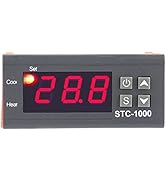
The Walfront Digital PID Temperature Controller offers a broad temperature range from -50℃ to 99℃ with fine 0.1℃ resolution and ±1℃ accuracy. Featuring an easy-to-read LCD, it supports both heating and cooling modes, includes safety alarms for temperature limits and sensor errors, and is perfect for diverse uses like aquariums, terrariums, and incubators. Its intelligent delay and calibration functions ensure reliable, precise climate control for professional and hobbyist environments alike.


| ASIN | B07Y6K5RZM |
| Brand Name | Walfront |
| Color | Black |
| Country Of Origin | China |
| Customer Reviews | 4.1 4.1 out of 5 stars (22) |
| Display Type | LCD |
| Included Components | inc |
| Item Weight | 0.11 Kilograms |
| Manufacturer | Walfront |
| Material Type | Plastic and electronic components |
| Model | Walfrontgmk8rt9xqv |
| Part Number | Walfrontgmk8rt9xqv |
| Smart Home Compatibility | Not Smart Home Compatible |
| UPC | 719233252406 |
| Unit Count | 1 Count |
| Voltage | 1 Volts |
C**Y
Fits the job i wanted
I love it, it simply does the job i want for such price! You DO NOT get input power and output power from the Heat/Cool connectors. These are not outlets. They are simply a circuit switch for one line. This means if you are connecting to cool or heat, Hot line, for example is shared from the input to the connector and the cold line is sent directly to the device. For the buttons, there’s a power button: • Hold it for 3 seconds to turn the device off. • Hold it for 1 second to turn it on. Then there’s the S button, and that’s the main one you use. When you turn on, you see the current temperature reading from the sensor - let’s say it’s 24°C. If you hold the S button for 3 seconds, it shows F1. F1 is the temperature you want the device to react at. When you’re at F1, press S once quickly and it will show you the target temperature currently set. Adjust this number up or down as needed by holding down the S and pressing up or down. When done, instantly and shortly press the power button to save. F2 is the temperature difference — how many degrees above/below the set point the relay uses to switch. I did not need this one so I set to 0.5 If you’re connecting the relay to a compressor (like in an AC or fridge), then you can use the protection settings.in F3. Same process, hold down S and press up and down, it sets minute of delays before connecting. F4 was not of use to me. The temperature reading was almost the same as the thermostat of the room
V**Z
Temperature shown is inaccurate
Display Temperature is not accurate. Atleast 3 ton4 degree difference its showing
M**R
Settings cannot be performed
I bought this item because it was the cheapest STC-1000 on sale. I thought all STC1000's are the same. The fact however is that CHEAP is either a rejected product or has no quality control. In my case, the temperature controller could not be programmed the Settings Buttons did not function. The STC1000 is a good digital temperature controller the cheapest however is a risky choice.
A**M
Received not working
Not working
A**D
عند توصيل الاسلاك تبين ان واحد من الفتحات مكسور من الداخل
L**I
Ottimo prodotto, facile intuitivo, ed anche di buona fattura. Consegna Amazon come sempre una garanzia.
Trustpilot
2 weeks ago
3 weeks ago