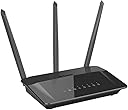
D-Link DIR-859 D-Link DIR-859 Wireless AC1750 Dual Band Gigabit Router Black
Product ID: 275130630
⚡AC1750 Speed
🌐Dual Band WiFi
🔌4 LAN Ports
Desertcart purchases this item on your behalf and handles shipping, customs, and support to Taiwan.
🚀 Elevate Your Internet Experience!
The D-Link DIR-859 is a high-performance Wireless AC1750 Dual Band Gigabit Router designed for seamless connectivity and speed. With 4 LAN ports and dual-band capabilities, it supports high-speed internet for multiple devices, making it perfect for both home and office environments.
| ASIN | B00PVCZI40 |
| Antenna Location | Home |
| Best Sellers Rank | #70,509 in Computers ( See Top 100 in Computers ) #1,009 in Routers |
| Brand | D-Link |
| Built-In Media | Wireless router - 4-port switch (integrated) |
| Color | Black |
| Compatible Devices | Personal Computer |
| Compatible devices | Personal Computer |
| Connectivity Protocol | Wi-Fi |
| Connectivity Technology | Wi-Fi |
| Controller Type | vera |
| Customer Reviews | 4.1 out of 5 stars 299 Reviews |
| Data Transfer Rate | 1750 Megabits Per Second |
| Frequency | 5 GHz |
| Frequency Band Class | Dual-Band |
| Frequency band class | Dual-Band |
| Global Trade Identification Number | 00790069415395 |
| Has Internet Connectivity | Yes |
| Is Modem Compatible | Yes |
| Item Type Name | D-Link DIR-859 Wireless AC1750 Dual Band Gigabit Router |
| Item Weight | 0.7 Pounds |
| LAN Port Bandwidth | 10/100/1000 megabits per second |
| Manufacturer | D-Link |
| Mfr Part Number | DIR-859 |
| Model Name | DIR-859 |
| Model Number | DIR-859 |
| Model name | DIR-859 |
| Number of Items | 1 |
| Number of Ports | 4 |
| Operating System | Windows 8.1, Windows 8, Windows 7, or Mac OS X (v10.7) |
| Other Special Features of the Product | durable |
| Router Network Type | hybrid |
| Security Protocol | WPS |
| Special features | durable |
| UPC | 790069428814 790069415395 790069415173 |
| Unit Count | 1 Count |
| Voltage | 12 Volts |
| Warranty Description | 'SOUQ1YEAR,SOUQ_WARRANTY' |
| Wi-Fi Generation | Wi-Fi 5 |
| Wireless Compability | 802.11a/b/g/n/ac |
| Wireless communication standard | 802.11a/b/g/n/ac |
J**L
1G ASDL Router for Home
Product meets my requirements and expectations.
P**N
Very average
I am using this device for home internet it doesn't cover a 1 bedroom apartment its weird
E**R
Very fast wireless router!!
So far it has been a great wireless router. We have 150+Mbps service through Comcast and I'm able able to get the full speed when running Speed Test on my LG G6 phone using 5Ghz (usually I get 200+Mbps). I have an older dell laptop but it usually gets 60+Mbps on 2.4Ghz. On our Roku devices they usually get 20+Mbps when running the Netflix speed test, so plenty of speed to run 1080p movies. I'm quite impressed with the range. It works well in our two level town house. I wish it had removable antennas but they could be installed with some modifications to the case and the necessary parts. The interface is pretty good (compared to other routers I've used). The one odd problem I had was it would not accept the "%" character as part of the wifi password. When the save button was clicked, it would just show a garbled mess where the password was. I couldn't find any answers as to why so I just didn't use that character. That was the only issues I had with the interface. It was easy to setup everything else.
D**E
Good router & Good Coverage
So far so good! After getting it set up and running I immediately had 5-bars of signal strength all over the house. The router is upstairs and has to pass through several walls/floor to reach me downstairs in various rooms. I can now use my 5-Ghz connection which is great as my wife used the 2.4Ghz connection. We will have up to 4 or 5 devices connected and one of them is a VOIP phone system. So far stability is good and I have not had to reset it in over 3-weeks. We are actually getting data faster than promised by our ISP. The next test in the near future will be to see if it can cover three floors in our new home (basement, main floor, upstairs. Which is why I bought it in the first place. The old D-link AC-1200 router was OK, but the 5-Ghz band was almost unusable unless you are on the same floor. This one is much better.
E**N
Solid router but leaves a little to be desired.
It's not quite as feature rich as I would have liked but for the money I can't complain too much. I got it for a great deal during Prime day and it's functioning quite well for my purposes. Pros: Good build quality The initial setup is a simple 3 step process: Install device, Configure WiFi, Setup password. Both wired and wireless connectivity are fast and reliable. 2.4Ghz and 5Ghz range is excellent. Cons: Limited network configuration options. Limited/nonexistent options for creating scheduled tasks. Limited NAT/Port Forwarding My complaints come from being familiar with a more open DD-WRT environment. Once a build of that firmware is made available for this router I will definitely be upgrading.
B**F
So easy to set up and increased my WIFI speed significantly!!
I used to have a D-Link AC-1000 and struggled to get fast internet when close to the router and got no connection on the other end of my small, 650 sq/ft condo. I also purchased a D-Link AC1200 Wi-Fi Range Extender in a successful attempt to get a WIFI connection on the opposite side of my condo from the AC-1000 router. Finally, my AC-1000 was dropped on the floor for the last time and no longer functioned. So, I bought this, D-Link AC-1750 and no longer need my range extender. I now have an extremely fast connection. I have not performed a speed test, but my connection is faster than I desire. I am lucky enough to have a low-cost, fiber optic connection. This is great.
J**9
Abnormal router IP address frustrations
After two hours of total frustration, I learned that despite the quick setup instructions, details printed on the ID card, and downloading the online manual, this particular router did not use 192.168.0.1. Every attempt to login with that address caused the guts in my Netgear cable modem/router to ask for Netgear Genie credentials. Using http://dlinkrouter.local./ had google sending me to a website with an emulator of the login screen. After mucho scratching and digging, I found that this router identifies itself as 192.168.100.1 Once I stumbled on that, everything went smoothly and it's a strong and powerful router. I know there are lot of reviews and questions, and I may have the only 859 that has this boogled-up address scheme, but if you get nowhere with 0.1, try 100.1 And, of course, everything in system that was not DHCP had to have the ip addresses changed to reflect the 100 instead of 0. That's why 1 star. Otherwise, a nice router.
Trustpilot
3 weeks ago
1 week ago