


⌨️ Protect your productivity with invisible armor!
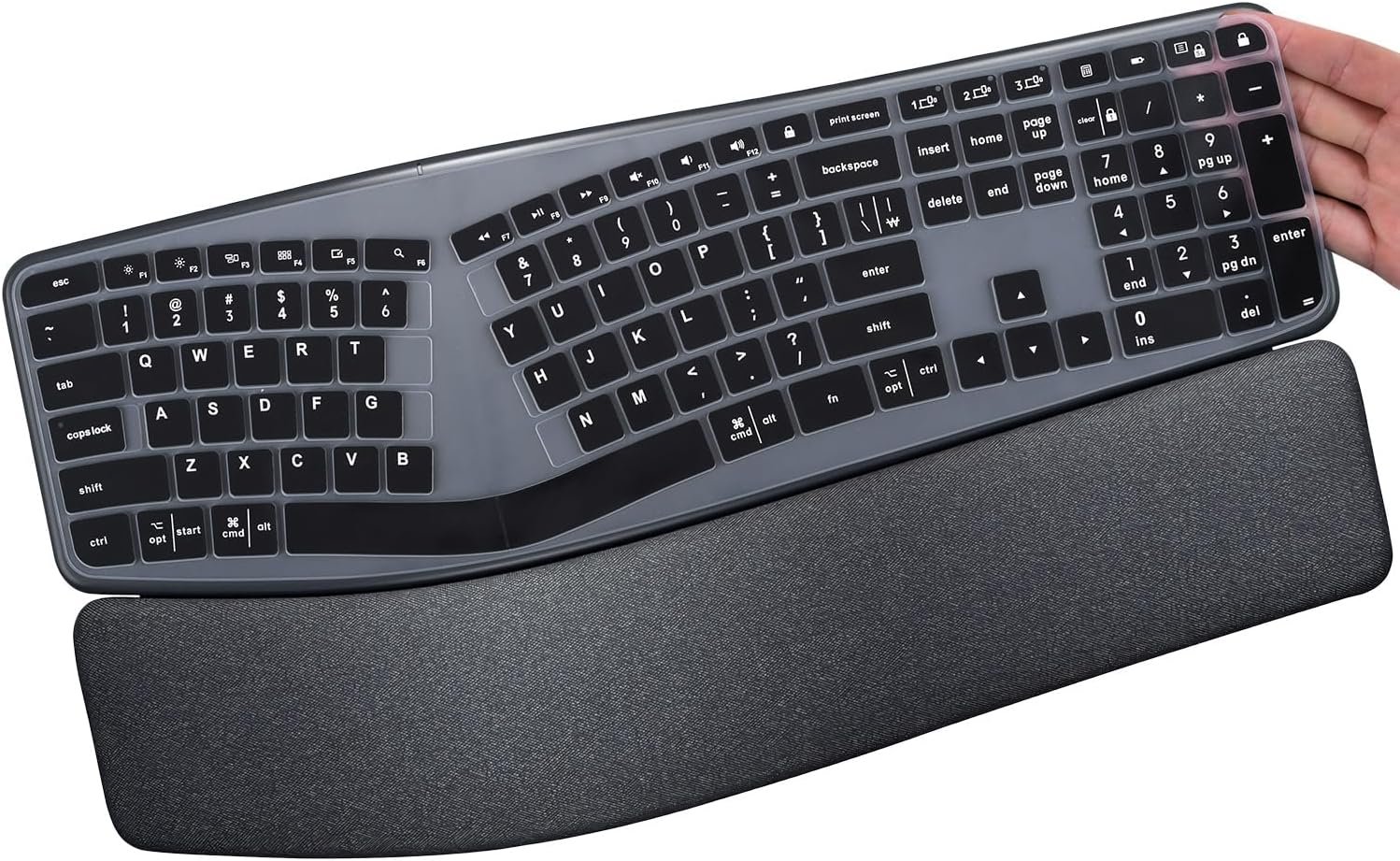
This ultra-thin 0.3mm silicone keyboard cover is custom-designed for the Logitech Ergo K860 wireless ergonomic keyboard. It offers waterproof and dustproof protection against everyday spills and debris, is washable and reusable for long-term use, and features a precise US keyboard layout fit with individually molded keys for a professional, seamless typing experience.


| ASIN | B093L5BXCZ |
| Additional Features | Dust Proof, Scratch, Water Resistant |
| Best Sellers Rank | #2,138 in Computer Keyboard Skins |
| Brand | CaseBuy |
| Color | Black |
| Compatible Devices | Logitech ERGO K860 Wireless Ergonomic Keyboard |
| Customer Reviews | 4.4 out of 5 stars 108 Reviews |
| Enclosure Material | Silicone |
| Item Dimensions L x W | 16.73"L x 4.53"W |
| Manufacturer | CaseBuy |
| Material | Silicone |
| Number of Packs | 1 |
| Pattern | Solid |
| Shape | rectangular |
| Size | Logitech Ergo K860, 4.53 x 16.73 inches |
| Special Feature | Dust Proof, Scratch, Water Resistant |
| Unit Count | 1 Count |
J**Y
Does exactly what it should
I really like it. It fits absolutely perfectly and keeps all if the stuff out of the keys. Cleaning was a breeze. It's super comfortable. It definitely feels different than a bare keyboard, but it didn't take long to get used to.
L**G
Just what I needed!
My keys had worn off so I tried this before purchasing a new keyboard. Fits my keyboard perfectly, easy to type on & haved me over $100!! WIN
E**E
happy to have a keyboard cover but not as durable as the earlier ones
NEW REVIEW, 2025: Not the same quality as CompuCover. I like the names on the keys, but the cover is not as durable as my old CompuCover was. This one developed holes. Better than a bare keyboard, though! EARLIER REVIEW: For YEARS, I have bought keyboard covers from CompuCover, but recently they just vanished. Website's there, but nobody is home. But this keyboard cover is just fine. Fits perfectly straight out of the package. Maybe a bit more rubbery than the CompuCover ones were, but it sits just fine on the keyboard -- you don't have to tape it to the bottom of the keyboard. What a RELIEF! If I / WHEN I change keyboards in the future, I'll look to these folks first for a keyboard cover -- or skin.
A**M
Great protection for expensive keyboard!
The Logitech K860 is quite expensive at over $100.00 retail. I purchased this keyboard cover to protect that investment. I had a Microsoft Sculpt Ergonomic Keyboard prior to this and for some reason there's apparently no cover available for it. To say the least, I can now be confident that the letters on the keys will not fade with this cover on it. Plus, dust and dirt won't get into the crevices between the keys. This will make cleaning and keeping this keyboard clean easier! Great item, I highly recommend it.
S**P
Not long lasting.
You get what you pay for. First off, the skin does not quite match the keys, the volume controls especially. Then, the paint or whatever, wears off fast. Simply looking down at my keyboard right now, I notice that I can see through, or nearly so, the A, E, T, I, O, and N and the space bar. Several other keys, such as the S are showing signs of wear as well. I have only had this skin for four months. Four. Therefore, 3 stars, for price and that it does adequately protect the keys from spills. If you buy this, buy two. You'll need it.
N**T
Perfect fit
Fit perfectly and feels just like the keyboard.
R**O
Reseña dos años despues
Se desgastaron un poco pero es porque lo uso un montón, ocio y trabajo. El teclado está bien protegido gracias al protector.
C**O
Works well enough, but read the review below
After breaking the hooks for one of my keys, I decided to get a cover to hold that key in place (as well as stop snack crumbs from sliding under the keys causing my wanting to remove said key and stopping liquids which have already destroyed several keyboards in the past) I ordered all the ones I could find on Amazon for my Logitech Ergo K860 wireless keyboard. DAMMOMKO https://www.amazon.com/dp/B0CC5KYK9H CASEDAO https://www.amazon.com/dp/B09336XXKF CaseBuy https://www.amazon.com/dp/B093L5BXCZ JuYuish https://www.amazon.com/dp/B09N8Y4VBW I am normally only looking at the screen and I use all 10 fingers and I am a fairly accurate and fast typist. This requirement is the force that kept me using only the Microsoft Natural 4000 keyboard from 2005 thru 2023 at both work and at home, so that my fingers would know where the keys are. I found that the DAMMOMKO, CASEDAO, and CaseBuy covers were all 100% identical. The only way to tell the difference was by the printing on the sheet of paper inside the clear plastic sleeve. These are probably the better bet for those that look at their keyboard or those that find the printing on their keys has worn off and want to see which key is which. I found that using the JuYuish cover gave me the fewest mis-types for the keys that I never look at the keyboard to use, but not by a huge amount compared to the others. By mis-types, I mean that I hit the key hard enough to register without a cover, but the cover kept it from registering. However, for those rare instances where I DO look at the keyboard to make sure I am about to hit the correct key, I find that the translucent cover makes it more difficult to see which key is which. But it is worth noting that I work in very low light conditions to make it easier to see the monitors. When I turn the overhead lights on, this issue goes away (tho again, compared to the others, it is still takes a half second longer to tell which key is which). My best guess for why there is a difference is that whatever is used to make the key tops black with lettering on the others is keeping it from sticking to the top of the keys. On this JuYish keyboard cover, all of the frequently used keys are clearly sticking to the keycaps of the underlying keyboard giving nearly the same response as hitting the key without the cover. Maybe using something to adhere each key to the cover would help. This sticking effect also highlights which keys I use the most and gives immediate credence to why the QWERTY keyboard layout was created and why it has stuck around for so long. I am keeping the JuYuish cover on my keyboard for now and one of the others as a backup and returning the remaining two (whichever two give me the biggest refund at Amazon.com) Accuracy is key for me and on the rare occurrence I do look at the keyboard, just seeing the physical layout is enough for me. An opaque keyboard cover with no keycap letters would be even better for me if it did not increase my typing error rate. I would probably buy one that used a removable adhesive on the underside to keep each key cap in contact with the cover at all times and to the base keyboard as well to keep it down. Maybe I will research spray adhesives? I think in the end, I will just buy a new keyboard and stop using a cover in order to get my accuracy back closer to 100%. Actually, make that several of them because finding replacement Microsoft 4000 keyboards every time I broke one became more and more difficult as the years went by.
J**E
Protector
In the beginning I found it a bit difficult with it coming on and off as it is not taped down. However, I have got used to it now and I like the fact that it protects my keyboard.
E**S
NO COINCIDE
EL MATERIAL ES DE BUENA CALIDAD, EL PROBLEMA ES QUE NO ENCAJA DEL TODO BIEN CON EL TECLADO, POR LO QUE SE MUEVE UN POCO Y HAY ALGUNAS TECLAS DE LA FUNDA QUE SON DIFERENTES AL TECLADO MISMO, POR LO QUE NO COINCIDE CON LOS CARACTERES ORIGINALES DEL TECLADO MISMO.
E**E
No estan bien
Usandolo me mancho los dedos con negro ..
Trustpilot
1 week ago
1 month ago