๐ผ Elevate your data game with pro-level speed and storage!
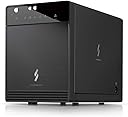
The Mediasonic PROBOX 4 Bay DAS is a robust 3.5โ SATA hard drive enclosure supporting up to four 30TB drives (120TB total) with SATA III 6Gbps transfer speeds. Featuring smart temperature-controlled cooling and dual USB 3.0/eSATA interfaces, it offers seamless compatibility with Windows and Mac systems. Designed for professionals demanding high-capacity, fast, and reliable external storage solutions.


| ASIN | B09WPPJHSS |
| Best Sellers Rank | #123 in Enclosures |
| Brand | Mediasonic |
| Built-In Media | Main Unit + Accessory |
| Color | Black |
| Compatible Devices | Desktop, Laptop |
| Connectivity Technology | SATA |
| Customer Reviews | 4.0 out of 5 stars 362 Reviews |
| Data Transfer Rate | 6 gigabits_per_second |
| Enclosure Material | Metal |
| Hard Disk Form Factor | 3.5 inches |
| Hardware Interface | USB 3.0, eSATA |
| Hardware Platform | Windows, Mac |
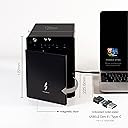
| Item Dimensions L x W x H | 6.8"L x 4.9"W x 9"H |
| Item Weight | 4 pounds |
| Manufacturer | Mediasonic |
| Material | Metal |
| Memory Storage Capacity | 72 TB |
| Mfr Part Number | HF2-SU3S3 |
| Model Number | HF2-SU3S3 |
| Product Dimensions | 6.8"L x 4.9"W x 9"H |
| Supported Devices Quantity | 4 |
| UPC | 629329002368 |
| Warranty Description | 1 Year Warranty from Mediasonic Store |
T**M
Quick, easy, and effective
Replaced an old Proliant Micro server (NxxL 1st gen) that would keep losing cheap Flex ATX power supplies every year or two. Was looking for a replacement that also had 4 bays, low power consumption and no need for RAID to drive a headless Linux media NAS with several Docker apps installed. Paired it with an older EliteDesk USFF which was already doing other related duties. Fit and finish is fantastic, better than expected. It's still slightly on the cheesy side and the lights are excessively bright (I'd recommend some black tinting tape). Drive installation was very easy. Much smaller than I expected. Options are dead simple and you basically know how to operate it from the small labelled picture on the folded quick start guide. Fans are quiet, even on max, although I'm not yet sure how well they are cooling the drives. Auto-sleep function also works well (I wouldn't use the auto-off as it fully powers down and doesn't power back up). I have been using it in USB mode since I am using a tiny, slim desktop with no expansion options and it has worked well so far. Drives were detected right away. I have not yet gained S.M.A.R.T. visibility but hope to at least get a basic "healthy" status. It's not technically supported (Linux that is) so not something I'd ding it for since I can read :-) Really nice unit so far. If all goes well, may pickup the 8-bay version for my backups. MAY 2025 UPDATE - Still running strong, no new fan noise/vibration, good disk health, never once had to reset due to disk communication loss. Have had power loss in my home where I had to manually turn the enclosure back on, but basically non-issue. Maybe people have problems with the USB 3.2 version and/or RAID? Was happy to see Mediasonic back in stock so immediately ordered the 8-bay eSATA/USB 3.0 when it became available. Both connection options exceed the network connectivity to the attached PC so no need for 3.2
F**T
Exactly what I wanted!
This mediasonic probox 4 bay enclosure is exactly what I needed! I have two 14TB Seagate exos X16 enterprise HDDs in it hooked up to my PC using eSATA VIA a 10Gtek eSATA to PCie card (also purchased here on Amazon) and it works great! I did install and update the 10Gtek driver before I hooked the mediasonic enclosure to my computer. The drivers for the 10Gtek card is no where to be found if you search for 10Gtek drives BUT this card is based on the ASMedia ASM1061 chip so I went to ASMedias websites and found the driver there. Once that driver was installed, I hooked the mediasonic probox enclosure up and turned it on and windows 11 recognized both my drives with no issues! For me, It was easy to open and install the drives. Yes, as mentioned by others here, the front blue lights are bright when its on but it doesn't bother me because I have it under my desk where its not really visible and plus I don't leave it on all the time. I only turn it on when I have to make a backup of something. I have the fan on high because fan noise doesn't bother me, plus all I'll about keeping components as cool as possible. On high, yes it is very noticeable but on medium, it is barely audible to me from about 3 feet away where it sits. And speaking cooling, it does a good job of keeping my drives cool. At Idle, according to crystaldiskinfo, they sit at about 34c-36c. I copied 4 TB of data to both drives and even copying for 10+ hours straight, neither drive got above 45C. I should mention I copied data to one drive at a time and not simultaneously so I can't speak to how the the temps would be doing more then one at time. Copy time was as I expected for 7200RPM drives in the range of 60MB/s to 220MB/s with an average of about 80MBs-110MB/s. I had a lot of very small files in the transfer so speeds where up and down. I am also using a 6FT eSATA cable and no issues with that length. I have not used USB nor do I plan on it so I can't speak to how that performs but I'm sure its good. I had read that eSATA can be a little more reliable and stable when transferring large amounts of data at a time so since I had planned on moving 4+ TB at a time, I specially went with eSATA. So far, I'm more then pleased with purchasing the mediasonic probox enclosure and will definitely purchase another one if I ever need another in the future!
B**D
HF2-SU3S3 - Blinding lights, nice dependable performance..
**This is for the HF2-SU3S3 4-bay (Non-RAID) Mediasonic PROBOX enclosure -- I received a "Revision 4" unit in July 2024** (FOLLOW-UP Aug 31, 2025 - Nothing has changed. Still running flawlessly over a year later.) Yes, the strip of blue LED HDD activity indicators is extremely bright. The enclosure's status indicators (fan speed, power sync mode, interface type) don't make a whole lot of sense unless you squint really hard to see the microscopic text next to the symbols. The USB vs. eSATA "Interface" button and the Power "Sync" button operate on 3-second long-presses. The "Fan" speed button operates on normal presses. This unit does a good job as a USB 3.0 JBOD drive enclosure (I have not tested eSATA connectivity). SMART data is accessible (I'm using OpenMediaVault on Debian OS). Each drive's correct Model, Vendor, and Serial Number appear in the OS. I have not noticed any drives dropping their connection. For a 4-bay enclosure, the USB 3.0 HDD drive speeds are mostly indistinguishable from having the drives mounted internally -- especially if you're using them on a NAS over a Gigabit network like I am. I'm running a bunch of HGST Ultrastar HC520 12TB 7200rpm drives in this unit. They're technically not supported, but work just fine with a strip of Kapton tape over the HDD Power Disable pin (Pin 3. But you can actually cover Pins 1-3 to make it easier, since Pins 1-2 are not used. Search online for a video.). With the fan pegged on High and the enclosure's glossy cosmetic front door attached, these HC520 drives can get pretty toasty during a Long SMART test -- topping out around 52 degrees Celsius. (NOTE: These are Enterprise drives and run about 10 degrees hotter than consumer drives at baseline.) Take the cosmetic front door off, and the temps quickly drop by 6-10 degrees Celsius. The fan is audible from about 6 feet away on High; and mostly inaudible on the two slower speeds. I use the sleep-sync power-sync mode ("orange light"), since the full-power-off power-sync mode ("blue light") does not automatically power the unit back on after a power cycle. After a power grid outage, you will need to manually power the unit back on -- it does not auto-power-on when power is restored.
H**S
Would not recommend - tech support could not resolve problems mounting SATA drive
I ordered this device based on the product description because I needed an esata external enclosure that would handle at least a 20TB sata drive which had been in another external drive enclosure. I wanted to be able to have 2 or more of these large TB backup drives online simultaneously. The Amazon description indicated that this should work. The item arrived and appeared to have no shipment damage. The item is relatively light, substantially all plastic as contrasted with the external enclosures for single drives that I have. The drive I needed to move is a Seagate EXOS X20. That drive connected appropriately in the old housing and it connected appropriately to an USB to SATA adapter I use for accessing other SATA drives that are not mounted in the computer or an external enclosure. However, the Seagate drive would not mount in the this multibay enclosure. I contacted the manufacturer's tech support and they sent me a video (poorly done) which suggested that the solution might be to cover three of the power contacts on the SATA drive. The person responding to tech support never seemed to grasp that the drive would not even seat in the connection port. I would not recommend this product nor the low quality of tech support.
D**E
Dead Drobo 5N. MediaSonic Probox is the DAS fix!
Got a dead Drobo? With now nonstandard formatted drives? I had 2 of mediasonics RAID boxes. Great products. I bought this box to create a JBOD using those old DROBO drives. Outstanding! 20+TB of backup DAS storage...
E**C
Only good for very light use
so, the way this thing is designed, it "functions" ok, as in, it will allow you to read and write on your HDDs. however, the fan on the thing, along with the thermal design, are severely lacking. Your HDDs will run warm when idle, for light use, it will be fine, if you are doing any long read/write sessions, especially if you have multiple drives, they will overheat and start throttling. replacing the fan is also a massive pain. it only uses specific 80mm fans that are 20mm thick. no normal case fans will work, as normal case fans are 25mm thick, thin case fans are 15mm thick, but they have the same performance as these 20mm fans. The fan connector is also seems to be a 2pin micro connection that only 20mm fans use. The biggest problem is the way the fan is installed. I have no idea what kind of screw it is, so I cant get longer ones to replace them. They are not normal fan screws, they are extremely thin. Do not get this enclosure unless you only are planning on using this for light use (reading and writing for a few minutes at a time), and only wish to put small capacity drives inside. the cooling solution is absolutely inane. I regret it, and will be spending far more on an enclosure in the future to replace this one.
D**R
Easy Setup and Solid Value
I've been very happy with this drive cabinet, which I used to create a three-disk RAID (parity) array for weekly backups, with the remaining slot as a seperate drive for additional storage. Pros: Quiet fan even on High. Extremely simple disk installation The choice of USB 3 or eSATA (I used eSATA) Configuration on the front panel for Power, Fan and other Modes is simple to use and handy to have for setting things up Throughput has been very good and I have no reason to believe that will change It's pretty quiet, though to be fair it's not on my actual desk but in a server closet and as I said set up for backups. Entirely reasonable price It "looks" nice though... (see below) Cons: It does look nice but it feels a lot lighter than I'd have preferred. The front panel especially is kind of cheap feeling, but then again: For what this thing is, it IS pretty cheap, right? But setting aside the weight of the front panel, what I really would prefer is just better ventilation! You've got a nice sized fan on the back, but only a little slot up front. I may take the front panel and machine some ventilation holes or slots into it (I have a shop). I don't want to remove the panel completely though because it seems like the drives are a little too exposed at that point because... No real "locking" mechanism for the drives. I mean sure, they won't just slide out, but they still feel like they should be a bit more secure than they are. Anyway: again for the price, you're getting some serious value here, and none of the Cons are enough to not reccomend it, which I most definitely do.
T**M
Test your drives, have patience
Works wonderfully after some minor hiccups. The device itself is sturdy with fan and standby options. Its fairy small holding 4 HDD, and the indicator lights are quite bright. Important notes: * If one drive is bad, none of them will show. This was my first issue, quickly solved by checking each disk in Slot 1 one by one, ejecting from PC and powering down between each check. This may take time, but save you from a headache and data loss later. * Also the included USB cable is quite short, at about 2-3 feet or so. I suggest getting a USB female to male extension cable, or your device will have to be quite close to the USB connection port.
R**D
Works well
I highly recommend this enclosure
I**L
I've had 4 Mediasonic 4-bay boxes for over 10 years, and only had to replace one.
I got my original boxes that were USB 2.0 and eSATA and have used them non-stop for over 10 years... they are simple to use but required a esata card with port multiplier to use, which made them a bit complicated to set up. The only situation I had for all those years was a power supply for one that died and had to be replaced. When COVID hit, one of the boxes died and I replaced it with a newer esata/USB 3.0 model but it was used as all new stock were impossible to find. And 2 years later, that is the box that has now died on me, but it is possible that it's due to power surges and such as these last few months, the city has had a lot of problems due to many storms and such, and it may have also damaged my UPS that should have prevented damage to my devices including these boxes... I'll never know. But that said, this box is replacing that other one (and is the exact same) and I will hope that it will last as long as my other older boxes that are still going strong so far. These boxes are simple to use, with only one annoyance of needing a small handle to be installed on the drives. The fans are very silent and aside the situation that requires me to get a replacement, have been very solid and working very well for a lot of year. In time I will most probably need to replace them for a more modern setup as the old boxes are supposedly limited to 4TB drives (while the newer ones are able to use much larger drives) and will switch to USB 3.0 (or better) and leave the eSATA in the past so to prevent the headaches I've had due to that. I almost went with the 8-bay boxes, but reviews have been alarming in reference to the number of issues that people have had compared to the 4-bay ones, so I'll have to see when the time comes. But for now, these boxes have been great, have been through constant use (24/7) and I've enjoyed them greatly, and for a price range that left all competition far behind.
S**N
Economic and sleek SATA Caddy
Bought this to house 4x SATA drives from a broken PC. Really easy to assemble and place the drives, and no problems accessing them once seated. Intructions are fairly idiot-proof as well.
H**I
Just a Bunch of Disk box.
Works well as a JBOD, good data transfer speed. Front cover is held down by a flimsy plastic catch the broke on the second opening.
A**N
Great add-on to have
OK, Like many of you, I had a few HDD lying around collecting dust, and I'm not talking about cheap stuff either. They were 2TB + that I pulled from my workstation when I scaled down to a laptop. The laptop does have a 2TB SSD, but I guessed might as well have more room then not enough (and I'm tired of "renting" space on the cloud) . This enclosure allowed me to have multiple HDD, each with a specific tasks, especially one for my backup and another for my backup's backup (I know, I know, but those who lost years of work because of poor or non-existent backups will understand) Been running great and everything secured...And yes, the Backup's Backup is safe in a theft/fire resistant safe....
Trustpilot
1 week ago
3 days ago