


Desertcart purchases this item on your behalf and handles shipping, customs, and support to Taiwan.
♻️🖊️ Digitize your ideas, ditch the paper clutter!
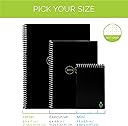
The Rocketbook Core Executive Notebook is a premium, eco-conscious reusable notebook featuring 36 dotted pages designed for versatile note-taking and sketching. Paired with the Pilot Frixion erasable pen and a durable waterproof cover, it connects seamlessly to the Rocketbook app for instant cloud uploads to platforms like Google Drive and Dropbox. Compact and stylish, it’s engineered for professionals and creatives who demand a sustainable, efficient, and tech-savvy way to capture and organize ideas on the go.


| ASIN | B06ZXWVZ3X |
| Best Sellers Rank | #6,592 in Office Products ( See Top 100 in Office Products ) #97 in Spiral Notebooks |
| Binding | Spiral-bound |
| Brand | Rocketbook |
| Brand Name | Rocketbook |
| Color | Black |
| Cover Material | Polypropylene(PP) |
| Customer Reviews | 4.4 out of 5 stars 34,774 Reviews |
| Global Trade Identification Number | 00855510007038 |
| Included Components | Everlast Notebook, Pilot FriXion Pen |
| Item Dimensions L x W x Thickness | 8.8"L x 6"W x 0.5"Th |
| Item Length | 6 inches |
| Item Weight | 5.28 ounces |
| Item Width | 8.8 inches |
| Manufacturer | Rocket Innovations, Inc |
| Number of Items | 1 |
| Pages | 36 |
| Paper Size | 6 x 8.8 inches |
| Pattern | Notebook |
| Ruling Type | Dotted |
| Sheet Size | 6 x 8.8 inches |
| Special Feature | Eco friendly,reusable,Hard cover |
| Specific Uses For Product | Note-taking, Journal Writing, Meal Planning, Grocery List, Checklist, Survey |
| Style | Minimalist |
| Theme | Notebook |
| UPC | 855510007038 |
| Unit Count | 1 Count |
G**I
Such a great idea and a game changer for my writing habits
I take a lot of notes, make a lot of to do lists... it's a lot of paper, it eats up space, and it takes a lot of time to organize. Digitalizing the whole process of note-taking, while keeping the writing gesture alive, is something that I always dreamt about (also because environmentally reasonable), but I always resisted the call of e-ink tablets (pricey, seemingly never fully reliable). And so, by chance, I discovered the Rocketbook: the Executive size one was on sale here on Amazon, and I bought it to give it a try. Now I enjoy the best of both worlds: I write, and I easily and quickly organize my notes digitally. There might be a little learning curve at the beginning, especially when it comes to making scans of the written page: my recommendation is not to erase your writing until you're 100% satisfied with your scans. After 3 or 4 document scans, you should be able to master the task of scanning the Rocketbook page with your phone, and you should be able to speed up your process. The OCR component through the (excellent) companion app does what it can, and it's not always reliable: but this has not been a problem for me, as I prefer my scans to be compiled in a single pdf and that's it. The uploading system (I use Google Drive), and its related features (ex. tagging, automatic file names) is fast and seamless, and it never gave me problems. Erasing the pages is very simple: just follow the instructions provided, carefully swipe your writing away, possibly in a repeated single direction, and maybe wait for like 20 seconds for the page to dry up, so to avoid residual stickiness from the wet towel. In general, I would say that using a Rocketbook has prompted me to write more "calmly" than before, when I used traditional notebooks: I make sure my trait is clear, I take my time to ensure a good scan, I take care of completing a good erasure of my work from every page. These adjustments are a very small price to pay for an almost endless notebook, and for the related platform that offers quick and efficient organizing capabilities. I am very happy with my Rocketbook: it might very well be the last notebook I will ever buy... or, at least, something close to that at least. I think it also makes for a great gift for another writer!
M**E
Fantastic tool for studying and note taking
I wanted to rate the rocketbook 5 stars for how much I was enjoying it. Then I ran into a bit of an issue. I was reusing the first page fairly often, not that I foresaw this as being an issue, but then my pen started having trouble writing on the page as good as it would on a page I had not yet wrote on much. I started to think I was wearing out the pages and this began to worry me as to the longevity of the pad. Then about a week later, only after about a month of use, the pen ran out of ink. So I am not sure what the issue was really. A new pack of pens is fairly inexpensive and I plan on trying the new pens out on what I thought was a page I was somehow wearing out. It the new pen writes well, then I suppose it was something to do with the failing ink supply in the pen. If not, then I am back to my concern about how long this reusable pad will actually remain reusable. Outside of all that, the pad is pretty fantastic and the app they have to accompany the pad works flawlessly. It's versatile enough to allow you to automatically scan and forward your pages to wherever or whomever you need to with a simple mark at the bottom of the page. Mind you there is a short setup to identify where things will go depending on what you mark, but it's really straightforward and extremely simple to setup. Their app takes very little time to setup and introduce you to the functionality of the rocket pad. The frixion pen is smooth and provides a steady writing experience. Couple that with the ability to erase your "ink" marks and you have the best of a pen and pencil setup. It really is a good mix. The microfiber cloth they provide for wiping your sheets clean feels really good and appears to be of good quality. Between all the items you get in the box, nothing seems to be of bad quality and attention to detail looks dead on. Now the issues I mentioned originally are still of a nature where I am unsure if its the failing on my part or the pad or the pen. Until I purchase new pens, I am going to settle for it being the way I personally used the pad and the pen. Even if it isn't, this is still a very good product and I would recommend you purchase one as the use case seems to far exceed your initial considerations. It certainly exceed mine.
T**S
Good, but some minor issues
Let me start by saying that I use my Rocketbook a lot and I really like the concept. That having been said, there are some things that could use improvement. What I like - I hate wasting paper so I'm very happy to be able to reuse the notebook repeatedly. The app is easy to use, although I do have some issues with sorting files in Dropbox - that may be user error. Some people mentioned in reviews that you cannot send multi-page documents, but that is not true (this may be an improvement to the software since those reviews were written). You just go into the options and enable multi-page sending and it will wait until you tell it the whole document is done before sending. I've found that the OCR does a pretty good job of reading my messy handwriting - it gets really messed up if I write notes in the margin or in two columns, but you can only expect so much from OCR on handwriting. Generally I carefully write a title at the top of the page so it will correctly read that and then I go crazy on the rest and assume I'll have to view the image. What I don't like - my primary problem with the notebook is the feel of the "paper." It's almost papery, but has a plasticky feel (to make it washable). You have to be careful not to smudge ink, but as long as you wait a few seconds, it holds the pen ink pretty well. Not only do you have to avoid touching the writing, you also have to be careful not to turn the page or close the notebook too early or it will transfer to the opposite page. As a result, I generally write only on every other page of the notebook. The paper is very thin and the pages stick together. A little more substance would help that. I also find it somewhat cumbersome to clean. You have to go page by page and wipe them clean, I generally also wipe them dry because otherwise the notebook takes a very long time to dry. Don't try to use the included microfiber cloth for the whole notebook, you'll get a smeary mess by the end. I use paper towels, but that offsets the paper I've saved with the notebook so eh. I'd love to be able to just spray the notebook in the sink or drop it in a tub of water, but I don't know how well it would hold up to that, as it is, the paper curls up a bit if I get it too wet and I'm not sure whether the spine has metal in it that would rust. Finally, if you don't clean your notebook frequently, especially (I've found) if you use friction markers as opposed to roller balls, you will get ghosting on your pages so beware of that. Overall, I'm glad I got the notebook and I do use it a lot, but I think there's room for improvement. If they did improve that paper and make it easier to clean, I'd buy the updated version without hesitation.
E**D
I recommend this to all university students
This particular Rocket book i used for 3 of my 5 years in college studying Engineering. It Was one of 2 notebooks that i used (the other one was the microwaveable notebook from rocket book which i have high praise for, not including it’s sturdiness) & i used it for all my courses (4-5 per trimester). It is fantastic, easy to use & absolutely increadible for keeping track of all your notes. I personally liked it to google drive files which i organized by trimesters. Protips with slight issues: - DO NOT leave this notebook or the pens inside your car on sunny days. The heat causes them to erase, that’s the whole gimmick about it. Sounds obvious but it’ll happen to the best of us if not informed. -I wouldn’t recommend it for left-handed people, the ink takes approximately 10sec to “dry” give it another 5 for it to actually dry. So it’s easy to smear. -For the people who enjoy drawing, this is notebook is absolutely amazing when it comes to line work. But the moment you decide to draw shadings, dark fillings, anything that requires a lot of concentration of it, the apps scanning wont really register it properly often leaving patchy imagery. (I.e. if you were to draw a big circle & fill it completely, the scan more often than not, will not register a completely solid circle) -for those who draw aswell, when erasing with the back end of the frixion pen, you might encounter some difficulty placing ink back where it had been erased. I’d recommend opting for a moist towel, but if you’re really trying to get those details in, i wouldn’t judge you if you used a q-tip. That’s about it. Other than that, i recommend once your done, scan it immediately, cause if you leave it all to the moment the notebook it filled, it’s like not washing the dishes the moment you placed them. It stacks up & it might come off as bothersome, but that’s your own fault you lazy bastards.
D**Z
Very useful and quality product
I love love love this notebook. I feel great that I can use it to journal, to take notes, and for anything really. Once I'm done, I can scan it. The scanning couldn't be any easier. It's easier than taking a picture. I just point the phone camera at the page and it automatically scans. Multiple pages, no problem. It is super easy to scan. The scans are perfect. I never have to adjust them. I have it save everything into my onedrive, but there are so many options of where to save your files. The best part is that I get to erase the pages. The ink deletes so easily. The ink won't erase unless you wipe it down with a damp cloth. Otherwise the ink won't erase off the page. What I love about it is that I can use it over and over again. It's like a whiteboard, but as a notebook is the best way I can describe it. I never have to worry about wasting paper and having so many notebooks to use. If I want to find anything, it is so simple because the digital files are custom named so I can easily find the file by the name I give it and I never have to search through different notebooks for what I'm looking for. It's printable as well if I ever need it on paper. What I love is that I like to write and use paper. I hated in the past is that I can't always find the notes I've taken easily. Not anymore, it's super east to find things now with the digital files. I don't have to worry about storing the notebooks since they are digital. I never have to worry about running out of paper or wasting paper. This has been a life changer for me. I love it so much. I also like to journal and I never want other people to find my journals and read them since they are private. This way, I can journal and erase it after I scan it. The files can stay private with a password of I choose. I can now journal without worrying about anyone possibly stumbling on my journal. So many amazing ways to use it. The erasable ink pens work so well. When I'm writing and I make a mistake or want to change a word, I can easily erase the ink and it's gone. Like if I was using a pencil, except I am using ink. I bought the color pack penz so my notes are colored and fun. The notebook is high quality. I highly recommend this product.
C**T
Good, not great- definitely a work in progress. Possibly useless for left handed writers!
I decided to try this out as a stopgap method of taking notes prior to diving in to a tablet/sylus combo. I attend a lot of meetings, get random taskers, etc and also am the type to jot down random stuff (often taking notes in a meeting when no one else is touching a pen), so I thought a reusable and scanable notebook was a decent way to experiment with "is digitally archiving my notes a useful endeavor?" On the whole, the Everlast is OK. Good, not great, but not terrible either. I view it as a beta model and if they could tweak things a bit more, it could be great. Pros: it basically works as advertised- the Frixion pens write well on the slick paper. it does not have the feel of normal paper, but I actually sort of prefer the smooth feel of the glossy surface + the gel ink; It scans and uploads to the destination of your choice for archival purposes; it cleans "fairly" well (but also see cons) Cons: the Frixion ink takes a few seconds longer than usual to dry especially on the slick paper. This is no secret and they tell you that, but you really have to experience it to see if you can live with that. Left-handed users would likely not be able to use it unless they used the complete "hooked over" style to mimic a right-hander. I am a righty and can write quickly and often fill a page, flip to the next, and the ink is not dry enough and it will smudge- ranging from "a little messy" to "text was lost."; the scanning generally works well but can be frustrating at times- in the same spot with the same technique, I will occasionally have one page blurry (my hands aren't that shaky, especially since I brace my arm while scanning) or one page totally washed out, even in the same position and light source. Also based on your lighting, the colors can be difficult to distinguish when scanned. I experimented with the multi-color pack and even with good lighting, purple was not much different from black when scanned. Colored-coded notes could lose meaning when scanned; the pages do clean well with a moist microfiber cloth, but do not expect to do this quickly and easily if the notebook is full. If you clean and scan after 4-5 pages, you're good to go, but if you have 30+ pages filled and you're wiping it down, you're going to find yourself going back with another dry cloth or paper towel to get extra moisture. Added to the frustration- the slick pages will adhere to each other when moist and you'll occasionally miss that and will come back to them later with caked-up smudges. Bonus Con: the Frixion ink does not last very long. I got a pen with the notebook and then ordered a multi-color pack along with it. The stock pen lasted 4 weeks with pretty low volume (lots of meetings, but often one sentence notes per; not a student composing papers or using it for a journal with lots of prose). This could add up quickly. Extra Bonus Con: (limited to certain users) my office system does not allow access to file share services like Google Drive, OneDrive, or DropBox, so I cannot readily back up my notes and access them at work. I can send to Outlook.com and then access that way, but it is less organized than a simple folder on OneDrive. This only affects some users, but if your work systems are similar, one of the key functions of the app is somewhat crippled. All in all- I have used this daily for 3 months and like it, but am probably going to switch back to pen and traditional paper or take the plunge and do all-digital notes with a tablet. I will definitely keep the Everlast in use as a way to take phone messages and replace the post-its that pile up for to-dos that pop up during the day, but as a main method of primary note-taking, I do not think it is ready for prime time. I think a key element required to get it up to speed would be to work on the paper+ink combo to find a way to set/dry faster but retain the ability to wipe clean.
C**.
One of the best purchases I ever made.
This product has been a game-changer for me. I find myself journaling or taking notes on a daily basis, but it gets so difficult to keep up with multiple notebooks or even find what I'm looking for in those notebooks. I enjoy actually writing notes as opposed to typing, so I began weighing the cost of getting a new iPad, a Remarkable2 tablet, or the Rocketbook notebook. In the end, I decided to go with the Rocketbook based upon a much cheaper price tag (I knew I could buy one of the other options later if I ended up not liking the Rocketbook) and the ability to actually write out physical notes that would then be digitized and sent to whatever platform I wanted, which for me includes Evernote, Slack, e-mail accounts, Google Drive, and Microsoft OneDrive. I was able to preset each of those destinations on the app (it gives you up to 7 presets) and then it will automatically send to whichever I have indicated on the notebook page. I love using the Rocketbook. It is a highly functional and efficient notebook, and I've been recommending it to anyone and everyone. This is one of those products that I find super satisfying to use and does everything I want and need. I got the executive size as it is closer in size to the rest of the books I might be carrying at a given moment, and I've been pleased with that. It is thinner than most notebooks, but I find that I only have to clean it out every 2 to 3 weeks, depending on how much I've used it. It does take maybe 5-10 minutes for me to clean it how I want it, but that's really not bad at all, especially when I consider how quickly my handwritten notes are digitized and sent where I need them. A few things to consider: The paper does have a glossy finish, and using erasable pens is required, so it's not 100% like writing on regular paper, but it was not that big of an adjustment. It takes a few seconds for the ink to dry, but that also hasn't been too big of an issue. I just wait 10 seconds or so before turning the page. While the ink comes straight off with a wet microfiber cloth, I did notice that I've left a few indentations on the icons at the bottom that indicate where to send the note. I think I must have pressed a little hard when hurriedly marking them, so I've tried to be more mindful of that. The cover on my notebook has slightly warped (I think from the Phoenix heat), so it doesn't lay completely flat; however, even this is only slight and doesn't impact any functionality. Overall, I'd say buy, buy, buy. I've filled and erased it many times already, and I still make a big thing every time about how much I like it. When my wife sees me with the microfiber cloth and notebook, she knows she's about to hear--yet again--how much I'm enjoying my Rocketbook.
L**A
In Love!! Must have for every student or professional
I love this notebook! One of the better investments I have made. And I feel EXTREME Boston pride knowing these were designed and made right in my own city! I am constantly taking notes at work and keep two glass dry-erase tablets on my desk. One next to my desk phone and the other by my computer. I hate using paper because of the amount of waste I was creating all in the name of passing along a G. damn phone number. The only downside to the dry-erase tablets is, after you clean it off, the information is gone forever. I LOVE how I can take my notes on my rocket book notebook, snap a pic through the app, and it appears on my computers desktop immediately. You cant get any better or easier than that. And when your done, simply erase and use again. My notes are easy to keep organized which means they are even easier to find when needed. I even ended up purchasing the sticky notes starter set and fell in love with those too. If you are on the fence you should give it a try. You just might be amazed at the amount of paper you save.
M**U
NIce, glad I bought it!
This is a really nice product, and so far it has worked very well for me. I use OneNote for project-related notes, but prefer to write notes during meetings and for to-do lists, etc. In the past I've switched between keeping an actual notebook and just writing on blank paper on a clipboard, and I'd occasionally photogrpah my important notes, crop the photos, and insert them in my OneNote pages. The problem with this system was that taking photos, cropping, saving, uploading to my cloud, then importing them to OneNote was really time consuming, and on top of that I was ending up with either full notebooks or stacks of hand-written pages that I no longer need. The Rocketbook is an ideal compromise. Just the right size for meeting notes and other similar things, pages are easy to write on, and the app is great - just point the camera, click through a few things, and my notes are already in OneNote. The OCR is surprisingly good for basic text (especially considering how bad my handwriting is); only problem is it doesn't automatically format bullets, extended sentences, and similar. Pages clean up very easily; I even accidentally used a regular pen on one, but it didn't take long to clean it up with a bit of isopropyl. I don't regret buying it. I also bought the carrying case for it; I'll review that in another post.
A**N
Amazing tech!
Love this piece of technology. It actually ensures all my notes are saved on Clouds like iCloud and One Drive. It is extremely helpful in retaining notes that you may need at a later instance. Only the wiping part is a bit of a work, but hey, this is available at 3,000INR and an eink tablet like the Remarkable costs 40,000+ INR. What more could you ask for?
D**D
Una genialidad
Es demasiado bueno, sumamente práctico, la aplicación para guardar tus apuntes esta muy fácil de usar, se siente muy duradero, la calidad del “papel” es muy resistente y cómodo al tacto, estoy muy feliz y lo recomiendo exageradamente, acabo de comprar otro ahora tamaño carta. Pensando en economía, cuesta lo mismo que dos o tres cuadernos pero este nunca te lo acabas y almacenas todo en formato digital. La pequeña toalla para limpiar también está de excelente calidad, todo está perfecto con este producto. Recomiendo comprar también al menos un paquete de plumas adicionales.
ゆ**く
強力な情報整理ツール!思考の外部記憶装置!
今まで散在していた情報(日記、アイディアノート、メモ、読書のまとめ、活動記録等)がまとめられてデータベース化できる!最高です! もっと早く手に入れたかった。 文句なし5つ星
M**T
Compact and works great
I received this as a birthday gift and I really like it. It has been so helpful already for taking notes at work and playing games with family. It is small and it feels like there aren't many pages but that's the beauty of everything being erasable. The app is also pretty easy to use.
Trustpilot
2 weeks ago
3 weeks ago