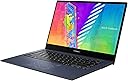
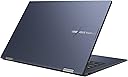
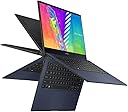
🔄 Flip your workflow, stay sleek, and stay ahead with VivoBook Go 14 Flip!
The ASUS VivoBook Go 14 Flip is a lightweight, ultra-slim 2-in-1 laptop featuring a vibrant 14” Full HD touchscreen, powered by an efficient Intel Celeron N4500 processor with Intel UHD Graphics. It offers versatile 360° hinge modes, up to 24 hours of battery life, and a hygienic antibacterial surface. Preloaded with Windows 11 Home in S Mode and a 1-year Microsoft 365 Personal subscription, it’s designed for seamless productivity and entertainment on the move.

| ASIN | B0B2RB6FNL |
| Are Batteries Included | Yes |
| Audio Details | Speakers |
| Average Battery Life (in hours) | 24 Hours |
| Batteries | 1 Lithium Ion batteries required. (included) |
| Brand | ASUS |
| Color | Quiet Blue |
| Computer Memory Type | DDR4 SDRAM |
| Connectivity Type | Bluetooth |
| Customer Reviews | 3.8 3.8 out of 5 stars (281) |
| Date First Available | 10 June 2022 |
| Form Factor | Convertible |
| Graphics Card Description | Integrated |
| Graphics Card Interface | Integrated |
| Graphics Card Ram Size | 4 GB |
| Graphics Chipset Brand | Intel |
| Graphics Coprocessor | Intel UHD Graphics 620 |
| Graphics RAM Type | DDR4 SDRAM |
| Hard Disk Description | Emmc |
| Hard Drive Interface | USB 3.2 |
| Hard Drive Size | 64 GB |
| Item Weight | 1.5 Kilograms |
| Item model number | J1400KA-DS02T |
| Lithium Battery Energy Content | 39 Watt Hours |
| Lithium Battery Packaging | Batteries contained in equipment |
| Manufacturer | ASUS |
| Maximum Memory Supported | 4 GB |
| Memory Clock Speed | 2.8 GHz |
| Memory Technology | DDR4 |
| Number Of Lithium Ion Cells | 2 |
| Number of USB 2.0 Ports | 1 |
| Operating System | Windows 11 Home S |
| Optical Drive Type | No Drive |
| Power Source | Battery Powered |
| Processor Brand | Intel |
| Processor Count | 2 |
| Processor Speed | 1.1 GHz |
| Processor Type | Celeron |
| Product Dimensions | 32.08 x 1.7 x 21.69 cm; 1.5 kg |
| RAM Size | 4 GB |
| Resolution | 1366x768 |
| Screen Resolution | 1920 x 1080 pixels |
| Series | ASUS VivoBook Go 14 |
| Speaker Description | Built-in speakers |
| Standing screen display size | 14 |
| Voltage | 19 Volts (DC) |
| Wattage | 45 watts |
| Wireless Type | Bluetooth |
J**N
This is a great little laptop, after a bit of tweaking. I needed something silent as a normal laptop's fan noise plays havoc with my Tinnitus and this is ideal - no fan, very little heat, crystal clear display and light weight. It was super slow to start with but changing it's performance setting from being "optimized for looks" to "optimized for speed" made a huge difference. I needed to adjust the basic font to make the words crisp and clear as performance optimization renders them pixilated but that's simple. Initially a web page would take a few minutes to load and is now instant. I use LibreOffice and can happily do spreadsheets and type up documents and YouTube plays clear video with really nice sound. I also modified the paging file settings so that the system now uses 16GB of the hard drive as virtual RAM and that cranked up the speed a lot too. The laptop has an empty NVMe socket built in so I added a 1TB SSD and now I have plenty of storage too. However, be aware that doing so probably voids warranty but at the price of this laptop I'm not too concerned. I chose a lower speed SSD to reduce the operating heat but even so copying 50GB from an external USB hard drive only took 10 minutes, which is fine. All said I'm very happy I'm now able work away in peace and quiet with this laptop sitting on my bare legs without burning them and also get a days worth of use in one charge.
S**I
Decent laptop for school
J**.
I just got my VIVOBOOK and so far it’s working great. My only complaint is that when I got it I had to update almost everything on it but it got done and it is running good. Love it so far.
E**)
Right out of the box, Windows is crashing. There is a ton of garbage apps which may be causing it. I'm sure all of them are unsupported by Microsoft. Stop loading your trash on my computer. The touchscreen isn't very responsive, which makes me not want to use it. You can tell it's cheaply made, just like most of the rest of the laptop. Day 1, a key popped off. Why? Keyboards have been around for over 50 years. There is zero excuse for keys popping off. The sound is decent for what it costs. I had no issues with wireless, Bluetooth, the trackpad, the 1/8th stereo jack, or folding the laptop into tablet mode. The screen brightness was fine for what I was using it for. As for speed, terrible. This is probably due to the garbage apps, and lack of testing. I would not buy this again due to poorly tested software, and overly cheap hardware. ASUS, it's a fail. You can do better. If you want this review removed, send me a working laptop. -MrNetTek
M**R
Decent build quality. Reverses nicely from a notebook computer into a tablet. 720P HD screen is acceptable but not outstanding. I got a "used" unit from a reputable seller and it arrived in new condition and I got an outstanding price. Touch screen works fine. Now: 4GB ram is on the low end but for normal day to day tasks, works fine. You will need to be patient for the first week as MSoft constantly updates all the software on the HD. 64GB of storage space is again, minimal but if you just need basic software, it will work. You can store your data on a micros sd card in the slot and you can get a 256GB micro card for around 20 bucks. Of course having the ability to expand your storage by plugging it in is great. The keyboard works fine. It's not backlit but at the price there are some compromises. All in all I like it a lot. I use it in tablet mode to access youtube while I ride my exercycle and have the tablet in a bracket. The screen isn't great, but it is okay. Again, price compromises. Give it a week or so and it will stop seeming to be slow once msoft updates everything.
Trustpilot
2 weeks ago
2 months ago