


Desertcart purchases this item on your behalf and handles shipping, customs, and support to Taiwan.
🖨️ Keep your Epson Ecotank running flawlessly—don’t let waste ink slow you down!
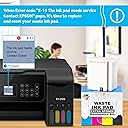
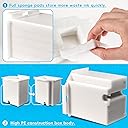
The Poschink Waste Ink Pad Replacement Maintenance Box is a high-yield, compatible solution designed for Epson Ecotank printers including ET-2800, ET-2720, ET-4700, and others. It features a super absorbent sponge and a durable tank body to extend printer life by resolving the 'Waste Ink Pad End of Service Life' error. The kit includes an extra sponge, dual-head screwdriver, and gasket bag for easy, complete replacement. Backed by responsive customer service, it supports up to 5000 pages of reliable printing maintenance.



| ASIN | B0C3CKSRV1 |
| Additional Printer Functions | Print Only |
| Best Sellers Rank | #55,962 in Office Products ( See Top 100 in Office Products ) #1,952 in Inkjet Printer Ink Cartridges |
| Brand | Poschink |
| Cartridge Type | Compatible |
| Color | waste ink pad |
| Compatibility Options | Compatible |
| Compatible Devices | EPSON Ecotank ET-2720 ET-2803 ET-2800 ET-2400 ET-2711 ET-4700 L3110 L3210 L3150 L3250 etc. Printers |
| Customer Reviews | 4.5 out of 5 stars 814 Reviews |
| Ink Base | Water |
| Ink Color | black |
| Ink Colour | black |
| Manufacturer | Poschink |
| Mfr Part Number | waste-ink-pad |
| Model Name | Poschink Waste Ink Pad Replacement Maintenance Box |
| Model Number | waste-ink-pad |
| Model Series | Ecotank |
| Number of Items | 1 |
| Other Special Features of the Product | High Yield, Refillable |
| Page Yield | 5000 |
| Print media | Paper (plain) |
| Printer Model Compatibility | Epson ET(EcoTank) ET-2400, Epson ET(EcoTank) ET-2711, Epson ET(EcoTank) ET-2720, Epson ET(EcoTank) ET-2800, Epson ET(EcoTank) ET-2803, Epson ET(EcoTank) ET-4700 |
| Printer Output Type | multiple colors |
| Printer Type | Inkjet |
| Special Feature | High Yield, Refillable |
| Unit Count | 1 Count |
M**N
Good product.
Good instructions and perfect results. Just make sure you have a printer cable, because you can't run the free download over bluetooth. Once I realized that, it went quickly and smoothly, as least for my ET 4700
A**E
Seemed super shady but it worked out perfectly for my ET 2720
I had the dreaded message about end of life cycle pop up. Quick check on Dr. Google directed me to this simple fix. I ended up selecting this Poshmark brand one, don't ask me why but I did. It arrived quickly, installed super easy. Then it came time to install the software.... It seriously felt like I was about to play a game of Russian roulette since it's source is an unverified publisher. I convinced myself that all my anti virus, anti malware, and all the other things I have would save me from my own stupidity in case something went wrong. It installed without issue. Then it came to following the directions, again, super scary wondering if you're about to give up everything to the dark web or not.. Nope, it was fine. Last but not least, having to click a link to go to another website that looks like it hasn't been updated font wise since the 90's.. I decided to play it safe and make the purchase using a card that I don't use for anything else, which would then tell me if it got stolen, exactly where it was taken from (so far so good on that, I will update this review if anything changes). I copy and pasted the magical WIC key into the super shady software, restarted the printer as directed and when I turned it back on, the error was gone! I have since printed 900 business labels and haven't had any errors or funky changes. All that to say, the super shady software that scares the crap out of you is legit. However, I still wouldn't install it without having some type of protection installed.
T**A
that my printer works effeciently
So far, so good.
R**N
Great replacement waste ink pad!
This waste ink pad maintenance box works well as a replacement for my printer. It was easy to install and fits perfectly. The extra sponge is a nice bonus and helps absorb excess ink effectively. The packaging was secure and arrived in good condition. My only small complaint is that it didn’t come with clear instructions, so I had to search online to be sure I was installing it correctly. Other than that, it does the job and is a cost-effective alternative to the original brand. Would definitely recommend if you’re looking for a reliable maintenance box!
E**A
Great buy
Clear instructions and works great!
D**.
Good product-May need to troubleshoot
I am giving this product five stars even though I had issues resetting my printer because it was not product fault. The maintenance box was easy to install. Based on other reviews, I was prepared for the wic reset site that looked suspicious. I will say it is legit. I purchased a reset key which I later found out that I did not need. Read further and I will explain. After I downloaded the WIC software, I spent over 2 hours troubleshooting yrying to reset my printer. I am writing this hoping that it might help others. In the end, the problem was my Wi-Fi was not recognizing the printer. When I was trying to reset it. I ended up connecting my printer via USB cable and I was immediately able to reset my printer and start printing again. I am going to list the troubleshooting steps I took, but you might want to try that first. In addition, before purchasing a reset key, they do offer a trial key. If you have never used a trial on that printer. I suggest doing this first because in the end I used the trial rather than the key that I had purchased. Here are a few additional troubleshooting steps you could try: 1. Ensure Correct Reset Key: Double-check that the reset key you purchased is for the correct model of your printer. If it's specific to another model or region, it may not work correctly. 2. Reinstall WIC Software: Uninstall and reinstall the WIC software to make sure it's functioning properly. Sometimes a corrupted installation can cause errors. 3. Run the Software as Administrator: Make sure you are running the WIC software as an administrator. Right-click on the WIC Reset tool icon and choose "Run as Administrator." 4. Disable Firewall/Antivirus Temporarily: Your firewall or antivirus software may be interfering with the connection. Temporarily disable them and try again to see if that helps. Make sure to turn it back on when finished. 5. Try a Different USB Port: If you are connecting via USB, try switching to another port. Alternatively, if you're using Wi-Fi, you might want to try a USB connection to see if that helps the software communicate with the printer. This is what worked for me. 6. Use a Different Computer: If possible, try using the reset software and key on a different computer. Sometimes system-specific issues can interfere with communication between the software and the printer. 7. Check for Firmware Updates: Ensure that your printer's firmware is up to date. If it's outdated, it might cause incompatibility with the reset tool. Be cautious, as some updates can prevent third-party reset tools from working. If none of the above works, it might be worth contacting the vendor of the reset key. They may have specific guidance or offer a replacement key if the one you purchased is faulty. Last resort would probably be to call Epson.
R**A
MAC OS users read this
1. There is no way around needing to reset the waste ink counter by downloading software, unless you want to pay for Epson to fix your printer. Replacing the waste ink tank alone will not make your printer work. Most of the WIC software you'll find if you google search this issue is only for WINDOWS. 2. The software recommendation that came with this part was for WINDOWS users only. It's an .exe file. I researched and found one that's for MAC, and LINUX (as well as windows.) I had to read the FAQ on that site to learn how to tell my MAC I was willing to bypass security and install it, but this was simple, and I was even able to use a trial key instead of paying. The trial key reset the counter to 80% so I'll need to go through the process again sooner than if I'd paid, but I was pleased to find out it would work first before buying a key. The site was "my printer club." 3. I have zero affiliation with "my printer club." Just trying to help out MAC users who may think they're out of luck, as it even says on the Epson site, direct quote: "Yes, the service alert and service repair process may be temporarily delayed on most printers by using the Maintenance Reset Utility to enable printing for a short period of time. This method is available to Windows users (Windows 10, Windows 8, Windows 7, Windows Vista, and Windows XP) as a one-time option while customers determine the best next steps for repairs. Currently there is no Maintenance Reset Utility available to Mac OS users." 4. Installing the waste tank purchased here was quick and easy. I'm only giving 4 stars because I had no idea when I bought it that their instructions weren't for MAC.
D**K
fixed my printer
followed the instructions and it worked like a charm
K**O
Buen producto
Quedan perfecto en L3250.
A**E
Software y Almohadillas van de la mano - Error de que la vida útil de almohadillas está por terminar
Lo compré para el modelo de impresora Epson L3110, la guía que viene para descargar el software e inicializar nunca encontré el modelo de mi impresora, me guie en videos en otras redes y con el software gratuito. La ventaja de este producto es que vienen 2 paquete de almohadillas y si trae todo lo que indica, pero no supe usar la descarga a como la tienen distribuida en su pagina. Es importante el software ya que la impresora va de la mano de la vida util de las almohadillas y reiniciar el contador de la impresora.
J**.
Me ahorré comprar una nueva impresora
Además de buen precio y que llegó mucho antes de tiempo, lo recomiendo ampliamente, viene no uno sino dos juegos de almohadillas, pensé que tenía que comprar nueva impresora y no, me ahorro tiempo y dinero, además de que trae herramienta para el cambio de las almohadillas de la impresora, saludos
J**S
Bueno
Es Fácil De Usar
A**Z
Buena compra
Funciono perfecto con mi impresora y le quedó perfectamente.
Trustpilot
3 days ago
2 weeks ago