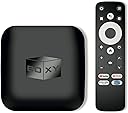
🎬 Elevate your streaming game—because ordinary just won’t do.
The BOXY Android TV Box is a compact powerhouse featuring a quad-core Amlogic S905X4 CPU, 2GB RAM, and 16GB storage. It supports 4K HDR10+ Dolby Vision and Atmos streaming across all major platforms including Netflix, Prime Video, and Disney+. With Android TV 11 OS, USB 3.0, Ethernet, and advanced Dune HD media center software, it delivers seamless, high-quality playback of local and online content in the latest formats like AV1 and MKV/ISO. Perfect for professionals craving premium home entertainment with versatile connectivity and smart features.


| Brand Name | BOXY |
| Item Weight | 1.1 pounds |
| Product Dimensions | 3.94 x 3.94 x 0.79 inches |
| Item model number | BOXY |
| Batteries | 2 AAA batteries required. (included) |
| Color Name | black |
| Special Features | Amazon Prime Video, Disney+, Apple TV+, HBO Max and many others with best possible audio and video quality up to 4K Dolby Vision and Atmos, Android TV 11 OS version, Automatic framerate and resolution switching, Chromecast, Netflix Android TV streaming media player and advanced Dune HD media center |
M**�
Impressive alternative to more expensive solutions!
This is a very impressive little box at an extremely competitive price. I decided to roll the dice on this Boxy device instead of purchasing much more expensive offerings such as the NVIDIA Shield Pro -- and I am actually very happy with this decision! This device provides support for AV1 and has totally eliminated the streaming quality problems I was having when accessing high quality videos with subtitles from a NAS. It also has built-in support for all the things someone with a local library might need, e.g. smb, upnp, etc. The only down side is you do need a Google account for initial set up, and you will have to make sure to turn off or block Google's telemetry, but this is the case with many devices these days. There is also a bit of set up involved, so it does help to be technically savvy, but there are very easy to follow instructions included as well. If you're looking for a more modern alternative to higher priced solutions, I think this one is totally worth it, even with the required time and patience for set up.
N**L
Good Little Beast
Does everything it claims it can do. Runs good. It has a few hiccups here and there, but what doesn't (my $1000 phone does once in awhile for example). Overall, a quality item that I am satisfied with.
F**8
My Audio Streamer
Of course it streams video, but I also chose this item for remote audio playback without using HDMI. There is a S/PDIF output which I can attach to a DAC or receiver with digital input. I use my tablet/phone app as a control point (browse, remote), and choose the Boxy as either a Chromecast or UPnP media renderer. I store my media on a separate server, but this Boxy has USB 3 and micro SD card support for local storage. Now, one can also stream audio via the USB 2/3 port to a DAC, but in this case, every time the power is disconnected the prior audio level gets reset to a very low level. Chromecast audio casting via Android google Home doesn't always work well for me. However, apps like VLC for Android or NPR news have their own cast functionality which works fine. For UPnP playback, I have the Yatse app on my tablet as the remote, and KODI running on the Boxy when it starts. No need to turn on the TV. As a third option, I am using Lyrion Music Server, for those of you who remember the Logitech Squeezebox. I have the media files and server running on my router, the Squeezer app is the remote on my tablet, and the Squeezelite app runs on the Boxy at startup. I decided to permanently change the Android launcher to FLauncher — ChatGPT can provide instructions using adb. The UI runs smoothly, I have no issues with the performance. The software supports the efficient AV1 video codec, popular for YouTube and Netflix. The remote control could be better quality. I like the buttons and D-pad on the Roku Ultra remote better. Dune HD Media Center is included. This could be useful for those who want to play high quality local/NAS media files. For many, I think the lower cost Xiaomi TV Box S 3rd Gen is a better video player than this Boxy. The Xiami has a better processor Amlogic S905X5M, 6 nm (v. S905X4-J, 12 nm) at a high clock speed 2.5 GHz (v. 2.0 GHz), a better GPU Mali-G310 V2 (v. Mali-G31 MP2), Wi-Fi 6, Google TV on Android TV 14 (v. Android TV 11). The advantages of the Boxy are: USB 3 + USB 2 + micro SD slot, LAN port, S/PDIF output. I have the older Xiaomi Mi Box 4, and it works fine for my needs. That model has S/PDIF output, while the newest Xiaomi S does not.
B**D
Possibly preloaded with malware
It’s been made known that many of these Android TV boxes come preloaded with malware. I’m finding all kinds of evidence that this is one of them. Play Protect keeps attempting to block an app that, when searching for info about it, is associated with malware on other brands of Android TV devices. But I did attempt to see if it could even solve the problem I was trying to solve: Playing video with TrueHD Atmos. You need a special app that you must sideload called Dune HD. Yeah, it doesn’t come with this capability out of the box. You need this special app that you have to go download somewhere. This app sucks. It’s not easy to use. And if you opt to secure your network by not connecting this device to your home network, it complains about not being able to verify its license and cuts back its features. It cannot stream high bitrate media over a gigabit connection. I have wirelessly connected devices that can stream these media fine. So I can only guess it handles networking so poorly that trying to play high bitrate UHD content over a network just swamps the CPU. But can it play my content at all? Yeah, if I load it onto a fast USB flash drive/USB SSD, it’ll play, with Dolby Vision and Dolby Atmos. On top of all of this, the performance is bad. I had a first generation Nvidia Shield TV from many years ago that I wish I still had because it performed so much better. So my conclusion is it doesn’t solve my problem. Yeah, it can play the content, but my requirements are to do so from my media server. I also require that my devices not contain malware. All of these problems compound, and the result is that this is a useless, and not even that cheap, device.
M**O
HDR 4k quality is absolutely better than roku
This is my first android box so I don't have another one to compare to. I used Gemini a.i to recommend me an android box that can install steam link so I can stream my PC games that's on my game room to my living room tv via Ethernet. This does a phenomenal job for that. Where it gets better is the HDR 4k quality with dolby atmos (also has dolby vision.) I'm used to my Roku TVs I buy from Walmart, and a Roku 4k box I use for my LG 4K TV in my living room. The quality is absolutely noticeable. Much better. I didn't know you could get better. I thought 4k was 4k but after installing this box and seeing the difference between 4k qualities, I now see I spent money on a high end LG tv and was not utilizing the TVs potential. I'm not a audio/visual snob the difference is noticeable. I had to write this review because it feel that someone like me may benefit from it.
T**R
For the price this one is a winner
Leaving 5 stars because this is easily the best cheap streaming device I’ve ever used. I would tell someone to buy this over a Roku Ultra and a Firecube tbh. I’ve used Roku Ultra, Apple TV 4K, Firecube 3rd gen and even the Shield TV Pro and this one comes the closest to the audio prowess of the Shield. Picture quality is lacking but the audio more than makes up for it. I use a Samsung Q990D soundbar so I do hear everything. I bought this mostly to see what the Dune Media Center was all about and from what I can tell it’s better for people with their own home media servers. If you’re on a tight budget or just don’t want to spend a lot of money on a device this is a good one.
L**T
Dune App Works But With major Flaw
When playing folders with a group of mp4 movie files, manual advance, via the remote control, doesn't advance to the next mp4 movie file, but instead advances to the next chapter of the currently playing mp4 file, and displays an annoying message at the bottom of the screen, noting the changing chapter numbers throughout the remaining playback. Bottom line? If you want to play a group of movie (mp4 files), straight through, either random or sequential, this player works great. However, if you don't like what's currently playing, and unlike an actual Dune Player, you are unable to manually advance to the next movie in the sequence. You are stuck with the current movie sequence as is. I can't use this player because I like advancing to the next whole movie if the current movie that's playing is a stinker. That's a major flaw I can't live with. I tried every way to get around it, but to no avail. There doesn't seem to be any obvious onboard control to fix it. Nothing in the instructions. I'm therefore unable to use this player, or give it a good review. I own several Dune Media Players, running the same Dune App, and I can tell you from experience, that the the Boxy Player doesn't work exactly the same with regard to the playback feature as previously mentioned.
A**X
Excellent Choice
I wanted a media player to play multiple codec files. This does the job. Thanks. Cheers.
Trustpilot
2 months ago
3 days ago