Buy anything from 5,000+ international stores. One checkout price. No surprise fees. Join 2M+ shoppers on Desertcart.
Desertcart purchases this item on your behalf and handles shipping, customs, and support to Taiwan.
🚀 Elevate your data game with Synology DS223J — where storage meets smart collaboration!
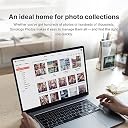
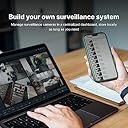
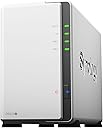
The Synology DiskStation DS223J is a sleek, 2-bay NAS device designed for professionals seeking reliable data backup, file sharing, and multi-platform access. Supporting up to 32TB raw storage, it integrates Synology Drive for seamless file management, Synology Photos for mobile photo backup, and Surveillance Station for network video recording. Ideal for home offices and small businesses, it offers real-time collaboration, cloud synchronization, and robust security features in a compact, user-friendly package.


| ASIN | B0C8814GKB |
| Assembly Required | Yes |
| Box Contents | Main Unit X 1 Accessory Pack X 1 Quick Installation Guide X 1 |
| Brand | Synology |
| Brand Name | Synology |
| Colour | Black |
| Compatible Devices | Android Phone, Windows PC, iPhone, macOS |
| Country of Origin | Taiwan |
| Customer Reviews | 4.5 out of 5 stars 784 Reviews |
| Enclosure Material | Plastic Tempered Glass |
| Global Trade Identification Number | 00846504004768 |
| Importer Contact Information | 9F., No.1, Yuandong Rd., Banqiao Dist., New Taipei City 220632, Taiwan |
| Item Dimensions D x W x H | 16.5D x 10W x 22.6H Centimeters |
| Item Type Name | NAS |
| Item Weight | 0.87 Kilograms |
| Manufacturer | Synology, Synology Inc., 9F., No.1, Yuandong Rd., Banqiao Dist., New Taipei City 220632, Taiwan |
| Manufacturer Contact Information | Synology Inc., 9F., No.1, Yuandong Rd., Banqiao Dist., New Taipei City 220632, Taiwan |
| Manufacturer Part Number | DS223j |
| Material | Plastic Tempered Glass |
| Model Number | DS223j |
| Mounting Type | Floor Mount |
| Packer Contact Information | 9F., No.1, Yuandong Rd., Banqiao Dist., New Taipei City 220632, Taiwan |
| Product Dimensions | 16.5D x 10W x 22.6H Centimeters |
| Size | 2-bay |
| UPC | 846504004768 |
| Unit Count | 1 Piece |
| Warranty Description | 2 Years |
V**T
Synology DS223J NAS: A Compact Powerhouse
The Synology DS223J NAS impresses with its swift performance and user-friendly interface. Its dual-core processor and intuitive DiskStation Manager software ensure smooth operation for tasks like multimedia streaming and remote access. The sleek design, multiple connectivity options, and built-in applications add to its appeal. While expandability options could be more robust, the DS223J remains a top choice for home and small office environments, offering excellent value and reliability.
V**�
Very bad quality is not work properly 😭
Very bad quality is not work properly 😭 download speed is 100 kb
L**1
Gut
Gutes NAS . Leicht einzurichten. Bisher ohne Probleme .Kein Zwang zu Cloud .
C**E
Does exactly what it should, straight out of the box, painlessly.
This is the least painful setup / configuration experience I have had with any product (including Apple devices) in my entire life. After tossing two SSDs into the internal drive bays, closing it up, plugging it in and pressing the power switch, the DS233J detected both drives, and proceeded to initialise and configure itself pretty much on auto-pilot (while still providing lots of options to fiddle with, if desired, along the way). The web-based setup assistant is idiot-proof (witness myself; exhibit A!), and the only extra step involved in my particular case, was quickly installing the Media Server app from within the web-based management environment (said installation took around 5 seconds, total), at which point, my smart TV immediately recognised the DS233J as a valid input source, and away it went, streaming movies, photos, etc. Network access to the RAID array in the NAS was seamless, from all devices in the house (Chromebook, Mac, Windows PC), and everything functioned as expected, without any further config. hurdles. This thing is small, lightweight, very very quiet (it does have a fan, but it's barely audible even up close), and the setup process and management software are absolutely superb. Even if you barely understand anything about NAS's, filesystems, RAID setups, or DLNA servers, you can have this device up and running within just a few minutes. Basically, it does exactly what it's supposed to, and does it in a way that should make Apple jealous.
W**N
Up up and away!
Finally took the plunge into getting a more solid backup solution. I have been backing up stuff for YEARS due to a heavy lost back in the 90's. So since then I've started to back up religiously!! The sad part is back in the 90's the HD was like what... 3GB maybe 6GB. Now you got TB's. Well more stuff on 1 disk, but if that disk dies or fails.... you are SOL right. Well, I've been just backing up from drive to drive piggy backing if you will and finally I decided to try a better solution with this drive/backup system. It was recommend by someone in IT as pretty decent and it didn't break the bank! So I got it, came pretty fast I think 4 days max along with a 14TB drive (different order) this thing doesn't come w/ a drive just so you know. Setup was pretty easy, but the interface is something I was not familiar with, so it took a little bit to get use to it, but now after a month or so its just doing its thing since I have it setup. PRO's - Nice design (looks nice), easy to open/close get your drive in etc. It also has USB port in the back which is excellent! I hooked up all my (old drives to be backed up) and once setup, I was able to transfer easily from those drives to my big 14TB. So pleased with that. The webpage/browser access is ok, lots of stuff which I have no clue how to use or why I would use it... Just wanted a drive that I could "share on network" without having to have it hooked up to a pc/laptop running 24/7. This does the trick as it has a network cable and is accessible without a PC being hooked up to it. *Although I haven't figured out how to access it lol* But hey any access I need I am at home so all good for me. For your techies you can probably figure out the offsite access fairly easy I am sure. Ohhhh one feature I did understand and was able to setup really easy is this power on/off of the drive. You can setup a power off and power on time, which is cool and I think that helps because I have it turn off like midnight and then back on around 7am. So it gets a little breather..... as I am sleeping. hahahahaha CON's - Hmmm the software is bit complicated for my taste, but maybe these types of setup are ALL like this so it may not be a huge CON if that makes sense. The stuff I needed to figure out and to use I did, so if you are along my speed (know enough to be dangerous) you should be fine. The only CON and its not huge, but it drives me crazy is this one. So when you plug in a USB drive to the system.... it calls the drive USB SHARED 1. I'd like to change the name to something I can remember... so my naming convention was out the window and luckily I still had my old laptop hooked up to figure out what drive what was so I could AT LEAST keep the (drive letter) the same. That I was familiar with so a little pain, but workable. Overall.... SOLID! I'd get this again for sure! If you don't have the $$$ for a larger drive system (like 4) then this TWO drive system is affordable and solid so far. I think there is even a RAID function for cloning drives in the system if you want to do that, but for me I just wanted to backup the other USB drives I had to another drive and I've done that. So I have 1 slot open for a drive to expand when the time comes. Maybe when I get bored I will look into the webpage "apps" and see what all I can do. There are photo apps and things which I think will let you share photos.... its basically like your "own" personal cloud although I don't have it setup for access like that it would seem. I did however get my PLEX stuff over to the drive and so that's cool! Hope this is somewhat helpful for at least those who may now be as knowledgeable like myself with these setups. :-)
T**.
Compact, stable, app easy to use, happy with it
Used for a week, it is good and performs as expected. Phone wireless backup is easy to set up and works smoothly, take a bit of time for first upload a few hundred GB of media. The app is user-friendly, making setup and file sharing simple. App will stop when you use the iphone even focus mode enabled. That can be improved though. Overall, it’s smaller and better than expected for daily home use. I’m using normal older HDDs and it still runs well. There is a bit of noise when it’s running, but it’s acceptable.
M**N
Great item!
Excellent product. Very nice and easy to use.
Trustpilot
3 weeks ago
1 day ago