


🖨️ Elevate your home office game with smart, speedy printing that keeps you connected and productive.
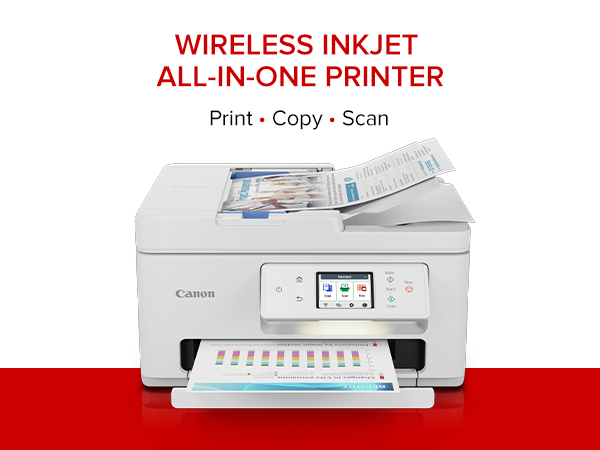
The Canon PIXMA TR7820 is a compact, wireless all-in-one inkjet printer designed for home use, offering fast print speeds of up to 15 ppm in black and 10 ppm in color. Featuring a 2.7” LCD touchscreen, automatic duplex printing, and a 35-sheet auto document feeder, it supports versatile media types and sizes. With easy setup, dual ink cartridges, and seamless connectivity via Wi-Fi and USB, it balances professional-quality output with user-friendly operation, backed by Canon’s 1-year limited warranty.




| ASIN | B0CHLBPMYF |
| Additional Printer Functions | All In One |
| B&W Pages per Minute | 15 |
| Best Sellers Rank | #44,480 in Office Products ( See Top 100 in Office Products ) #50 in Ink Tank Printers |
| Brand | Canon |
| Built-In Media | Documentation, Ink: 1 PG-285 Black and 1 CL-286 Color Cartridges, PIXMA TR7820, Power Cord |
| Color | White |
| Color Pages per Minute | 10 |
| Compatible Cartridge | PG-285 Pigment Black Ink CL-286 Color Ink |
| Compatible Devices | PC, Smartphones |
| Connectivity Technology | USB, Wi-Fi |
| Control Method | App |
| Controller Type | Android |
| Customer Reviews | 3.7 out of 5 stars 478 Reviews |
| Display Type | LCD |
| Dual-sided printing | Yes |
| Duplex | Automatic |
| Hardware Interface | USB |
| Ink Color | Black, Color |
| Item Dimensions D x W x H | 13.8"D x 14.8"W x 8.2"H |
| Item Height | 8.2 inches |
| Item Type Name | Inkjet Printer |
| Item Weight | 16 Pounds |
| Manufacturer | Canon |
| Maximum Copies Per Run | 99 |
| Maximum Copy Resolution Black and White | Up to 1200 x 1200 dpi |
| Maximum Copy Resolution Color | Up to 1200 x 1200 dpi |
| Maximum Copy Speed Black and White | 15 ppm |
| Maximum Print Resolution Black and White | Up to 1200 x 1200 dpi |
| Maximum Sheet Capacity | 100 |
| Maximum print Resolution Color | Up to 1200 x 1200 dpi |
| Media Size Maximum | 8.5 x 11 inch |
| Model Name | PIXMA TR7820 |
| Model Number | 6258C002 |
| Model Series | TR |
| Number of Trays | 2 |
| Other Special Features of the Product | Auto Document Feeder, Auto-Duplex, Borderless Printing, Energy Star, Touch Screen |
| Paper Size | Rear Tray: LTR, Legal, A4, A5, B5, 4” x 6”, 5” x 7”, 7” x 10”, 8” x 10”, Square 3.5” x 3.5”, 5” x 5” Custom Size: 2.2” - 8.5” / Length: 5” - 14” Cassette: LTR, A4, A5, B5 |
| Power Consumption | 22 Watts |
| Print media | Envelopes, Glossy photo paper, High-resolution paper, Paper (plain) |
| Printer Connectivity Type | USB, Wi-Fi |
| Printer Output Type | Color |
| Printer Type | Inkjet |
| Printing Technology | Inkjet |
| Processor Count | 1 |
| Resolution | 1200 x 1200 |
| Scanner Type | Flatbed |
| Special Feature | Auto Document Feeder, Auto-Duplex, Borderless Printing, Energy Star, Touch Screen |
| Total USB 2.0 Ports | 2 |
| Total Usb Ports | 1 |
| UPC | 013803359985 |
| Warranty Description | 1 year |
| Warranty Type | Limited |
| Wattage | 22 watts |
N**R
Very nice printer for the price
I had a HP Officejet printer that I've used since 2011-2012. Nice little all in one printer but I got a printhead not found issue. The issue might have been ink cartridge related and new ink ($110) might have fixed it, but rather than take the risk I figured I would buy a new printer because it wouldn't cost much more than that. Enter the Cannon PIXMA TR7820. $130 delivered and it came with ink. Set up very quickly. Print and copy quality is solid. The auto feeder for scanning is much better than my HP (keeps the pages straight). My only concern buying this was would it integrates with Google Drive, which is where I like to scan my documents to? Sure enough it handles this quite well. You can spend more and get a nicer printer that can scan/copy/print faster and in higher quality, but if you don't need that then why pay for it? As a bonus replacement ink is reasonable. $45 for regular black and color cartridges or $75 for the XL versions.
D**1
Love-Hate relationship
1. When it is working, this printer does very well. The Scan feature is much more sophisticated than my old HP 4-in-1 device. In most ways it is user-friendly. And I repeat, when it is working- or more precisely, when it is connected to my PC. 2. The setup did not go smoothly and took much longer and more effort than previous printers I have owned. 3. Repeatedly this printer goes “off line” and says there is no connection to WiFi. I have a good WiFi-Router and our TV has no problems receiving it or staying connected to it four rooms away.. This printer is sitting next to the WiFi router and can’t seem to stay connected. It takes up WAY too much of my time getting it re-connected so that I can print something. 4. If I had to use one word to describe this printer, I would say, “annoying.” 5. I probably WOULD NOT buy this printer again knowing what I know now. I should have paid more attention to those reviewers who warned me that this printer had problems staying connected to WiFi. 6. I almost NEVER write negative reviews and I waited nearly two months before I wrote this. I am pretty tech-savvy and I am about 98% certain problems with this printer are not my fault. Addendum October 20, 2024: I probably would give this printer just one star now. Recently it insisted on updating the software. I should have refused. It took me over an hour to get it reconnected to my desktop and printing normally. The printer has slipped from the irritating to the maddening category. In retrospect (everything is 20/20 in the rearview mirror), I should have tried harder to get a printer with both a Wi-Fi AND a hard-wired connection. Like my old printer. Also I should have paid more attention to the reviewers who mentioned how expensive the ink is for this printer… my bad. 2nd addendum August 20, 2025: I have now downgraded my rating to one star. This printer worked reasonably well for a few days or weeks at a time and it is now back to its old tricks. The worst of which is in inability to stay connected to my desktop PC. I spent 45 minutes trying to get it reconnected last night. I think it is time to throw in the towel and get another printer. This one is not heavy enough to use for a boat anchor and is too bulky to use as a doorstop... It has now entered the category of worthless piece of dung.
T**N
Surprisingly great Little Printer
This Printer is a Gem so far - Don't usually write reviews but this printer came quick fast and easy from a long distance down south. It worked perfectly right out the box. any by the way, no cover box was used, only the printer box. The printer is so masculinly cute for men use as well as women and compact but prints fast smooth and easy. It connects to your wifi and devices quick and easy. I sure hope this last at least a year minimum and on the best side three or more years - Thanks Canon! if this printer does not hold up I will do a second review to give a better evaluation for the duration long term use which is the real test of any such product. It prints pages much faster than I thought - The long term use of the ink is now the final measure and that will take another week or two- see you then!
A**L
Good Printer for Home Use
This printer works well and was a breeze to setup. The only one issue I ran into was when I tried to print some photos on Canon's matte paper. The pictures looked all washed out. I played around with the settings and found out if I selected the glossy paper setting, the pictures look fine on the matte paper. I wish Canon would fix their matte paper setting so the pictures look acceptable. Other than that everything works fine and I like the fact the rear paper feed is set for photos only so when you use the different size paper for photos, you only need to use that tray every time. Good overall all-in-one printer.
A**K
Affordable clear printing printer
Love it! Prints great. The speed is great and there is of use.
R**3
The TR7820: A basic printer cosplaying as a multifunction device
As with most base-tier multifunction printers, this one has its faults. The ADF has never worked. It has never identified a sheet(s) placed into the feeder. Need to copy a multipage document? Do it one sheet at a time on the platen glass. Need to scan a multipage document? Manually place each page on the platen glass and tap "scan". The Canon TR7820 is a basic printer dressed up to look like a multifunction device.
D**V
Excellent Upgrade
This is an excellent unit. Very easy to set up and connect instantly with the canon app. It was an upgrade/replacement from my previous printer, which was also a canon and they are both excellent but this new unit does so much more. I’m very pleased with my purchase.
A**M
FAILED CONNECTION/FAILED SET-UP! I
Chose this Canon after 2 wks of research.. was so excited to get it after issues w previous HP. Assembled easily once out of box... Very heavy. Loved the look. That's where all positivity ended. The 1 page titled EASY SETUP was just 3 cartoon like pictures with no written directions. How hard could it be? Turned it on and answered 3 questions on the display.. chose English and agreed to auto updates. Exit. At this point the App Canon Print was supposed to take over but it didn't say that! I had to Google it. So...app was ready but the display was showing the top of the unit opening and closing where it had showed paper placement. From that point on that picture in the display NEVER varied! Never went back/forward, never responded to the app or anything I did, including unplugging, restarting resetting.... NOTHING affected the stuck display. Several calls to Tech Support had the same result. Tried to connect via my Samsung Android.. at 1 point it said printer was ready but it was NOT ready. It was stuck in the very early setup process where it stayed! My issue now is to repurchase this Canon TR7820 as it may have just been a defective unit or go back to my HP All in One printer that worked but had issues with multiple Tech Support charges that were very expensive and frequent. Opinions are welcome. The Canon had the best reviews and tho many commented on the Starr Up page most were able to get set up and working fairly easily! Unit is on the way back and want to decide if I should reorder and try this again! Very frustrated!
Trustpilot
2 days ago
1 month ago



