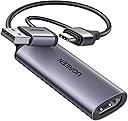
Desertcart purchases this item on your behalf and handles shipping, customs, and support to Taiwan.
🎮 Capture Every Frame, Own Every Stream!
The UGREEN HDMI to USB C Video Capture Card delivers professional-grade 1080P@60FPS video capture with 4K@60Hz input support, ensuring ultra-smooth, crystal-clear streaming and recording. Compatible with a wide range of devices including iPads (iPadOS 17/18), laptops, phones, and major gaming consoles, it offers a hassle-free, driver-free plug-and-play experience. Built with a durable aluminum shell and reinforced cables, it’s designed for long-term use without overheating, making it the perfect tool for content creators and gamers aiming to elevate their live streams and gameplay recordings.


| Asin | B0CFQ2BMPZ |
| Best Sellers Rank | 987 in Computers & Accessories (See Top 100 in Computers & Accessories) 1 in External TV Tuners & Video Capture Cards |
| Box Contents | Soft TPE cable, reinforced joints |
| Brand Name | UGREEN |
| Compatible Devices | PS5/PS4, Xbox series, Nintendo Switch, Raspberry Pi camera, Mobile devices (with additional HDMI cable) |
| Country Of Origin | China |
| Customer Reviews | 4.3 4.3 out of 5 stars (1,781) 4.3 out of 5 stars |
| Item Weight | 30 Grams |
| Manufacturer | Ugreen Group Limited |
| Manufacturer Part Number | 25854 |
| Model Number | 25854 |
| Network Connectivity Technology | HDMI, USB |
| Number Of Items | 1 |
| Product Warranty | 2 Year Limited Warranty |
| Unit Count | 1.0 count |
| Video Input | HDMI |
User
Very good for switch to PC
Really really good for putting my switch on my PC to play Tomodachi Life, colours are great and vivid and no weird green / purple hue. A bit of a lag but that’s to be expected with something like this. Thank you great price and easy to use.
User
A good capture card.
Although the card can capture 1080p, the image quality on Linux can be hit or miss. I purchased this for a video a while ago for bios settings but it appears that the UEFI doesn't duplicate the screen to show the settings, though it has been good use. Overall, a cheap and good capture card.
User
Almost perfect however let down by functionality.
Product received quickly and packaged well.Build quality is great too.minus one star however for the simple fact i cannot have my PS4 Pro on any resolution higher than 1080p otherwise the device will simply not pickup a signal, see attached screenshot showing my PS4 Pro could go up to 2160p but when chosing that or automatic i get nothing, annoying depending on what screen i'm playing on as doesn't sit right on larger screens being stuck at 1080p when the device is meant to receive upto signals / resolutions of 4KOther than that picture at 1080p of recording / streaming is good, and is at 60fps which is the main reason i bought this and upgraded from 720p 30fps device.
User
Brilliant HDMI capture card
An absolute 10/10. Great replacement for any other capture card, the ability to use USB A or C is fantastic. Little to no latency, matches almost perfectly from my mirrorless camera to my RODE microphone/interface. Haven't tested audio quality through this since I don't use the built in mic on my camera, but honestly you can't go wrong at this price.Doesn't get too hot, never had it shut down. I do get a few hiccups every now and then but honestly for the price it's amazing. (I have purchased a total of around 7 of these, they're that good)
User
It works!
Bought this for some analogue video archiving (used in conjunction with an additional ADC box) without having to put up with some dodgy ancient software supplied on an optical disc. Works great for this, and handy to have around going forward. Fair asking price and well made. OBS sees it as a 1080p 60 Hz source, so as advertised.
User
Simple and Effective with Great Quality Output For The Price
I've used this device on between a Nintendo OLED switch (not the switch 2) and an M1 Mac Air. Utterly fantastic. The quality is more than enough for demonstrating (in my case) gaming progress and/or techniques.I just had to download the OBS Studio software for the Mac which is free and very easy to navigate.Great value for money.
User
Worked well for a few hours then died
Initially this worked very well with good picture and sound, but it did run very warm. However after a few hours use (under 10 hours in sessions of 1-2 hours) it started freezing and losing sound and/or picture. This is clearly not a good choice if you want a reliable product that will last. Returned for refund, and I will look for an alternative product. Disappointing because UGREEN products are usually very good in my experience.
User
OK for the price, but not for Fire TV Stick
Works with GoPro but not with Fire TV Stick for some reason.
User
Muy buena, con consideraciones
Funciona para Switch 2. Buen funcionamiento, se calienta pero no en exceso, cumple con lo establecido. Pero, a tener en cuenta:Al estar conectada genera una leve estática sobre sí misma.No da 60 FPS en Streamlabs ni en OBS sino 30, pero sí en reproductores como PotPlayer, la solución es streamear la ventana del reproductor.El cable es corto como se ve en la foto ilustrativa, hay que tener en cuenta la longitud del HDMI.Es pesada al menos para un puerto de un gabinete, es importante tenerlo en cuenta para no dejarla colgada.
User
Gut für Unterwegs
Ich nutze diese Capture Card, um meine Xbox unterwegs über meinen Laptop als Bildschirm anzuschließen – funktioniert einwandfrei! Die Einrichtung ist unkompliziert, das Bild kommt ohne merkbare Verzögerung an und die Verarbeitung wirkt hochwertig und robust für den mobilen Einsatz. Gerade für unterwegs, wo man keinen externen Monitor dabei hat, ist das eine super praktische Lösung. Klare Kaufempfehlung für alle, die ihre Konsole flexibel und ohne zusätzlichen Bildschirm nutzen möchten.
User
Perfecte compagnon voor digitale fotocamera
Voortreffelijke beeldkwaliteit. Ik gebruik hem om het beeld van mijn fotocamera op een ipad weer tegeven
User
Working as expected
Works to capture video from my DSLR using HDMI to mini-HDMI converter
User
Studio DisplayでPS5を映すために購入。Mac経由で問題なく表示できました
Studio DisplayでPS5を映すために購入。Mac経由で問題なく表示できましたApple Studio DisplayにはHDMI入力がないため、PS5を接続する方法としてこちらのキャプチャーボードを購入しました。接続はPlayStation5 → HDMI → 本製品 → USB-C → Mac mini → Studio Displayという形で使用しています。MacでQuickTime Playerの「新規ムービー収録」を開き、カメラを本製品に設定するだけでPS5の画面を表示できました。設定も特に難しくなく、無事に映すことができました。画質については、キャプチャー経由になるためか少しだけ荒くなる印象はあります。ただ、個人的にはたまにゲームをする程度なので十分許容範囲です。音声はStudio Displayのスピーカーから出るためとても良い音で楽しめます。Studio Displayのスピーカーはかなり優秀なので、ゲーム音もしっかり迫力があります。Studio DisplayでPS5やSwitchなどを使いたい方には、Macを経由する方法として良い選択肢だと思います。小型で配線もシンプルにまとまりました。
Trustpilot
3 weeks ago
1 day ago