Desertcart purchases this item on your behalf and handles shipping, customs, and support to Taiwan.
🚀 Dominate your digital domain with the Flint 2 – where speed meets security!
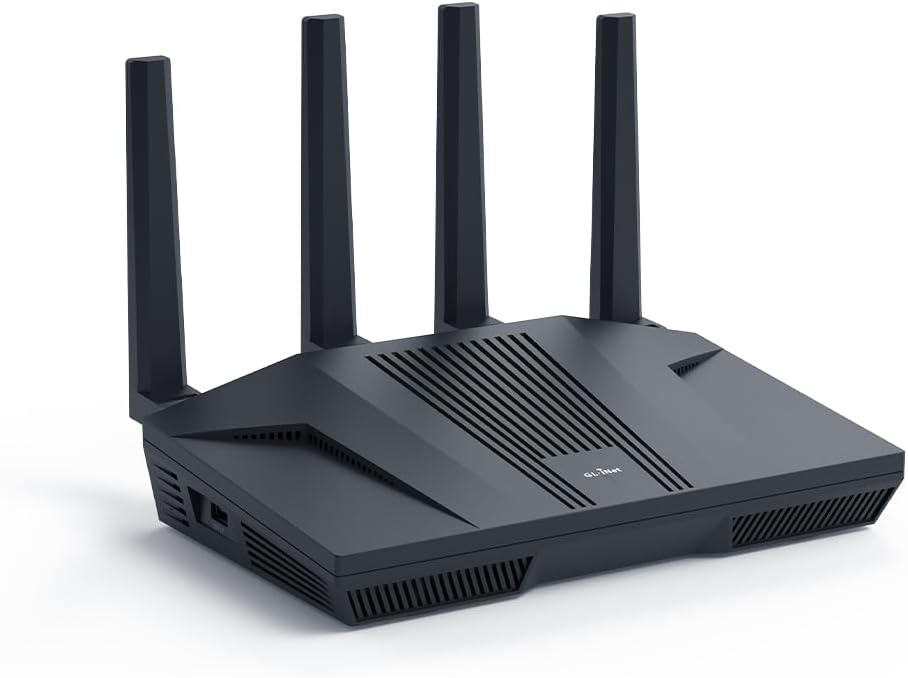
The GL.iNet GL-MT6000 Flint 2 is a cutting-edge Wi-Fi 6 gaming router featuring 8-stream technology delivering up to 6 Gbps wireless speeds, dual 2.5G multi-gig Ethernet ports for ultra-fast wired connections, and pre-installed OpenWrt with OpenVPN and WireGuard for advanced security. Designed for gamers and professionals, it supports over 100 devices, integrates AdGuard Home for ad-blocking, and offers easy setup with firmware updates to maximize performance.


| ASIN | B0CP7S3117 |
| Antenna Location | Business, Gaming, Home |
| Antenna Type | Retractable |
| Best Sellers Rank | #186 in Computers & Accessories ( See Top 100 in Computers & Accessories ) #19 in Computer Routers |
| Brand | GL.iNet |
| Built-In Media | Ethernet Cable, GL-MT6000 router with 2-year warranty, Power Adapter (US Plug), User Manual |
| Color | Black |
| Compatible Devices | Gaming Console, Personal Computer |
| Connectivity Protocol | Wi-Fi 6, Ethernet, Multi-WAN |
| Connectivity Technology | Wi-Fi |
| Control Method | Touch |
| Coverage | Wide Coverage |
| Customer Reviews | 4.6 4.6 out of 5 stars (2,865) |
| Data Transfer Rate | 6000 megabits_per_second |
| Frequency | 5 GHz |
| Frequency Band Class | Dual-Band |
| Item Weight | 761 g |
| LAN Port Bandwidth | 2 x 2.5G Ports, 4 x 1G Ports |
| Manufacturer | GL.iNet |
| Maximum Upstream Data Transfer Rate | 2500 megabits_per_second |
| Mfr Part Number | GL-MT6000 |
| Model Name | Flint 2 |
| Model Number | GL-MT6000 |
| Number of Ports | 6 |
| Operating System | Linux |
| Other Special Features of the Product | Access Point Mode, Guest Mode, Internet Security, QoS |
| RAM Memory Installed | 1 GB |
| Security Protocol | WPA3 |
| Unit Count | 1 Count |
| Voltage | 5 volts |
| Warranty Description | 2 Years |
| Wi-Fi Generation | Wi-Fi 6 |
| Wireless Compability | 802.11ac, 802.11ax, 802.11b, 802.11g, 802.11n |
K**J
Great router
This GL.iNet Flint 2 is a massive upgrade for anyone looking to get the most out of a high-speed fiber connection. The dual 2.5G ports are the standout feature here, as they allow for true multi-gigabit speeds that most standard routers just can’t handle. I found the setup process to be incredibly straightforward through the web interface, and the WiFi 6 coverage is strong enough to reach every corner of my home without any dead zones. It handles gaming and 4K streaming simultaneously without any noticeable lag or stuttering. I especially appreciate the built-in VPN support and AdGuard Home integration, which provide an extra layer of privacy and security for all my connected devices right out of the box. It feels like a professional-grade piece of hardware that is still easy enough for a regular user to manage. The range on this router is impressive and significantly better than the standard equipment provided by my ISP. Even with dozens of smart home devices connected at once, the performance remains stable and snappy. The build quality feels solid, and the cooling vents do a great job of keeping the unit from getting too warm during heavy downloads. It is the perfect choice for a home office or a gaming setup where consistent speed is the top priority. Overall, it is a powerful and reliable router that offers a lot of advanced features without being overly complicated to use.
O**R
Wow! Just wow!
I had a Synology RT6600ax that I bought just under a year ago. I really like that router, but I didn't like the fact it only has one 2.5Gb LAN port and the WAN port is only 1Gb. I upgraded my internet plan to 2.5Gb, so that router would no longer work for me. I could have connected the single LAN port to my 2.5Gb switch, but the internet would be limited to 1Gb. I tried various workarounds, but decided it needed to be replaced. I did some research and people were raving about the GL.iNet GL-MT6000 (Flint 2) router. I was a bit unsure, but the price was so good I decided it wouldn't be too big of a risk. The risk has so far paid off and this is an exceptional router. It runs on OpenWRT, but configuring it wasn't too difficult because GL.iNet has a custom GUI which simplifies things. I like the custom GUI, but I also like that the OpenWRT GUI is still accessible for more advanced settings. Once I got the router up and running, I was shocked at the WiFi performance. In addition to the Synology router, I had three Synology MR2200ac access points. Even with the GL-MT6000 (Flint 2) router in the basement, it still had a much faster speeds than the Synology access points. I almost didn't connect my Synology access points, but I thought it would be best to do so since I have IoT devices outside the house and the signal might not go that far (especially seeing as how the router was in the basement equipment room). Configuring the Synology MR2200ac access points without the Synology router was still possible. I was able to have the wireless devices that connect to the main network via the Synology APs appear on my GL-MT6000 (Flint 2) router and be handled via DHCP. I still need to figure out VLAN on OpenWRT to have my IoT devices be handles by the GL-MT6000 (Flint 2) router DHCP. These devices are currently being handled by the Synology APs, and it they are working fine. I originally bought this router expecting to use it until I found something better. I don't know if I will be replacing it anytime soon. Though not as simple to configure as a Synology router, it outperforms my Synology RT6600ax router in many other ways.
A**R
Good and reliable open source router
This is a decent "home router" that comes with expandable "open source" firmware. This router has a number of features that my previous home router lacked. And this router also has better signal/range than other routers I've owned, and it also crashes less often than those other routers did. One router feature I really like is full support support for the semi-regulated DFS frequencies in the 5ghz WiFi band. While those frequencies are legal to use in the US, they do have extra regulations on them. And sadly most home routers don't implement those extra regulations, so you can't use the DFS frequencies with most home routers. But I found that configuring this router to use the DFS frequencies greatly increased my WiFi speeds (on some days more than doubling the speed gotten on the more traditional WiFi bands). And this router also has support for extra features that I don't personally use, but others might find handy. For example, this router has built-in support for VPNs (i.e. the router can setup a VPN into your network, or have your network use an external VPN). Also this router has an option to have the router itself do ad-blocking for all devices on your network. And because the firmware for this router is "open source" you can easily download/install other features you may want your router to do. So in my personal opinion this router really is the worth the retail price of around $160. Yes, this router is more costly than many home grade routers, but that higher price buys you a more reliable and feature rich router.
J**S
Powerful OpenWRT IQRouter Replacement for Low Latency No Bufferbloat Cake SQM Performance and More
Regarding the Flint 2 GL-MT6000 router by GL.iNet received May 1, 2025 I have a Netgear CM600 cable modem (also purchased on Amazon IIRC) and 300/10 Mbit cable service feeding the Flint 2. After the very sad demise of the IQRouter company, I knew I couldn't be without a full featured OpenWRT based router that could handle SQM and Cake without choking and that would give me access to all those settings I was reading about on the internet. I wanted those A+ bufferbloat scores that the IQRouter gave me even if I had to wade through millions of misleading and obsolete configuration posts. The training wheels have come off and the Flint 2 has delivered. On the hardware side: The hefty passive heatsink inspires confidence because routers heat up under heavy load which can cause intermittent performance issues. The antennas can't swivel to the side unlike my stone age routers that you could rotate into a rabbit ears position. It appears this generation they are meant to stay parallel, likely for beamforming purposes. On the operating system and software side: If you're confronting the full fat OpenWRT for the first time like me then the slick Netdata monitor console which you can install, plus the preinstalled systemwide AdGuard ad blocking and VPN that can be turned on or off by clicking a button will make you feel satisfied. You can run a multimedia server, Tailscale for remote access and other stuff I didn't know I needed is built in and made easy. I can finally get a decent port forward for QBittorrent. WiFi coverage is as good or better than my last router although I don't have any WiFi 6 devices to test that band. The Flint 2 does have DFS bands on 5G WiFi that I didn't know existed. My cell phone sees those bands but my 4K Firestick doesn't. If you live in an apartment building then you will appreciate those DFS bands because not as many of your neighbors will have access to them, so less interference. There is a new GL.iNet firmware version in the works which is great to know, and anyway you can put vanilla OpenWRT on the device so obsolescence is not an issue. Their product release schedule is impressive too which gives me confidence in this company. Customer support was excellent. I contacted them about a mistake I had made which was not their responsibility and that was entirely their prerogative to dismiss yet they handled it with aplomb. Research indicates this is a good value router too, but don't buy on impulse if you know what I mean. In summary, if you've done your research, and this router is on your list of candidates, then I can recommend it. This review was written without the assistance of any AI, and ignoring all my browser's grammar autosuggestions to add more commas. I left out some hyphens too that the browser missed. Stupid browser.
A**S
Outstanding quality and performance
I've owned a lot of routers in my time, and this one is the best by far. It's at an extremely affordable price, and offers basically every feature you can want. The hardware is more than enough to keep up with gigabit speeds, and the wifi speed and reliability is exceptional. The software is very nice and easy to use, and is based on OpenWRT which makes it easy to flash actual OpenWRT if needed. The only feature it doesn't have that I wish it did is PoE, but it's understandable that a home networking router wouldn't have that. This router (or one of GL.iNets other similar routers such as the GL-BE6500) is what I will be recommending to everyone I know, especially for those who need it for gaming.
D**J
Versatile WiFi 6 router that is also an excellent AP-Bridge for 5G Home Internet
Since the Flint 3 (wifi 7) model has already been released, I picked this unit up on sale to help improve the overall security of a T-Mobile Home Internet connection I have as a redundant Internet service for our rural home. The various T-Mobile Home Internet gateways do a reasonable job of delivering fast internet over 5G connections in many communities but they lock down many of the settings in order to simplify their own technical support protocols. I wanted to add more security to this link and better visibility into the actual traffic on it. For that project, I had to deal with the T-Mobile Gateway enforcing that it had to be the DHCP server and would only use its own DNS servers (the latter can be avoided on PCs, tablets, phones and other clients that can set their own DNS). I purchased a firewall that could run in "inline" mode without serving as router or DHCP server and matched that up with this Flint 2 product that could run in AP-Bridge mode. It is a wifi 6 unit, has excellent range, bandwidth and works well in either auto-select channel mode or manual channel assignment.network. I know there are a lot of features available in full-router mode that are disabled when the unit runs as an AP-Bridge, but I didn't need the headache that would cause when both the T-Mobile Gateway and the Flint 2 were independently performing NAT (network address translation) on my network traffic. I also know there are less expensive AP-Bridge products out there, but I wanted something that had a strong track record in performance, durability and fairly open code (much of the Flint 2 code base is from a fork of OpenWrt). Setup was a little convoluted, as everything starts with the assumption the consumer is setting up a router, but as long as you set up the SSID and password of the wifi network you'll want the unit to respond as in AP-Bridge mode everything goes relatively straight forward (such settings cannot be changed once in AP-Bridge mode!). This is a very versatile device and can meet almost any home network need. Documentation is minimal, consistent with the trend in home consumer electronics, but there are vendor videos and numerous YouTube videos out there on this particular model.
G**H
Excellent, powerful WiFi 6 router with open source firmware support
This router is amazing and very versatile. I love that it comes pre-installed with a version of OpenWrt because that opens a lot of possibilities you absolutely will not find in other consumer-grade routers. It generally just works right out of the box, but then you can customize it until your heart's content, even so far as to flash other versions of open source firmware (which is what I ultimately did since I was only using features from OpenWrt anyway). While it does not look like much (very boxy, plain), it has loads of good qualities. - The antennas do not rotate side-to-side, but they do rotate forward/backward to lay down flat on the top of the router for transport. - Has a 2 GHz CPU and 1 GB of RAM to handle all the packages, packets, and special firewall rules for your setup. - 2.5 Gbps WAN port for future needs. - This has four 1 Gbps ports and a 2.5 Gbps port that can be used for WAN failover or LAN, depending on settings (LAN by default). - The Wi-Fi range, even with 16 dBm transmit (Tx) power for 2.4GHz and 20 dBm for 5GHz, is more than adequate for my apartment. I lowered those values intentionally to test that. 2.4GHz can be set to 30 dBm, and 5GHz can be set to 24 dBm. - Connectivity has been excellent so far - for more than a week. - Supports WPA3-SAE for modern encrypted Wi-Fi connections. - It comes with a good 4-amp wall plug. - Construction is sturdy, not flimsy at all. - No overheating, despite my 8 VLANs and 6 simultaneous WiFi SSIDs. Granted, some of them are not heavily used. With the pre-installed OpenWrt (accessed through the Advanced Settings), it's possible to: - Setup multiple VLANs to isolate your networked devices - Install additional packages for more tailored setups - Run services like DDNS for Cloudflare (and others) - Completely lockdown your network through firewall traffic rules If you're looking for a powerful upgrade from an old Wi-Fi 5 device from 2013 (this was me), this is an excellent option, even without the newest Wi-Fi 6E and 7 features. I bought this during the 2026 Spring sale for a 15% discount, but I was going to buy it anyway at the full price at the time of writing because of the incredible versatility, powerful hardware, and peace of mind of modern security. Note: I ended up flashing OpenWrt 25.12.2 (latest at time of writing) onto the device because 1) I was only using features from OpenWrt anyway, and 2) the original firmware was limiting my ability to create and utilize the number of SSIDs I wanted for my setup.
A**R
Best router for home use with sufficient customization for those who tinker
Best router I’ve used. Very customizable (runs openwrt internally which is great), built in wireguard, Adblock, nas storage. Solid admin panel. Always good connection with all my devices (Linux, Mac, ps4, etc). But works like an appliance — I’ve never seen it get wedged and need a restart or manual fix.
J**D
Excellent openWRT router
Router uses a custom openwrt firmware, you can flash normal openwrt on it but i decided to stay on the custom version. It’s great with good specs.
R**S
A Privacy oriented router That Actually Works . Great Choice for VPN Users
I've tried my fair share of routers, but the Flint 2 (GL-MT6000) has actually outdone my expectations, considering that I value privacy, speed, and control of the network most. Setup: The configuration is simple and easy to use. The web user interface (available through both GL.iNet and LuCI) is suitable for beginners and power users. I set it up with ProtonVPN directly on the router itself, so no VPN client software is required on every device now—a huge convenience. Performance: Performance is impressively high on the 2.4GHz and 5GHz Wi-Fi bands. Even when the VPN is running continually through the router, the speed loss is only minimal. The streaming, browsing, and video calling are uninterrupted and smooth. In addition, I have DNS filtering done through AdGuard Home, and the Flint 2 takes it all in stride with no noticeable slowdowns. Security & Privacy: • Full VPN tunneling to protect all devices that are connected • DNS-over-HTTPS (DoH) for encrypted DNS queries • A customizable kill switch that prevents data leaks if the VPN connection drops • The ability to skip the VPN on a certain device or app Network Management: I like the convenience of having independent SSIDs, deciding whether to give both bands the same or different names, and the ability to isolate devices when necessary. Also nice is the feature of labeling some devices such as my work laptop or guest device to a non-VPN Telus connection for selective access. Extras: GL.iNet updates the firmware for performance and security on a regular basis, and the community support is good. The device is also quiet and does not use a fan, ideal for home use. Final Thoughts: If you want a robust, privacy-orientated router that is capable of running an entire VPN client, ad- and tracker-blocking, and sustaining maximum speed, Flint 2 is a winner. The best for those that must have end control of the network but will not compromise speed in the least. Highly recommended!
T**A
La scelta obbligata per chi vuole il massimo dalla propria connessione
Il router arriva in un'elegante confezione in cartoncino blu che protegge una solida scatola interna in cartone nero. All'interno troviamo il router, l'alimentatore, una serie di adattatori per prese europee e inglesi (avvitabili direttamente sull'alimentatore), un cavo Ethernet e la manualistica. Il router è costruito con materiali di ottima qualità, interamente in plastica nera opaca. La scocca superiore, leggermente inclinata, presenta insieme alle fiancate numerose prese d'aria per consentire un'adeguata dissipazione del calore generato dalla potente componentistica interna. Sul lato destro è presente una porta USB-A 3.0 per il collegamento di memorie di massa come hard disk esterni, SSD o chiavette USB. Nella parte posteriore, oltre alle imponenti antenne Wi-Fi, sono presenti in totale sei porte Ethernet: due da 2.5 Gbps (configurabili come LAN o WAN) e quattro porte Gigabit classiche (LAN). Completano la dotazione il tasto di reset e l'ingresso di alimentazione DC da 12V. L'alimentatore fornisce in uscita 12V e 4A, ma il consumo medio alla presa si attesta sotto i 20W, un valore ottimo considerata la potenza del dispositivo. Sulla parte superiore della scocca è presente anche un indicatore LED di stato, che può essere personalizzato o spento via software. Il Flint 2 è un router Wi-Fi 6 (AX6000) che, da specifiche, può raggiungere velocità fino a 1148 Mbps sulla banda a 2,4 GHz e 4804 Mbps su quella a 5 GHz. È importante segnalare il pieno supporto ai canali a 160 MHz per massimizzare le prestazioni. A livello hardware, il dispositivo è equipaggiato con un potente processore Quad-Core Mediatek da 2 GHz, affiancato da 1 GB di RAM DDR4 e 8 GB di memoria eMMC per il sistema operativo e l'installazione di pacchetti aggiuntivi. A differenza dei firmware chiusi della maggior parte dei produttori concorrenti, questo router (come molti altri di GL.iNet) monta OpenWrt, un sistema operativo open source basato su Linux, appositamente progettato per dispositivi di rete. Essendo basato su Linux, l'utente ha un controllo granulare sulla rete, potendo configurare ogni minimo dettaglio, modificare impostazioni normalmente non disponibili e aggiungere nuove funzionalità installando pacchetti software. Alcuni esempi di pacchetti che ne espandono le funzionalità sono iPerf3 (per testare la velocità della rete locale), AdGuard Home (per bloccare pubblicità e tracker a livello di router per tutti i dispositivi) e, soprattutto, i pacchetti QoS/SQM per abilitare policy avanzate di gestione del traffico. Una funzionalità molto apprezzata, specialmente da chi gioca online, è la capacità di mitigare il bufferbloat tramite l'algoritmo SQM. Questo sistema gestisce in modo intelligente le code di dati per evitare che attività pesanti (come un download) aumentino la latenza delle applicazioni interattive (come i giochi online o le videochiamate), garantendo un ping basso e stabile anche quando la rete è sotto sforzo. Il software di sistema è molto ben fatto e offre due interfacce di gestione: - La prima è l'intuitivo pannello di controllo personalizzato da GL.iNet. - La seconda è LuCI, l'interfaccia web standard di OpenWrt, accessibile per gli utenti più esperti direttamente dal pannello principale. L'interfaccia personalizzata è semplice e ideale per utenti meno esperti. Consente di regolare rapidamente le impostazioni di base, monitorare il traffico e configurare facilmente il dispositivo in modalità router, access point o extender. Particolarmente interessante è il supporto nativo per client OpenVPN e WireGuard. È possibile configurare una VPN direttamente dal pannello web, facendo passare tutto il traffico della rete interna attraverso di essa. Le prestazioni sono eccellenti grazie all'hardware potente, raggiungendo fino a 190 Mbps con OpenVPN e 900 Mbps con WireGuard. Al momento in cui scrivo, il prezzo del router oscilla tra 120€ e 160€ a seconda delle offerte. A questo prezzo, specialmente quando scontato, questo router è a mio avviso ancora imbattibile. Offre prestazioni Wi-Fi 6 più che sufficienti per la stragrande maggioranza delle connessioni attuali, un hardware di fascia alta e una flessibilità software che è semplicemente su un altro livello rispetto alla concorrenza con firmware chiuso.
A**E
Gut, schnell und leicht einzurichten
Der GL.iNet Flint 2 überzeugt auf ganzer Linie. Die beiden 2,5G-Ports und das Wi-Fi 6 sorgen für extrem stabiles, schnelles Gaming und Streaming. Absolutes Highlight ist die grandiose VPN-Performance (WireGuard läuft rasend schnell) und die flexible OpenWrt-Oberfläche. Trotz vieler Smart-Home-Geräte im Netz gibt es keinerlei Ruckler. Kompakt und leistungsstark. Extra VPN-Abo erforderlich!
R**S
Seriously, hands down, best router ever. Block youtube, simple NAS, adblock etc.
This is the best router ever! It has tons of possible configurations. I bought it primary for blocking youtube on my "smart" TV and my kids phones. And it works. Under Parental control you can ad a profile and under that profile you ad the devices you want to be able to connect to internet. If they are not on a list they will be blocked. Even if they are connected to the network, and this is a must. Then you ad a a rule set under witch you can add all youtube sites to block. I asked an AI for that. There are a lot of sites you need to block. After this you can also ad time windows where these rules applies. Awesome! I also tried to add an M.2 SSD via the USB3 on the side. You set it up under Applications/network storage. My SSD is NTFS formatted but AI told me ext4 is best. Follow the guide and give the disk a UN och PW. Then I added a network drive in my computers file explorer pointing to the one configured in the router. Bam! 256GB on the network for moving files in the network (in Linux Mint, the manual says windows works to). AdGuard Home is a built in feature. It can also block sites and ads! Check out NetworkChuck on YT for more information. Awsome! No more ads. I also connected my old TP-Link P7 mesh network downstream the Flint 2 to extend the range. The rules set in the Flint 2 now also applies to the old P7 mesh network as they work as extenders from now on. AI helped me do this to. Now I have 4 access points for my devices with awesome range! I an go on and on. Best money ever spent on a router! Just buy!
Trustpilot
3 weeks ago
2 days ago