

Buy anything from 5,000+ international stores. One checkout price. No surprise fees. Join 2M+ shoppers on Desertcart.
Desertcart purchases this item on your behalf and handles shipping, customs, and support to Taiwan.
🔀 Switch Smarter, Work Faster — Your Desk’s Ultimate USB Command Center!
The Jancane USB 3.0 Switch lets professionals effortlessly share 4 USB devices like keyboards, mice, printers, and scanners between 2 computers. With blazing 5Gbps transfer speeds, broad OS compatibility, and a simple one-button switch with LED indicators, it streamlines multitasking and boosts productivity. Ideal for hybrid work setups, it supports high-power devices via optional external power, ensuring stable performance across Windows, Mac, Linux, and Chrome OS.
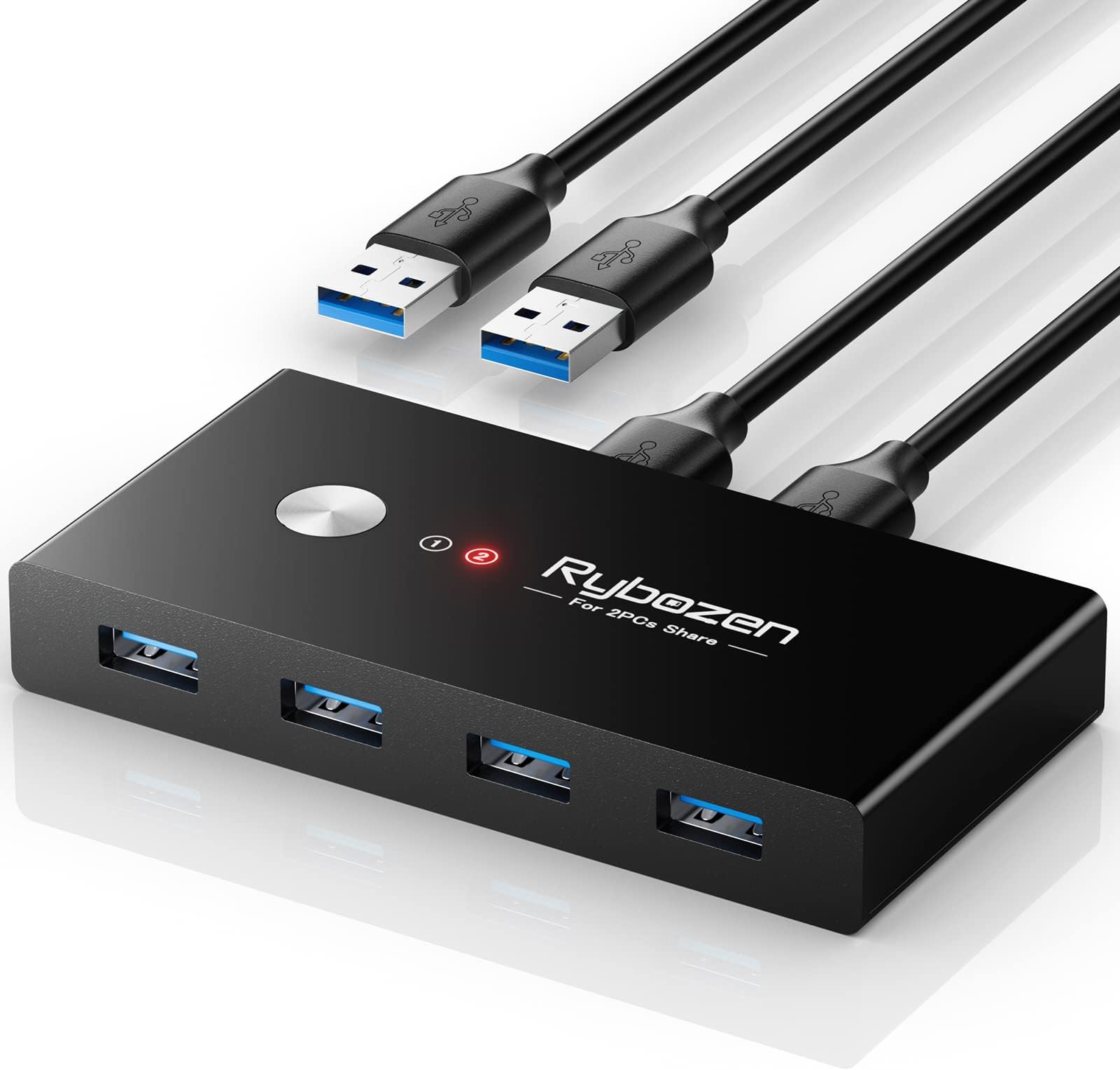


| ASIN | B0CQR4M44K |
| Best Sellers Rank | #140 in KVM Switches |
| Brand | Jancane |
| Brand Name | Jancane |
| Circuit Type | 2-way |
| Color | USB KVM Switch |
| Connectivity Protocol | USB |
| Connector Type | Usb |
| Contact Material | Copper |
| Contact Type | Normally Open |
| Control Method | Touch |
| Current Rating | 1 Amps |
| Customer Reviews | 4.4 out of 5 stars 191 Reviews |
| Item Dimensions | 4.1 x 2 x 0.6 inches |
| Item Weight | 3.52 ounces |
| Manufacturer | JANCANE |
| Material Type | Plastic, Polycarbonate |
| Model | U309 |
| Mounting Type | Surface Mount |
| Number of Positions | 7 |
| Operating Voltage | 9 Volts |
| Operation Mode | manual |
| Specification Met | Ip54 |
| Switch Type | Push Button |
| Unit Count | 1.0 Count |
| Warranty Description | 3 year warranty |
| Wattage | 10 watts |
M**K
imple to install, simple to use and works veru well.
With (2) PC's, (3) printes, (3) montors, (1) cordles keybord and mouse is a must have!! With this simple device my life just got a little simpler.
C**S
Recommend this
works great switching between computers
J**B
Good, but doesn’t seem to like dell laptops
This is a great KVM. Easily swaps between two computers at the push of a button and carries any usb devices between the two computers for access to a Mouse and Kyboard, Storage Device, or any other usb device. It more or less emulates you plugging the device into each device when it is switched to the other computer. I have 3 computers and my original plan was to be able to switch between my Dell G7 7588 and my work desktop, as it’s only used to run the VoIP software. I would only need to switch briefly to accept the call. However, for whatever reason when it is connected to my Dell, it lags like crazy on both PC’s. Mouse and keyboard work sporadically and keyboard acts like it looses connection and will not type or will repeat characters or backspaces making it virtually unusable. However, connected to the desktop and the HP laptop I do not have this issue. I googled why it might be happening and seems a common complaint amongst several KVM, so don’t really want to knock it being that this seems to be an issue for a lot of KVMs. Issue seems to be when it is plugged into a USB-3 port. Unfortunately, all my usb ports on the Dell are USB 3.0. I have ordered a USB C docking station that has USB 2.0 ports as well as 3.0 that I will try. I will update review if this resolves the issue. However for now, just be aware this may happen.
K**H
Easy setup-works great!
When I got it, it looked a little intimidating but I went back to where I purchased it and they had an instructional video. Everything works good. When it switches over it does take about 10 seconds but not a big deal. Makes work a lot easier when you're using two laptops.
P**N
Works as advertised
Small package packed with big functionality. Two entirely different Windows PCs using one large monitor, wireless keyboard and mouse. Push button to switch from one PC to the other. It takes the monitor a moment or two then desktop or whatever app is on top is displayed. Good value.
R**D
Works great
I have a macbook for work and a PC for gaming, but only 1 desk and needed to switch over the keyboard and mouse when I am moving around in between my setups. I have had this for over a year now and it still works great. I use it almost daily.
Z**N
Very slow!
It works but very slow! I use it only to switch mouse and keyboard. After clicking the button it takes 5-6 seconds to switch!! while my other cheap hdmi switcher almost switches instantly. That is very disappointing.
E**L
Good With A Few Minor Issues
I bought this to keep my apartment from filling up with monitors. 3 computers: 2 Linux PCs and a Mac Mini. This saved me the cost of a new monitor and let me keep one of my existing ones as a backup. Hooking up was a no-brainer, switching is simple and fast, and it's GENERALLY reliable. On occasion it does lock up and stop switching, but a quick power off/on always fies it. Despite that, I like it and would buy another if it broke.
Trustpilot
2 months ago
2 weeks ago