๐ฅ Keep Your Cool, Stay in the Game! ๐
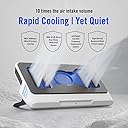
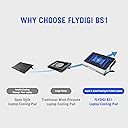
The Flydigi BS1 Laptop Cooling Pad features a high-performance turbo-fan with a maximum speed of 3000RPM, ensuring rapid cooling while maintaining a quiet environment. With intelligent temperature control and a high-density dustproof mesh, it not only enhances your laptop's performance but also extends its lifespan. Its adjustable angles and wide compatibility make it a must-have for any professional on the go.


| ASIN | B0D2MXHM19 |
| Best Sellers Rank | #48,177 in Computers & Accessories ( See Top 100 in Computers & Accessories ) #232 in Laptop Cooling Pads |
| Brand | FLYDIGI |
| Color | White and Blue |
| Cooling Method | Air |
| Customer Reviews | 4.4 out of 5 stars 98 Reviews |
| Enclosure Material | Metal, Silicone |
| Fan Count | 1 |
| Manufacturer | Flydigi |
| Material | Metal, Silicone |
| Number of Fans | 1 |
| Number of Items | 1 |
A**R
Good product, I would buy this again or recommend to a friend or family member
Iโve not had over heating issues with my laptop but wanted it to run a little quieter when not being pushed. I also use my laptop on my lap 90 percent of the time and the design of this cooler was the first thing I liked as it looked like it should work well as a lap platform which it does. The sides where it angles out are perfect place to grab it and move to or from your lap. I found the cooler to highly effective. When using, if Iโm not pushing the CPU or GPU hard I donโt hear anything. Without the cooling pad I canโt play any games without the computer fans being audible, with it I can. Iโve also found if Iโm pushing the limits of what my laptop can do to where it starts to stutter as the laptop heats up this cooling will prevent that. With the cooling I can run the laptop at 100 percent for hours without issue. Of course, doing this means itโs loader than with just laptop fans but it can also maintain peak performance which it canโt without it (very close though). This will not make your games start running at playable levels but it can help your computer run at itโs peak performance. I like numbers so hereโs some testing data if this helps. Iโm using a Lenovo i9 pro with 14900 and a 4090. The first test is Civilization 7, I used HwInfo64 to monitor the system. I let the game run for over an hour before testing. I reset HwInfo64 prior to each run and made several moves each time. Civ 7 no cooling pad. CPU E-cores 76; CPU P-cores 96; GPU 76.5 Cooling pad 1st setting silent. CPU E-cores 71; CPU-P cores 75; GPU 69.1 2nd setting, you can hear it but doesnโt bother my wife. CPU E-cores 66; CPU P-cores 69; GPU 69.1 3rd setting is about as load as the laptop fans at 90 percent CPU E-cores 65; CPU P-cores 68; GPU 66.3 4th setting is when my wife asks if thatโs cooling pad she hears. CPU E-Cores 62; CPU P-cores 66; GPU 64.6 I next ran 3dMark Time Spy Extreme. Score first followed by temps for the 3 sections of the test. All numbers are taken from the graph just prior to the end of the test. Foor the CPU that means single thread portion of the test but temps dropped through each of the multi threaded portions. No cooling pad. Score 10430 1st phase temps GPU 72, CPU71 2nd phase temp GPU 76, CPU 73 3rd phase temp GPU 57, CPU 83 Cooling Pad 2nd setting Score 10524 1st phase temps GPU 67, CPU 67 2nd phase temp GPU 69, CPU 73 3rd phase temp GPU 50, CPU 77 Cooling Pad 3rd setting Score 10515 1st phase temps GPU 65, CPU 64 2nd phase temp GPU 67, CPU 67 3rd phase temp GPU 48, CPU 77 Cooling Pad 4th setting Score 10515 1st phase temps GPU 63, CPU 63 2nd phase temp GPU 65, CPU 64 3rd phase temp GPU 48, CPU 71
Z**Z
Crazy Good
My how laptop coolers have changed! If you were considering a Llano or IETS 500/600 etc model cooler - but somehow found this cooler as well - welcome. That's how I ended up here myself. Finally a powerful cooler that doesn't need to plug into the wall! I wish this cooler came with some English instructions. It comes with a large extra piece of foam - that I believe is meant to be cut and used to customize the fitment of the foam seal to your laptop. While not immediately apparent - this foam sheet is a high quality sticker - and it adheres well to the existing foam. Once you have a piece cut to size - pinch a corner to get the backing to start to come off. Take some time looking at how your laptop lines up and how to cut a decently shaped seal in larger/longer pieces. I ended up adding a layer all the way around to boost the thickness and I have almost half of the extra foam left over - so there is plenty if you end up making a mistake. I am using this on a Lenovo Legion Pro 7i with a 4080 - which is a 16" laptop that has pretty tall feet on the bottom. These make it necessary for me to use the extra foam and customize the fitment to get a good seal. A good seal is absolutely essential to making this thing whisper quiet - and it also will affect how well it cools the laptop. Once you have a good seal you hear a big difference in noise when you lift the laptop off the pad. You will also be able to feel a nice stream of air being forced through your laptop especially on setting 2/3. On my 16" laptop this cooler has about and extra .5" each side - so it could fit a 17"+ comfortably. The shape of the seal - after adding a layer to thicken it - is perfect for my laptop. At max fan speed im looking at a 20c+ temperature drop on the GPU in 3dmark Timespy - and a similar 18-21c drop on the CPU at 100% load set to full power mode. (Sensors say GPU pulled a maximum of 179w on extreme) Max fan speed is quite loud and I can't say I'll be using it outside of benchmarks/tests - although the sound is not high pitched. It's a nice rushing air sound that you could tune out much more easily than the shrill laptop maximum fan speed sound. Average GPU temp of 60.0c in benchmarks on the 4080 at up to 179w draw is quite good though for a laptop. Low fans is nearly inaudible and will be the setting I use most. Medium fans is definitely audible - but if you have any sound playing in the background I don't think you'll be able to hear it. I am still testing - but medium fans seems to offer excellent cooling as well. Performance set to quiet mode (low powe) nets me 37-40c in games on the 4080 which is quite cool even considering the low power. (Was getting 48-52c without the cooler under similar conditions) While I haven't tried the IETS or Llano coolers - I will be keeping this thing if it lasts. Since it pulls air from the rear you can use it on your lap or a bed without obstructing the airflow. It's super thick - and I wish it came in black - maybe I'll paint it. Edit: USB C port on mine is solid - will update if that changes.
J**N
Perfect!
Best vacuum cooler on the market, bought two. Will work with most any gaming laptop, but is especially perfect for any of the Lenovo Legion series. (I have the 9th gen Lenovo Legion Pro 7i) If the pad turns off every time you restart, try to open your laptop's BIOS settings and look for "Always On USB"
K**J
Missing USB Ports
This laptop cooler works very well. I mistakenly kept pressing the power button to get it to come on. I found out, all you need to do is "tap" the power button and it comes on. Also, the cooler revs up to max speed by default, so after 5-10 seconds, it backs down to an almost inaudible level. All my previous laptop coolers had a pair of USB Ports on the back to plug a hub or video camera in. This particular model has (NO) USB Ports whatsoever. I have a powered hub that this is plugged into so I did a work around, but had to sacrifice a USB Port by doing so. I give this 4/5 stars for not have USB Ports.
J**N
Works great at keeping laptop cool, runs quiet.
Works great for ASUS ROG Strix 18" 240Hz Gaming Laptop with NVIDIA GeForce RTX 4080. Nice and quiet, just adjust power level based on laptop usage. Update: Oct 2025 Downgrading two stars because the plastic supporting leg broke. It is made of plastic with clip like pin inserted into the base. The fan is still running very strong.
W**Y
Amazing performance and quiet
I'm coming from a Llano v12 and I'm so glad I bought the Flydigi BS1. First of all, it's quiet. Even on the highest setting, it's way more quiet than the V12. I almost never use the 4th speed which is called overclocking mode because I don't need to. The 3rd setting is so efficient that there is simply no need. It runs off of USB c so I just plug it into a battery bank or a wall outlet with a USB C adapter like the ones that charge your phone. I have tried the IETS 500 and the Llano V12 and for some reason I didn't really see much of a difference in temperature. I had a good seal and everything. I see a noticeable drop with the BS1 though. Lastly, the form factor is smaller than the V12. I can fit the BS1 in my backpack where the V12 would not fit at all.
C**N
5+
Its difficult to find a cooling pad that suits for lap-usage. It takes air from the lower back section, therefore you can place it onto couch, ottoman or hold in the lap. Noise is quite low, i have no comparison other than my laptopโs vents (Acer Nitro 5). Before having this coolingpad, i used plastic pad (ikea) to hold it in my lap, a game was running GPU at 85C on laptops auto-fan. After placing laptop on top of this coolingpad, using minimum coolingpad fanspeed and auto-fan on laptop, the GPU dropped to 55-60C. Dont have to use autofan on coolingpad, so that was great benchmark comparison in my eyes. :) downside little heavy, but i dont care)
S**S
This one actually works!
This thing is pretty much silent. I went from running COD BO6 on my gateway core i5 2060rtx 16 gig ram 6gig vram laptop at 92-97c cpu temp to 80-85cpu temp! My GPU went from 85-87c down to only just 62-67c! That's insane! From no cooling pad to adding one that is a huge difference! I cant believe it most of these laptop pads don't even work but this one I can literally feel air come through my trackpad. Fantastic product absolutely love it! I'll be buying one for my son soon for his laptop as well.
L**E
Quality
Good quality
W**Y
Best cooler on the market
If I have a gaming laptop... Just get the bs1 and save your insvetment... Worth every penny... And a lot quicker than the rivals.... Reduces temps UpTo 15-20 degrees all while remaining quiet and does not sound much louder than the laptop fan speeds at full blast!
Trustpilot
1 week ago
2 months ago