Buy anything from 5,000+ international stores. One checkout price. No surprise fees. Join 2M+ shoppers on Desertcart.
Desertcart purchases this item on your behalf and handles shipping, customs, and support to Taiwan.
🚀 Elevate your workflow—scroll, switch, and conquer with effortless precision!
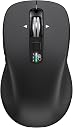
The CITLLA Wireless Bluetooth Mouse is a full-size, multi-device powerhouse featuring 2.4G USB and dual Bluetooth connectivity, a 4-way ultra-fast scrolling wheel, adjustable DPI up to 3000, and a sweat-proof ergonomic grip. Compatible across Windows, MacOS, iOS, Android, Linux, and Chrome OS, it offers seamless switching between three devices and an exceptional battery life of up to 40 months, making it the ultimate productivity companion for professionals on the go.


| ASIN | B0CTCP28NK |
| Additional Features | 4 Way Scrolling, Dual Bluetooth |
| Antenna Location | Office |
| Are Batteries Included | Yes |
| Are Batteries Required | Yes |
| Battery Average Life | 40 months |
| Best Sellers Rank | #230 in Computer Mice |
| Brand | CITLLA |
| Built-In Media | 2 AA batteries |
| Button Quantity | 10 |
| Color | Black |
| Compatible Devices | Laptop, MacBook, Personal Computer, Tablet、Smartphone, iPad |
| Connectivity Technology | Bluetooth, USB |
| Customer Reviews | 4.4 out of 5 stars 867 Reviews |
| Enclosure Material | Metal, Plastic |
| Hand Orientation | Right |
| Hardware Platform | Computer, Laptop, Tablet |
| Item Dimensions L x W | 4.6"L x 2.6"W |
| Manufacturer | CITLLA |
| Mfr Part Number | L360 |
| Model Name | L360 |
| Model Number | L360 |
| Mouse Maximum Sensitivity | 3000 Dots per Inch |
| Movement Detection | Optical |
| Movement Detection Technology | Optical |
| Number of Batteries | 2 AA batteries required. (included) |
| Number of Buttons | 10 |
| Operating System | Chrome OS, Linux, MacOS, Windows, iOS |
| Power Source | Battery Powered |
| Range | 10.0 meters |
| Special Feature | 4 Way Scrolling , Dual Bluetooth |
| Style Name | Modern |
| Unit Count | 1.0 Count |
| Warranty Description | 2 Year |
L**E
Good bluetooth mouse
A good bluetooth mouse that's easy to connect to a laptop. It's working great, and I'd recommend it.
J**K
Amazing mouse, very smooth!
This mouse is exactly what I needed. I have my work laptop home laptop, and an older desktop I can't depart with all on one desk. The two laptops have Bluetooth and the desktop doesn't which needed USB. The responsiveness is extremely smooth, especially with the option of changing the DPI. Switching between the three machines is as simple as clicking a button on top of the mouse. Better than the mice that have the switch on the bottom. The button also lights up white, blue or green which now I've just gotten used to the association of which machine is which color. The mouse feels good in your hand and has the right weight to it. Definitely feels very durable. It clicks smoothly which makes you feel you can click faster. Overall, it's an amazing product.
L**D
Work well, has good features for the price but a little larger than expected.
This mouse has more features than a similar Logitech brand but at a lower cost but the "small/medium" size is larger than the Logitech counterpart. This mouse can connect to 3 different devices using a switch on the top so you can quickly switch from one device to another without picking the mouse up. There is an LED on the top that lights up each time a new device is enabled. The scroll wheel turns freely. There is no clicking sound when using the buttons or when using the wheel. I have not had it long enough to access the battery life, but it does come with 2 batteries and the manufacturer claims that it will last a long time. Over all, I'm pleased with the performance, style and feel of the mouse but would have preferred it to be slightly smaller.
M**N
Nice Wireless Mouse, But A Few Caveats
I really like the look and feel of this CITLLA wireless mouse as well as its weight and smooth operation. I give all of those things 5+ stars. However there are some things to be aware of that are inconvenient, at least for me. It is possible (probable) that these same things would occur with any wireless mouse. (1) this mouse does not work when you are in your BIOS, or when you boot from a USB or DVD. (2) it does work to "wake up" a sleeping pc (3) it doesn't work if windows fails & upon reboot prompts you whether to do a regular start, safe mode, chkdsk, etc. So I have to keep a wired mouse & keyboard on the desk also, hence clutter was not reduced as I had hoped. It would also be nice if a single switch could be used for both the keyboard and the mouse. My wireless keyboard is also from CITLLA, but they were 2 different products, not a bundle. I couldn't find any bundle with the mouse I liked with the keyboard I liked, so I didn't really expect to be able to single switch them together, but it would have been a nice little bonus. So for operation, this is a winner. You just need to be aware of a few times when it will not work.
E**T
Mouse works out of the box, but side buttons don't work as expected on Mac
Edited for clarification on Windows 11 customizable features ———————————————————————————- This mouse works right out of the box with both Windows 11 and MacOS Tahoe 26.0.1 for basic mouse activities like scrolling, and clicking both left and right buttons on top. Both my Windows and Mac paired to the mouse's bluetooth (I used the button on top to choose between USB A receiver, and two different bluetooth connections each for Mac and Windows PCs. Here are the problems, as I see them: While the left side buttons work for navigation within an application, say a browser, in Windows, on the Mac it acts as an application SWITCHER (meaning it moves you between applications that are open). These actions are NOT customizable. Mac offers some mouse options (as it does for every mouse) like click speed, scrolling speed, etc, Windows 11 offers more options in a separate location in settings. I searched and searched, and I couldn't find the manufacturer's website in an effort to obtain some software or perhaps drivers, to no avail. Otherwise, I was pleased with the functionality and feel of the mouse. The DPI setting button on the mouse acts as a proxy for cursor speed if you don’t want to mess with settings in Mac or Windows. Pros: nice feel, works out of the box for basic functions (and side buttons work well in Windows) via bluetooth or the USB A receiver. Batteries included. Cons: minimal customization in Mac (thanks to Apple's OS), but side buttons don't navigate as they do in Windows 11. And Windows 11 some tweaks. There is no manufacturer's website that I could find, nor drivers or other software for enhancements. BTW I tried SensibleSideButtons, and SaneSideButtons to alter the actions of the side buttons in Mac, and neither worked for me. Conclusion: a good mouse for Windows 11 but don't expect any enhancements beyond what Windows offers as a baseline. An OK mouse for Mac, but unless you like application switching, the side buttons will not serve your purposes.
D**E
Does what it is advertised to do, and it does it very well.. Nice size and feel too.
This thing is really good.. I like the weight, the level of effort to move it on a mouse pad is just right and it switches between USB and my BT system easily. set up was very simple. It tracks with no drag or delay at all. I have only had it a few days, but so far it is my favorite mouse.
K**X
Keep a working mouse on standby - revised Buy a different product
11/23/2024 update Mouse no longer pairs with anything. The pull batteries hack no longer works. Would give "Zero" stars but Amazon doesn't allow those for really poor products. Save yourself grief and keep looking. finally disillusioned completely. Fortunately its bLACK fRIDAY AND A FAMOUS Big Box computer retailer has sales on. Veterans Day Update: Vendor is standing behind their product and offered a full refund, which I will not take; as I suspect that it will count as a return and Amazon is frowning on those and holding "too many returns" against you. May have found a work around for the problem by doing an extreme NASA orbital fix, pull the battery as the on / off switch does not appear to cut all power. Pulling a battery for ~10 seconds appears to unlock the 5GHZ connection which is the one that I know is freezing. Easier than plugging a mouse in the back of the big gaming tower case. Original review Bought this in August for Bluetooth connectivity so I would not tie up a USB port for a mouse. Well it didn't work out, this mouse looses 5Ghz connectivity every 2-3 days and you need to delete and re-pair the mouse. Kinda hard without another mouse. So I need to plug in a wired mouse or buy a second Bluetooth mouse to re-pair this one when it becomes lost in the ether frequently. Oh it also pairs uniquely with one device per frequency band (5Ghz & 2Ghz), so if you want to use it with another system, you must use a different Bluetooth frequency band. This mouse has two blue tooth bands (2Ghz and 5Ghz) so you can only pair it with two devices. Unlike an HP Bluetooth mouse I had which could be happily paired with several PC's. When connected it works very well as a mouse and probably is good for notebooks with touch pads or other built in pointing devices to easily re-pair it. But for a desktop look elsewhere.
B**N
Good Mouse Well Trained
Works well on bluetooth or usb. The center wheel works good for scrolling up, down or left to right. No complaints.
F**A
Horizontal scroll with tilt works brilliantly
Perfect for the price. First non-Logitech mouse I've bought in 15 years, because I love a horizontal scroll with titling the wheel. I prefer a lower height & smaller mouse, and sometimes it seems to lag a bit - but that might just be drivers (using bluetooth direct not the dongle).
O**R
Sehr guter Ersatz für die Logitech M590 (mit kleinen Anpassungen nahezu perfekt)
Ich habe diese Maus als Ersatz bzw. Ergänzung für meine Logitech M590 gekauft (nutze sie im Office, kein Gaming). Die M590 habe ich über Jahre sehr schätzen gelernt. Die M590 ist meiner Meinung nach eine der besten Mäuse, die Logitech je gebaut hat. Das zeigt sich auch daran, dass sie heute gebraucht zu völlig überzogenen Preisen gehandelt wird. Für eine Zweitmaus wollte ich diesen Preis allerdings nicht zahlen und habe daher nach einer Alternative gesucht, die funktional möglichst identisch ist. Meine wichtigsten Anforderungen waren: - kippbares Mausrad (Vier-Wege-Scrollrad) - zwei Seitentasten für den Daumen - Bluetooth-Verbindung Mit der CITLLA Bluetooth-Maus (Modell D1036E9Z) habe ich genau das gefunden. Ausstattung & Funktion: ======================= - Vier-Wege-Scrollrad - zwei gut erreichbare Daumentasten - DPI-Schalter mit vier Stufen - Verbindung mit zwei Geräten per Bluetooth sowie einem dritten Gerät über den beiliegenden 2,4-GHz-USB-Dongle Damit ist sie technisch mindestens auf dem Niveau der Logitech M590. Größe, Gewicht & Haptik: ======================== Die CITLLA-Maus ist etwa einen Zentimeter länger als die M590 und im Originalzustand auch spürbar schwerer. Während die Logitech mit einer AA-Batterie betrieben wird, benötigt die CITLLA standardmäßig zwei AA-Batterien, was das Gewicht deutlich erhöht. Da ich mich sehr an das geringe Gewicht der Logitech gewöhnt habe, habe ich (als Bastler) die Maus geöffnet und festgestellt, dass die Elektronik nicht mit 3 V, sondern mit 1,5 V arbeitet! Die beiden AA-Batterien sind also parallel geschaltet. Ich nutze die Maus nun mit nur einer AAA-Batterie, ergänzt durch einen kleinen selbstgebauten, leitfähigen Abstandshalter in dem Batteriefach (alternativ reicht auch eine kleine Kugel aus Alufolie am Pluspol). Das funktioniert absolut zuverlässig. Gewichtsvergleich: ================== Logitech M590 inkl. Batterie: ca. 100 g CITLLA mit 2× AAA-Batterien: ca. 123 g CITLLA mit 1× AAA-Batterie: ca. 109 g Mit einer AAA-Batterie kommt das Handling sehr nahe an die Logitech heran. Selbst wenn man die Batterie monatlich wechseln müsste, wäre das für mich völlig in Ordnung. Gleiteigenschaften & Sensor: ============================ Die Maus besitzt vier Gleitflächen auf der Unterseite. Nach dem Entfernen der Schutzfolie gleitet sie hervorragend, vergleichbar mit der Logitech. Der Sensor arbeitet zuverlässig auf Mousepad, Holzoberflächen und sogar auf Stoff (z. B. Jeans). Hier gibt es absolut nichts zu beanstanden. Fazit: ====== Für mich ist diese Maus ein sehr gelungener Ersatz für die Logitech M590. Alle wichtigen Funktionen sind vorhanden, die Verarbeitung ist gut und mit einer kleinen Gewichtsoptimierung passt auch das Handling. Die etwas größere Bauform ist gewöhnungsbedürftig, aber akzeptabel. Da ich alle meine technischen Anforderungen erfüllt sehe und das Preis-Leistungs-Verhältnis stimmt, vergebe ich fünf Sterne und eine klare Kaufempfehlung (insbesondere für alle, die eine M590-Alternative mit Vier-Wege-Scrollrad suchen).
S**I
Good
Very good, comfortable and practical mouse. Especially for the price .
T**F
Il migliore mai provato!
Adoro il fatto che si possa collegare via Bluetooth a 2 pc e a un terzo con la chiavetta, si cambia cliccando un tastino. Comodo, ottimo il fatto che si possano mettere 1 o 2 batterie, in modo da regolare il peso. Le batterie durano tantissimo. E poi la rotella di metallo fantastica, che si può “lanciare” per far scorrere le pagine velocemente!! Unica pecca, la rotella ha iniziato a toccare un po’ su un lato e quindi non è più silenziosissimo. I tasti sono anche silenziosi. Lo consiglio al 100%, lo sto usando da parecchi mesi.
V**Y
Polecam
Super jak za ta cene 💪😎
Trustpilot
2 months ago
1 month ago