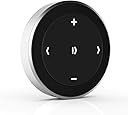




Satechi Bluetooth Media Button, Steering Wheel Mount
Product ID: 662801130
Details
- BrandSatechi
- ColorMedia Button
- Connectivity TechnologyBluetooth
- Special FeatureAutomatic
📶40ft wireless range
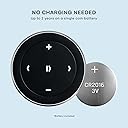
🔋2 years battery life
🎛️one-touch tactile control
Desertcart purchases this item on your behalf and handles shipping, customs, and support to Taiwan.
🎵 Control your vibe, anywhere, anytime.
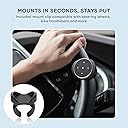
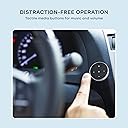
The Satechi Bluetooth Media Button is a sleek, wireless one-button controller that lets professionals effortlessly manage music playback and volume from up to 40 feet away. Compatible with a wide range of devices including iPhone, Android, MacBooks, and iPads, it features a tactile, distraction-free design and versatile mounting options for steering wheels, bike handlebars, or desks. Powered by a replaceable CR2016 battery with up to two years of life, it’s built for seamless, long-term use backed by a 2-year warranty.
| ASIN | B00RM75NL0 |
| Additional Features | Automatic |
| Battery Type | CR2016 |
| Best Sellers Rank | #24 in Bluetooth Car Kits |
| Brand | Satechi |
| Button Quantity | 1 |
| Color | Media Button |
| Compatible Devices | MacBook Pro 14/16-inch (2026 M5/M4/M3/M2/M1), MacBook Air 13/15-inch (2026 M5/M4/M3/M2/M1), MacBook Neo 13-inch (2026), iPad Pro 11/13-inch (2025 M5/M4/M3/M2/M1), iPad Air 11/13-inch (2026 M4/M3/M2/M1), iPad Mini (A17 Pro/6), iPad (A16/10th Gen), iPad Pro 12.9-inch (6th/5th/4th/3rd/2nd/1st gen), Mac Mini (2026 M6, M5 Pro, M4 Pro, M4), iMac (2024 M4/M3/M1), Mac Studio (2026 M5 Max/Ultra, M4 Max, M3 Ultra M2, M1), Lenovo ThinkPad, Microsoft Surface, Google Pixelbook, Google Pixel Pro 8/9, Samsung S24/Z Flip 5 Compatible Devices MacBook Pro 14/16-inch (2026 M5/M4/M3/M2/M1), MacBook Air 13/15-inch (2026 M5/M4/M3/M2/M1), MacBook Neo 13-inch (2026), iPad Pro 11/13-inch (2025 M5/M4/M3/M2/M1), iPad Air 11/13-inch (2026 M4/M3/M2/M1), iPad Mini (A17 Pro/6), iPad (A16/10th Gen), iPad Pro 12.9-inch (6th/5th/4th/3rd/2nd/1st gen), Mac Mini (2026 M6, M5 Pro, M4 Pro, M4), iMac (2024 M4/M3/M1), Mac Studio (2026 M5 Max/Ultra, M4 Max, M3 Ultra M2, M1), Lenovo ThinkPad, Microsoft Surface, Google Pixelbook, Google Pixel Pro 8/9, Samsung S24/Z Flip 5 See more |
| Connectivity Technology | Bluetooth, Wireless |
| Controller Type | Button Control |
| Customer Reviews | 3.9 out of 5 stars 3,019 Reviews |
| EU Spare Part Availability Duration | 2 years |
| Global Trade Identification Number | 00879961004866 |
| Item Dimensions L x W x H | 1.3"L x 1.3"W x 0.24"H |
| Item Highlight | Wireless music and volume control, for iPhone, iPad, MacBook, Android, car and bike audio systems |
| Item Weight | 14 g |
| Manufacturer | Satechi |
| Maximum Range | 40 feet |
| Mfr Part Number | ST-BMB |
| Model Number | ST-BMB |
| Number of Batteries | 1 Lithium Metal batteries required. |
| Number of Buttons | 1 |
| Number of Items | 1 |
| Special Feature | Automatic |
| UPC | 879961004866 |
| Unit Count | 1 Count |
| Warranty Description | 2-year limited warranty |
M**H
Handy, helpful bluetooth music button!
I have an old car. I often play music from my phone 6S through the car speaker or through a bluetooth speaker. I have my iphone mounted on the dash, but it's not convenient to change songs while driving. It's one thing to push radio buttons on the dash, but it's harder to reach over and push virtual buttons on a phone screen while driving. So this Satechi Bluetooth Media Button helps tremendously. You can see in the photo how perfectly it mounts on my steering wheel. It doesn't get in the way at all while turning. There could be some improvements, such as making it easier to feel what I'm pressing without having to look, but I'm getting used to it. Sometimes I hit pause when I mean to hit forward. But that's a small issue. This button is much easier to use than having to reach over to tap a virtual button on my iphone. It paired easily and wakes up easily. I like how easy it is to pop it off and toss it in the glove box when I park. Some of the comments by other reviewers make lots of sense. I also wish they'd either included a tiny screw driver for help in changing the battery when that time comes or made it easier to open the back. Anyway, it's attractive, functions perfectly, makes driving safer, and it's really fun to have some new technology in my old Bug! As a plus, the media button works well with taking photos and videos with my iphone. Just like on my iphone, you can use the volume up or down buttons to take a photo. And you can also start and stop recording a video the same way. I like having a remote button to play with the next time I'm taking photos with friends. I have one bone to pick with Satechi. The size of this media button is obvious from the photos, yet the dimensions listed on Amazon and on the Satechi site are totally wrong! They list the diameter of the button accurately, but the other dimensions are way off! I don't know why. Doesn't make sense. Fortunately the pictures give you a good idea. Overall, I'm very happy with my purchase. It's fun to use. Time will tell how long it lasts.
Q**B
Awesome little remote for my motorcycle.
First of all, I was surprised that there aren't as many of these bluetooth remotes out there. That being said, this one would probably be the best designed anyways. Pros: Small and compact Aesthetically pleasing Functions as advertized Cons: Hard to push pairing button Steering wheel mount diameter is to big for my motorcycle handlebars (not a real complaint since that's not the design, but something for them to think about if they come out with a newer model) The unit looks great and functions as it should. The button in the back which is the pairing button is a little hard to push but other than that I have no legitimate complaints. I bought this for my motorcycle so I could control my music in my bluetooth helmet without taking my hands off of the handle bars. The steering wheel attachment is awesome and I used it to help mount it to my handlebars. My handlebars diameter is slightly smaller than a steering wheel which allowed it to spin freely so I used some thick foam tape to bulk it up and then rapped the base up to keep it from spinning due to the vibrations. I think this company would do much better with this product if they targeted motorcycles as well. I'm not sure how it will hold up to water, but then again, I don't plan to ride in the rain. However, if it happens, I will update. Addition: I'm using this with a samsung galaxy note 4. This product pops up as a keyboard on my phone. Works with amazon mp3, slacker radio, iheart radio and Google music app. June 4th 2015 update! So after a few months of use, this little guy is still going strong, I use it a lot and it seems very tough. I will update again if it breaks anytime soon. With that being said, I got caught in the rain a couple weeks ago, which was light to moderate shower and it held up just fine. Also yesterday I was near the beach and in the morning my bike (including the button) was covered in a heavy, heavy dew. After the ride home today, I think it's in the clear as its still working fine with no deficits. But again, only time will tell. Bottom line? 4 of my riding buddies have bought one since I got mine and they all love it and you will too. Good job Satechi.
D**S
Pretty good but also disappointing
I've been using them for several years. In that time, I've bought 3. I needed more than 1 since it gives no warning when the battery is low. So I carry 2 at a time. Bought another because I accidentally ran over one with my car ;-) and had to return one that was defective. So 4 altogether! But I'm looking for a different model. Too many annoyances in this one. - The right/left buttons have to be woken up after just 10 seconds. You have to press them twice if more than 10 seconds have passed from pressing any other button. (First press to wake; 2nd press to do forward/backward.) It's quite irritating and it makes no sense. The other three buttons have much longer timeouts (15 minutes). I asked the company and they said "We don't know why the engineers designed it this way." In my opinion as a programmer, it's a bug. - Each press has the side-effect of causing my iPhone's screen to light up. My phone is in my pocket - what's the point of turning on the screen? If I go out for a day-long bike ride, my screen could be turning on/off hundreds of times as I skip over advertisements in podcasts every 10 minutes. Although the screen itself is efficient, the process of turning the screen on draws a lot of power. Even worse, my podcast player buttons appear so they could be triggered by the phone leaning against the side of the pocket so I always have to be careful to somehow leave the phone in such a way that the screen never touches anything else. The company says this screen-lighting is a property of iOS but I have a Bluetooth speaker with the same set of controls, none of which cause my iPhone screen to light up. On the pro side, I'm delighted to find that the MB can do both "skip to next episode" and "fast forward". It's not obvious from the way the buttons are labelled. It's not explained in the documentation either. And some of the questions people have submitted here suggest that it's not even possible. But it works with all the apps I tried - however, it is up to the app how to do it. For instance, with Overcast, a single right click fast forwards by 15 seconds, while a 1-second press skips to the next episode. It works differently with Apple's own podcast player and music player and I won't bother to explain how. I'm just pleased that it does. I'm surprised Satechi doesn't mention this ability in the advertising and documentation.
A**N
Unreliable
I had intended to use this button to help navigate through music and playlists on my M11 Pro, a music player that runs a modified Android 7, without need it to be in arms reach. This way I could put it into my pocket or securely mount it to my car's stereo system without having to worry about out-of-reach pause, skip, and volume keys. This particular one has proven immensely unreliable and effectively useless for what I expected from it. When it is connected properly it is fairly okay. Acceptable latency, fairly responsive, and the small size is kind of nice as well if I am honest. The issue comes in keeping it connected. After a few minutes or so of not using the device, or after leaving it out of connection range, it will, naturally, disconnect. Reconnecting however is a chore, and where the button becomes irritatingly unreliable. Pressing any switch to power the media button back on will reconnect it to a bluetooth device, but it will no longer work as a media remote. I found myself needing to power my device's bluetooth off and then on again to get this to work again. I've tried using the button on my Android 11 Pixel 5 as well, and the behavior was exactly the same. The likelihood that my devices are at fault is next to nothing in my eyes. I had my reservations when I realized this thing was powered by a CR2016 battery, immediately fearing it would have to make severe compromises on connection quality to keep from having to swap it weekly. Unfortunately, my fears were confirmed. Worse yet, build quality. The thing barely holds together, there is a noticeable ridge where the front faceplate is jutting out from the casing. Touch this even remotely the wrong way and the thing might just fall apart. It did for me once, and the aluminum casing surrounding the thing is so thin it almost doesn't feel like aluminum anymore. Initially I didn't do much research as I probably should have as I had thought, clearly, bluetooth technology had advanced more than far enough that even the cheapest option would more than do the job. Frankly, after handling and using it for a day, I expect this to be worth $5, maybe $10. After actually trying to use it, $30 is mildly baffling.
C**R
As advertised
Rather than hardwire a new headset I grabbed a carpod t3 pro for my older vehicle. Love it! But suddenly my steering weel buttons don't work. This fixes that. I held off for a while because I was only seeing the dinky usb-c charging ones (can't plug a cord into something attached to a wheel). Then I found this. If it continues working as it currently does I'm happy. Battery seems easy to replace. Sometimes I have to hit the buttons a few times but I'm sure I'll figure out why that is and fix it. If anything of note happens I'll update this review.
F**1
Fairly good product, but mounted on bike and stopped working after rain.
I have been using this product, the Satechi Bluetooth Button Series remote now for about 6 months. I bought it to control my music played from my iPhone (iphone 6) while cycling. When the product arrived, it came with a mount that clips on the handlebars, but it was way to big and would not fit without constantly moving. I wrote an email to the customer support and they got back to me and sent me some pieces of rubber that worked well to help the clip mount fit more snugly on my handlebars. It only occasionally moves a litle when bumped and just needs to be recentered uncommonly. The product does exactly what I wanted. I use an apple watch as well, but this product, the Satechi remote, is MUCH easier to use while biking to adjust my music. If I am first starting out on a bike ride or at other times during my ride, if I have not used the remote for several minutes, I have learned that it takes a single hit of the remote button to connect to the phone. This hit will not register to do anything to my phone, other than connect, and I will wait 5-15 seconds and it will be connected and I can easily control the volume (up and down) and advance to next song, previous song or back to the beginning of the song that is playing. I can easily pause the music with one button hit as well. Additionally, after taking a photo during one ride, I accidentally found out that if you leave your camera as the last app used on the iPhone, the buttons on the remote also serve to control the camera and snap photos. (When I got home, I had several pictures taken of the inside of my rear shirt pocket!) I use a cycling app when I ride as well, called Cyclemeter, and the pause button on my remote also serves to start my announcement on the app, to tell me the time, how far I have ridden, etc, as a function of the Cyclemeter app. Hitting the button twice, quickly pauses the music, starts the music again and starts the announcement. Also, found by mistake, while riding. Addendum: After using for a longer period of time (more than 2 years), still think it was a fairly good product, long battery life), but two issues are the symbols wore off, so I had to put a sticker on to show where +/-, < ,> were, and the button stopped worked entirely after a 5 minute rain shower. I would like to think that a button marketed for mounting on your bike, would at least be splash water resistant. I rarely ride in rain, but in Florida, a brief downpour is not always able to be predicted.
P**Y
Love using it for Track Control with Carplay
Many cars either have no steering wheel, skip/prev track controls, or have controls that don't support CarPlay. (eg. Several new Mercedes, and others have steering wheel controls that don't support CarPlay, and my Porsche Panamera supports forward track or back track, but not both) This means that with one of those cars, whenever you're using Maps and need to skip forward or back, You've got to leave maps in carplay, go to the audio app, tap the on screen skip controls until you find the right spot or track, and then return to maps. (Too much time with the eyes on the screen) Siri works for this, but IMO its too disruptive. I use the audible app all the time and this is a very big deal for me, since I very often need to skip back to catch something I missed. I found a solution that works perfectly for me: Satechi Bluetooth Media Button, a bluetooth audio controller. It's really working beautifully. It is battery operated, with no wiring to install, just that little button. The MFR claims the battery will last two years. You just pair it to your iPhone and you're done. They include a steering wheel attachment, if you want to go that way, and a non destructive sticky pad which you can use to attach it to any small flat surface (As in the Photo). It also has a pause button in the center, which is a nice plus, and works well when pausing any audio app I've tried. You can use it entirely by feel without ever looking at it. Because it talks to your phone, rather than the car's head unit, it should work with any car, and any head unit. I'm using it with my iPhone XS Max. Two minor imperfections to note: 1) In order to achieve their long battery life, it automatically goes to sleep after about 10 minutes. The next time you press ANY button on this remote it wakes up and reconnects with the phone. But that first click after it's sleeping will be ignored by the phone (for its intended purpose). Just wait about a second after that wake-up click, and its ready. At this point you can click as many times as you want, as quickly as you want, and every click works perfectly. 2) The volume doesn't work because this remote is controlling the iphone volume (as would any bluetooth controller), and CarPlay volume is totally independent of iPhone volume. We all have usable volume controls in the car so it's not an issue, but if you want to use this for adding CarPlay volume control to your steering wheel, this won't do it. I have to say I'm delighted with little device.
W**X
Very useful for its stated purpose!
I read about this in the Wall Street Journal (http://www.wsj.com/articles/how-to-use-a-smartphone-to-make-older-cars-more-connected-1438979585). The article focused more on the "home" button, which I found extraneous because on my android phone, "Ok Google" works really well. THIS one, however, piqued my interest. None of the cars in our stable are younger than 10 years old, if not older. We use a cassette tape adaptor for listening to music from our smartphones, for the time being. When I have to change a track, or pause the music, I have to wake up the phone and swipe the lockscreen. Sounds like no big deal, I know, but it definitely distracts from the driver's (my) attention. My son has a Motorola 360 and uses that to change his tracks, etc. This button does the same thing and I LOVE IT. I don't have to wake up the phone, and the controls are right at my fingertips! It comes with a sort of ring that you use to mount it on the steering wheel (also has a sticky thing if you want to glue it to somewhere in the car but my hubby hates things being stuck to the car; as well as a little strap that you can attach to it and hang it on your keychain). Pop it in, pop it on the steering wheel wherever best suits you, and voila! You have steering wheel bluetooth controls for your music! So far I have used it with Google Play Music and Audible. Tonight I will be taking a couple-hour drive and can really put it to the test. Another thing that I really like is that while it is connected by bluetooth, the phone can also be connected to a bluetooth speaker, which makes sense but isn't always the case with things that SHOULD make sense (if that makes sense). It connects as a keyboard, which allows a speaker to be connected at the same time. I used it at home to change tracks on the phone which was hooked up to a bluetooth speaker. Happy lazy me! If my opinion changes I will update. But so far, I really, really, like this thing.I feel like I may just have to carry it around because it is fun to use!
M**S
Fantastico
Va perfecto, y es lo que buscaba, lo tengo en un Mac y puedo subir y bajar volumen, pasar de canción hacia adelante y atrás y pararlo y ponerlo, todo desde el botón, yo le hice un apaño y me lo pongo en la muñeca
S**N
Simple and Convenient Media Control
Easy to connect and very handy for controlling music without reaching for your phone. Compact, responsive, and particularly useful when driving or when your device is out of reach.
H**L
Excelente producto
Cumple funciones descritas, función con Huawei P40 Pro
N**O
İyi işçilik sorunsuz kullanım.
Tek kelime ile mükemmel Direksiyona tuturmak için aparatta var. ileri geri. ses açma kapama ve durdurma....
A**.
Good
Works very well and the battery holds. I placed it right under the armrest where it isn't visible but easily accessible. After a short while of getting used to it it becomes very natural.
Trustpilot
5 days ago
2 weeks ago