Desertcart purchases this item on your behalf and handles shipping, customs, and support to Taiwan.
🚀 Upgrade your WiFi game — because buffering is so last decade!
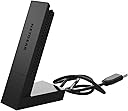
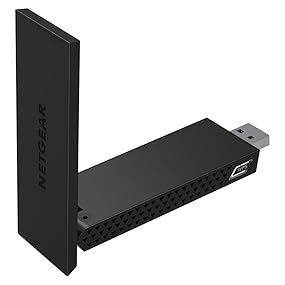
The NETGEAR AC1200 Wi-Fi USB 3.0 Adapter (A6210-100PAS) delivers dual-band wireless speeds up to 1200 Mbps with high-gain antennas and Beamforming+ technology. Designed for Windows desktops and laptops, it plugs into a USB 3.0 port for ultra-fast, lag-free internet access, perfect for HD streaming, gaming, and multiple device connectivity. Its flexible desktop dock ensures optimal placement for maximum range and reliability.


| ASIN | B00MRVJY1G |
| Best Sellers Rank | #767 in USB Computer Network Adapters |
| Brand | NETGEAR |
| Built-In Media | USB cradle, WiFi USB Adapter |
| Color | Black |
| Compatible Devices | Desktop, Laptop |
| Compatible Operating System Family | Windows |
| Customer Reviews | 4.3 out of 5 stars 2,920 Reviews |
| Data Link Protocol | 802_11_ABGNAC |
| Data Transfer Rate | 1200 megabits_per_second |
| External Testing Certification | Não aplicável |
| Global Trade Identification Number | 00606449103328, 10606449103318 |
| Hardware Interface | USB 3.0 |
| Item Dimensions L x W x H | 6.36"L x 5.31"W x 1.61"H |
| Item Type Name | Netgear A6210-100PAS A6210 Network Adapter SuperSpeed USB 3.0 802.11 B/A/G/n/AC |
| Item Weight | 8.16 ounces |
| Manufacturer | Netgear |
| Mfr Part Number | A6210-100PAS |
| Model Number | A6210-100PAS |
| Number of Items | 1 |
| Product Dimensions | 6.36"L x 5.31"W x 1.61"H |
| UPC | 724627111504 804067318159 809395318277 808113001873 804904121539 012304133827 801947299508 606449103311 |
| Warranty Description | 1-year Limited |
D**N
Great Buy!!
I have only had this for 1 day so at this time here is my story. I have Brighthouse Cable 200 meg download and 15 meg upload. I have a Netgear N900 and a Netgear X6 Nighthawk router both connected to my Brighthouse modem. I have 23 devices that connect to my routers including 1 iPhone, 2 iPads, 3 iPods, 1 Galaxy Note 4, Laptops, Security cameras, 2 Wireless Printers an Amazon Echo and 5 Hue Lights. Everything works great except for my Lenovo Flex 2 15 laptop that only has 2ghz WiFi adapter connection. My laptop is running Windows 10 Pro and when watching Netflix, Hulu or Amzon Prime movies it got to the point where I felt like I was watching pain dry. Everything was always buffering and I was at the point where I wanted to buy a new laptop. I removed everything from my network except for the laptop. I turned off Bluetooth, made sure I had the latest drivers and made numerous changes to the settings of my adapter and router but nothing seemed to help. I decided it had to be the WiFi adapter built into the Lenovo laptop so I decided to take a chance and purchase this Netgear adapter to see if getting a 5ghz connection would make a difference. I received the adapter, ran the installation, plugged in the adapter and connected to the 5ghz connection. The 1st thing I did was run a speed test and all I can say is WOW! The speed test showed my download speeds were over 200 meg. I reconnected everything to my network and then ran another speed test and was still hitting the 200 meg speeds on the 5ghz channel. See attached picture. At this time I have zero buffering on anything I watch and I am quite surprised at how well this $60 adapter has made a difference. While it has only been 1 day I will update this review if I notice any difference from what I am seeing today.
D**N
A solid little device and really good value for the money. Buy this device today!
I waited a few months before giving this review from experience with another product (wireless mouse). Let me start by saying I have never liked USB wireless adapters since using them on laptops a couple years back. I've always found them to work for a bit then start getting twitchy. And as a result I almost passed over this device when looking for a wireless solution for my home gaming computer. This device is pretty solid. My internet connection is stable as a rock, and full disclosure I don't even have this directly plugged - it's hanging off a USB3 hub. I don't recommend that however; but my point is it's a very decent device for both gaming and work purposes. Latency is extremely well managed as is full speed transmission (I have a 250Mb connection at home and typically hit within a factor of 0.5-1% for cabled speedtest.net).
C**L
Nice Netgear :)
My initial install of this device was simple and it is working very well however, there were some things worth noting regarding its operation and the software. First off, while connected using the A6210, it shows in my task try icon that my connection is 802.11n and not 802.11ac. My router, NETGEAR R6300v2 is 802.11ac capable and I have another device that connects and shows an 802.11ac connection. Additionally, the NETGEAR A6210 Genie software shows that my 5 GHz network is AC capable. In conversation with Netgear support, they have indicated that this is a limitation of Windows 7. My link rate is fairly consistently 866.5 Mbps and my download rates have gone up significantly also when compared to my internal Wi-Fi adapter that was only 2.4 GHz capable. Where I would get about 50 Mbps download speeds, I am now consistently above 80 Mpbs. The connection is rock solid and I have had no issues otherwise with the performance of this device. Next, when using the NETGEAR genie software that came with the A6210, under the section "Other", the "Software Update" button "Check", I receive an error message, "ERROR: Could not connect to the NETGEAR server. Please check your Internet connection." Clearly my Internet connection is working, so there must be an error in either the server it is looking for or the server is unavailable. Netgear did not respond to this issue when I brought it up. The last issue I have noticed is, when selecting the "Get Diagnostics Info:, Get Info" feature, a separate window pops up, with a progress bar and this updates to 75% where it does not progress any further regardless of how long you wait for it to continue. From this pop up window, the only option available is "Exit" as the "Save to File" option is greyed out. Netgear did not respond to this issue when I brought it up. All of that having been said, I have tried uninstalling and reinstalling the software and there is no change to the issues I have noted. I rated it 4/5 stars simply because it isn't perfect, but it does work very well aside from what I consider the minor issues listed above. The packaging says requires Windows, to include Windows 7, yet Netgear insists that Windows 7 doesn't support 802.11ac. I am fairly confident that this is a defect in the presentation of the connection as my download speed is consistent with my other device (MacBook Air) that is showing an 802.11ac connection. Subsequent to installing this device, I have gone back and disabled my internal wireless adapter, though I don't believe that was required. The last thing worth noting is that my current setup is a large laptop that I have essentially setup as a desktop replacement and I am using the A6210 via a USB 3.0 (powered) hub and using the supplied cradle. I did this initially as my laptop only has one USB 3.0 port and I have two other devices (external portable hard drive and an external Blu-Ray optical drive) so I had reservations that it would work. I was happy to discover that it has worked just fine in this configuration. Overall I am pleased with its performance and I am happy to say that it was a good purchase.
D**R
but I love it. I bought it to replace a Netgear ...
It's only been a few weeks that I've had this adapter, but I love it. I bought it to replace a Netgear WNDA3100 which was reaching the end of reliability in its very busy service life. The signal reception of the Netgear AC1200 is strong and reliable. It can pickup signals from my neighbors' routers, which are hundreds of feet away in all directions, through trees and landscaping. I have this adapter paired with the Netgear R8000 Nighthawk router. The location of the router in our home requires that the signal partially pass through a brick wall as well as some interior walls to reach this PC on the other end of the house. The Netgear AC1200 grabs the signal with no problem whatsoever. As of yet, I've only seen connection speeds to the router upwards of 835mbps. I don't have any other AC1200 adapters in the house at this time, so I can't comment on end-to-end speeds from one computer to another. However, I have a backup drive attached to the router, and I did an initial backup that took roughly 8 hours and was +/-200GB in size. I'm not sure what that would work out to be in mbps, but you also have to factor in drive latency and that I hadn't configured the backup to use maximum resources (more cores/threads/memory) to run faster. (Not to mention I was still actively using the computer while the backup was running.) All in all, I have no complaints about the Netgear AC1200. It gets the job done for me. It's also kind of "stylish" looking. The photos don't show it deployed, but when the antenna is flipped up into its service position, it mimics one of the antenna arms of the R8000 Nighthawk router. It's as if they were made for each other! ;-)
S**Z
Shazzam I'm Flyin' pretty fast with this WiFi Adapter
Netgear AC1200 Wi-Fi USB Adapter High Gain Dual Band USB 3.0 (A6210-100PAS) I have three laptops. One is old and just plain was born slow. One is new but I didn't know until just recently when I decided to do home networking that it's network card wasn't working correctly which was the reason I was constantly dropping my internet. Now in comes the fully functional laptop to save the day. When talking to a support tech to find out my problem losing my internet connection he informed me of the wireless USB WiFi Adapter. He said my internet bundle should get me speeds of 100-120mbps down and with this USB device I could easily reach that speed, even wirelessly. The Adapter he suggested was another brand but I decided that since I have a Netgear Nighthawk R7000 router and a Netgear CM600 cable modem I should just stick with Netgear devices so chose this one. Before connecting my speed tests were very slow, I mean down to 25-60mbps wireless down, depending on which laptop was used. When using a direct connection I topped out at 117mbps. The installation was very simple and the instructions were easy to follow. I am running Win 10 and have anywhere from 16 to 24 devices connected to my router with an average of 14 running simultaneously. From the moment I clicked on the speed test button I knew I had made the right choice. I topped out at 130mbps with a finishing speed of 121mbps. The poor old slow laptop was hitting 115-117mbps and the one with the bad network card even reached 117mbps also. Don't believe those that say this Adapter won't work with Windows 10 or when connected to the 3.0 USB connection because that is what I am using. I am hooked up with a Toshiba Satellite S70 Series originally running windows 8.1 and upgraded to windows 10. It has two external 17" monitors and two portable external 1Tb hard drives attached. Doing the speed test the router was supplying a wireless signal to: a Security System, three wireless security cameras, three laptops, two tablets, two cell phones, one FireStick box and one FireStick Stick, one 55inch LG SmartTV and a BluRay player used mostly for Netflix (15 connected devices) I say............You can't go wrong with this item. Be sure to have it join your home network so all devices get the signal.
T**T
Easy to use and built for speed
The short summary: I had the earlier iteration of Netgear's USB AC WiFi adapter and the frustrating sticking-point for me was that at the time they only made it in USB 2.0. Both this model and the earlier one were good about connecting at high speeds and staying stable, but the USB 3.0 doesn't have the bottleneck of USB 2.0's slower bus. The full review: This is the high-speed USB wireless adapter we need: it's USB 3.0, for starters. The USB plug swivels to allow plugging into a laptop at an odd angle. It comes with a USB cable and base to make it easier to put in a different position from the device you're plugging it into--a feature desktop users will probably appreciate because it means you don't have this thing sticking out from your PC. As an added bonus, the top part of the adapter is a high gain antenna that you can swivel out to improve the signal if you need to. If you're in a place that uses WPS, the button to toggle a WPS connection is easy to see on the side. Last, the unit has a light that flickers to show you connection status, just like an Ethernet cable would. The software that comes with the Netgear AC1200 is the Netgear Genie. I didn't care for Netgear's Genie in the early days, but it's gotten a lot better: not only is the installation very simple, but the Genie software lets you do all sorts of work with your network, from tracking who's connected and how to pulling down updates for your adapter or logging into your router to work with it (I think this last feature *might* require you to own a Netgear router). I used this device on both a Windows 8.1 Professional 64-bit laptop and a Windows 7 Professional desktop. In both cases, I installed the software before connecting the device. I have Netgear ac wireless equipment and I get good connection speeds from the adapter. If you want a high-gain WiFi adapter, this one is your best bet. It offers a lot of small extras.
G**N
Started out well... Highly suggest staying away from NETGEAR due to their "support" or lack there of.
The wireless adapter worked well for a few months. No issues and installation was easy. The range is good enough that I have three to four bars on the desktop in my office despite the router being on the complete other side of the house (it couldn't be any farther away). Last weekend the adapter started intermittently disconnecting. Yesterday it completely stopped working. I have attempted to call NETGEAR multiple times. Their phone tree is broken and won't allow you to enter your serial number no matter what different branch of the tree you attempt to use. Consequently I've emailed them in an attempt to start an RMA. I will update this if there is some resolution. I'm still inside the 1 year warranty but the customer service interface seems like it could use some work. Well I did get an answer from NETGEAR's support and then was able to call in and talk to an actual human being after a little wait. The tech support employee re-took my information and then informed me that the 90 day period of free support was over. He said the purchase of an additional tech support contract was required in order to determine whether or not the product was in fact defective / broken. I could not exercise the 1 year warranty without paying for the additional support contract. The support would cost me... $39.99... for one day! I told the tech support person that I was not interested in purchasing that (it is selling new for $55.00 right now). After seeing how the "support" scam works I cannot recommend purchasing ANYTHING from NETGEAR in the future. I'll buy another TP-LINK adapter like the one in my shop and call it a day.
R**.
Good and stable connections
I used to use an antenna that connected directly to the PCI-e port. It started to have connection issues, where I would get huge ping spikes when I'm gaming. Webpages sometimes could take a while to load, or I'd need to disconnect/reconnect to the router to finally get a stable connection I've only had this for about 5 days, but in the 5 days that I've had it, game ping is very stable, even sometimes better than my old adapter that used the PCI-e port, and no random disconnects with my router. So far so good. I did have a small issue with the installation. It requires a CD/DVD drive, and since I was building a new PC that did not have a CD drive, I needed to log into their webpage to download the installation files. Not normally an issue, but since my old PC was completely disconnected from everything (monitor, power, mouse, keyboard, etc), I needed to re-set everything back up just to get those files and put onto another USB just to install it. This might be an issue very specific to me though, as most PCs come with CD drives, and this did come with an installation CD, so I didn't take stars away just for my own circumstance.
C**E
De los pocos dispositivos que funcionan con Linux
Un buen dispositivo que sirve su propósito, pero lo que mas destaco es que es de los pocos que funciona en Linux sin necesidad de compilar un driver. Solo lo conectas y funciona.
P**H
Reliable Performance and Easy Setup!
The Netgear AC1200 A6210-100PES USB High Gain Dual Band Wi-Fi Adapter has been a fantastic upgrade for my home network. Here’s why this adapter stands out: Key Highlights: Dual Band Connectivity: The dual-band capability is a major plus. It connects seamlessly to both 2.4GHz and 5GHz bands, providing faster speeds and more reliable connections. I’ve noticed a significant improvement in internet stability and speed for both streaming and gaming. High Gain Antenna: The high gain antenna ensures a strong and stable connection even at greater distances from the router. It has greatly improved my Wi-Fi performance in areas of my home that previously had weak signals. Easy Installation: Setting up the adapter was a breeze. The included installation CD made the process straightforward, and it was also easy to download drivers from the Netgear website. It took just a few minutes to get everything up and running. Compact Design: The compact and sleek design of the adapter is unobtrusive. It’s small enough to fit snugly into a USB port without interfering with other connections, which is a great feature for a clutter-free workspace. Reliable Performance: I haven’t experienced any drops in connection or issues with the adapter since I started using it. It maintains a consistent and high-speed connection, which is crucial for streaming HD content and online gaming. Good Value for Money: Considering its performance and features, this adapter offers excellent value for money. It’s affordable and provides a significant boost to Wi-Fi connectivity, making it a great investment for improving network performance. Verdict: If you’re in need of a high-performance USB Wi-Fi adapter, the Netgear AC1200 A6210-100PES is a great choice. It’s easy to install, provides strong and reliable connectivity, and offers dual-band support for enhanced performance. Highly recommended for anyone looking to upgrade their Wi-Fi setup!
V**C
Fixed my internet woes.
My computer: Sager NP9150 Windows 10 No 5GHz card Problem: Internet was slow, roommates internet was not. Did this solve it: Yes, my internet is extremely zippy, with very good quality. Highly recommend.
A**M
Amazing for old laptops
I have had my Sony VAIO laptop since 2011, so it neither supports 5Ghz Wi-Fi nor USB 3, but this NETGEAR dongle was a game changer, whenever I downloaded a movie with Internet Download Manager using 2.4Ghz , the downloading speed was 2-3 Mbps which now is 25, yes!, twenty five Megabytes per second!!! I uploaded the photos from SPEEDTEST.NET for you to see the difference between 2.4Ghz speed with laptop Wi-Fi card and 5Ghz with NETGEAR Wi-Fi adaptor. Heads up , my laptop USB ports are USB 2, not 3, (this NETGEAR adaptor {AC1200} is USB 3), so if I had USB 3 ports, the speed was so much much more.(almost 300-350 Mbps according to manufacturer). Installing the driver is too easy, just INSERT CD AT FIRST!! then insert the adaptor when it asks you to do.
R**Y
Good Product. Does what advertised.
Pros: >Fast and reliable connection. (Been using it for around 3-4 months now) >Durable >Sleek Cons: Setup will require you to install the driver from netgears site as the cd version is generally not reliable in terms of setup and working.
Trustpilot
1 month ago
1 week ago