


🚀 Print Big, Print Fast, Stay Ahead!
The Epson Workforce Pro WF-7840 is a wireless all-in-one wide-format printer designed for high-volume, professional-quality printing up to 13" x 19". Featuring PrecisionCore Heat-Free Technology, it delivers fast speeds of 25 black and 12 color pages per minute, auto duplex printing, a 50-sheet ADF, and a large 500-sheet paper capacity. With a 4.3" touchscreen and Epson Smart Panel app, it offers seamless mobile connectivity and intuitive control, making it ideal for busy professionals who demand reliability and versatility.
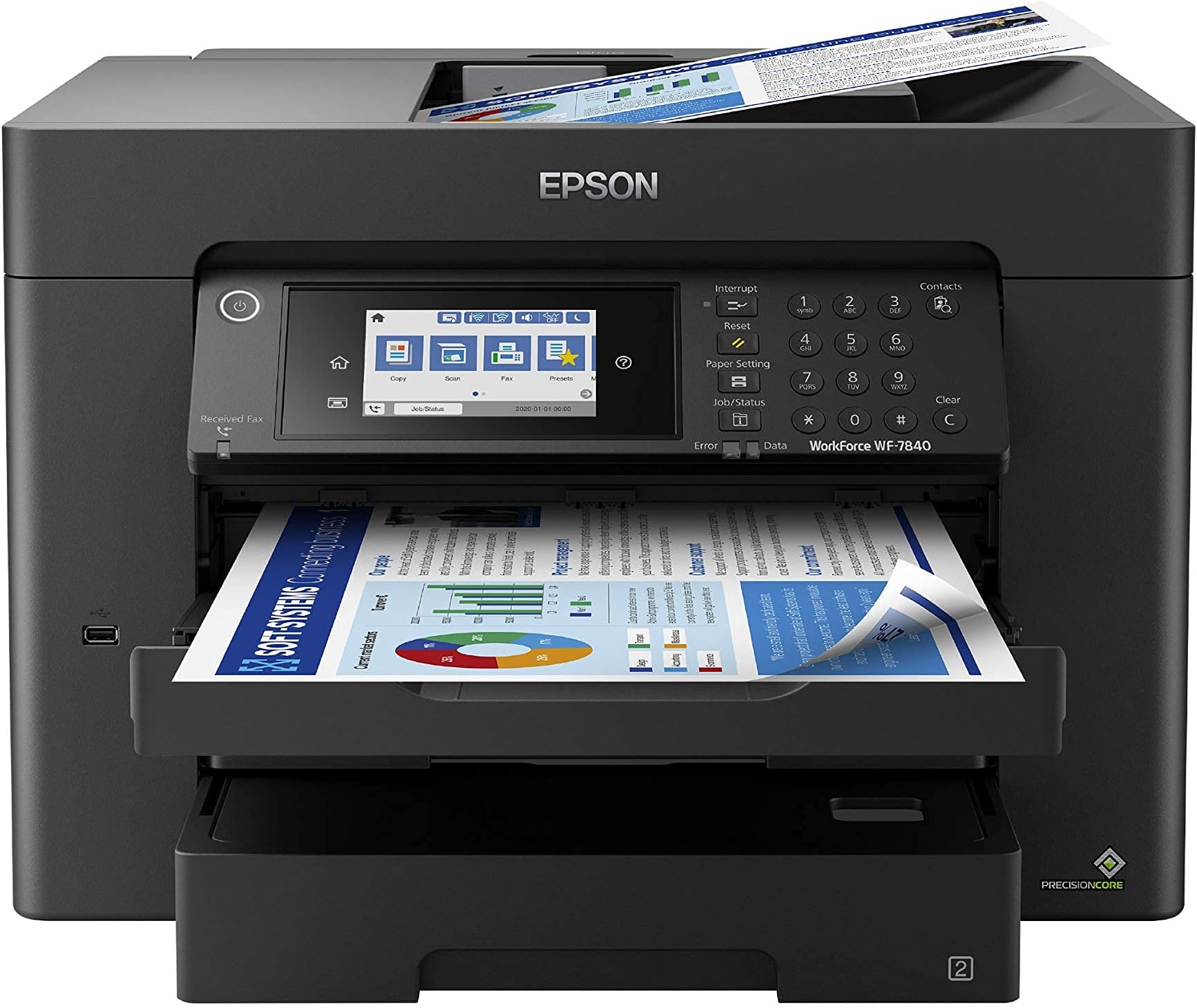


| ASIN | B08DXKBY6N |
| Additional Printer Functions | Copy |
| B&W Pages per Minute | 25 ppm |
| Brand | Epson |
| Built-In Media | WorkForce Pro WF-7840 printer, quick setup guide, CD-ROM with drivers, power cord, 4x DURABrite Ultra Ink cartridges (1x Black ink cartridge and 3x color ink cartridges: 1x Cyan, 1x Magenta, 1x Yellow) |
| Color | Black |
| Color Depth | 48 bpp |
| Color Pages per Minute | 12 ppm |
| Colour | Black |
| Compatible Cartridge | Epson-brand cartridges |
| Compatible Devices | Laptops, PC, Smartphones |
| Connectivity technology | Ethernet |
| Control Method | App |
| Controller Type | Amazon Alexa |
| Customer Reviews | 4.0 out of 5 stars 763 Reviews |
| Display Type | LCD or LED |
| Dual-sided printing | Yes |
| Duplex | Automatic |
| Global Trade Identification Number | 00010343922686, 00010343923775, 00010343924604, 00010343950405 |
| Hardware Interface | Ethernet, USB |
| Ink Color | Color |
| Item Dimensions D x W x H | 97.5D x 51.6W x 52.1H centimeters |
| Item Type Name | Inkjet Printer |
| Item Weight | 45.4 Pounds |
| Manufacturer | Epson |
| Maximum Copies Per Run | 999 |
| Maximum Copy Resolution Black and White | 4800 x 2400 |
| Maximum Copy Resolution Color | 4800 x 2400 |
| Maximum Copy Speed Black and White | 40 ppm |
| Maximum Media Size | 13" x 19" |
| Maximum Print Resolution Black and White | 4800 x 2400 |
| Maximum Sheet Capacity | 500 |
| Maximum print Resolution Color | 4800 x 2400 |
| Model Name | Workforce Pro |
| Model Number | WF-7840 |
| Model Series | WF-78 |
| Model name | Workforce Pro |
| Number of Drivers | 3 |
| Number of Ethernet Ports | 1 |
| Number of Trays | 3 |
| Other Special Features of the Product | Wireless |
| Paper Size | 13 inches |
| Power Consumption | 0.01 Watts |
| Print media | Paper (plain) |
| Printer Connectivity Type | Ethernet |
| Printer Output Type | Color |
| Printer Resolution Horizontal in Black and White | 118.11 Centimeters |
| Printer Type | Inkjet |
| Printing technology | Inkjet |
| Resolution | 4800 x 2400 |
| Scanner Type | Image Scanner |
| Series Number | 7840 |
| Special features | Wireless |
| Specific Uses For Product | High-volume professional or business use, including high-speed printing and duplex printing |
| Total USB 3.0 Ports | 1 |
| UPC | 010343924550 010343950405 010343941458 010343923775 010343922686 010343924604 010343923942 |
| Unit Count | 1 Count |
| Wattage | 20 watts |
C**.
no recomiendo...
basura
Z**6
4 years on - Still - A very good printer, if you can ignore its demands to update firmware
Summary: It is an excellent printer (4.6 out of 5) if you don't mind its constant requirements to update the firmware, which I have not since the day I bought it. I have had this printer for over a year. It has printed close to 5,000 pages of different sizes, papers, colors and document types. As someone said in the other posts (a big thank you), firmware update is only to drive users to get Epson's proprietary ink cartridges. When the printer harasses me to update the firmware, I just keep on ignoring it. Epson does a good job to harass you both on the printer and computer - just ignore it. Pros: 1. Only printer for <$500, which could print Ledger paper (11x17), which was a must for me. This thing prints beautiful and very crisp AutoCAD drawings. The lineweights and scales are phenomenal. 2. Excellent printing quality using stock and generic print cartridges. The printer can be really customized to get the right tones and textures for your print. Works very well with heavy stock papers and photo papers. I am yet to try any stickers, but I do not foresee any issues with it. 3. Good printing speed. It is not blazing like the commercial printers you find in the offices, but it is very fast for what it does. 4. Excellent connectivity. I had no issues with using either Ethernet or wireless. The printer can print on my Windows devices and Mac machine. I do not print from my phone, so cannot comment on that. 5. Heavy duty. The printer has printed approx. 5,000 pages so far without any troubles. I have not seen it overheat nor do any weird activities when it is printing. Indifferent: 1. Scanning. While scanning quality is very good, the direct scan option is cumbersome. You cannot use the scan button on the printer to scan into the computer disk. You have to go to the computer and activate the scan software to perform scanning. This can be an issue, if you have a setup where your office is on one floor and the printer is on another, like I have in my home. Cons: 1. Heavy. This thing is decently heavy and bulky. Don't try to keep on moving it or have it in your mobile office. Also, make sure to have a good sturdy and stable table. The printer twerks, jerks, sashays, parries. 2. Constant harassment to update the firmware. It can sometime be very annoying, but that's a small price to pay, if you get to ignore it. Look at the bigger picture. Price: When I bought it, the price was just below 3 bills, I understand it has gone up by half a bill (however, I am seeing the price going >$400 on some occasions). The new price of 3 and a half is not bad given the shape of the economy and supply chain issues. Also, the OEM cartridges (812) are cheaper at Staples than trying to Subscribe and Save here. Bottom-line: A very good printer, if you ignore and disprove its petulance to update itself. Update 3/23/2023 - I have had it now for over 2 years. The printer continues to print flawlessly and as of now has little under 10,000 pages printed of different sizes and paper weights. It still begs to update its firmware, which I have not done since its purchase. The only wishlist item I have for this printer is if it were to come with the Epson ink-tank. Update 3/28/2024 - Three years into it I have, still not updated it. The printer continues the work. I have now printed about 12,000 pages. In December, after I replaced all my cartridges, it started missing colors' tones, textures, and locations. Did full printer head alignment and cleaning twice (instructions are clear on the printer screen under Settings-> Maintenance menu). Printed test pages, and now it is working flawlessly. Update 3/20/2025 - Marks 4 years of running this printer. Definitely the least amount of pages printed annually - about 1,500. No firmware update performed and it still cries to update. Still running strong on both inks - generic and branded. There is a seller on eBay that offers XL cartridges for the colored ones too. Definitely worth giving a shot. If you are in a market for a prosumer printer consider this one in your list, if you can get it below $300.
F**D
Great All in one
Like everything about this product print quality is great and the copy and scanning features are fantastic. I would recommend this printer to all friends and family and even recommend it to strangers. As for others saying that the ink that is included with the printer does not last long I have to disagree because I have printed lots of pages (over 500) in the past week and still have plenty of all colours.
K**Y
I got 10 years constant use out of the first Epson Workforce Pro, so easy choice.
Works great and as expected. When the yellow ink tubing in my old Workforce Pro finally got clogged and forced me to buy a new printer, it was an easy choice. My last Epson Workforce Pro lasted 10 years, and I used it many thousands of times, nearly every day, usually in color. I gave it (the old one) to my father, as it still copies great, just not in color anymore. I love the wider format, which is a bit bigger than the last one had, but I have been using 17” x 11” paper regularly in this one, just like the old one. I like how easy it is to use, and most of all the quality of color copies. I hope I have the same longevity with this one. I’ve had it almost 2 months now and it is great so far. The copies are noticeably quicker with this new copier, which is nice. Note: Ignore the warning about “incompatibility with Windows 11” in the listing. It’s a non-issue. Connectivity and compatibility with my PC is no problem at all; I’ve no idea why that “warning” was even necessary.
P**N
I can't believe I can print 13" x 19" paper posters on this!! It's awesome (and fast)
Today for the first time I printed 13x19 paper. The supplier's paper was 1/8" too wide and tall so I had to fuss around with the manual paper tray to get this paper to work (the tray won't go any wider). I printed a bunch of letter size black and white yesterday and it printed 20 pages (double side) in about 45-60 seconds. My laser printer was taking 5+ minutes to print the same job order.
Trustpilot
1 month ago
2 weeks ago