Desertcart purchases this item on your behalf and handles shipping, customs, and support to Taiwan.
📸 Elevate your content game—stabilize, track, and create like a pro!
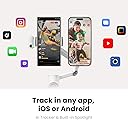
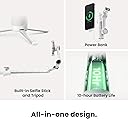
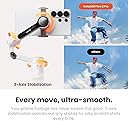
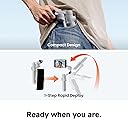
The Insta360 Flow 2 Pro is a cutting-edge, foldable smartphone gimbal designed for iPhone and Android users. Featuring 3-axis stabilization, 10-hour battery life, and compatibility with over 200 iOS apps, it offers advanced AI-powered multi-person and active zoom tracking. Its all-in-one design includes a built-in tripod, selfie stick, teleprompter, and power bank, making it the ultimate portable content creation tool for professionals and creators seeking flawless, cinematic 4K video with Dolby Vision and ProRes support.


| ASIN | B0DPKV8LP7 |
| Audio Recording | No |
| Battery Average Life | 10 Hours |
| Best Sellers Rank | 9 in Mobile Phone Handheld Gimbals & Stabilisers |
| Box Contents | In the Box: Standard Bundle includes 1× Insta360 Flow 2, 1× Magnetic Phone Clamp, 1× USB-C to USB-A Charge Cable and 1× Protective Pouch. |
| Brand | Insta360 |
| Brand Name | Insta360 |
| Colour | Grey |
| Compatible Devices | Cellphone |
| Compatible devices | Cellphone |
| Country of Origin | China |
| Customer Reviews | 4.4 out of 5 stars 1,826 Reviews |
| Exposure Control Type | Automatic |
| File Format | MP4 |
| Folded size | 4.8x11.1x2.1in |
| Has Self-Timer | Yes |
| Image Stabilization Type | 3-axis stabilization |
| Item Dimensions D x W x H | 12.1D x 5.4W x 28.2H centimetres |
| Item Highlight | Gimbal Stabilizer for Smartphone, Native Tracking with DockKit, AI & Multi-Person Tracking,Built-in Tripod/Selfie Stick |
| Item Weight | 385 Grams |
| Item weight | 385 Grams |
| Manufacturer | Insta360 |
| Manufacturer Part Number | CINSABQB |
| Maximum Weight Recommendation | 300 Grams |
| Media Type | Video |
| Model Name | Flow 2 Pro |
| Model Number | CINSABQB |
| Model Series | Flow 2 Pro |
| Number of Items | 1 |
| Number of Packs | 1 |
| Product Warranty | 2 |
| Product dimensions | 12.1D x 5.4W x 28.2H centimetres |
| Shooting Modes | Automatic, Scenario-based Modes |
| UPC | 842126111402 |
| Unit Count | 1.0 count |
| Video Capture Format | Dolby Vision, Apple ProRes |
| Video Capture Resolution | 4K (3840 x 2160) |
| Viewfinder Type | LCD screen |
| Water Resistance Level | Not Water Resistant |
A**S
Good pocket sized smartphone gimbal
I decided to upgrade my gimbal and was drawn to the Flow 2 Pro for a number of reasons. Firstly, it has the free tilt mode which is very handy for playing with things like crane shots. And it's pocket sized when closed - there are many other gimbals I'd like to have but I know I'll just end up leaving them at home when I travel due to size issues. Plus, the magnetic attachment is so much nicer for attaching, and detaching, the gimbal - it may not seem much but trying to hold a gimbal, pull apart the phone holder and attach the phone, especially in a hurry to catch some action, can be a real pain. So overall I find it a good step up from my previous gimbal just in those regards. Having an Android phone I can't say what use the Apple DockKit tracking is (in the Insta360 app - this kit version doesn't have the external AI tracker). And I don't really use tracking anyway. But the infinite pan feature is good as you can turn the phone direction as much as you want. And I have to say that the small fill light is very good as long as you're fairly close to the subject, and it seems to attach quite securely. As you would expect, it works very well with the Insta360 smartphone app, including adding things like software tracking and some nausea inducing effects if you're that way inclined. But I've mostly used it with stock camera apps including on an Xreal Beam Pro for 3D video, and it's worked very well with pretty much every feature I want (obvs not including tracking) accessible through the physical controls. So overall I'm quite happy with the purchase.
L**N
Manufacturing fault - UPDATE
Updated to review a replacement was sent, I think my original may have been really stiff or can faulty but new one moves perfect - updated to 5* I’ve gone for 4* as I believe this is a great gimble however the one I received was faulty and I wasn’t able to find the same fault anywhere else, the elbow looks like it’s been put together in the wrong position, when I first tried the flow 2 pro it seemed off, having never used one before I thought it was me and went back to one of the “how to use “ you tube vides I’d seen before purchase and I couldn’t work it out until I noticed the nut which holds the elbow in place was in line with the black wheel and in eveything else I’ve seen it is on the side, I’ve added a photo and you can see the different from the promotional photos where the hinge is at the button not the nut. The refund process has started smoothly and I intend to buy another one when I have the refund back.
D**O
A pro!!!
I recently bought the Insta360 Flow 2 Pro and, as a beginner, I am genuinely impressed by its build quality and performance. It feels incredibly solid in the hand—parts like the telescopic extension ring feel as tough as metal, which gives you a lot of confidence when mounting a premium phone. The stabilization is top-notch, and the AI tracking features work like a charm, allowing you to create smooth, cinematic shots even while walking around and relaxing. One important tip for fellow beginners: make sure you check all the mechanical locks before powering it up! If you leave the extension rod lock on "OFF" while trying to use it, the motors will strain and vibrate against the physical block. Luckily, the device has an excellent built-in protection system that immediately cuts the power (going into a safe "neutral" mode) to prevent any engine damage. Once you flip everything to "ON" and let it auto-calibrate through the app, it runs smooth as silk. I also highly recommend getting the FlexiCare insurance plan for total peace of mind. It’s a fantastic piece of tech that takes your mobile videography to the next level. Highly recommended!
M**K
Need to master the way it functions
After deliberating and watching numerous YouTube reviews (what did we do years ago ! Oh yes wait for a magazine to review a product ) I went for this gimbal . I’ve only used it indoors so far. There is a bit of a learning curve when using a gimbal. Sometimes you point in one direction and the camera goes elsewhere! You need to master the different modes ie pan follow. The tracking works great in the insta app. It also works in the native iPhone camera app. However the gestures to start and stop only work on the insta app. I do find that sometimes the commands you use don’t work. For instance press the trigger button 3 times and the phone changes from front to rear facing . The gimbal is small enough to fit in a small carry bag when travelling . I think it will be a bit like vlogging when using outside, need to get over the fear of people looking at you. I particularly like the MagSafe connection from the phone to the gimbal , it makes setting up very quick and easy . I’m planning to use when on holiday and I’m sure it will be a great bit of kit .
P**R
Best Buy for years
What an absolutely astounding piece of equipment. Now selling Canon Mirrorless Camera M50 Mark II and five lenses, tripods and so much else. What a clutter reducer. In its place I have bought a second IPhone 15 pro max, to use for remote control, great tracking, incredible control, silky smooth. A must get!
M**E
Brilliant, works perfectly with my iphone 17 pro with Miracase Magnetic Case
Excellent Gimbal for my iPhone 17 pro. The unit is small and easy to pop into a pocket or small carry bag (my purchase included the case). Setting up was an absolute breeze and connected to the iphone and app worked flawlessly. As for the app, it is brilliant and has all the programmable functions you could want. The app also works with the standard Apple camera app and the Black Magic app if you prefer. For me one of the best features is the magsafe adapter which attaches firmly to the back of my Miracase Magnetic Case, brilliant!! I did have one question of a technical nature and I have to say the customer service was extremely helpfull and responded fast and positively, top marks. I have no hestitaion in fully recommending the gimbal (no they haven't paid me) which has been a pleasure to use. If in doubt check out the numerous youtube videos and judge for yourselves!
J**O
Not recommended, very low quality.
I'm very disappointed with this gimbal. First of all it is mostly made for iPhone, as some features are only available on iPhone. Also, it makes horribly shaky videos when walking gently, see my video (I can do much better without gimbal) using Samsung Galaxy s25 Ultra. Sure, there is no chance of using amazing optical zoom (that s25 ultra offers), but even even trying to use it's in-app zoom by rotating zoom wheel, it only works once in every 10 attempts. As much as I like the design and features, this gimbal is not recommended. While some gadgets using word Pro in their name, you would expect something extra, as for gimbal that would definitely be better (higher) weight allowed, but this gimbal just goes with usual -300 grams phone to hold. Overall, that is a waist of time, and money. Unless my one is faulty.
P**K
Fairly good hardware but poor software
I tried hard to love this gimbal but it just has too many issues. I was using it on a Google Pixel 8 Pro phone. I knew from the start that some of the features wouldn't work on android. However the Insta360 camera app sometimes freezes when recording and you end up with a freeze frame part way through until the end of the recording. It happens about one in 10 times. So I lost some good shots. The recording is fine in the Blackmagic camera app, with no freezing, so is definitely an Insta360 issue. The supplied phone clamp presses on the volume buttons sometimes (on the Pixel 8 Pro). As one of these can be used to start and stop recording, this resulted in the camera occasionally starting and stopping repeatedly and generating hundreds of short recordings. This could of course be resolved by using a magsafe case and the supplied magsafe attachment. However I didn't have a magsafe case for my tests. In the native camera app and Blackmagic camera app you can disable this function for the volume buttons but this is not possible, as far as I could see, in the Insta360 camera app. The Insta360 camera app takes a while to load and communicate with the gimbal. Add this to time it takes to unlock the phone it makes it impossible to take a quick shot. The Insta360 app doesn't allow you to access the other camera lenses, which I could do in the Blackmagic camera app. So I made most of my recording in the Blackmagic camera app as it worked much more quickly, reliably and allowed me to select the lenses. However most of the gimbal features don't work in the Blackmagic app so all you really get from the gimbal is a stable shot and the ability to start and stop the recording. The touch feature of the ring on the gimbal allows you to change recording modes, e.g. from video to photo, etc. However it is difficult to use but annoying very easy to touch accidently changing the recording mode in error and making it difficult to change back. Generally the hardware is good but let down by poor software. Given all this I was unable to justify the cost of the gimbal for the functions that are usable. The item is being returned.
D**S
Impressionnant
Très bon stabilisateur, simple et efficace. L’Insta360 Flow 2 Pro est vraiment facile à prendre en main, même pour quelqu’un qui n’a jamais utilisé ce type de produit. La stabilisation est fluide et le rendu vidéo est très propre, ce qui change vraiment la qualité des prises de vue au quotidien. L’application est intuitive et les fonctions de suivi fonctionnent bien. En regardant rapidement quelques tutoriels pour comprendre les réglages de base, on arrive vite à exploiter l’essentiel du produit sans difficulté. C’est un accessoire très pratique pour les vidéos et les voyages, avec un vrai gain de qualité sans prise de tête. Très satisfait de l’ensemble.
D**A
Maravilhoso esse produto, gostei
Produto Original, e lacrado
D**Y
Install Insta360 App 1st, Pair Device, Watch Tutorials, Use Flow 2 Pro with App
I picked up the Insta360 Flow 2 Pro Creator Bundle when it was only one-forty, to use as a portable go-to for filming video with my iPhone 15. I'm happy it's part of my kit. The more I use it, the more I like it. The tripod is sturdy and perfect for tabletop filming. The gimbal's tracking works well and video is smooth, whether using the tracking while the phone is on the tripod or handheld. Pairing the Flow 2 Pro with the iPhone 15 is easy with the DockKit, but at first I struggled as I was doing it another way - the hard way looking to pair it in Bluetooth settings at first. Do yourself a favor and download the app before anything else, get it open and then that pairing is seamless! Speaking of the Insta360 app, it's where you should start your journey with this thing. Tutorials, an editor, and a camera icon that launches the Flow 2 Pro's integration is well thought out and works very well to help users with the "how to" of using this gimbal. Frankly, on the box in red it should say: "BEFORE YOU DO ANYTHING ELSE, DOWNLOAD THE APP AND PAIR THE DEVICE. THEN JUST WORK WITH THE APP TO USE YOUR GIMBAL." The gimbal charges quickly; about 1.5 to 2 hours when fully discharged, and can last up to 10 hours. It can also be used as a power bank to charge your phone or another device. Having never used a gimbal before, I sometimes feel awkward using this one, but with practice it's getting easier. I like that YouTube has lots of tutorials for film-making with this tool, and I know I'm just scratching the surface using it as I am now. The whole thing has so much versatility (selfie stick, gimbal, tripod) lifestyle and travel vloggers should all consider getting it! I do feel like the connection of the camera to the gimbal is sometimes a little fussy, but if you make sure things are lined up and locked in, it's usually OK. I have an iPhone 15 with a thin silicone case. Both the magnetic mount and the clamp work with the phone in the case, but I feel like the clamp is a bit more secure. If I had my phone out of a case, the magnetic mount would be my choice. This kit includes a light that I haven't used yet, but love having for low-light conditions. I use a wireless mic when recording and it has a long range. If I connect the receiver for that mic into my phone which is in the gimbal used as a tripod it works well and the additional weight of the receiver doesn't seem to affect the ability of the gimbal to move in a 360-degree rotation or other directions. Getting this on sale, I'm very happy. I think it's a lot of tech for a highly-portable (or not) device. The only thing I wish was better is the learning curve to use it. I think that's a little steep, but that could just be me. Watch the tutorial videos, download the app, pair your device, and you'll be creating in no time! NOTE: You may want to consider getting the Insta360 Flow 2 case accessory (sold separately) for your gimbal. It's about twenty-five and well worth it for organizing and protecting your gimbal.
G**D
Perfecte Gimbal voor creators en voor hobby video’s
Zeer goed compatibel met mijn iPhone 16 pro Max sterke motoren die geen moeite hebben met mijn iPhone inclusief hoes ondanks dat het nog aardig weegt , de software van insta sluit mooi bij mijn wensen aan , de bediening werkt goed maar je moet wel eerst even leren hoe de verschillende functies werken van de knoppen, het is zeer handig op te bergen, het past zo in je jaszakken zodat je het altijd overal mee kunt nemen. Ik kan dan ook iedereen de insta 360 flow 2 pro aanraden
H**Y
Smooth Footage & Super Easy to Use
Really impressed with this gimbal. It was very easy to set up and start using right out of the box. The controls are intuitive, and everything feels well-designed and responsive. The app works great—no glitches, and it connects quickly every time. The tracking features are solid and make shooting a lot easier. I’ve been using it with my iPhone 17 Pro Max, and the footage comes out super smooth and high quality. It honestly makes a big difference compared to handheld shots. Overall, a great tool if you want clean, professional-looking videos without any hassle.
Trustpilot
2 days ago
1 month ago